Instagram Posting API: Publish & Schedule Reels, Stories and Posts
Publish Reels, Stories and feed posts to Instagram with a single API key. No Meta App Review, and no container-and-polling flow to build. Connect a Business or Creator account, then post from your own app, an AI agent or n8n.
Free plan · 2 accounts · No credit card · API + MCP included
- Feed posts
- Carousels
- Reels
- Stories
- Trial Reels
- Reel covers
WoopSocial vs the Instagram Graph API
| Instagram Graph API direct |  WoopSocial |
|---|---|
| Register a Meta app and pass App Review (multi-week cycles) before you can publish for other accounts | Already approved. Connect an account and start posting |
| Create a media container, poll its status, then publish | One POST /posts call |
| Host your media at a public URL that matches Meta's specs | Upload files up to 5 GB, resized and transcoded for each format |
| Build your own scheduler and retry logic | SCHEDULE_FOR_LATER, drafts and automatic retries (1 to 5) |
| Maintain token refresh and two separate login flows | Tokens stored and refreshed for you |
| Metric renames break dashboards (impressions became views in 2025) | Post analytics normalized on the same post object |
Three steps to use the Instagram Posting API
Step 1
Connect your account
Send yourself, or your own users, a hosted connect link (POST /social-accounts/authorization-url) and they approve access in a few clicks. The Instagram account must be a Business or Creator account linked to a Facebook Page, because WoopSocial connects through Facebook Login.
Step 2
Create the post
Send a single request that describes the post - Your Instagram account, the format (POST, REEL or STORY), your caption and media, and when your post should go live. You can add a custom cover for Reels and turn on Trial Reels by selecting how they graduate.
Step 3
We handle the rest
WoopSocial uploads and optimizes your media, builds the Instagram container, queues for processing and publishes the time scheduled. When a delivery fails for a temporary reason, WoopSocial retries automatically, and webhooks inform your app about the action.
Everything you need to ship features with the Instagram Posting API
Reels, Stories & feed posts
Switch between POST, REEL and STORY with one postType field. The rest of the request stays the same, so adding a new format doesn't mean learning a new endpoint.
Trial Reels
Test a Reel with non-followers first. Then graduate it to your followers yourself, or let it graduate automatically based on performance (SS_PERFORMANCE).
Scheduling & drafts
Schedule to the minute in UTC, or save a post as a draft for someone to approve first. Instagram's publishing API has no native scheduling, so WoopSocial handles it for you.
Per-platform copy
Send the same Reel to TikTok and YouTube Shorts with a different caption for each, using contentOverride, all in a single request.
Media handled
Upload large videos in chunks, up to 5 GB. WoopSocial converts them to Instagram's specs, so you don't prepare a separate file for every format.
Post analytics
Get views, likes, comments, shares and saves back on each post.
Three ways in
Same Instagram publishing backend whether you talk to an AI agent over MCP, call the REST API, or drop a node into n8n, Zapier or Make.
1 · Account
Create a free WoopSocial account
Sign up at app.woopsocial.com/signup (no credit card). You'll authorize through OAuth when the agent connects — no API key required for MCP.
2 · Instagram
Connect a Business or Creator account
Link Instagram (Business/Creator + Facebook Page) in the WoopSocial dashboard before you ask an agent to post.
3 · Agent
Add the MCP URL and authorize
Use
https://api.woopsocial.com/mcp. Your client opens OAuth — approve access and you're connected. Docs: Integrating MCP clients.
Install by client
Pick your agent. Cards marked On this site open another WoopSocial page; External opens outside this site (new tab).
Social Media MCP
On this siteStep-by-step install for Claude, ChatGPT and any MCP client, with screenshots.
Open page →
Claude
External1-click: add the WoopSocial connector from Claude's directory and authorize with OAuth.
Open external link →
ChatGPT
On this siteEnable Developer Mode, add the MCP URL, authorize with OAuth, then test in chat.
Open page →
Cursor
External1-click: install the WoopSocial plugin from Cursor Directory, then schedule Instagram from the agent.
Open external link →
Hermes
On this siteInstagram publishing skill for Hermes — MCP config, OAuth, and prompts.
Open page →
Grok
On this siteCustom connector for Grok — authorize with OAuth, then post Reels and Stories.
Open page →
Muse
On this siteMuse covers Instagram natively; use WoopSocial when you want the other platforms too.
Open page →
MCP scheduling guide
On this siteCopy-paste prompts and setup for Claude, ChatGPT and Cursor.
Open page →
Config for Cursor / other MCP clients
Prefer 1-click? Install the WoopSocial Cursor plugin. Or paste this into .cursor/mcp.json (or your client's MCP config). Authorize with OAuth when prompted — no API key in the URL. Allowlist *.cloudflarestorage.com if media uploads are blocked.
{
  "mcpServers": {
    "woopsocial": {
      "url": "https://api.woopsocial.com/mcp"
    }
  }
}
Claude Code
One command registers the remote HTTP MCP server. Complete OAuth when prompted.
claude mcp add --transport http woopsocial "https://api.woopsocial.com/mcp"After install — try this
Plain-language Instagram prompt
You
Ask Claude: Schedule this Reel to Instagram for Friday 6pm Amsterdam time
Prefer a full walkthrough with screenshots? Start at /social-media-mcp.
One POST /posts call for Reels, Stories or feed posts. Same shape as every other platform.
curl -X POST https://api.woopsocial.com/v1/posts \
  -H "Authorization: Bearer YOUR_API_KEY" \
  -H "Content-Type: application/json" \
  -d '{
    "content": [{
      "text": "New Reel - shipping this week.",
      "media": [{ "type": "MEDIA_LIBRARY", "mediaId": "MEDIA_ID" }]
    }],
    "schedule": {
      "type": "SCHEDULE_FOR_LATER",
      "scheduledFor": "2026-07-01T16:00:00Z"
    },
    "socialAccounts": [{
      "platform": "INSTAGRAM",
      "socialAccountId": "YOUR_IG_ACCOUNT_ID",
      "postType": "REEL"
    }]
  }'
All three open external partner sites in a new tab.
REST API example: schedule an Instagram Reel
Same POST /posts call with a Bearer API key. Authorization header and request body included.
curl -X POST https://api.woopsocial.com/v1/posts \
  -H "Authorization: Bearer YOUR_API_KEY" \
  -H "Content-Type: application/json" \
  -d '{
    "content": [{
      "text": "New Reel - shipping this week.",
      "media": [{ "type": "MEDIA_LIBRARY", "mediaId": "MEDIA_ID" }]
    }],
    "schedule": {
      "type": "SCHEDULE_FOR_LATER",
      "scheduledFor": "2026-07-01T16:00:00Z"
    },
    "socialAccounts": [{
      "platform": "INSTAGRAM",
      "socialAccountId": "YOUR_IG_ACCOUNT_ID",
      "postType": "REEL"
    }]
  }'
Prefer a calendar? Schedule Instagram posts from the dashboard
Not everyone wants to touch an API. If you prefer to plan content visually, the WoopSocial dashboard shows a calendar where you can specify the date and time you want Instagram to post. Connect multiple Instagram accounts, and see them all side by side, perfect for agencies and for anyone managing more than one brand.
AI captions get you over the dreaded blank page, while cross-posting allows you to send the same content to other platforms from the same screen. The dashboard shares the same backend with the API so a post your team schedules in the calendar is exactly the same as one your code creates. The free plan allows 2 accounts, does not require a credit card, and is completely free.
Schedule from the dashboard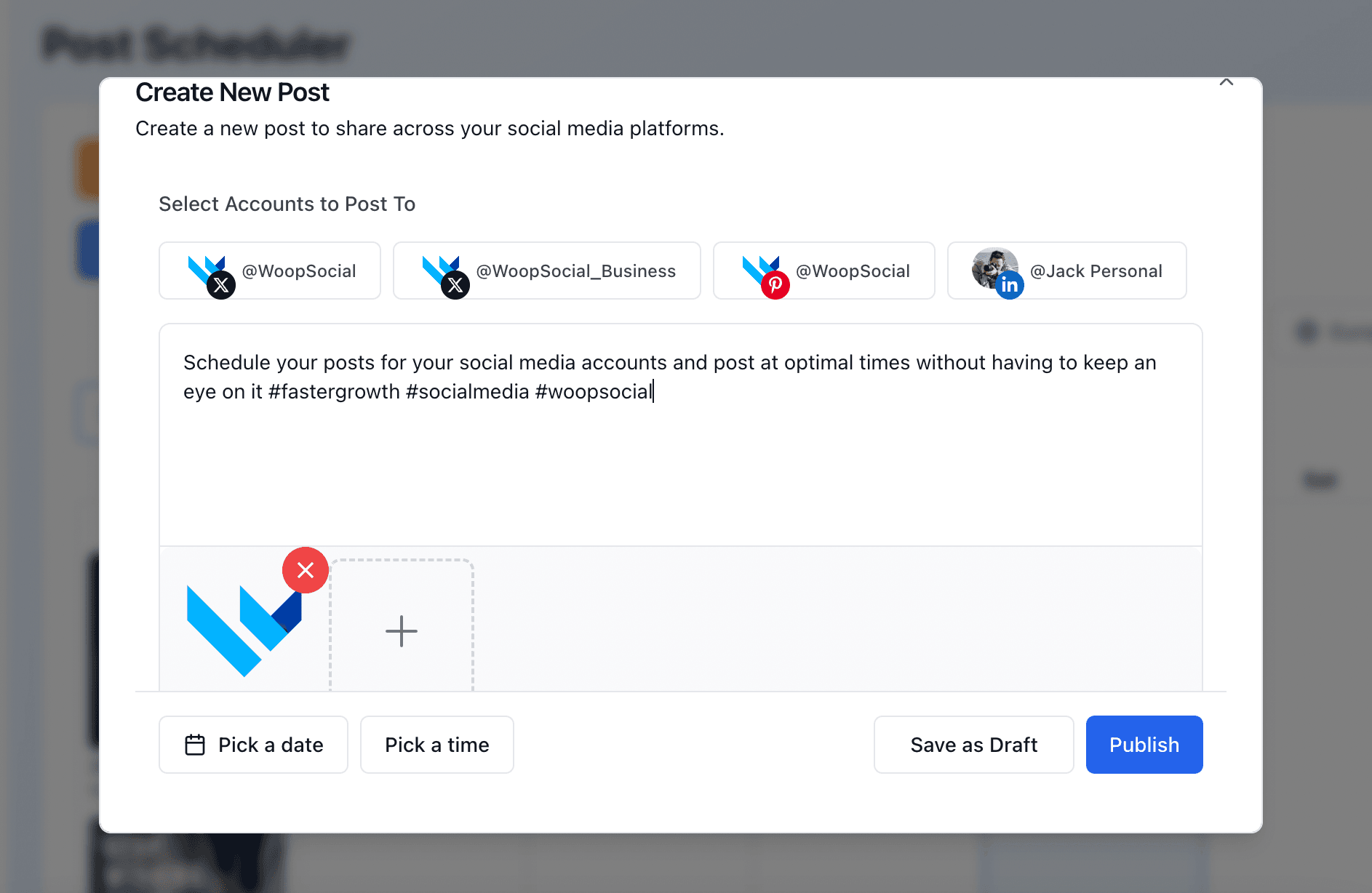
Instagram API requirements & limits
Professional account
You need an Instagram Business or Creator account linked to a Facebook Page, because WoopSocial connects through Facebook login, and Meta's API doesn't support personal accounts.
Captions
Up to 2,200 characters, 30 hashtags and 20 @mentions per caption. If an AI agent writes your captions, it helps to put these limits in the prompt.
Carousels
Up to 10 images or videos in one carousel. Add all the media to a single post and it publishes as one easily swipeable carousel.
Reels
Videos from 3 seconds to 15 minutes long. Vertical 9:16 is the recommended aspect ratio.
Stories
Video Stories can be up to 60 seconds long. Plan your clip length around that limit - longer videos won't fit in a single Story.
Daily publishing limit
Meta allows up to 100 API-published posts per account in 24 hours. Check Meta's documentation for more specific details.
Feed images
Aspect ratios from 4:5 to 1.91:1 are supported. Portrait 4:5 is the tallest format allowed - it takes up the most room in the feed.
Story lifetime
Stories disappear 24 hours after they're published. Try your best to schedule them for a time when your audience is most likely to be watching.
Post the same Reel to TikTok, YouTube Shorts and Facebook Reels in one call.
FAQ
Learn more
Each card opens another page on this site.
Instagram API alternatives
On this siteSee what alternatives for the Instagram API are best when you want to schedule, get analytics or publish, so you can set it up without the complexity
Open page →
Meta App Review rejected?
On this siteThe top reasons Meta rejects apps, and how to avoid the wait altogether.
Open page →
How to schedule social media posts with MCP
On this siteA step-by-step setup for Claude, ChatGPT and Cursor, with copy-paste prompts.
Open page →
Post to Instagram with Grok
On this siteLet Grok write the caption and publish it, including Reels and Trial Reels.
Open page →
Start posting to Instagram today
“I connected WoopSocial's MCP to my AI agents, now I can post directly to all my social channels with just one command. Whenever I finish some website work or wrote a new blog post, I simply tell the AI agent to post it directly to my social media channels via WoopSocial. The content generation and bulk scheduling via the web app is also very useful. The time I spent managing social media has been reduced drastically. Gamechanger!”
Connect an Instagram account, grab a free API key and publish your first Reel in minutes. No Meta App Review, no credit card.
Free plan · 2 accounts · No credit card · API + MCP included