Schedule Your LinkedIn Content with Ease

Save time by planning and scheduling your LinkedIn posts in advance. Build your professional presence and grow your network with consistent content.

Get started now
No credit card required
Schedule unlimited posts
Manage profiles and company pages

Grow your professional network

Streamline your LinkedIn presence with powerful features designed for professionals

Smart Scheduling

Schedule your LinkedIn posts in advance.

  • Up to 15 posts/month (Free)
  • Unlimited posts (Pro)
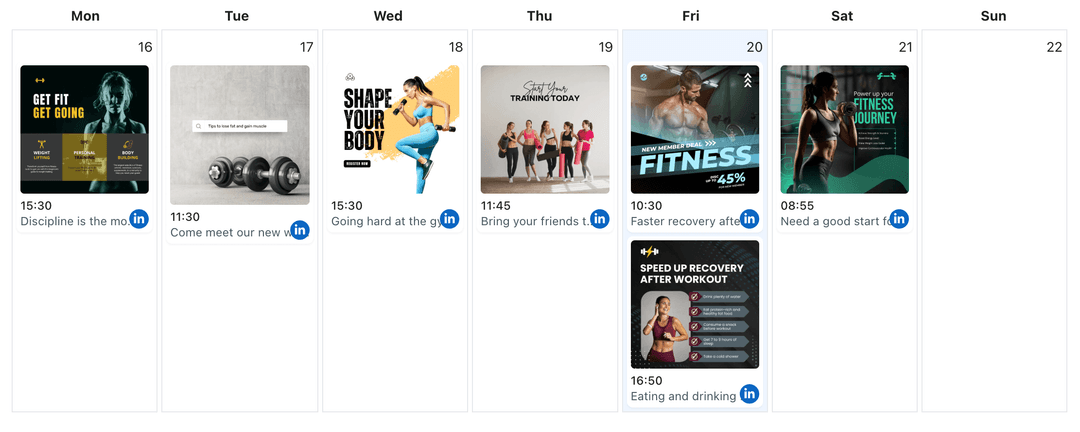
  • Visual calendar view

Profile Management

Manage multiple LinkedIn profiles from one dashboard.

  • 1 profile (Free)
  • Multiple profiles (Pro)
  • Easy profile switching

Content Features

Create engaging LinkedIn posts with rich media.

  • Text posts
  • Image posts
  • Multiple images

How It Works

1

Connect LinkedIn

Connect your LinkedIn profile or company page securely

2

Create Content

Write posts, articles, and add rich media content

3

Schedule & Publish

Set your preferred time and let us handle the publishing

Frequently Asked Questions

Free plan includes 15 posts per month. Pro plan users get unlimited posts.

Yes, you can connect multiple LinkedIn personal profiles. Free users get 1 profile with 15 posts per month. Paid users get unlimited posts per month.

You can schedule text posts and posts with images to your LinkedIn profile.

Yes, you can schedule posts with multiple images on both Free and Pro plans.

On the Free plan, you'll need to wait until the next month or upgrade to Pro for unlimited posts. Scheduled posts beyond the limit won't be published.

Features

Switch Between LinkedIn Profiles and Company Pages

Switch between multiple LinkedIn profiles and Company Pages from one dashboard. Manage all your accounts, schedule posts, and switch between personal profiles and Company Pages without logging in and out repeatedly.

Learn more

Automate Your LinkedIn Posting

Automate LinkedIn profile and Company Page posting with WoopSocial. Set up posts to publish automatically at scheduled times and maintain consistent professional presence.

Learn more

Automate LinkedIn Posts with AI

Use AI to draft LinkedIn updates faster and automate publishing. Approve every line, keep your tone professional, and post on schedule without manual work.

Learn more

Organize Your LinkedIn Content Planner in One Calendar

Coordinate LinkedIn posts, Company Page announcements, and executive commentary inside WoopSocial's content planner so every professional message publishes on schedule.

Learn more

Create Your LinkedIn Content Strategy with AI

Get AI-powered content strategy recommendations for your LinkedIn profile or Company page. Receive topic suggestions, professional content planning guidance, and strategic insights to grow your LinkedIn presence.

Learn more

Create LinkedIn Images with AI

Generate professional LinkedIn visuals with AI. Produce on-brand banners, post images, and thought-leadership graphics you can edit and schedule to Profiles or Company Pages.

Learn more

Create Your LinkedIn Posts with AI

Use AI to draft LinkedIn posts faster. Generate professional copy for profiles and Company Pages, then edit and schedule updates from one organized calendar.

Learn more

Cross-Post Your LinkedIn Content to Instagram

Cross-post your LinkedIn images and thought-leadership snapshots to Instagram. Keep your professional voice while adapting captions for the Instagram feed from one calendar.

Learn more

Cross-Post Your LinkedIn Content to Pinterest

Cross-post your LinkedIn posts and professional content to Pinterest boards. Repurpose LinkedIn visuals to reach Pinterest audiences and expand your professional presence.

Learn more

Cross-Post Your LinkedIn Content to TikTok

Cross-post your LinkedIn videos, thought leadership clips, and professional visuals to TikTok. Adapt professional stories for short-form viewing and keep both audiences active.

Learn more

Generate LinkedIn Captions with AI

Use AI to generate LinkedIn post captions faster. Describe your professional update, get caption suggestions, then edit and schedule them from one calendar.

Learn more

Manage Multiple LinkedIn Pages from One Professional Calendar

Connect LinkedIn profiles and Company Pages to one WoopSocial calendar so every audience receives coordinated updates that publish automatically on schedule.

Learn more

Post at the Best Time on LinkedIn

Schedule LinkedIn posts at optimal times for your professional network. Plan your posting schedule and publish automatically when your connections are most active.

Learn more

Schedule Your LinkedIn Carousel Posts

Schedule LinkedIn carousel posts in WoopSocial. Upload PDF slides or image sequences, organize captions, and publish automatically to your Company Page or personal profile.

Learn more

Schedule Your LinkedIn Image Posts

Schedule LinkedIn image posts to your personal profile or Company page. Share professional visuals and schedule automatic publishing with WoopSocial.

Learn more

Schedule Your LinkedIn Short Video Updates

Schedule short LinkedIn video updates to your profile or Company Page. Upload concise clips, write professional captions, and publish automatically on a clear calendar.

Learn more

Schedule Your LinkedIn Video Posts

Schedule LinkedIn video posts to your personal profile or Company page. Share professional videos and schedule automatic publishing with WoopSocial.

Learn more

Ready to Grow Your LinkedIn Presence?

Join thousands of professionals who trust WoopSocial

Get started for free