Schedule Your Pinterest Pins with Ease

Save time by planning and scheduling your Pinterest pins in advance. Build your visual presence and grow your audience with consistent content.

Get started now
No credit card required
Schedule unlimited pins
Manage multiple boards

Grow your Pinterest presence

Streamline your Pinterest strategy with powerful features designed for creators

Smart Scheduling

Schedule your Pinterest pins in advance.

  • Up to 15 pins/month (Free)
  • Unlimited pins (Pro)
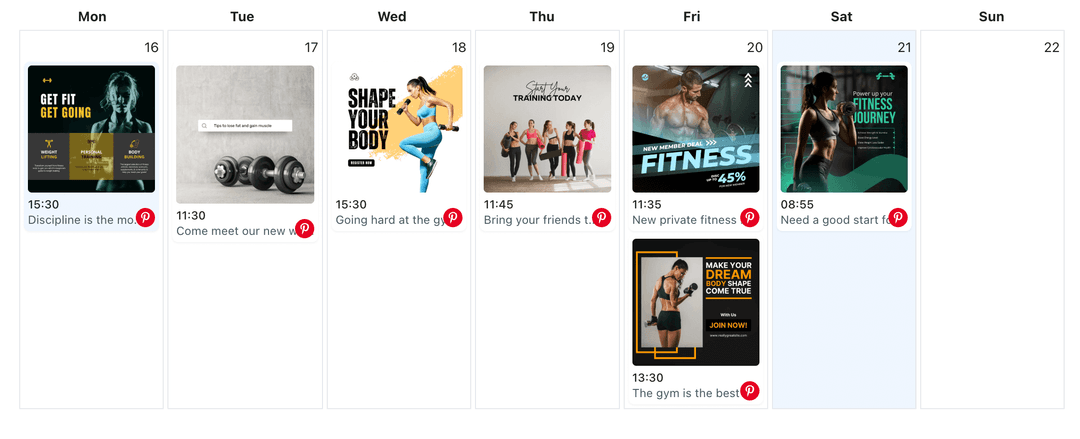
  • Visual calendar view

Account Management

Manage multiple Pinterest accounts from one dashboard.

  • 1 account (Free)
  • Add other social platforms as well

Content Features

Create engaging Pinterest content with rich media.

  • Image pins
  • Idea pins

How It Works

1

Connect Pinterest

Connect your Pinterest account securely

2

Create Content

Create pins and organize your boards

3

Schedule & Publish

Set your preferred time and let us handle the publishing

Frequently Asked Questions

Free plan includes 15 pins per month. Pro plan users get unlimited pins.

Yes, you can connect multiple Pinterest personal profiles. Free users get 1 profile with 15 posts per month. Paid users get unlimited posts per month.

You can schedule image pins, video pins, and idea pins to your Pinterest boards.

Yes, you can schedule the same pin to multiple boards on both Free and Pro plans.

On the Free plan, you'll need to wait until the next month or upgrade to Pro for unlimited pins. Scheduled pins beyond the limit won't be published.

Features

Design a Pinterest Content Planner for Every Board

Turn seasonal ideas, product pins, and inspiration boards into a Pinterest content planner. Map posts on WoopSocial's calendar so every board stays fresh automatically.

Learn more

Create Your Pinterest Content Strategy with AI

Get AI-powered content strategy recommendations for your Pinterest boards. Receive topic suggestions, pin planning guidance, and strategic insights to grow your Pinterest presence.

Learn more

Create Your Pinterest Pins with AI

Use AI to draft Pinterest pin titles and descriptions faster. Generate keyword-rich copy for your boards, then edit and schedule image and video pins from one calendar.

Learn more

Manage Multiple Pinterest Profiles and Boards from One Calendar

Connect every Pinterest profile you run, plan pins for multiple boards in a single WoopSocial calendar, and publish image or video pins automatically.

Learn more

Pin at the Best Time on Pinterest

Schedule Pinterest pins at optimal times for your audience. Plan your pinning schedule and publish automatically when pinners are most active.

Learn more

Schedule Your Pinterest Carousel Posts

Plan Pinterest carousel Pins inside WoopSocial. Upload up to five vertical frames, add descriptions with keywords, and schedule automatic publishing to your boards.

Learn more

Schedule Your Pinterest Image Pins

Schedule Pinterest image pins to your boards. Upload images, write descriptions, and schedule automatic pinning with WoopSocial.

Learn more

Schedule Your Pinterest Short Video Pins

Schedule short vertical video Pins to your Pinterest boards. Upload clips, write keyword-rich descriptions, and publish automatically when your audience is looking for ideas.

Learn more

Schedule Your Pinterest Story Pins

Schedule Pinterest Story Pins (Idea Pins) with WoopSocial. Upload vertical panels, add keyword-rich notes, and publish multi-page stories automatically to the right boards.

Learn more

Schedule Your Pinterest Video Pins

Schedule Pinterest video pins to your boards. Upload videos, write descriptions, and schedule automatic pinning with WoopSocial.

Learn more

Ready to Grow Your Pinterest Presence?

Join thousands of creators who trust WoopSocial

Get started for free