Facebook Page Posting API: Publish & Schedule Posts, Reels and Stories
No Meta App Review and no Page tokens to manage. Connect a Facebook Page, then publish text posts, photos, video, Reels and Stories through a single API key.
Free plan · 2 accounts · No credit card · API + MCP included
- Text posts
- Image posts
- Multi-image posts
- Video
- Reels
- Stories
- Link posts
- Location tags
What is the Facebook Page Posting API?
The Facebook Page Posting API is Meta's official way for apps to publish to a Facebook Page through the Graph API - text posts, image posts, video, Reels, Stories and link posts. It works for Pages only as personal profile sharing isn't supported and Meta stopped supporting the Groups API in April 2024.
Publishing for Pages requires Meta App Review for permissions like pages_manage_posts, with review cycles of ~20 days, along with Page access tokens and different upload flows for video & Reels. This is different from WoopSocial which allows you to publish and schedule Page posts, Reels & Stories directly via its dashboard.
WoopSocial vs the Facebook Graph API
| Graph API direct |  WoopSocial |
|---|---|
| Meta App Review for Page publishing permissions | Already approved |
| Derive and store long-lived Page tokens for every Page | Tokens handled for you |
| Separate upload flows for video and Reels | One POST /posts call with a postType |
| Build your own scheduler and retry logic | Scheduling, drafts and automatic retries |
| Insights metrics removed in Nov 2025 break your reports | Post analytics normalized for you |
| Groups API no longer supported since Apr 2024 | Same limit here - we’re upfront that Pages are the target |
Three steps to automated Facebook posting
Step 1
Connect your Page
Send yourself, or your own users, a hosted connect link and they approve the access in a couple of clicks. You must be an admin of the Facebook Page you are connecting. WoopSocial stores the Page tokens and manages them for you, so you have one less thing to worry about.
Step 2
Create the post
Send one request with a description of the post - the Page, the format (TEXT_ONLY, IMAGE, VIDEO, REEL or STORY), your text and media, a link or location (optional) and the date/time to publish. Use SCHEDULE_FOR_LATER with a UTC timestamp to schedule or save as draft.
Step 3
We handle the rest
WoopSocial has the correct upload flow for photos, video or Reels, and will publish at your scheduled time. Temporary errors will retry automatically, and the webhooks will notify your application when a post has been published or has failed, so no custom polling is required.
Everything you need to ship Facebook features
Every Page format
Switch between text, image, video, Reels and Stories with a single postType field. You don't need to maintain a separate flow for each format, as the rest of the request remains the same.
Link posts with previews
Add a link and Facebook will create a preview card for it. Your article or landing page will be shared in a proper way rather than as a plain URL.
Location tagging
Add a location to a post with locationId. This is useful for shops, restaurants and events that want to be on the map.
Scheduling & drafts
Schedule to your preferred date/time in UTC, or save a post as a draft for someone else to approve first. WoopSocial holds the post and publishes it right on time.
Cross-post to Instagram with different copy
Send the same media to Facebook and Instagram in one request, and customize the caption for each platform with contentOverride.
Post analytics
Get views, unique views, reactions, comments, shares and clicks on each post.
Three ways in
REST. MCP: Claude and ChatGPT prompts. Agent pages: /hermes/facebook, /grok/facebook. n8n, Zapier, Make.
1 · Account
Create a free WoopSocial account
Sign up at app.woopsocial.com/signup (no credit card). You'll authorize through OAuth when the agent connects — no API key required for MCP.
2 · Facebook
Connect a Page you admin
Link a Facebook Page in the WoopSocial dashboard before you ask an agent to post. You need an admin role on that Page.
3 · Agent
Add the MCP URL and authorize
Use
https://api.woopsocial.com/mcp. Your client opens OAuth — approve access and you're connected. Docs: Integrating MCP clients.
Install by client
Pick your agent. Cards marked On this site open another WoopSocial page; External opens outside this site (new tab).
Social Media MCP
On this siteStep-by-step install for Claude, ChatGPT and any MCP client, with screenshots.
Open page →
Claude
External1-click: add the WoopSocial connector from Claude's directory and authorize with OAuth.
Open external link →
ChatGPT
On this siteEnable Developer Mode, add the MCP URL, authorize with OAuth, then test in chat.
Open page →
Cursor
External1-click: install the WoopSocial plugin from Cursor Directory, then schedule Facebook Page posts from the agent.
Open external link →
Hermes
On this siteFacebook publishing skill for Hermes — MCP config, OAuth, and prompts.
Open page →
Grok
On this siteCustom connector for Grok — authorize with OAuth, then post to a Facebook Page.
Open page →
Muse
On this siteMuse has no Facebook Page on this site. Use WoopSocial when you want Facebook from Muse.
Open page →
MCP scheduling guide
On this siteCopy-paste prompts and setup for Claude, ChatGPT and Cursor.
Open page →
Config for Cursor / other MCP clients
Prefer 1-click? Install the WoopSocial Cursor plugin. Or paste this into .cursor/mcp.json (or your client's MCP config). Authorize with OAuth when prompted — no API key in the URL. Allowlist *.cloudflarestorage.com if media uploads are blocked.
{
  "mcpServers": {
    "woopsocial": {
      "url": "https://api.woopsocial.com/mcp"
    }
  }
}
Claude Code
One command registers the remote HTTP MCP server. Complete OAuth when prompted.
claude mcp add --transport http woopsocial "https://api.woopsocial.com/mcp"After install — try this
Plain-language Facebook prompt
You
Schedule this Reel to our Facebook Page for Friday 6pm
Prefer a full walkthrough with screenshots? Start at /social-media-mcp.
One POST /posts call for text posts, photos, video, Reels or Stories. Same shape as every other platform.
curl -X POST https://api.woopsocial.com/v1/posts \
  -H "Authorization: Bearer YOUR_API_KEY" \
  -H "Content-Type: application/json" \
  -d '{
    "content": [{
      "text": "New on the Page this week.",
      "media": [{ "type": "MEDIA_LIBRARY", "mediaId": "MEDIA_ID" }]
    }],
    "schedule": {
      "type": "SCHEDULE_FOR_LATER",
      "scheduledFor": "2026-07-01T16:00:00Z"
    },
    "socialAccounts": [{
      "platform": "FACEBOOK",
      "socialAccountId": "YOUR_FB_PAGE_ID",
      "postType": "REEL"
    }]
  }'
All three open external partner sites in a new tab.
REST API example: schedule a Facebook Reel
Same POST /posts call with a Bearer API key. Authorization header and request body included.
curl -X POST https://api.woopsocial.com/v1/posts \
  -H "Authorization: Bearer YOUR_API_KEY" \
  -H "Content-Type: application/json" \
  -d '{
    "content": [{
      "text": "New on the Page this week.",
      "media": [{ "type": "MEDIA_LIBRARY", "mediaId": "MEDIA_ID" }]
    }],
    "schedule": {
      "type": "SCHEDULE_FOR_LATER",
      "scheduledFor": "2026-07-01T16:00:00Z"
    },
    "socialAccounts": [{
      "platform": "FACEBOOK",
      "socialAccountId": "YOUR_FB_PAGE_ID",
      "postType": "REEL"
    }]
  }'
Prefer a calendar? Schedule Facebook posts from the dashboard
If you prefer a calendar, you can plan and schedule Facebook posts from the WoopSocial dashboard instead. Its calendar lets you pick the date and time for each post, and you can connect several Facebook Pages and run them side by side. This helps agencies and anyone managing multiple brands.
AI captions are there to assist you and cross-posting sends the same content to Instagram and other networks from the same screen. The dashboard uses the same backend as the API, so a post scheduled by your team in the calendar works exactly like one created by your code. The free plan covers two accounts, with no credit card needed.
Schedule from the dashboard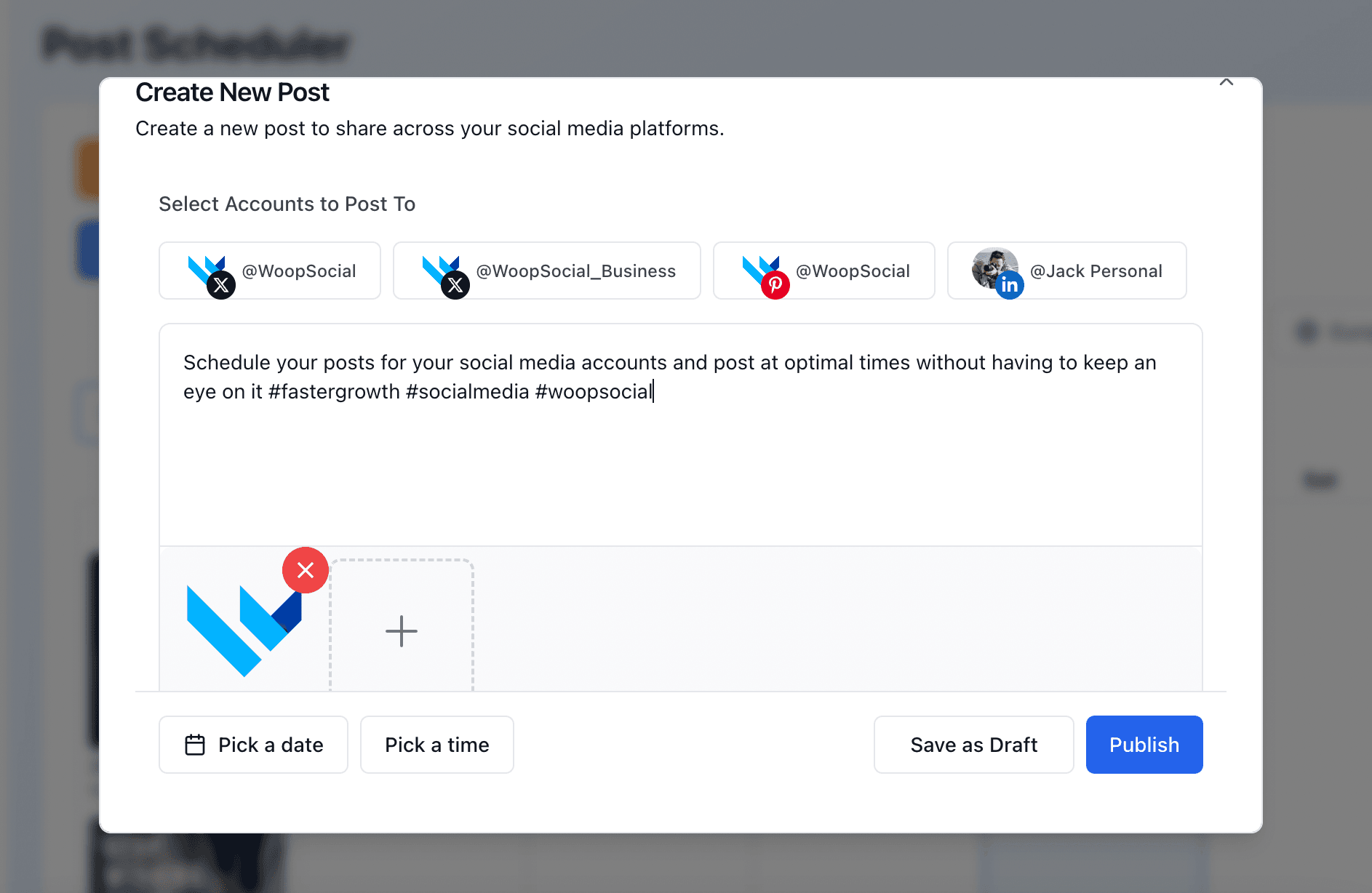
Facebook requirements & limits
Page and admin role
Before you can connect your Page and publish through WoopSocial, you need to have a Facebook Page plus an admin role.
Pages only
Personal Profiles and Groups are not supported. Groups API was deprecated by Meta in April 2024, there's no third-party tool that can make a post to a Group.
Reels and photos
Reels run 3 to 90 seconds in 9:16, minimum 540 x 960 pixels. Photos, up to 10 MB.
Reels limit
Meta allows up to 30 API-published Reels per Page in 24 hours. This is a platform limit and not a WoopSocial issue.
FAQ
Can I post to a Facebook Page via API without App Review?
Can I post to Facebook Groups or personal profiles?
Can I schedule Facebook Reels and Stories?
Can I add a link preview or a location?
Can I post to Facebook and Instagram at the same time?
What happened to page_impressions?
Does it include Facebook analytics?
How many Facebook Pages can I connect?
Can AI agents post to Facebook?
Learn more
Each card opens another page on this site.
Facebook API alternatives
On this siteThe Facebook Graph API review can take weeks. Compare the best Facebook alternatives for posting, scheduling and more.
Open page →
Meta App Review rejected?
On this siteHere are the exact rejection reasons, how to fix each one, and how to publish to Facebook & Instagram without app review at all.
Open page →
Post to Facebook with Hermes
On this siteLet your Hermes agent write and schedule Facebook posts for you.
Open page →
Start posting to Facebook today
“The success rate of posts being published across social media platforms has also been very good. So far, I have shared around 500-600 pieces of content, and I have only had errors in a very small number of them. Most of those were caused by YouTube limits, so overall I would say the experience has been quite stable. In general, I'm happy with WoopSocial, and the main reasons I keep using it are the fair pricing, wide range of supported social media platforms, and how quickly you respond to user needs.”
Connect a Facebook Page, grab a free API key and publish your first post in minutes. No Meta App Review, no credit card.
Free plan · 2 accounts · No credit card · API + MCP included