TIKTOK
TikTok Content Posting API: Publish & Schedule TikTok Videos and Photo Posts
Publish public TikTok videos and photo posts with one API key, without the Direct Post audit, the private-only sandbox or the 24-hour token refresh. Connect an account, then post from your own app, an AI agent or n8n/zapier/make.
Free plan · 2 accounts · No credit card · API + MCP included
What is the TikTok Content Posting API?
The TikTok Content Posting API is the official TikTok API for publishing your videos and photo posts to your account from another app. There are two modes: Direct post directly publishes the content to your profile, and Upload sends your post to your TikTok inbox to finish it in the app. Public Direct Post is (unlike posting to TikTok through WoopSocial) only accessible for companies that pass TikTok's audit.
WoopSocial has already passed this audit, allowing you to directly post to your profile or schedule posts that go out later. You can also use WoopSocial to publish or schedule posts that are first sent to the inbox of your account(s) on TikTok so you can publish them manually. WoopSocial also handles the media upload, token refreshing, status checks and scheduling.
- Videos
- Photo posts
- Direct post or Inbox draft
- Custom cover
- AI-generated label
- Branded-content disclosure
Using the TikTok Content Posting API directly vs with WoopSocial
| TikTok Content Posting API direct |  WoopSocial |
|---|---|
| Pass the Direct Post audit (2 to 6 weeks) before you can post publicly | Already audited. Post publicly from day one |
| Posts stuck at SELF_ONLY, with a cap of 5 users per 24 hours, until the audit passes | Every privacy level available, no user cap |
| 24-hour access tokens to refresh | Tokens refreshed for you |
| Query creator info before every post, then poll for status because there are no webhooks | One POST /posts call, plus a signed webhook when the post is published or fails |
| Strict video encoding requirements | Upload any common format and FFmpeg converts it for TikTok |
| Required disclosure screens and toggles you have to build yourself | Disclosure fields in the API (isBrandedContent, isAiGeneratedContent and more) |
Three steps to automated posting with the TikTok Content Posting API
Step 1
Connect your account
Send a hosted connect link to yourself or your own users and they will grant access with a few clicks. You can connect your personal, Creator and Business TikTok accounts and WoopSocial will save and refresh the tokens for you.
Step 2
Create the post
Send one request describing the post - TikTok account, type (VIDEO or PHOTO), publish now or draft to creator's inbox, your media, and when to post. For every post. TikTok also asks users to define things like privacy level, comments, duets and stitches and WoopSocial validates these settings before publishing. You can also get a TikTok account's allowed privacy levels and max video length by calling GET /social-accounts/{id}/platform-inputs.
Step 3
We handle the rest
WoopSocial posts and converts your media, runs TikTok's asynchronous upload, queries the status, and publishes at the scheduled time. Temporary failures are automatically retried, and a signed webhook informs your app when the post completes or fails.
Everything you need to ship TikTok features
Videos & photo posts
Set postType to VIDEO or PHOTO. The rest of the request stays the same, so adding photo carousels doesn’t mean learning a second endpoint.
Direct post or Inbox draft
Publish live with DIRECT_POST, or send the post to the creator’s TikTok inbox with MEDIA_UPLOAD so they can finish it in the app. This is a pre-made approval flow for agencies.
Compliance built in
Branded content, “your brand” and AI-generated labels are fields on the request, not screens you have to build. Disclosure matters more each year, so your posts stay compliant from the start.
Scheduling & drafts
Schedule to the minute in UTC or draft a post for somebody to review first. WoopSocial creates the draft and queues the post for when you're ready.
Validation
Call /posts/validate to catch a missing TikTok toggle or a bad setting before anything is published, instead of finding out from a rejected post.
Post analytics
Get views, likes, comments and shares back on each video. Read more in our TikTok analytics API guide.
Three ways in
Same TikTok publishing backend whether you talk to an AI agent over MCP, call the REST API, or drop a node into n8n, Zapier or Make.
1 · Account
Create a free WoopSocial account
Sign up at app.woopsocial.com/signup (no credit card). You'll authorize through OAuth when the agent connects — no API key required for MCP.
2 · TikTok
Connect a TikTok account
Personal, Creator and Business TikTok accounts can all connect. Link one in the WoopSocial dashboard before you ask an agent to post.
3 · Agent
Add the MCP URL and authorize
Use
https://api.woopsocial.com/mcp. Your client opens OAuth — approve access and you're connected. Docs: Integrating MCP clients.
Install by client
Pick your agent. Cards marked On this site open another WoopSocial page; External opens outside this site (new tab).
Social Media MCP
On this siteStep-by-step install for Claude, ChatGPT and any MCP client, with screenshots.
Open page →
Claude
External1-click: add the WoopSocial connector from Claude's directory and authorize with OAuth.
Open external link →
ChatGPT
On this siteEnable Developer Mode, add the MCP URL, authorize with OAuth, then test in chat.
Open page →
Cursor
External1-click: install the WoopSocial plugin from Cursor Directory, then schedule TikTok from the agent.
Open external link →
Hermes
On this siteTikTok publishing skill for Hermes — MCP config, OAuth, and prompts.
Open page →
Grok
On this siteCustom connector for Grok — authorize with OAuth, then post videos and photo posts.
Open page →
Muse
On this siteLet Muse write, upload and schedule TikTok videos for you.
Open page →
MCP scheduling guide
On this siteCopy-paste prompts and setup for Claude, ChatGPT and Cursor.
Open page →
Config for Cursor / other MCP clients
Prefer 1-click? Install the WoopSocial Cursor plugin. Or paste this into .cursor/mcp.json (or your client's MCP config). Authorize with OAuth when prompted — no API key in the URL. Allowlist *.cloudflarestorage.com if media uploads are blocked.
{
  "mcpServers": {
    "woopsocial": {
      "url": "https://api.woopsocial.com/mcp"
    }
  }
}
Claude Code
One command registers the remote HTTP MCP server. Complete OAuth when prompted.
claude mcp add --transport http woopsocial "https://api.woopsocial.com/mcp"After install — try this
Plain-language TikTok prompt
You
Post this video to TikTok as public, comments on, labelled AI-generated
Prefer a full walkthrough with screenshots? Start at /social-media-mcp.
One POST /posts call for videos or photo posts. Same shape as every other platform.
curl -X POST https://api.woopsocial.com/v1/posts \
  -H "Authorization: Bearer YOUR_API_KEY" \
  -H "Content-Type: application/json" \
  -d '{
    "content": [{
      "text": "New video.",
      "media": [{ "type": "MEDIA_LIBRARY", "mediaId": "MEDIA_ID" }]
    }],
    "schedule": { "type": "PUBLISH_NOW" },
    "socialAccounts": [{
      "platform": "TIKTOK",
      "socialAccountId": "YOUR_TIKTOK_ACCOUNT_ID",
      "postType": "VIDEO",
      "postMode": "DIRECT_POST",
      "privacyLevel": "PUBLIC_TO_EVERYONE",
      "allowComment": true,
      "allowDuet": true,
      "allowStitch": true,
      "isAiGeneratedContent": true,
      "isYourBrand": false,
      "isBrandedContent": false,
      "autoAddMusic": false
    }]
  }'
All three open external partner sites in a new tab.
REST API example: schedule a TikTok video
Same POST /posts call with a Bearer API key. Authorization header and request body included.
curl -X POST https://api.woopsocial.com/v1/posts \
  -H "Authorization: Bearer YOUR_API_KEY" \
  -H "Content-Type: application/json" \
  -d '{
    "content": [{
      "text": "New video.",
      "media": [{ "type": "MEDIA_LIBRARY", "mediaId": "MEDIA_ID" }]
    }],
    "schedule": { "type": "PUBLISH_NOW" },
    "socialAccounts": [{
      "platform": "TIKTOK",
      "socialAccountId": "YOUR_TIKTOK_ACCOUNT_ID",
      "postType": "VIDEO",
      "postMode": "DIRECT_POST",
      "privacyLevel": "PUBLIC_TO_EVERYONE",
      "allowComment": true,
      "allowDuet": true,
      "allowStitch": true,
      "isAiGeneratedContent": true,
      "isYourBrand": false,
      "isBrandedContent": false,
      "autoAddMusic": false
    }]
  }'
Prefer a calendar? Schedule TikTok videos from the dashboard
Many people don't want to touch an API. If you prefer planning your own content schedule, the WoopSocial dashboard allows you to add TikTok videos to your calendar and upload anytime you want.
Manage multiple TikTok accounts at once for clients or for different owned channels. AI captions help you smash through writer's block, and cross-posting allows you to send the same video to other platforms from the same screen. The dashboard uses the same backend as the API, so a video scheduled by your team in the calendar will work like one your code writes. The free plan includes 2 accounts and doesn't need a card.
Schedule from the dashboard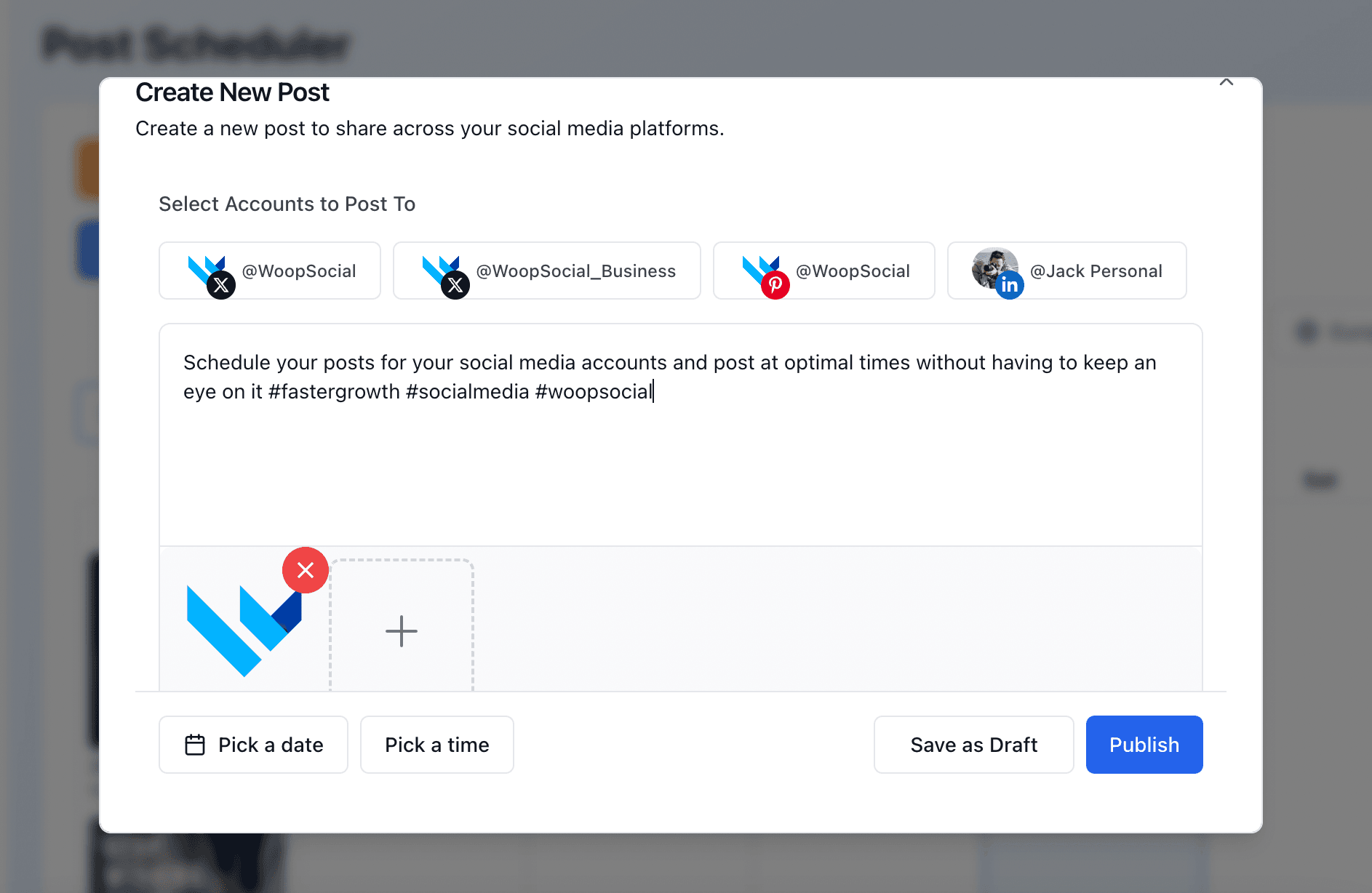
TikTok requirements & limits
Account types
Personal, Creator and Business TikTok accounts can all connect, so you aren’t limited to one account type when you start posting through WoopSocial.
Daily posts
The limit that TikTok sets for its creators is usually just about 15 posts per creator per day, aggregating all the apps a creator posts on. The exact number can vary by creator.
Videos
MP4, WebM or MOV files up to 4 GB and 10 minutes through the API. Each creator’s own maximum comes back from the platform-inputs endpoint as maxVideoPostDurationSec.
Captions
Video captions can be up to 2,200 characters. Photo posts allow a title of up to 90 characters and a description of up to 4,000 characters.
Photo posts
Up to 35 images per post, in JPEG or WebP format.
Post the same vertical video to Instagram Reels, YouTube Shorts and Facebook Reels in one call.
FAQ
Can I post publicly to TikTok without passing TikTok’s audit?
Why are my API posts on TikTok private?
Can I schedule TikTok posts via API?
Can I post TikTok photo carousels?
Can I send a video to the TikTok inbox as a draft?
How do I label AI-generated or branded content?
Can I post to multiple TikTok accounts?
Does it include TikTok analytics?
Can AI agents post to TikTok?
How do I get access to the TikTok Content Posting API?
How long does the TikTok’s Direct Post audit take?
Is the TikTok Content Posting API free?
What’s the difference between Direct Post and Upload to inbox?
Learn more
Each card opens another page on this site.
TikTok API alternatives
On this siteGetting access to TikTok’s API can take weeks, but there are alternatives available. Compare the TikTok API alternatives that give access instantly.
Open page →
Post to TikTok with Hermes
On this siteLet your Hermes agent write, upload and schedule TikTok videos for you.
Open page →
Start posting to TikTok today
“WoopSocial let me fully automate my social media posting, which is something I had been trying to get off my plate for a long time. I set it up once, and now posts go out without me touching anything day to day. Social went from a recurring chore to something that just runs in the background. That is the whole reason it stuck for me. What keeps me coming back is the trust. I do not have to log in and check whether something actually posted, because it always does. And on the rare occasion I have needed support, the team has been genuinely great to deal with. Thanks for building something this useful.”
Connect a TikTok account, grab a free API key and publish your first video in minutes. No Direct Post audit, no credit card.
Free plan · 2 accounts · No credit card · API + MCP included