API & MCP included on every plan
Cross-Post Your TikTok Content to Instagram
Cross-post TikTok vertical clips to Instagram. Select highlights, refresh captions, and schedule Instagram feed posts without rebuilding your short-form content.
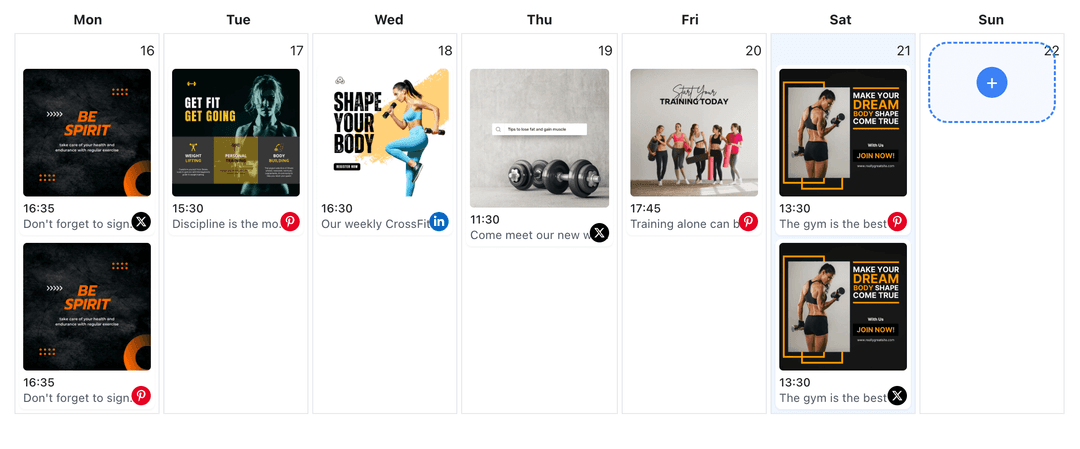
Creators and brands share TikTok highlights with Instagram audiences using WoopSocial
Post to TikTok through one unified social media API for your apps, AI agents, and automation tools. Use the WoopSocial REST API or MCP server to automate posting — we handle OAuth, tokens, and platform changes so you can ship features.
One API for posting
Publish to TikTok through a single unified social media API — no separate integrations per platform
TikTok to Instagram Cross-Posting
Choose the clips that performed on TikTok, keep the vertical format, and adapt the caption for Instagram. If you need TikTok-only scheduling, you can also schedule TikTok video posts directly. schedule TikTok video posts
- Select top clips
- Refresh captions
- Schedule automatically
Highlight Selection
Pick the moments that hook fast. Trim intros, add concise context, and keep overlays light so the clip feels native to Instagram's feed.
- Front-load the hook
- Keep text minimal
- Match feed pacing
Calendar Coordination
Plan TikTok and Instagram drops together. Space out short-form releases, avoid doubling announcements, and use the TikTok content planner when you need a deeper view. TikTok content planner
- One shared schedule
- Avoid overlap
- Campaign visibility
How It Works
Get your free API key
Sign up in under 70 seconds, connect your TikTok account, and start calling the unified API or MCP server.
Build your integration
Send posts from your app, workflow, or AI agent with one endpoint — no separate platform SDKs to maintain.
Publish automatically
Schedule or publish TikTok content instantly. WoopSocial handles OAuth, tokens, and platform API changes.
Caption Adaptation
Rewrite TikTok captions for Instagram by leading with the takeaway, keeping hashtags selective, and removing links that do not belong in the feed.
Vertical-Ready Output
Keep clips in their vertical format while making sure text and subjects remain centered for Instagram. Preview before scheduling to confirm framing.
Audience Timing
Use the shared calendar to stagger when TikTok and Instagram see the same story. Schedule a follow-up on Instagram after the TikTok drop to keep interest rolling.
Multi-Account Control
Switch between TikTok profiles and Instagram accounts without reauthenticating, keeping agency and brand teams productive.
Why Cross-Post TikTok Content to Instagram?
Short-form clips that win on TikTok often translate to Instagram when you keep the hook tight and the branding clear. Cross-posting lets you extend that momentum to a second audience without recreating the video.
Planning both feeds together means you can stagger reveals, turn one clip into multiple follow-ups, and keep campaigns visible longer across channels.
Best Practices for TikTok to Instagram
Choose clips with a clear payoff in the first few seconds. Keep captions concise, skip heavy overlays, and avoid long hashtags.
If a clip needs context, add it in the first line of the caption rather than on-screen text. Schedule it when your Instagram followers are most active to maximize reach.
Ready to build your TikTok integration?
Move your best TikTok clips into Instagram, adjust the captions, and publish on time from one calendar.
Cross-post to InstagramFrequently Asked Questions
Yes. Choose the clip, trim the highlight if needed, update the caption, and schedule it for Instagram without reuploading elsewhere.
No. TikTok and Instagram keep separate schedules. You decide when each post goes live on its own feed.
Keep overlays light and centered so they render well on Instagram. You can trim or adjust before scheduling if text crowds the frame.
Yes. Cross-posts count toward the free plan (up to 2 connected social accounts). Upgrading to Pro removes posting limits.
Pro users can switch between TikTok profiles and keep the same Instagram connections active without repeated logins.
Instagram Business or Creator accounts are required for scheduling. Connect once and manage permissions anytime.
Absolutely. Continue scheduling TikTok video posts and decide separately which clips should also run on Instagram.
Share TikTok Highlights on Instagram
Bring your top clips to Instagram, keep captions aligned, and manage both feeds without extra uploads.
Get your free API key