API & MCP included on every plan
Schedule Your TikTok Carousel Posts
Schedule TikTok Photo Mode carousels with WoopSocial. Upload multiple stills, add captions and audio notes, and publish automatically when your audience is scrolling.
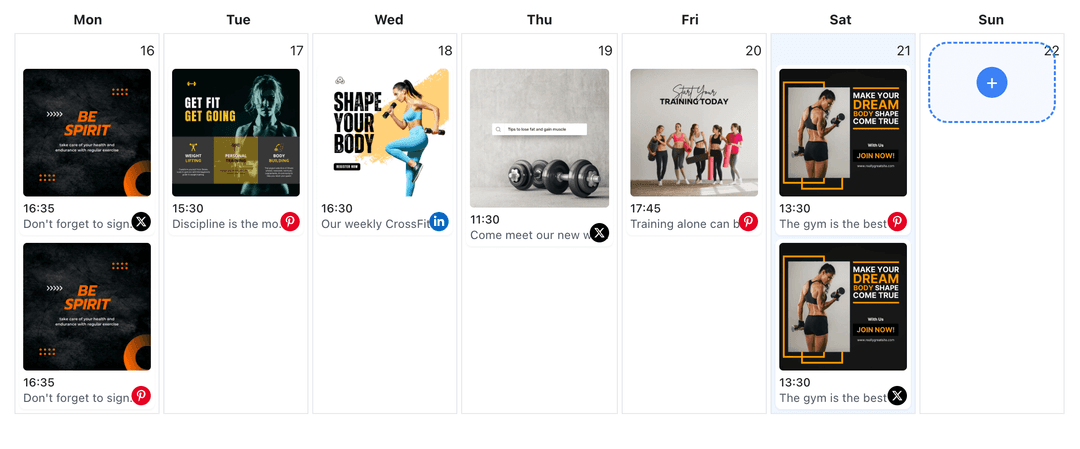
Product brands, educators, and creators use WoopSocial to keep TikTok Photo Mode content consistent
Post to TikTok through one unified social media API for your apps, AI agents, and automation tools. Use the WoopSocial REST API or MCP server to automate posting — we handle OAuth, tokens, and platform changes so you can ship features.
One API for posting
Publish to TikTok through a single unified social media API — no separate integrations per platform
Photo Mode Scheduling
Upload up to 35 stills, choose the cover image, and preview how the carousel will animate in TikTok. When you want motion-first content you can also schedule TikTok video posts. schedule TikTok video posts
- Up to 35 frames
- Cover selection
- Automatic publishing
Caption & Audio Notes
Draft captions with hashtags, call out which sound to pair in the app, and keep talking points handy so the story flows when viewers swipe.
- Hashtag collections
- Sound reminders
- Emoji-safe editor
Trend-Aware Calendar
Map carousels next to Reels-style clips or live reminders so you never miss a trend window. Need to see the full month? Open the TikTok content planner in seconds. TikTok content planner
- Color-coded schedule
- Timezone controls
- Week and month views
How It Works
Get your free API key
Sign up in under 70 seconds, connect your TikTok account, and start calling the unified API or MCP server.
Build your integration
Send posts from your app, workflow, or AI agent with one endpoint — no separate platform SDKs to maintain.
Publish automatically
Schedule or publish TikTok content instantly. WoopSocial handles OAuth, tokens, and platform API changes.
Cover Image Control
Pick the thumbnail that appears on your profile grid so the carousel fits your aesthetic.
Frame-Level Notes
Add reminders for text overlays or callouts so every swipe includes the detail you planned.
Caption Templates
Save CTA or hook templates for launches, tutorials, or behind-the-scenes Photo Mode posts.
Cross-Format Planning
Line up Photo Mode posts next to short-form videos on the same calendar so you never publish duplicates. If you need single-image promos instead, you can schedule TikTok image posts from the exact workflow. schedule TikTok image posts
Why TikTok Carousels Work
Photo Mode keeps viewers swiping through your story while audio plays, making it perfect for recipes, lookbooks, or quick tutorials.
Scheduling ensures you drop carousels when your audience is most active instead of rushing to upload assets from your camera roll.
Batching Photo Mode posts also gives you time to line up captions, sounds, and follow-up videos that keep viewers engaged longer.
Creative Tips for Photo Mode
Hook viewers with a bold first frame that states the pay-off in one line. Every swipe after should add context, detail, or transformation.
Use a mix of wide shots and close-ups to maintain momentum. When attention dips, add a text-forward slide to reset the story.
Pair the carousel with a trending sound or your own voiceover note so the experience feels intentional even without motion video.
Ready to build your TikTok integration?
Stay ahead of Photo Mode trends, keep captions organized, and trust WoopSocial to publish right on time.
Get your free API keyFrequently Asked Questions
TikTok currently allows up to 35 stills per carousel, and WoopSocial supports that limit when you upload.
Audio selection still happens in TikTok, but WoopSocial lets you leave notes about the sound or timing you want to use when it publishes.
Yes. Once scheduled, WoopSocial posts the carousel at the chosen time even if you are offline.
Swap images, change order, or update captions anytime before the scheduled publish window.
Free plan includes unlimited posts on supported networks with up to 2 connected social accounts. Upgrade to Pro for more accounts and credits.
Free plan includes up to 2 connected social accounts. Pro adds more accounts and credits.
Keep TikTok Photo Mode Consistent
Batch swipeable stories, coordinate trends, and publish on autopilot with WoopSocial.
Get your free API key