API & MCP included on every plan
Switch Between TikTok Accounts
Switch between multiple TikTok accounts from one dashboard. Manage all your accounts, schedule videos, and switch profiles without logging in and out repeatedly.
Trusted by creators managing multiple TikTok accounts
Post to TikTok through one unified social media API for your apps, AI agents, and automation tools. Use the WoopSocial REST API or MCP server to automate posting — we handle OAuth, tokens, and platform changes so you can ship features.
One API for posting
Publish to TikTok through a single unified social media API — no separate integrations per platform
Instant Account Switching
Switch between TikTok accounts with one click. No need to log out and log back in- select the account you want to manage and start scheduling immediately. For creators with multiple accounts, you can also manage multiple TikTok accounts from the same dashboard. manage multiple TikTok accounts
- One-click switching
- No logout required
- Quick account selection
Unified Account Dashboard
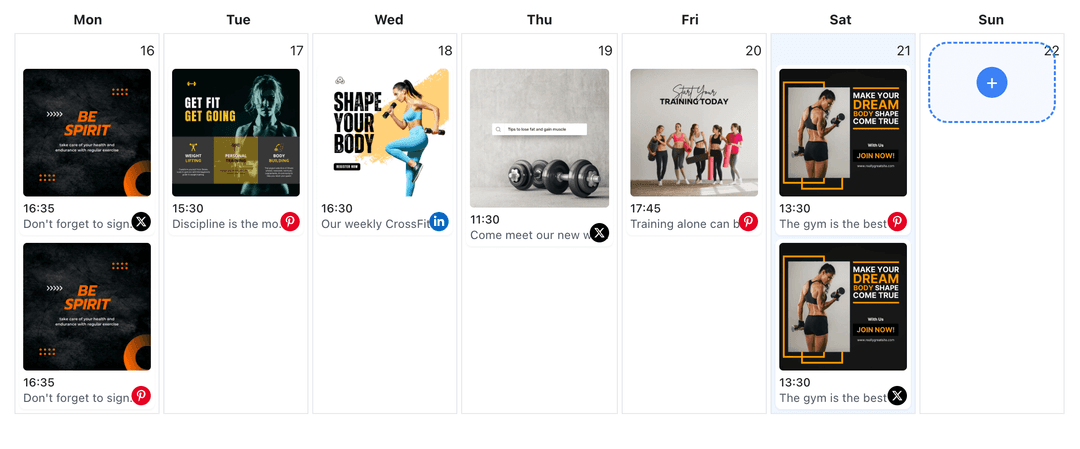
See all your TikTok accounts in one place. View scheduled videos for each account, switch between accounts to schedule content, and maintain a clear overview of all your TikTok account activity.
- All accounts in one view
- Account-specific calendars
- Easy navigation
Account-Specific Video Scheduling
Schedule videos to any TikTok account after switching. Select your target account, upload your video content, and schedule it without leaving the dashboard. For video content, you can also schedule TikTok video posts to any account. schedule TikTok video posts
- Select target account
- Schedule to any account
- Account-aware scheduling
How It Works
Get your free API key
Sign up in under 70 seconds, connect your TikTok account, and start calling the unified API or MCP server.
Build your integration
Send posts from your app, workflow, or AI agent with one endpoint — no separate platform SDKs to maintain.
Publish automatically
Schedule or publish TikTok content instantly. WoopSocial handles OAuth, tokens, and platform API changes.
Multi-Account Management
Connect and manage multiple TikTok accounts from one WoopSocial dashboard. Switch between accounts instantly to schedule videos, view calendars, and maintain all your TikTok accounts without the hassle of multiple logins.
Account-Specific Video Calendar
View scheduled videos for each TikTok account separately. Switch between accounts to see their individual calendars, plan video content for specific accounts, and maintain organized scheduling across all your TikTok profiles.
Efficient Account Workflow
Save time by switching between TikTok accounts without logging out. Create videos for one account, switch to another, and schedule content across all your accounts in one efficient workflow session.
Free and Pro Account Limits
Free includes up to 2 connected social accounts across all platforms. Pro plan users can connect and switch between multiple TikTok accounts, making it easy to manage all your TikTok profiles from one dashboard.
Why Switch Between TikTok Accounts?
Creators often manage multiple TikTok accounts for different niches, personal and brand profiles, or content themes. Switching between accounts traditionally requires logging out of one account and logging into another, which wastes time and disrupts your video workflow. WoopSocial's account switcher lets you manage all your TikTok accounts from one dashboard, so you can switch between profiles instantly and schedule videos to any account without the login hassle.
When you can switch between TikTok accounts quickly, you maintain better control over all your profiles. Schedule videos for one account, switch to another, and continue scheduling without losing your workflow momentum. This efficiency is especially valuable for creators running several niche accounts or agencies managing multiple client accounts simultaneously.
The account switcher also helps you maintain consistent posting across all your TikTok accounts. Instead of remembering to log into each account separately, you can view all your accounts in one dashboard, identify which accounts need content, and switch to schedule videos efficiently. This approach ensures all your TikTok profiles stay active and engaged with your audience.
Managing Multiple TikTok Accounts Efficiently
When managing multiple TikTok accounts, organization is key. WoopSocial's account switcher shows all your connected accounts in one place, making it easy to see which accounts have scheduled videos and which need attention. Switch between accounts to review their individual calendars, plan video content for specific accounts, and maintain a balanced posting schedule across all your TikTok profiles.
The visual calendar helps you see scheduled videos for each TikTok account. Switch to a specific account to view its calendar, identify posting gaps, and schedule new video content. This account-specific view ensures you maintain consistent presence on each of your TikTok profiles without losing track of your overall content strategy.
Switching between TikTok accounts also helps you coordinate campaigns across multiple profiles. If you're running a promotion that spans several brand accounts, you can switch between accounts to schedule related videos, ensuring all your accounts support the campaign consistently. This coordination is much easier when you can switch between accounts instantly without multiple logins.
Ready to build your TikTok integration?
Start managing all your TikTok accounts from one dashboard. Switch between accounts instantly and schedule videos efficiently without multiple logins.
Switch between TikTok accountsFrequently Asked Questions
Yes, you can connect and switch between multiple TikTok Business accounts. Free includes up to 2 connected social accounts across all platforms. Pro plan users can connect and switch between multiple TikTok accounts from one dashboard.
No, WoopSocial's account switcher lets you switch between TikTok accounts instantly without logging out. Select the account you want to manage and start scheduling immediately.
Yes, switch to the TikTok account you want to schedule for, create your video post, and schedule it. You can switch between accounts to schedule videos across all your TikTok profiles from one dashboard.
Free includes up to 2 connected social accounts across all platforms. Pro plan users can connect and switch between multiple TikTok accounts, making it easy to manage all your TikTok profiles.
Yes, switch to a specific TikTok account to view its individual calendar. Each account has its own scheduled videos view, helping you maintain organized content across all your TikTok profiles.
No, scheduled videos remain assigned to their specific TikTok accounts. Switching between accounts only changes which account you are currently managing in the dashboard.
Yes, you can connect additional TikTok Business accounts at any time. New accounts will appear in your account switcher, allowing you to switch between all your connected accounts instantly.
Start Switching Between TikTok Accounts Today
Manage all your TikTok accounts from one dashboard. Switch between accounts instantly and schedule videos efficiently without multiple logins.
Get your free API key