API & MCP included on every plan
Post at the Best Time on TikTok
Schedule TikTok video posts at optimal times for your audience. Plan your posting schedule and publish automatically when your followers are most active.
Trusted by developers, agencies, and product teams building on the unified WoopSocial API
Post to TikTok through one unified social media API for your apps, AI agents, and automation tools. Use the WoopSocial REST API or MCP server to automate posting — we handle OAuth, tokens, and platform changes so you can ship features.
One API for posting
Publish to TikTok through a single unified social media API — no separate integrations per platform
Strategic Video Timing
Choose any date and time for your TikTok Business account video posts. Schedule content for peak engagement windows when your audience scrolls most. For video content, you can also schedule TikTok video posts at your preferred times. schedule TikTok video posts
- Any time selection
- Date and time control
- Automatic publishing
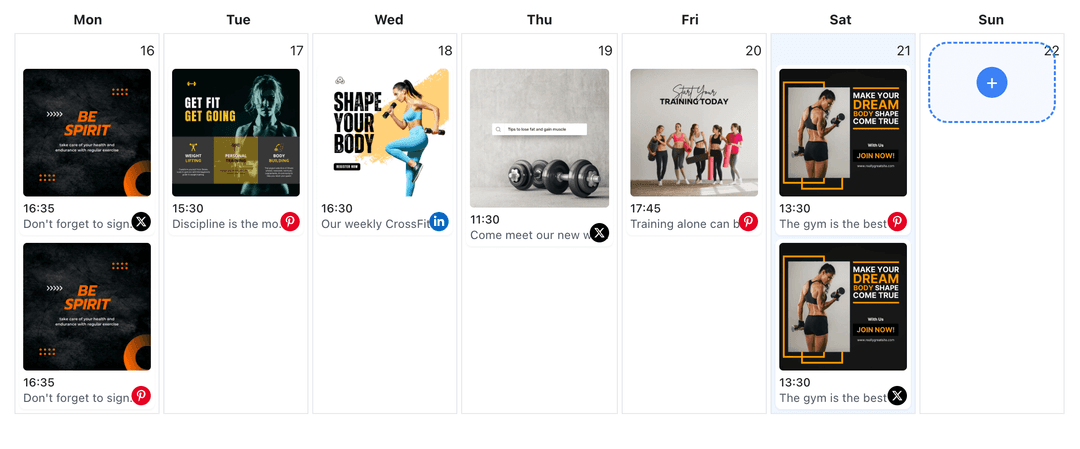
Feed Planning Calendar
Plan your entire TikTok content calendar in advance. Schedule video posts for optimal engagement windows and maintain consistent posting without daily interruptions.
- Week and month planning
- Consistent posting
- Visual calendar view
Automatic TikTok Publishing
Set your posting times once and let WoopSocial handle delivery. Your TikTok video posts publish automatically at the scheduled times, even when you are offline.
- Automatic posting
- No manual intervention
- Timezone support
How It Works
Get your free API key
Sign up in under 70 seconds, connect your TikTok account, and start calling the unified API or MCP server.
Build your integration
Send posts from your app, workflow, or AI agent with one endpoint — no separate platform SDKs to maintain.
Publish automatically
Schedule or publish TikTok content instantly. WoopSocial handles OAuth, tokens, and platform API changes.
Time Zone Support
Schedule TikTok video posts in your preferred time zone. WoopSocial handles time zone conversions automatically, ensuring your posts publish at the right local time for your audience.
Batch Video Scheduling
Schedule multiple TikTok video posts at once for different times throughout the week. Plan your entire content calendar in one session and maintain consistent posting schedules.
Visual Calendar Planning
See all your scheduled TikTok video posts in a visual calendar. Identify posting gaps, adjust times, and ensure your content publishes at optimal engagement windows.
Flexible Time Adjustments
Edit scheduled post times anytime before they publish. Adjust posting schedules based on campaign changes or audience insights without losing your video content.
Why Posting Time Matters for TikTok
TikTok's algorithm favors accounts that post consistently and engage their audience. Posting at times when your followers are active increases the likelihood that your content appears in their feed. While WoopSocial does not provide analytics, you can use TikTok's native analytics to identify when your audience is most engaged and schedule video posts accordingly.
Scheduling video posts for optimal times helps you maintain a consistent TikTok presence without interrupting your daily workflow. Instead of posting manually throughout the day, you can plan your entire week or month in advance and let WoopSocial handle automatic publishing at the times you choose.
Consistent posting at strategic times builds audience expectations. When your followers know when to expect new content, they are more likely to engage with your TikTok account regularly. This approach helps you grow your following and maintain active engagement with your video content.
Finding Your Best Posting Times on TikTok
TikTok Analytics provides data about when your audience is most active. Review your Business account's native analytics to identify peak engagement hours, then schedule your video posts for those windows using WoopSocial. Many creators find success posting during evening hours and weekends when people browse TikTok for entertainment.
Experiment with different posting times and track engagement through TikTok's native analytics. Once you identify patterns, schedule your content consistently at those optimal times. WoopSocial makes it easy to adjust your posting schedule as you learn more about your audience's behavior.
Consider your specific audience when choosing posting times. Entertainment content might find success during evening hours, while educational videos may see better engagement during morning or afternoon browsing. Schedule your TikTok video posts accordingly and use the visual calendar to maintain a balanced posting rhythm throughout the week.
Ready to build your TikTok integration?
Get your free API key and start posting in under 70 seconds. API and MCP access included on every plan, including free.
Get your free API keyFrequently Asked Questions
Yes, you can schedule TikTok Business account video posts for any date and time you choose. Select your preferred posting times based on when your audience is typically most active.
Use TikTok's native analytics to identify when your audience is most engaged. Schedule your video posts for those peak times using WoopSocial's calendar view.
Yes, WoopSocial automatically publishes your scheduled TikTok video posts at the specified date and time. You do not need to be online when they go live.
Yes, you can edit the posting time for any scheduled TikTok video post before it publishes. Simply update the date and time in your calendar view.
WoopSocial does not provide analytics or best time suggestions. You can use TikTok's native analytics to identify optimal posting times and schedule accordingly.
WoopSocial supports time zone settings, allowing you to schedule TikTok video posts in your preferred time zone for accurate publishing times.
Free plan includes unlimited posts on supported networks. Pro plan users can schedule unlimited TikTok video posts at any times they choose.
Start Posting at the Best Time Today
Schedule your TikTok video posts for optimal engagement windows and publish automatically with WoopSocial.
Get your free API key