API & MCP included on every plan
Schedule Your TikTok Stories
Schedule TikTok Stories for Business accounts. Upload vertical clips, add caption prompts, track audio notes, and publish story runs automatically with WoopSocial.
Multi-location retailers, educators, and creators use WoopSocial to keep TikTok Stories alive between long-form videos
Post to TikTok through one unified social media API for your apps, AI agents, and automation tools. Use the WoopSocial REST API or MCP server to automate posting — we handle OAuth, tokens, and platform changes so you can ship features.
One API for posting
Publish to TikTok through a single unified social media API — no separate integrations per platform
Story Clip Workspace
Upload vertical clips, trim them into 15-second blocks, and stack them in order. When the idea deserves a longer treatment, you can also schedule TikTok video posts from the identical interface. schedule TikTok video posts
- Clip ordering
- 15s segment helper
- Caption preview
Audio & Sticker Notes
Add reminders for trending sounds, link stickers, or text overlays so whoever uploads from the phone knows exactly what to add.
- Sound suggestions
- Sticker checklist
- Voiceover cues
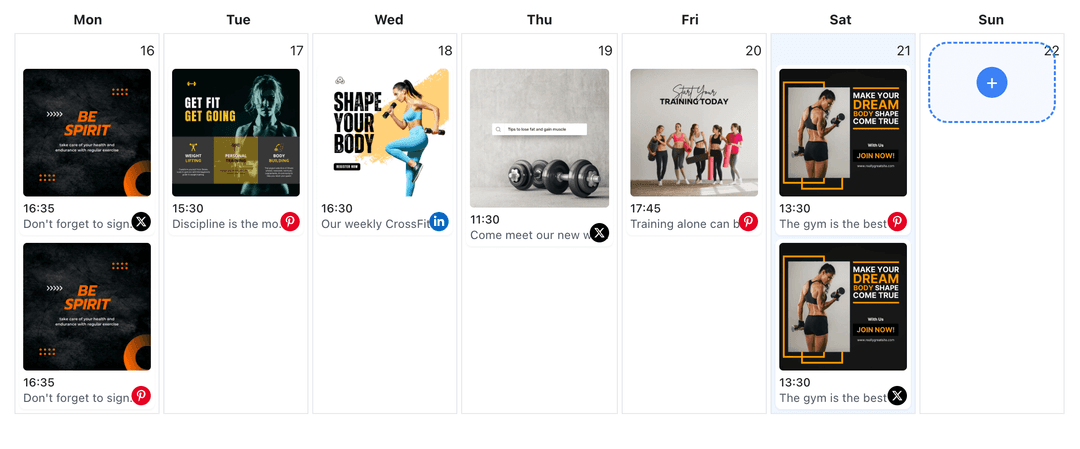
Story Calendar
See Stories next to feed videos, Photo Mode posts, and live reminders. Need a bird’s-eye view? Pop open the TikTok content planner to balance shoots. TikTok content planner
- Week/month views
- Color-coded formats
- Drag-to-reschedule
How It Works
Get your free API key
Sign up in under 70 seconds, connect your TikTok account, and start calling the unified API or MCP server.
Build your integration
Send posts from your app, workflow, or AI agent with one endpoint — no separate platform SDKs to maintain.
Publish automatically
Schedule or publish TikTok content instantly. WoopSocial handles OAuth, tokens, and platform API changes.
Vertical Safety Checks
Preview captions and stickers inside a 9:16 frame so nothing gets cut once the Story hits TikTok.
Highlight Planning
Tag Story runs you want to repurpose as future feed videos or compilation clips so editors know what to export later.
Cross-Format Duplication
Convert strong Stories into Photo Mode or long-form posts by duplicating assets and scheduling TikTok video content with images without leaving the calendar. schedule TikTok video content with images
Plan Limit Tracking
Watch how many Stories count toward the free plan (up to 2 connected social accounts) and upgrade to Pro when daily cadence ramps up.
Why Schedule TikTok Stories?
Stories keep your profile top-of-mind between algorithm-driven videos. Scheduling them means you can capture behind-the-scenes moments during shoots, then release them later without scrambling for your phone.
It also helps multi-person teams stay aligned- creatives batch Story footage, strategists set publish times, and WoopSocial handles delivery automatically.
Creative Tips for TikTok Stories
Open with the value statement, follow with two or three cuts that add context, and end with a CTA that nudges viewers to DM or check the latest video.
Pair a Story teaser with a permanent piece of content- schedule TikTok video posts or Photo Mode carousels on the same calendar so every announcement lives beyond 24 hours. schedule TikTok video posts.
Ready to build your TikTok integration?
Batch clips, document sticker ideas, and keep Stories on schedule without interrupting your filming day.
Get your free API keyFrequently Asked Questions
Yes. Upload a sequence of clips, arrange them, and WoopSocial publishes them in order at the scheduled time.
Stories are supported on the free plan with unlimited posts on supported networks. Pro adds more connected accounts.
Update clips, captions, or timing anytime before WoopSocial posts the Story to TikTok.
Add sound notes inside the Story workspace so the person uploading from the phone can pick the correct audio in TikTok.
Duplicate the Story slot and schedule TikTok video posts or Photo Mode carousels using the same footage for longer-lasting content.
No. Once scheduled, WoopSocial publishes automatically even if your phone is offline.
Keep TikTok Stories Rolling
Stay top-of-mind with daily Stories that publish themselves while you plan the next shoot.
Get your free API key