Smart Automation for Social Media Visual Content: Build a Visual Content Factory
Smart Automation for Social Media Visual Content: Build a Visual Content Factory A lot of automation advice for social media focuses on treating yo...

Smart Automation for Social Media Visual Content: Build a Visual Content Factory
A lot of automation advice for social media focuses on treating your posting process like an assembly line: create posts, schedule posts, rinse, and repeat. That’s all well and good, but it also overlooks the actual pain point for small businesses. It’s not usually the act of posting that kills you. It’s the act of visual creation. It’s having to create five versions of the same content for five different social media platforms, resize and resize and resize, rewrite and rewrite and rewrite overlay text, swap out graphics, ensure that all of your font styles and colors match, export everything, name all the files properly, and then do it all again next week and the week after without your branding getting all wonky.
Smart automation of your social media visual content doesn’t mean AI-generated images that you pray will work. It means creating a system to produce multiple on-brand visuals for all platforms from a single clean input, with near zero active designing. You have one source of truth, a product, offer, testimonial, blog post or video. I help you structure that one input in a way that it can be automatically filled into multiple predefined templates to create variations, square, vertical, story, carousel slide, thumbnail, while following the brand rules that matter. If you’re building toward a repeatable cadence, see consistent social media growth.
In real life, the best way is a combination of four elements: smart templates that lock in your brand identity, an automation tool that populates them with your data and outputs the final product in batches, a workflow that delivers the right asset to the right place, and a measurement tool that reports on the success of different versions so you can lock down what’s working and kill what’s not. Once you’ve got these four elements working together, you’re no longer designing one asset at a time; you’re running a visual content machine.
Think of it as a Visual Content Factory: Inputs → Asset Library → Templates (It’s more than a scheduler)
1) Start with standardized inputs
You should begin your process by selecting the type of content input as this will dictate all subsequent steps, as there are different creative, copy, and proofing requirements for:
- product or catalog content (price, benefit, visual hierarchy)
- blog or SEO content (key claim, supporting stat)
- video, podcast, or webinar content (clip and thumbnail)
- community and UGC content (branding, authenticity)
- news and announcements (clarity, call to action without spamminess)
Once these inputs are standardized, you’ll no longer need to repeat this process every time you post and you’ll be prepared for the ultimate way to automate social media visual content production, a single production workflow that converts any input into a set of platform-specific creatives.
Second, create a single source of truth for each post to go into so your automation can use reliable, standardized information rather than making assumptions. For a broader system that supports this, review a social media content calendar.
You need one entry per post that includes the idea, angle, offer, link destination, CTA, responsible individual, deadline, and any other notes on creative elements such as which photo or product to use, or what proof to include.
Be rigid here: one field for the hook, one for proof, one for the CTA, one for the primary photo or product code.
I have worked with small teams that have reduced the amount of rework significantly by doing this, because the biggest unseen task is not designing, but clarifying, which is the back-and-forth that happens when the input is not clean.
2) Build a real asset library (not folder trash)
Next, turn your asset library into a highly functional, easy-to-use thing, not just a mismanaged pile of folder trash.
This includes light/dark logos, safe fonts you have licenses for, hex code brand colors, icon sets, background textures, product images, headshots, and a well-defined, brand-matching stock image style.
The idea here is to be fast, but not drift off-brand: if you (or your part-time contractor) can get the right headshot and background in less than 10 seconds, then you truly have a library.
Again, it’s also where tools like WoopSocial come in handy by applying your logo, colors, and style consistently once you’ve set your brand inputs, so your content output stays on-brand even when you’re pumping it out in volume. (This aligns with what marketers are reporting: in Deloitte Digital’s research on GenAI in content marketing, generative AI users reported saving an average of 11.4 hours per week.)
3) Create a template system by platform format
Last, build a template system by platform format, with the brand elements that can’t be changed and the text/imagery components that can: feed, story, reel cover, LinkedIn square, Pinterest pin, and thumbnail.
The secret sauce is that you have to define variant rules before you scale, as what can change and what must remain constant, so you’re conducting structured experiments rather than indulging in creative anarchy.
For instance, maybe you’re holding layout and typography constant while you rotate through a hook line, swapping out one proof point and trying two different CTA styles as you cycle through two approved color schemes.
If you do, then every single batch of visuals is structured creative testing, and your automation will yield comparably structured variants, not a design mess.
4) Template Ops and Batch Production
Save time on routine design tasks by using Template Ops and Batch Production. That’s the key to automating visual content for social media.
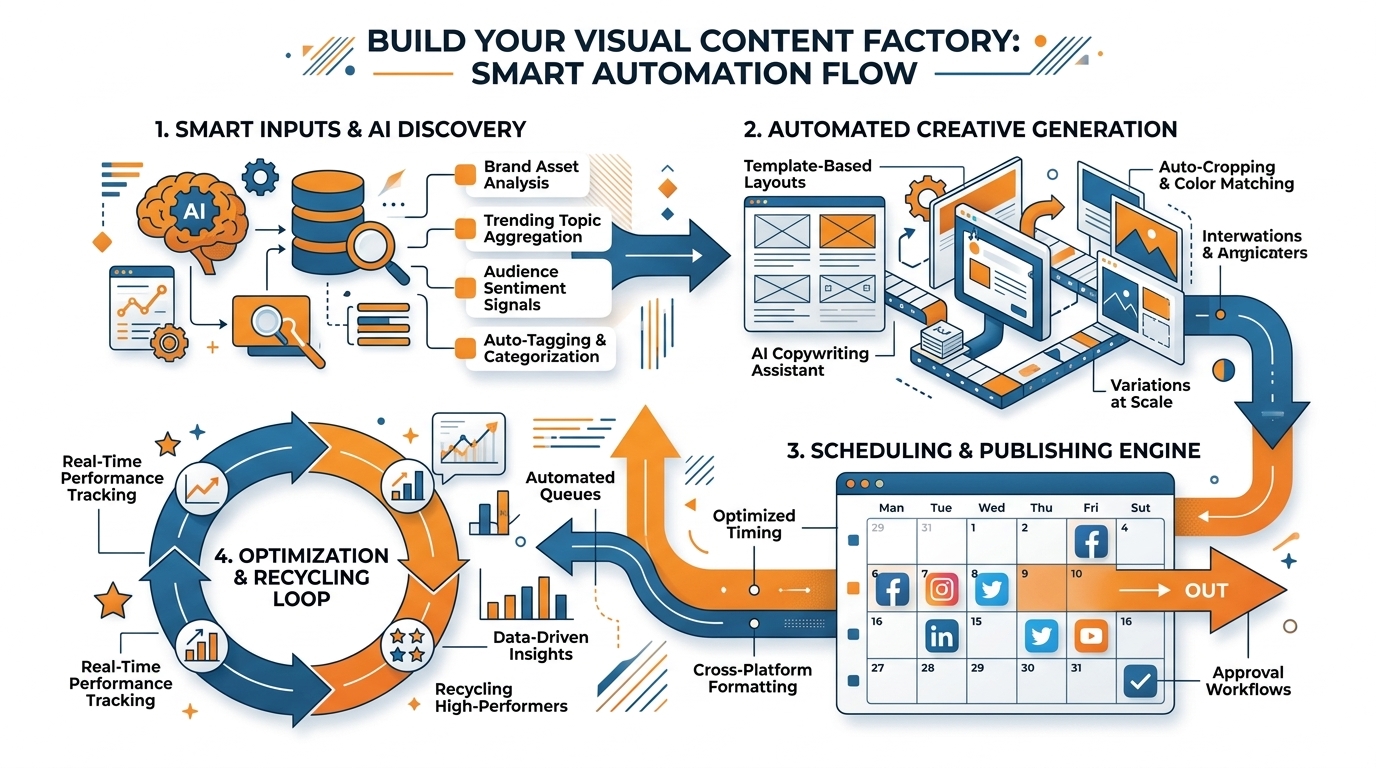
Instead of designing each piece of social media graphics as a standalone artwork, design them as a template-driven process.
Make sure that you can populate them automatically from a structured data source: spreadsheet or database columns mapped to text layers such as hook, proof, CTA, price, disclaimer, and to image layers such as product photo, founder portrait, UGC screenshot.
Use fields for QR codes or URLs so you never have to type in a link again, and avoid the unseen productivity vampire of a few seconds editing and copy-pasting which inevitably leads to mistakes.
This way, the job isn’t about designing, but about preparing inputs, and that’s precisely where small businesses thrive, because you can standardize once and generate endlessly. If you want to take this further, explore social media automation.
Create systematic variations with intent
Second, create systematic variations with intent.
You should be able to generate one asset into a batch with the following layout dimensions in one go: square feed, vertical story, reel cover, pin, thumbnail, all considering safe zones and safe areas for platform UI elements.
Include typography size rules within the template, so longer headlines scale down properly without compromising the hierarchy, and batch out systematic variations that test only one design variable per item such as: layout A vs layout B, or proof stat vs testimonial.
You gain efficiency and performance insights at the same time, because you’re not guessing what worked, you’re testing systematic changes within a system. This matches real adoption trends: Capterra’s GenAI for Social Content Survey (PDF) reported Australian businesses creating an average of 49% of their social media content using GenAI.
Naming conventions and versioning
Batch export will only remain fast if you can quickly locate your results, so implement naming conventions and versioning at the outset.
Construct a unique identifier based on your source-of-truth record (e.g. 0247 HookB Layout2 IG1x1 v3), then include a variation attribute and platform attribute to ensure that each export has a clear lineage.
This enables you to easily find, for example, which version used the new pricing, which layout performed best on LinkedIn, and which images will need to be updated if you ever change your offer.
I’ve watched little teams waste hours per week re-exporting because they can’t easily identify the most recent correct file and a strict naming convention solves that problem immediately.
Low-touch approvals + AI within guardrails
Last but not least, balance speed with risk by introducing a low-touch approval step and applying AI within guardrails.
Identify which elements require human oversight before publication, such as the messaging, costs, brand identity, and responsiveness on smaller screens, and leave other more mundane aspects of output such as file size optimization, output formatting, and watermarking to be automated.
Apply AI to areas where it can consistently improve the workflow, such as providing a few title suggestions that meet your title field length requirement, suggesting a few lines of text that align with your style, removing image backgrounds, or auto-resizing, and use templates to enforce aspects of the design that require continuity such as overall page structure. (This shows up on the creator side too: the Adobe MAX Creators’ Toolkit survey found 86% of creators reported actively using creative generative AI.)
Within platforms such as WoopSocial, employing a combination of brand-safe templates and content suggestions can make bulk production feel like a breeze as a result.
Scaling Brand Protection: Rights, Compliance, and Platform Limitations
I don’t think anyone gives nearly enough thought to the value of applying a Brand Safety strategy to your social media graphics.
Set up a usage rights list in your asset manager, or a notebook or whatever.
Make a list of the fonts that are cleared for use in paid social campaigns, which stock images are cleared for paid advertising use and resale, which music you can use on which platforms, which creators and models have signed releases for use of their images.
I’ve worked with tons of small businesses that don’t bother with this until the post is flagged or until they get a takedown notice.
When that happens, it’s not just the one image that you’re losing, it’s the fact that you have to rebuild dozens of templates in a rush.

I once had to re-export 50 or more posts because a single font wasn’t cleared for commercial use, and the typography was woven through every template.
Especially for riskier verticals, incorporate a lot of this into your template, so you don’t have to try and remember this stuff at the moment.
Your template should automate claims into their own field, require a disclaimer field if a certain category needs one, and restrict claims from being before and after unless your guidelines are saying it’s fine for that platform and that market.
You can get tripped up by testimonials too, as you can’t imply results, and you need proof they gave you permission.
If you can take every strong claim and have a rule that you’re gonna make sure you fill in the 3 boxes of claim, proof, and qualifier, because you can get in trouble from regulators and platforms for making certain claims without context.
You should bake platform-specifics into your template.
You need a hard text buffer around key items, where you know they won’t be obliterated by UI components when they are served up.
You need maximum characters on captions that are safe for a mobile screen.
You need minimum font sizes on thumbnails that will still look good when they are tiny.
You should design for the smallest possible delivery, where your headline is still legible at thumbnail size, and you need to have a known optimal length of text on each platform, so your captions don’t get truncated in the middle of sentences.
When you are automating the creation of batches, services like WoopSocial will take care of applying your branding for you, but you still have to get the platform specifics right to succeed, which is really just a question of reach. For a broader view of how people are creating with GenAI, Deloitte’s 2024 Digital Media Trends reported that among Gen Zs and millennials, 25% reported using generative AI to create text.
Third, automation must be contained to remain human and not spammy.
Rotate angles, imagery sets, and hooks on a schedule while maintaining your absolutes; typography hierarchy, brand colors, and visual structure so that your stream has a continuity to it but isn’t repetitive.
Have a very strict do not automate list and adhere to it religiously; sensitive announcements, crisis communications, and nuanced community replies require a human to send them as there is a level of context that trumps expediency.
I have a pretty good rule of thumb that if I can imagine a scenario in which it could be misinterpreted without tone, timing, or situational awareness, then it shouldn’t be automated.
2. Distribution and Performance: Turn Automation into a Creative Testing Engine
It’s time to optimize social media visual content.
Instead of working against the platforms, work with them.
Instead of using a ‘one size fits all’ approach, create platform-specific content, with the emphasis on platform-specific.
The algorithms are designed to reward consistency, but it’s consistency of a certain type: consistent cadence, consistent messaging, consistent formats.
We can do that, and we can do it without needing to handcraft each post individually.
It’s time to create platform-specific content from a single data source.
A single investment offer can become a quick, text-heavy square post for LinkedIn, a snappy vertical Story for Instagram, and a clear, graphic stat for Pinterest, all derived from the same single source and optimized for each platform.
For distribution to become performance, you need your variations to educate you.
Attribute each image with a few intentional tags so you can begin to recognize patterns instead of playing a guessing game: hook type, layout, CTA type, offer type, color scheme.
I’ve witnessed tiny teams derive their largest wins from simply realizing one hook type performs well to grab attention while one CTA type performs well to reap clicks.
The beauty lies in the fact that you can only automate more of what’s working if you can first recognize what is working, and attribute tagging is the easiest way to make your results both findable and repeatable.
Finally, create the feedback loop to make your system even more intelligent over time: templates that win can move into the default, templates that lose can move out to the variants.
Try and hold one variable at a time, so you understand why a post succeeded, not just that it succeeded.
If you do this, you move automation from a speed hack to a compounding strength, where your templates are a collection of successful patterns rather than a graveyard of templates.
Your volume of creation stays the same, but your noise drops, and that’s where growth happens.
Lastly, combine scalable distribution with collaboration to further extend the impact of your work without adding more time.
Create graphics that are quick and easy to collaborate on like branded frames, quotes, or stat graphics where you can swap out the partner name or logo without editing the design.
Create and utilize templates to generate partner graphics in a matter of minutes, and reuse templates with dozens of collaborators without sacrificing your brand.
To do this efficiently without getting locked into a specific system, look into services like WoopSocial to generate on-brand visuals in bulk across major networks from one dashboard to ensure distribution consistency and keep your creative testing machine going. For additional perspective on adoption, the AI Trends for Marketers report (PDF) reported 31% of marketers using AI to create social media posts.
O Fim
The ideal automation for social media visual content is not a stack of workarounds, or just “faster.”
It’s a pipeline where each phase reduces the number of variables: clean inputs that stay the same, locked templates that safeguard your brand, batch creation that produces all formats in one batch, brand and risk controls that prevent costly errors, and an optimization loop that links to distribution so the next batch is better than the last.
When you stack it this way, automation stops being a band-aid, and starts to become an operating system for growth. If you want more depth on setting up the workflow end-to-end, see social media calendar automation.
If you can focus on only a handful of things: (1) get an actual source-of-truth data model that allows you to generate your graphics from verifiable fields rather than a copy and paste nightmare, (2) develop a template infrastructure for each medium to ensure proper dimensions and safe area standards, (3) export assets in batch with specific naming and versioning conventions to easily locate, edit, and re-apply them without having to re-export, and (4) perform organized experimentation on variants, with only one element changed at a time, so you can get to results faster.
You will quickly see an improvement in the productivity of a small team that results from significant reductions in rework and revisions.
Most of the time spent on graphic design isn’t design at all, but the constant revisions and refinements after the fact.
To make this fun and rewarding, run each batch as an experiment with safety rails.
You should be able to look at a file name or a record ID and immediately know what was different about that iteration: hook type, layout, proof type, CTA and colorway.
I’ve seen teams start to realize that one particular type of hook is almost always a stop, and one particular type of proof is almost always a click, and because the iterations were systematic, the knowledge was applicable rather than a one-off.
That’s how you build compounding art, where each month of work helps make next month’s templates better, not just fills the feed.
The result is everything SMBs are looking for: fewer hours of designing; more uniformity; increasing quality, not just the speed of content creation.
And if you want the funnel to be as frictionless as possible, use software that will automatically apply your branding, color schemes, and design language, but still allow you to freeze templates and mass-produce content; that’s where platforms like WoopSocial come in, to support rather than supplant the best practices of input hygiene, template management, and rigorous testing.
Construct the engine once, then let it pay back in the form of saved hours and greater quality, week after week.
Related reads
4/27/2026
B2B SaaS social media benchmarks: Set the right targets.
B2B SaaS social media benchmarks: Set the right targets. The trouble with defining B2B SaaS social media benchmarks is that it's an inherently impe...
4/25/2026
Building a personal brand as a technical founder (without becoming a creator)
Building a personal brand as a technical founder (without becoming a creator) Creating a personal brand as a tech founder should feel less about ma...
4/20/2026
Creative Post Ideas for Sustainable Brands (That Don’t Sound Greenwashy)
Creative Post Ideas for Sustainable Brands (That Don’t Sound Greenwashy) That’s not what creative post ideas for sustainable brands should look lik...