Generate a 2-4 Week Social Media Content Calendar Instantly
Generate an instant 2-4 week social media content calendar. Stop daily worries by transforming your business overview into a complete, low-investment posting plan.
Generate a Social Media Content Calendar Instantly (2-4 Weeks Ready)
If you read most tutorials, they will tell you what a social media content calendar is.
I will not waste your time with a definition.
You want content that is ready to be posted. In this post, I’m going to show you how to generate a social media content calendar straight away, with a plan you can execute that’s already fully populated for the next 2 to 4 weeks, once you’ve finished reading it. No overthinking which platform to use. No trying to come up with a list of content pillars. No big branding planning session that takes up all your Saturday. Just a low-investment way to transform the one or two sentences you’d use to explain what your business does into a real social media plan that you can actually use straight away.
This is what I promise you: you provide me 5 lines that tell me what you offer, to whom, and what sets you apart, and you will be left with a concrete plan of posts for each day, with theme, tone, and basic guidelines of what to publish. Then, you will use a batch process to produce the content in one go, so that your social media will no longer be a daily worry, but a lead and trust machine for your small business.
I've developed calendars for extremely short turnarounds in a wide range of markets, and it is always the same: we go faster with less, not more. You will follow a repeatable format that optimizes for algorithm and customer feedback. You will launch the first pass as soon as possible, and iterate based on performance.
If you want to shorten this process further, you can fill out a business overview on WoopSocial and it will provide a month’s worth of brand-matched content that’s already formatted for a repeatable structure, meaning you can go straight to creation.
The 10-minute setup that makes an instant calendar possible
If you are looking for the best way to create a social media content calendar quickly, start with what “quickly” means before you start filling boxes.
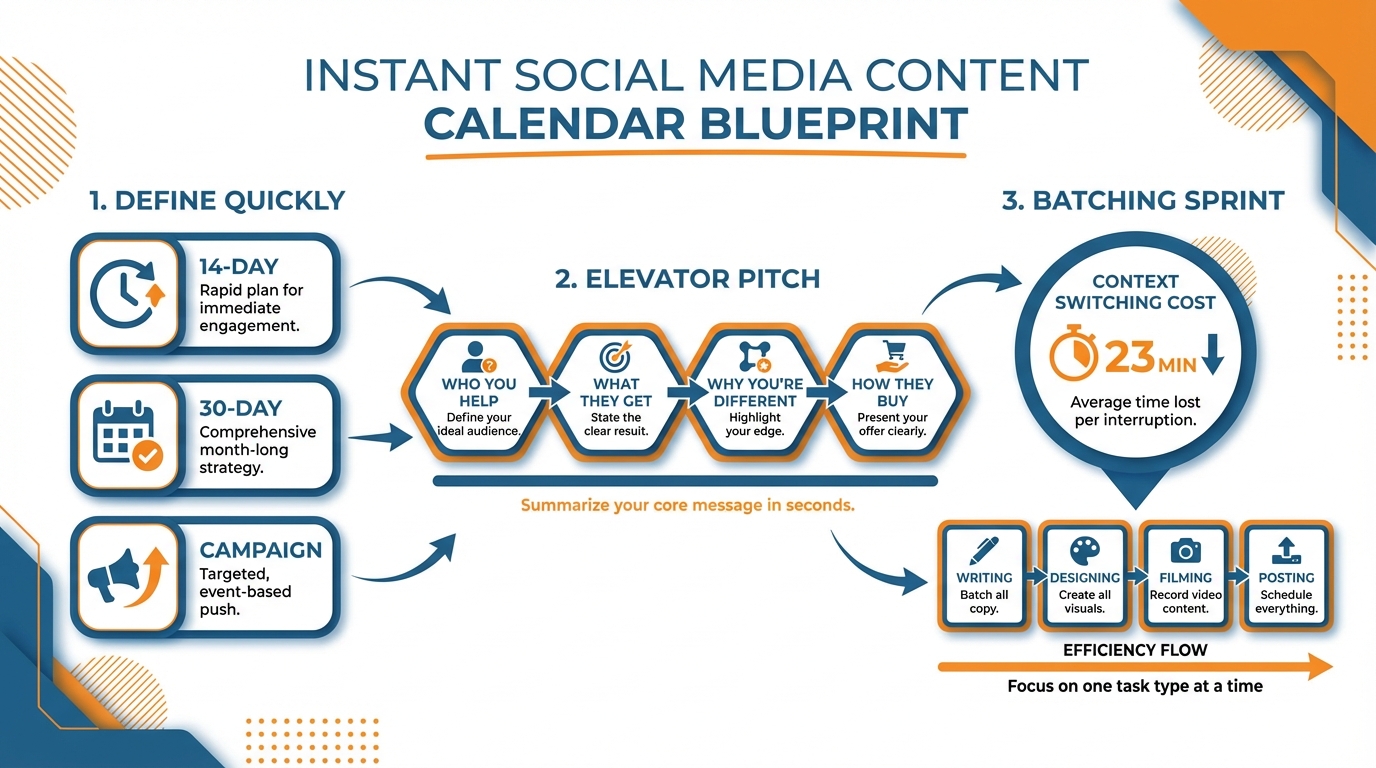
Take your pick: a 14-day calendar is the quickest to implement, a 30-day calendar is the best for creating momentum, and a campaign calendar is best when there is a launch date and a need to control the timing.
For most small businesses, 30 days is the winner because it is long enough to provide consistency but short enough to make adjustments when you see what is getting saves, comments, and clicks.
I have done calendars under ridiculously tight time constraints, and the rule is always the same: you build a calendar faster by limiting the choices rather than expanding them.
2nd, minimize your surface area.
Pick one core channel your target audience already consumes on, one secondary channel your content easily translates to, and nothing else for the first 30 days.
That alone eliminates the silent calendar assassin: stacking effort across multiple channels.
Then commit to a minimally viable frequency you can maintain even during heavy weeks: light is 3 posts a week, standard is 5, and daily is 7.
Data point to guide your decision: frequency is better than volume since most channels incentivize consistent posting patterns with more reliable delivery, and in my experience small businesses can maintain 5 posts a week longer than daily, which is why standard is the default. As CoSchedule’s marketing strategy data puts it, “Organized marketers are 674% more likely to report success,” and “Proactive planners are 3x more likely to report success.”
Next, define your content engine and decide on only 3 pillars, no more: education, credibility, and conversion.
Education is all the questions your customer has before purchasing, credibility is receipts of results, process, behind the scenes, customer stories, etc., and conversion is offer, objections, etc.
Make it instant and sustainable by defining only 2 repeatable formats you can quickly create without getting creative burnout e.g short video and single image or carousel and text post.
Repetition is not lazy, it is how you train your audience and the algorithm on what to expect from you, and it is how you actually complete a calendar instead of endlessly planning.
Lastly, have one rule in your calendar that means you rarely have a blank day: Each piece of content must be linked to a pillar, format, and single action and nothing goes on the calendar until it ticks those boxes.
That makes planning an issue of quickly selecting combinations, which is much quicker than planning on the fly because you’re choosing from a limited set of options.
Create an entire month's worth of content in a matter of minutes (no templates here!)
Want to generate a social media content calendar at light speed?
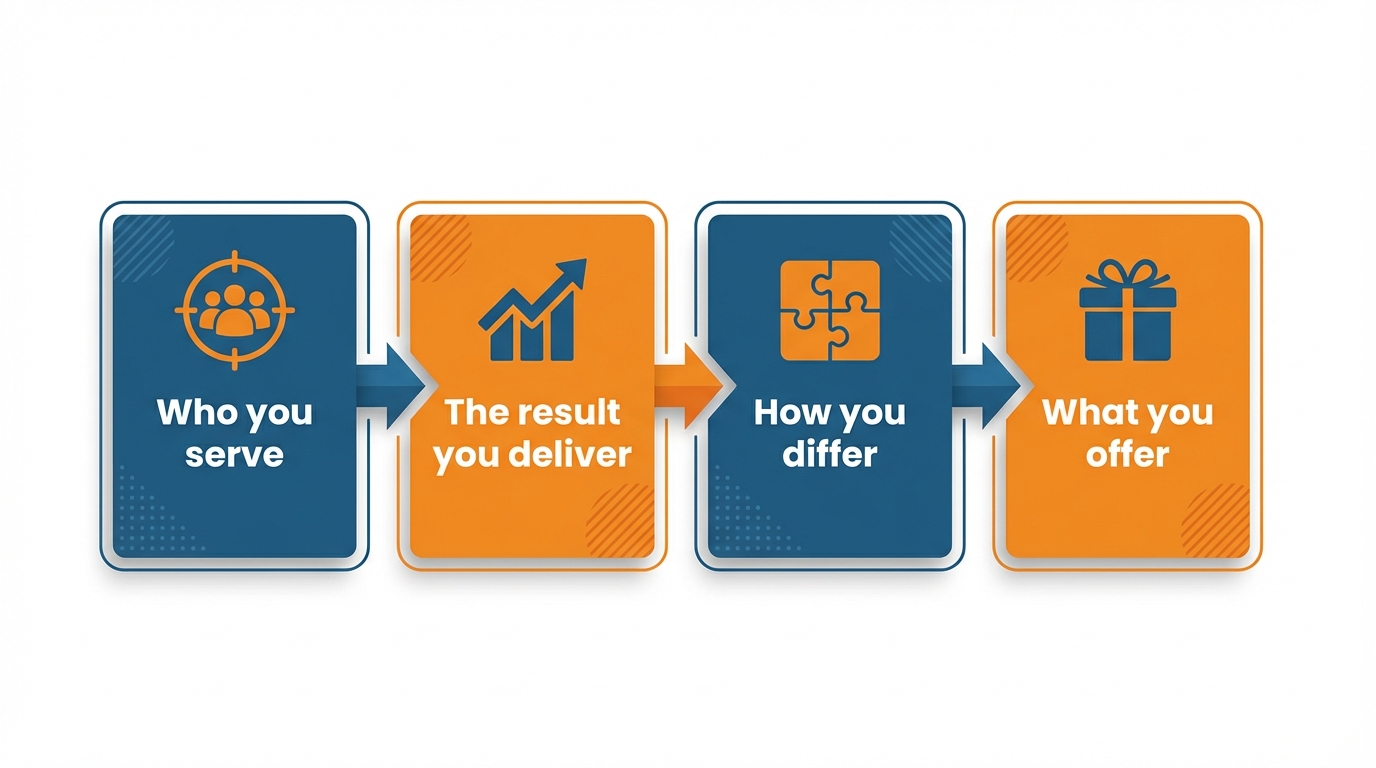
Instead of starting with topics, start with a one-paragraph elevator pitch that you can reuse forever: who you serve, the result you deliver, how you differ, and what you offer.
Condense it to sticky note length.
Example I use to generate fast: I help local service businesses convert website visitors into booked appointments, using simple offers and proof-first content, with a fixed setup package.
That becomes your filter so every topic idea both sounds like you and leads to a tangible result (rather than generic content that could come from anyone).
Now that you have your content pillars, turn them into recyclable content formats that can be used to fill up a month’s worth of content.
Educational posts should come from actual questions you’ve received from customers via DMs, phone calls or in person - as they’re more likely to elicit comments and saves than general advice.
Platform research has shown that formats like carousels that are often saved for later tend to perform better than single posts in terms of engagement - so try to create bite-sized, actionable and shareable lessons from each.
Approach these posts as direct as possible (e.g. how much does this cost?, how long will this take?, where could I go wrong?, where should I start?), and less as ‘how-to grow’ or ‘how-to improve’.
Next, add proof prompts so your calendar automatically earns trust: case studies, before-and-afters, 5-step processes, screenshots, and objection responses.
Proof works because it lowers risk, and risk - not a lack of knowledge - is what holds small-business buyers back.
I like to vary the types of proof I’m posting so it doesn’t get stale: one day I post a comparison of what to expect in Week 1 versus Week 4; another day, I share my exact 5-step process; another day, I address a common objection with an example from a past client.
Finally, incorporate distribution prompts into the calendar with partnership ideas: Brainstorm people you can co-post with, tag, feature, and whose audience is similar to yours, because one well-placed partner post a week can expand your reach without expanding the number of posts you create.
To get an instant calendar, fill out days with prompt + hook + CTA, rather than topic. Prompt is the concept, hook is the first line that gets attention in 2 seconds or less, and CTA is the 1 thing you want them to do next.
This is what allows you to write copy quickly and stick to a routine, because you never have a blank page.
If you want it fastest, I can generate 30 pieces of ready-to-post content from any website or business description using a tool that gives me copy in the brand’s voice; apps like WoopSocial are made to turn that snapshot into 30 days of on-brand prompts in about 2 minutes, so you can focus on execution, not planning. If you want a fast starting point for hooks and captions, use an AI social media content generator to keep the prompt + hook + CTA structure consistent.
Also, written plans matter: Content Marketing Institute’s research on documenting strategy notes that “Just 37% of B2B marketers and 40% of B2C marketers have a written content marketing plan,” and it cites a goal-setting study where people who write down goals, review them, and share them were “33% more successful” in achieving goals.
Batch those dates into social media posts (the batching sprint)
Want to generate a social media content calendar now? The secret is to complete an entire month in one go - not one piece each day.
The key insight is that context switching kills: when you need to jump from writing to designing to filming to posting, you incur a mental reset cost.
In practical terms, I estimate that task switching can add 20-40% to a task’s duration.
This is why small business owners say that it takes an entire week to create content.
Now, I’m simply aiming to convert each line (idea, hook, call-to-action) into an upcoming post without getting out of my seat:
I recommend batching the content creation in this order, because it allows your brain to stay in one mode:
- Write hooks for all posts, since the hook is the only thing that gets the post views in the first 2 seconds. Write one-liners and quickly.
- Write the rest of the caption in one format, so you can just fill in the blanks, rather than having to recreate the post.
- Write the CTA at the end of the post, since it’s a single choice after you already know what you are saying, and never include more than one CTA in a single post, so people always know what you want them to do.
I say to do it in this order, because hooks are idea creation, text is an explanation, and CTAs are a decision. It’s switching between those 3 modes that slows you down.
You create the visuals after finalizing the copy, and you use a system, not creativity.
You use one design style per media type so that you are only changing out copy, not rebuilding a design: one quote graphic style, one carousel style, one talking-head video style, etc.
And you automate the creative process by turning your editorial calendar into a design and shoot list before you begin: 8 talking head videos, 6 quote graphics, 4 carousel explainers, etc., and create them in the same order.
I do this because it removes the creativity pressure from the content process, making it more of a production line, but it also allows you to identify production holes, like 12 carousels you planned for but only have time to design 6.
Continue to keep the scheduling work down by doing it at the moment of creation - not re-reading and second guessing next week.
If you’re using WoopSocial, this is where the workflow wins because the posts and brand graphics can be generated to schedule and ready for next month without further work. You can also speed up production by generating post-ready drafts with an AI social media post generator and then moving straight into your visual batching.
Lastly, include at least one distribution trigger per week (collaboration tag, partner shoutout, feature request, co-created content post etc) so that your calendar isn’t just about content volume but about distribution growth.
Make it smarter after it’s live (without slowing down the instant workflow)
Want to learn how to create a social media content calendar on the fly? Create version one as version one.
One big pitfall small businesses face is that they spend a month learning, which is spending thirty days paying for guesses.
Better to have a forty-eight-hour feedback loop; once you have been posting for two days you only tweak the next five to seven posts, not the entire calendar.
That way you preserve the on the fly nature of the process because you’re making slight and strategic modifications while things are gaining traction, not performing a band-aid that pauses momentum.
You should only watch three signals, because when you watch more it becomes homework and you will stop doing it.
Saves signal value.
People are saving this to come back to it later; comments signal resonance.
Your unique spin, your framework, your framing and your illustration of a point, strikes a chord or a memory for someone and they share a brief story; clicks signal intent.
This is a signal to you that someone is interested in taking a next step, which is to buy, or to learn more, to have a closer relationship.
My rough heuristic is that for educational content, saves is the leading indicator.
For opinionated hooks and myths, comments is the leading indicator.
For proof and offer posts, clicks is the leading indicator.
Now turn what’s working into calendar rules so your next instant calendar is even better.
If you observe a pattern, nail it down as a constraint: maybe every single week you find that exactly one proof on a Tuesday increases clicks all week. Maybe hooks that start with Stop doing X get more comments, or maybe pricing and timeline posts get the most saves because they make things feel less ambiguous.
This is how you improve quality without spending more time: you’re not thinking even harder, you’re standardizing what works so next month takes less time than the last.
Last but not least, maintain a lightweight idea bank for your best-performing prompts.
Mine comes from DMs, calls, store chats, comment engagement, and FAQs from the competition.
It’s already in my customer’s voice and outperforms list-of-topics prompts.
My system is very basic: if I get asked a question twice, I turn it into a prompt within 24 hours.
If you are generating a month in a snap with WoopSocial, this is where the next two-minute calendar generation gets even more precise and custom because it’s using direct language from buying conversations. For planning the next cycle faster, an AI social media calendar generator can turn those prompts into a full month with less friction.
Timing can also matter when you go from v1 to v2: this large-scale study on when to post reports an empirical assessment including 0.5 million active users and 25+ million messages over a 56-day period, and it found reaction gain “up to 17% on Facebook and 4% on Twitter” when recommended posting times are used; another temporal analysis found that the best posting schedule can lead to “seven times” more audience reactions versus average without an optimized schedule, based on ~0.3 million posts and 10 million audience reactions (study on maximizing visibility).
You are not aiming for the ideal calendar; you are aiming for the repeatable instant.
Perfect isn’t your objective.
A calendar you can fill, execute, and publish regardless of imperfections is your objective because it helps advance your business.
The pursuit of how to make a social media content calendar instantly is the pursuit of an instant returns system.
For small businesses, that is the difference between filling a 30-day calendar and dropping off after a week because it was too much thinking.
The instant part only works if you make three fast decisions, and don’t keep revisiting them: your cadence, your three pillars, and your two formats.
Once those are locked, you’re not planning, you’re choosing combinations.
That’s why prompt-based planning is better than topic-based planning: every calendar event should already include a prompt, a hook that gets attention in two seconds, and one clear CTA that tells the reader what to do next.
That’s the structure that solves blank days, and it’s also the structure that saves you from the most dangerous small-business trap: spending 45 minutes editing a post that was never even meant to generate saves, comments, or clicks.
So you win one with a single production sprint, not daily willpower.
You write all hooks first, then all captions, then all CTAs, and only then create the visuals from a simple shot and design list, so you are not paying the 20 to 40 percent time penalty that comes from task switching.
I’ve seen companies take a full week of scattered content effort down to one focused session simply by keeping their brain in one mode at a time and refusing to reread and second-guess posts later.
Then, your calendar becomes a living document, not a monthly reset.
You ship v1 quickly, monitor just 3 signals - saves, comments, and clicks, and only update the next 5-7 posts instead of completely redoing the month.
This is also where tools like WoopSocial can remain as a speed layer in the background, generating brand-matched prompts with hooks and CTAs from a simple business description or website in minutes so you maintain flow and never face an empty calendar again. If you want to support the “hook + CTA” workflow, an AI caption generator for Instagram can help keep the writing sprint moving.
Repetition is not lazy, it is how you train your audience and the algorithm on what to expect from you.
Perfect isn’t your objective.
Want to generate a social media content calendar now?
Related reads
4/27/2026
B2B SaaS social media benchmarks: Set the right targets.
B2B SaaS social media benchmarks: Set the right targets. The trouble with defining B2B SaaS social media benchmarks is that it's an inherently impe...
4/25/2026
Building a personal brand as a technical founder (without becoming a creator)
Building a personal brand as a technical founder (without becoming a creator) Creating a personal brand as a tech founder should feel less about ma...
4/20/2026
Creative Post Ideas for Sustainable Brands (That Don’t Sound Greenwashy)
Creative Post Ideas for Sustainable Brands (That Don’t Sound Greenwashy) That’s not what creative post ideas for sustainable brands should look lik...