Automating Social Media Calendar for Small Businesses
Learn to truly automate your social media calendar for small businesses. Create consistent, dynamic content from existing material, ensuring flexible posting. Implement a scalable, platform-agnostic method.
Automating your social media calendar without turning into robot social media
'Automating' your social media calendar isn't copying and pasting the same seven days' worth of posts over and over again, then praying you'll do it again next Monday. True automation for a small business means your calendar gets populated consistently with content you're already making, your posting abides by the rules you've set for it instead of the ones you're trying to remember on a sticky note, and you're still in control enough to not have robot social media, non-dynamic copy, and awkward posting timing whenever something in your niche shifts.
In this piece, you will create a platform-agnostic automated calendar that can scale without becoming a brittle mess of sign-ins, tabs, and custom work.
You will establish a single source of truth, identify what can and cannot be automated, and implement checks and balances such as approval gates, post-automation checklists, and tracking labels to make sure your calendar evolves, not devolves, over time.
I’m going to teach you the method that I personally use when I need a full calendar, consistent results, and the flexibility to schedule in real-time collaborations and promotions that drive the needle for my income.
As a reality check on why this matters now, 74% of marketers are using at least one AI tool at work according to a HubSpot Communications update on marketers doubling AI usage in 2024, based on more than 1,000 global marketing & advertising professionals.
Plan the automation approach prior to any tooling
There is one important caveat to the “set it and forget it” model, that usually holds back those who leverage automated social media scheduling tools: namely, choosing which posts to automate and which not to. Most people who attempt to set up their automated social media calendar struggle with this, and it’s the reason why many of them ultimately give up.
Content that can be automated is great, as it will keep you top of mind for your audience. However, you will still want to maintain full control of the types of posts that have the potential to produce massive returns (or losses).
A good gauge for determining which posts you can automate and which ones you should not is whether or not you can post it on a Tuesday afternoon without any further information.
Second, your posting frequency should be based on the behaviors of your audience, not the need for a perfect square.
If you’re posting an equal amount on all of your platforms, you are prioritizing the ease of maintaining a consistent number of posts over the distribution to your audience.
Designate a primary platform where your target audience actually resides and build your posting frequency from there, and your secondary platforms should be designated to a lower posting frequency that aligns with how people are consuming on that platform.
One indicator of a posting frequency that is strong is that: regular posting SMBs are overwhelmingly outperforming irregular posters, and a number of studies in our industry suggest that the impact of consistent posting results in an increase in engagement over time, as long as the format aligns to the platform.
This can be dictated by guidelines such as 1 education post to 1 proof post on your primary platform, and 1 proof post to 2-3 education posts on your secondary platforms.
Next, you need to organize your content calendar by types of evergreen content so your automation doesn’t become too automaton.
Instead of organizing by theme, you want to organize by types of intent and trust. If you need a reference point for this approach, see behind-the-scenes content and how it fits as a type rather than a theme.
I personally organize by educational, behind the scenes, proof, promotion, and community, and I cycle through them to make my feed seem more human.
The idea is to build rules into your system: if you only have five content types, and you only publish five times a week, you can avoid repeating yourself, and you can avoid getting stale by only letting yourself repeat a concept every 30 to 60 days.
Lastly, establish the recycling rules for evergreen content that help you avoid getting stale.
For every evergreen post, approach it like a modular asset with several alternatives: swap out the hook, swap out the example, swap out the format, swap out the opening line to align with what your customers are asking today.
It’s equally important to establish the manual override lane: product launches, brand events, and anything topical or date-related should still be booked as anchors on your calendar that bump automated content.
A platform like WoopSocial comes in handy here once you know the rules, because they can generate on-brand variants rapidly, and keep your automated channel of the calendar full without removing the tone.
Figure out the stack: only one system is responsible for the calendar
Most attempts to automate social media calendar setup fail due to something very mundane: nobody establishes what system will be the 'source of truth' for the calendar, and then all the tools try to claim dominion over it.
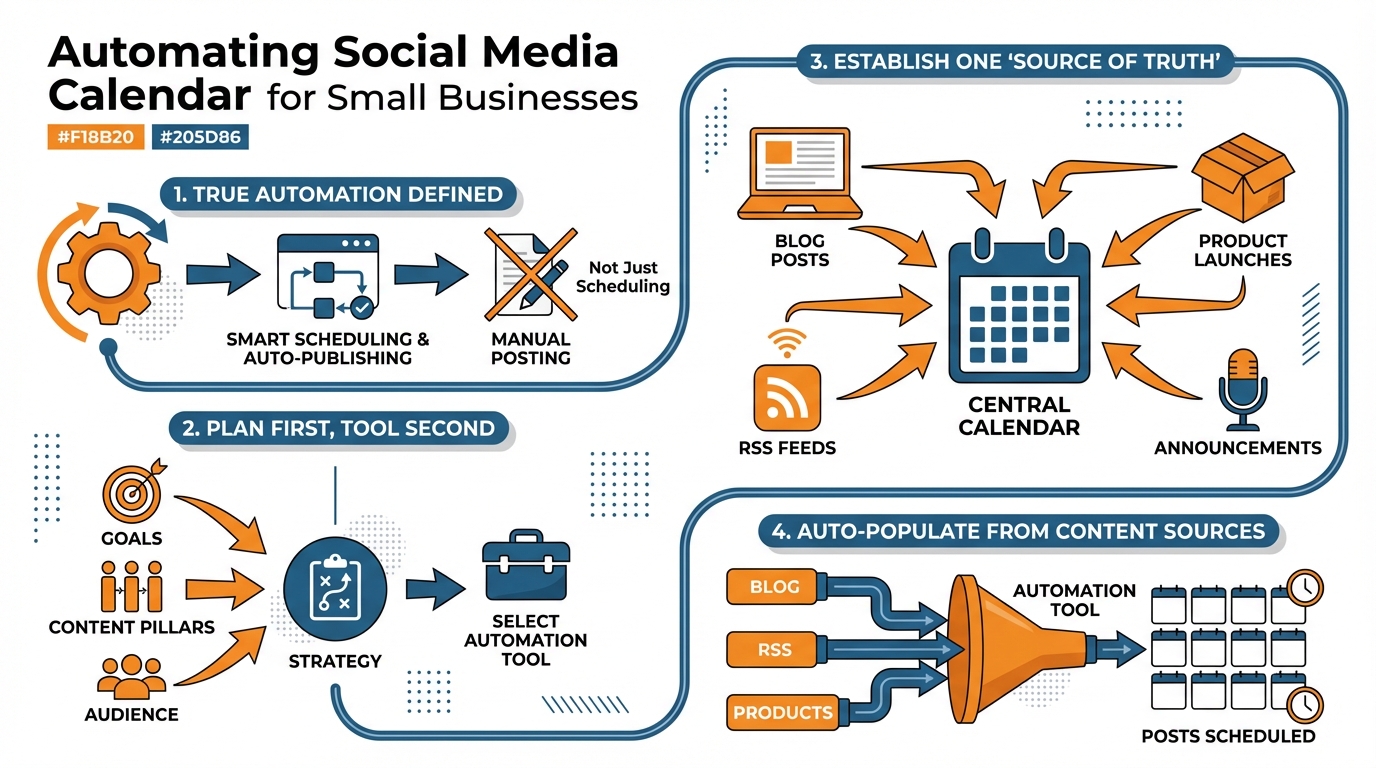
Before you start automation, make sure to identify what a single-source chain you can actually run as a small business might look like and lock that in: one system is for intake of ideas, one system is for approvals, one system is for asset development, and one system is for the actual calendar.
Once you do, automation can be made modular: you'll be able to change out components later on without disrupting the entire system, because each tool will have one simple role, and only one transfer of work to another system.
1st choose your master calendar, then rig the rest of your process to serve it, not fight it.
You have three basic design patterns:
- A calendar-as-trigger design means the calendar entry is what actually triggers the creation and/or publishing of the content, which can be quick and easy, but also prone to errors if the calendar must be 100% accurate every time.
- A scheduler-native calendar means the calendar lives inside the publishing tool, which minimizes integration points and usually minimizes errors, but means you may be committed to a particular tool.
- A database-driven design means your content database is the master info source, and your editorial calendar is just a view of it, which can take a little longer to set up, but usually wins in the end because you can enforce rules such as content type rotation, minimum repetition time, and manual anchor points.
Choose based on risk tolerance, not preference.
If you need to go fast and you’re the only one on the content, calendar-as-trigger is fine, but you’ll have to standardize platform, post type, asset link, and approval status, or you’ll publish the wrong thing on the right schedule.
If you need to avoid risk and you hate dealing with workflows, let the publishing tool control the calendar and keep earlier stages simple, because fewer handoffs generally means fewer silent failures.
If you need to publish different things across channels and you want the calendar to auto-populate from a content library, go database-driven and treat each post as a record with required fields; I use this when I need to switch up the posting rules without overwriting my entire tool, because the calendar becomes an output, not the master plan.
Once you decide on an owner, you can wrap automation around it in a tidy circle: you create or curate concepts into an organized repository.
You filter anything dangerous behind a basic approval process.
You produce assets and versions from that single item, and then-and only then-you schedule.
That’s where something like WoopSocial can fit in elegantly: you maintain your strategy filters up top, then use it to produce on-brand versions and rapidly fill a calendar without forcing your process into a flaky game of copy-paste.
Optimally, one thing is the master of the calendar, all other parts serve it, and your automation remains resilient even if your business changes.
This aligns with broader adoption trends: a Gartner survey on marketing leaders investing in generative AI reported that 63% of marketing leaders planned to invest in generative AI in the next 24 months, based on a survey of 405 marketing leaders conducted May-June 2023.
Auto-populate the calendar: let the source fill the calendar
Want to automate social media calendar setup that actually fills up? Start thinking in sources, not posts.
You create a small number of outputs that already exist, and then funnel those into a steady flow of social media calendar items.
Your best sources for this are probably:
- your blog and RSS feed
- new product announcements and release notes
- upcoming webinars and events
- a library of your most useful explanations and FAQs
The goal here is to have every real action in your business add intelligence to your calendar without opening a blank Google Doc. If you want a stronger rhythm to make this easier to run, a weekly social media system fits this approach.
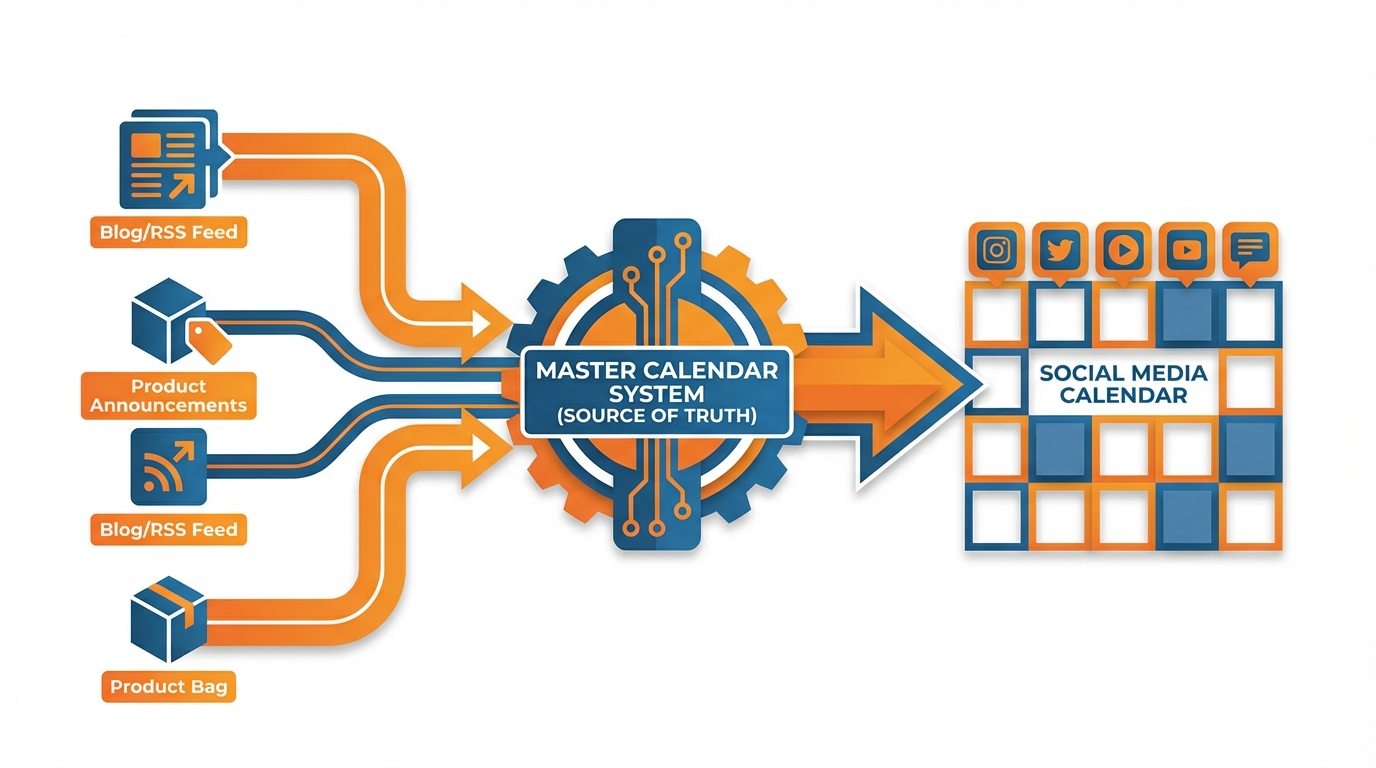
The hack here is to create a micro funnel that takes a source to a post object that contains the bare essentials: what happened, who it is for, the proofpoint or benefit, and the link or next step.
Then create platform-specific versions of this object so you’re not posting the same copy on all channels by pivoting on what each platform optimizes for.
On LinkedIn you lead with the lesson and credibility, on Instagram you lead with the visual and short hook, on X you lead with a hot take or stat, and on Facebook you lead with community language and a question.
I apply a basic pattern to keep these variations authentic (one source, three angles, two formats, different first line each time) which is a low enough bar to ensure you don’t have repeating feed syndrome, but a high enough bar to keep you moving fast. A tool like an AI social media content generator can support the “one source, three angles” approach without collapsing everything into one voice.
Automation is useful only insofar as it doesn’t clog your schedule with irrelevant items, so you’ll want to put on the brakes.
Create a priority filter so only items that match your business logic can auto-schedule: e.g. a product update has to have customer impact, an event has to have a registration URL, and an evergreen post has to have hit a certain performance threshold previously.
Create rate limits on a per-source basis, so your RSS feed can’t take over the week, and lock a few anchor slots for non-auto placements like launches, partnerships, or topical promotions.
I also use a quarantined content channel, where auto-generated but low-confidence items go for review because the best way to fail at automation is to allow a stream of trivial, non-newsworthy updates to publish as if they were important.
You want to be able to get all the rest in one go, when needed, but without switching to generation.
The way to make that happen is to get a service that pulls your services, tone, and uniqueness out of your website, and gives you back a batch of on-brand content ideas (and branded visuals if you like) that you can curate and schedule out across the media with your rules applied.
That’s what WoopSocial offers, that you can get a batch of on-brand ideas (and branded content if you like) quickly out of your website, and schedule it across the media.
The key to this is that the batch you’re generating becomes your evergreen content, and the ‘filler’ content, and your ‘real world’ channels mean your calendar will be auto-filling every week.
Separately, there’s evidence that titles and metadata matter more than people think: an arXiv field experiment on AI-generated metadata for UGC platforms found that providing AI-generated titles increased valid watches by 1.6% and watch duration by 0.9%, and when producers adopted the AI-generated titles, valid watches increased by 7.1% and watch duration by 4.1%.
Third principle: governance and self-correction: guardrails that prevent mistakes (and improve over time)
If you want to automate your social media calendar and not have to publish a mea culpa later, you need this governance at the calendar level, not in your brain.
This starts with names that are disciplined and clearly identify the post as it is automated: Category-Offer-Platform-Format-Date usually prevent 90% of the errors because you can immediately tell if it is the wrong asset going to the wrong place.
Then it needs to include links standardized like the branding: every external link has UTM tags defining category and platform, so you can later prove what worked. If you want to standardize this part of the workflow, a UTM generator helps keep “category and platform” consistent.
I insist on a number of standard fields that need to be completed in each post record before it is allowed to be scheduled: objective, target segment, key message, proof, asset link, target link and if time-limited, expiration date.
This makes your calendar a system, not a collection of drafts.
We also built a system to run our posts through a series of tests to prevent platform-specific errors, because the penalty for getting something wrong is different for each.
We check for things like character limits, disallowed formatting, whether links are allowed, aspect ratios, and whether text is within safe zones so it’s not cropped out on social media.
By doing that, we prevent wasted impressions due to posting something with, say, a giant X over it, because platforms use ‘reshare’-style content, ‘this picture is too cropped’, ‘looks like a duplicate’, etc. to downrank, and the impact is felt more when you’re a smaller business because you don’t have enough content to bury it.
I use this as more of a preflight checklist, so if a post fails, it goes for human review rather than going out.
Then round out with performance signals that relate back to categories (not surface level metrics).
For each category, ensure that you are measuring at least one attention-based signal and one intent-based signal:
- For short video: Thumb stop rate, 3 second view rate, etc.
- For education: Link click-through rate, saves rate, etc.
- For proof: Profile visits rate, inquiries, etc.
- For promotion: Conversion rate, assisted conversions (UTMs), etc.
The nuance here is that cadence should be managed by efficient categories, not surface engagement:
If education posts are yielding 2x the amount of saves than proof posts are yielding 3x the amount of qualified clicks, you should weight more proof content even if proof content appears less engaging.
Lastly, don’t let automation make bad content louder.
Add some basic rules of thumb like: if a post is in the bottom 25% in its category for the primary KPI, kill the recycling; if it’s average on that KPI but performs above average for comments, rewrite with a better hook and reuse; if it’s top 10%, it gets a ticket to controlled reuse with some variation rules to keep it fresh.
I like to get a lot of mileage from the same winning post by changing the first sentence, example, and format, and things like WoopSocial can help you do that really fast while still using your brand voice consistently, but the principle is the thing: you’re not just scheduling more content, you’re teaching your calendar to be smarter every week.
A final operational note: a report on AI saving marketers time found that AI is saving marketers 13 hours per week on average (32.5% of a 40-hour workweek), and daily AI users (“Power Users”) report 14.8 hours saved per week, based on a study of 1,000 US-based marketing professionals and business owners with marketing responsibilities.
Em conclusão,
If you’re automating the right way, this means that your social media calendar is now a dynamic resource that uses business information, posts according to your schedule, and is governed to maintain your social media reputation.
And for small business owners, this translates into consistent posting leading to cumulative returns on audience reach and engagement.
This is how you pin it down and nail it to the floor: (1) define the automation plan before you start mucking around with APIs; (2) pick a single owner of the stack; (3) generate it from existing source content, automagically; and (4) introduce guardrails so that it doesn’t take a ton of time to ensure quality.
You should be able to answer yes to the following question: if you go dark for 3 days, will your calendar do the right things, on the right media, at the right times, with the right links and the right formatting?
If not, something’s wrong, and it’s probably not content, it’s probably ownership, input, or guardrails.
You’ll also benefit from separating two funnels - the everyday content that can be automated without permission, and the high-leverage content that requires our more discretionary attention such as promotions, collaborations, and anything timely.
I use automation to serve as an engine, with a manual bypass.
The engine keeps us current and consistent, and the bypass gives us the ability to really take advantage of moments in time without overriding the engine, or over-posting the feed.
If you're most concerned with getting a month going ASAP, try out a generator-and-scheduler that can learn your brand's tone by scanning your website, and use that to create a month's worth of content in a short period of time, and schedule it for you according to your policies. If inconsistency is the real blocker, inconsistent social media posting maps cleanly to the “engine, with a manual bypass” idea.
WoopSocial is designed for this, but the trick is in the integration: hook WoopSocial up so it populates your evergreen and filler channels, but use your other data sources, and your policy engine, to ensure that what ends up on your calendar is correct, aligned, and survivable.
Related reads
6/14/2026
YouTube API Alternatives in 2026: start developing right away
Skip the YouTube quota system caps and API calls. Compare the best YouTube API alternatives with code examples, pricing and understand recent changes.
6/12/2026
Best Facebook API Alternatives for Developers in 2026 for direct access
The Facebook Graph API review can take weeks. Compare the best Facebook alternatives for posting, scheduling and more.
6/12/2026
Best LinkedIn API Alternatives in 2026 - instant access for developers
See a list of all the LinkedIn API alternatives for all types of use cases so you can skip the waiting time and get right on automating your work on LinkedIn.