Create Social Media Content Faster with Systems & Workflows
Stop typing faster and start building systems! This guide shows you how to create social media content faster, reduce rework, and maintain consistency.

Create Social Media Content Faster by Building Systems (Not Typing Faster)
Want to create social media content faster? Well, the answer is not to type faster, design better, or look for one more template. It’s to create systems. Once you take out the repetitive decision-making, you’re no longer wasting time on the same questions daily. What do I publish? How long should it be? What is the format? What does “done” look like?
I’ve developed social workflows in multiple markets and I see the same thing every time: the constraint is not ideation, it’s friction. There are too many options, no definition of “good”, and no handoff between concept and published post. When you define what “good” looks like, you can go fast without sacrificing quality. You avoid variable content and messaging, and you quit rewriting the same caption three times.
In this guide, you’ll learn how to create a working system to go from idea to published article with as little back-and-forth as possible.
You’ll get more work done, instead of making more decisions, and maintain consistency in your brand, style, and results even as you grow in speed. Create a basic workflow (input to scheduled).
With zero rework.
Want to know the secret to writing social media posts more quickly? Quit thinking of them as a one-time deal and think of them as an assembly line where each person has a fixed handoff.
Mine is input → copy → image → proof → post → repeat, and the speed comes from the fact I never have to ask myself, what do I do next?
Small businesses spend tons of time doing 3 things: creating everything from scratch, adjusting between write and design mode, and making last-minute edits because nothing had a done.
By defining the assembly line, you eliminate all of that because each step has a defined end point and defined responsibility, even if that responsibility is still you. If you want to see how this ties into a broader operating model, this is aligned with smart social media automation.
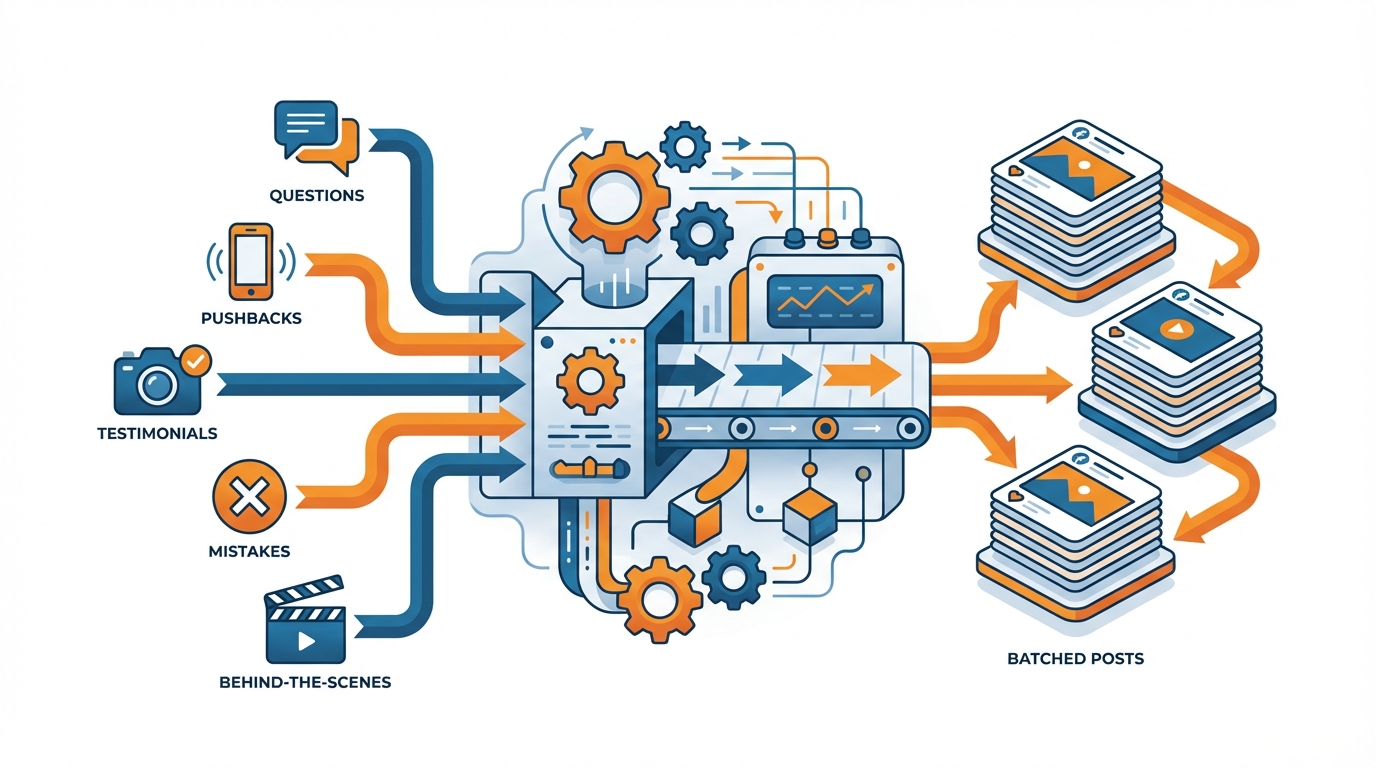
Take Inputs and Create Batched Outputs
Throughout the week, I gather inspiration in one place: the questions customers ask me, the pushbacks I get on calls, testimonial screenshots, mistakes I see people making, and short behind-the-scenes moments from my day. If you want to systematize those moments specifically, behind-the-scenes content can fit directly into this input stage.
Then I write in batches with constraints to avoid scope creep: choose 3 content formats I’m going to repeat (e.g., quick tip, myth-bust, mini case study), write 5-10 of each, and each one can have just one key point and promised outcome.
I’m also faster because I write shitty first drafts on purpose: the objective of the drafting stage is quantity and clarity, not quality.
Second, you split drafting from designing to prevent your mind from task-switching every 5 minutes.
When you design, you follow the same basic layout rules every time: one hook line, one supporting image, one spot for the logo, and a limited set of typography and color choices.
Finally, you treat quality assurance (QA) as an actual gate, not an emergency, and check the work for one message, one target, one ask, no typos, and the first line causing a pause while scrolling.
The QA gate is where rework goes to die, because it gets rid of the “post -> hate -> edit -> re-post” loop.
Lastly, you put scheduling as the last station in your assembly line, rather than something you do occasionally when you think about it.
Your weekly routine is simple: one day for input gathering, one for writing, one for design & quality control, then scheduling them all at once and then starting over.
When your posts go live, you get leverage by repurposing a winner from the last week into 3 new versions for the next week, which is how you get accelerating returns for a small business rather than starting from scratch each week.
And if you want that to be even more efficient, I use WoopSocial to generate draft posts in a few clicks from my site which I then feed through the same stations, so that the process remains the same but the prep time goes down. If you’re building this into a repeatable cadence, a social media content calendar supports the same “batch then schedule” approach.
A key reality check: an estimate for crafting an average post is 30-90 minutes (often closer to 90 minutes), including research, design, copywriting, and engagement & optimization, according to a 2023 breakdown from a post-creation time estimate by The Silver Linings Group.
Choose 3 Post Types and Optimize Those (Specificity Is the Hack for Speed)
Want to know how to write social media posts faster? Well, quit trying to invent a new social media post every time you post.
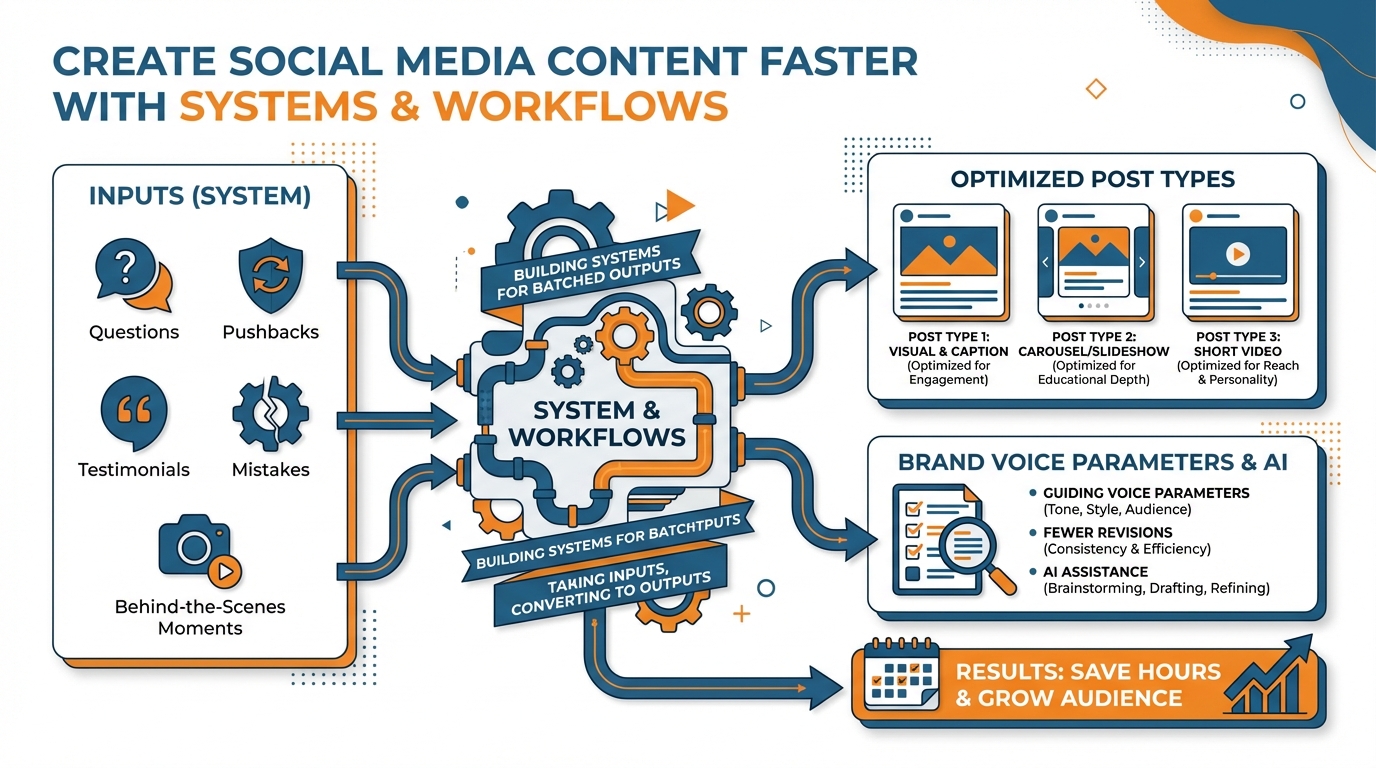
Repetition is the best thing that’s ever happened to the busy, small business owner. This is because the biggest time drain of all is to create a new concept, design, copy, and decide each time you post.
Standardization of post types creates social media efficiency. Pick 3 and get good at those formats and then batch the heck out of them!
It’s better to create less, more often than to create more, less often. The reason is simple: there is more time spent on the decision of what to post.
Three filters to filter for: Fast to create. Easy to repeat. Strong engagement signals.
- Fast to create: It takes you between 10-20 min to create and no ‘rabbit hole’ research required.
- Easy to repeat: It’s formulaic. You don’t go into the ‘blank page’ mode.
- Strong engagement signals: It’s save-worthy, share-worthy, comment-worthy or DM-worthy. It solves a clear problem.
Example: I alternate between a quick tip post, a myth-bust post and a mini case study.
When you narrow down to three, you’ll also become quicker at design as well because you’re relying on the same visual language, so your brain isn’t creating the ‘house’ every time.
The amount of time it takes to create different formats varies wildly, and most people end up using the most time-intensive formats.
For instance, a well-produced video can take anywhere from 3 to 8 times more time than a single-point post, but if you have a great hook and good clarity, it will do just as well.
You can think of time the way you think of money: you need formats where 80% of the outcome is achieved with 20% of the effort.
As a rule, I recommend choosing at least one format that you can do even on the busiest day, one that teaches, and one that uses social proof.
That combination keeps your consistency strong without forcing you to be in maximum creative output every single week.
Once you commit to three formats, you no longer agonize, you’re just iterating: Monday format A, Wednesday format B, Friday format C, wash, rinse, repeat.
Your work is now filling in the boxes, not building them.
I actually tie each format to a single metric that allows it to evolve over time: tips aim for saves, myth-busts aim for comments, case studies aim for DMs or clicks.
If you want to squeeze the setup time to a pulp, I’ve also done WoopSocial-generated on-brand content ideas and copy from my site, which I can then fit into my formats and just edit the hook. (If you want a practical workflow for this, see auto-generate social media posts.)
The key is not more creativity, it’s fewer formats, done better, week after week.
A time benchmark helps here too: in a 2024 dataset of 500 social media marketers (US + UK), average time spent was 5 hours per week on content creation and approvals, 3.8 hours on data analysis and reporting, and 3.6 hours on strategic planning, based on how social media marketers spend their time (MarketingProfs, from a Sprout Social survey).
Fewer Revisions with Brand Voice Parameters
(And AI that actually sounds like me)
When people ask me how to create social media posts faster, I tell them the biggest bottleneck is a request for revisions and tone adjustments.
The solution is not writing more, it is writing once.
A voice guide that you can follow is the bible of what you do say (topics, themes, opinions), how you say it (cadence, sentence length, surprise), and what you don’t say (taboo words, overused expressions, wishy-washy commitments).
Personally, I like to keep it concise: one paragraph of tone, one list of signature words that I really use, three examples of good posts and three bad posts.
When you have that, you don’t start from scratch and try to edit your way to the holy land.
To make it actionable, define your tone using five consistent checks that can be done in 60 seconds: tone (simple or expert), personality (soft or loud), format (lines or blocks), tone of voice (me or you), and proof (anecdotes, statistics, tales, or bullets).
Also, add a mini stylebook to wipe out inconsistencies: emoji use (or no use), punctuation, slang, and headline formatting.
I do this because tone and voice drift is a thing: even experienced writers change when they move from how-to articles to ads, and AI will make the shift more pronounced unless you constrain it. In practice, generative AI is already widely used: 83% reported using it for written content and 82% for images, and 69% said it saved their teams at least 2-3 hours per week, according to a Marketing Brew survey on AI’s usefulness.
Second, define the guardrails for claims and sensitivities to avoid getting into last-minute revisions.
A claims ladder is defined at 3 levels: safe (claims you can make without any evidence), supported (claims you need a metric or customer evidence for), and forbidden (claims you just cannot make).
Define a short list of sensitivities that are particularly important for your business to handle properly (e.g., health metrics, income guarantees, competitor comparisons, customer images, personally identifiable information, etc.).
This simple step will also reduce revisions, as it avoids the most common failure scenario of coming up with a good hook and getting into a compliance crisis just before posting, and then having to build the post again from scratch.
Lastly, unifying text and visual guidelines means you don’t need to rebrand each post.
You specify visual language consistent with your language: one headline font, one body font, one color system, one treatment of highlights.
Then you perform a quick quality check that text guidelines and visual guidelines align: hook = tone? Body = architecture? Design = stack? Claim = ladder?
If you desire the speed of AI without the loss of identity, tools like WoopSocial will serve you best if you start with a brand library like this, because then the results come back much closer to done and your revisions much closer to fine-tuning. A 2025 study reported that AI saves marketers 13 hours per week on average (32.5% of a 40-hour workweek), with daily “Power Users” reporting 14.8 hours saved, and average operational cost savings of $4,739 per month, according to ActiveCampaign’s report on getting 13 hours back each week.
Fast Track: Backlog, Scoring, and Weekly Feedback That Ensures You Don’t Post a Dud
You can’t create social media posts quickly if you’re in ideation mode every time you need to create one. There’s no template that will save you from that problem.
So I keep a backlog. Everything goes in there. I don’t worry about the title, I just get the thing in there, whether it’s customer questions, objections, testimonials, tiny wins, mistakes you keep seeing, or something I need to talk about. That’s where everything goes.
I keep that backlog as high as possible because once you drop below 20 items in there, it starts taking a long time again. I try to keep 20 things in there or more.
Finally, you decide what to create using simple math, not intuition.
If I’m in a rush, I’ll rate things on three 1-5 scales: Speed (can I write it in 15 minutes?), Proof (do I have some kind of evidence, outcome or customer quote?), and Pull (does it relate to something people search for this month?).
The three ratings are then multiplied together to create a simple prioritization stack.
Anything below a 40 is returned to the queue to await more proof or another angle.
This is where most smaller companies drop the ball, and end up spending unnecessary cycles on buffing up a piece of content that shouldn’t have been made in the first place.
You then choose to refresh, repost, or create new, because new is not automatically better, it is just more work.
If a post already performed in the top 20% of your last 30 posts, treat it like an asset: repost it after 6 to 10 weeks with a new first line and a sharper example, and you will often see 60 to 80% of the original engagement with about 20% of the effort.
Refresh instead of repost when the topic is evergreen but the details aged (pricing, steps, screenshots, results).
Create new when the idea solves a different problem, targets a different buyer stage, or uses a different proof source, otherwise you are just rewrapping the same point and calling it progress.
Lastly, do the weekly feedback cycle that saves your speed and your outcomes by measuring both behavioural (e.g., saves) and time-to-publish metrics.
For every post, record the time from concept to completion, then record a behavioural metric that is relevant to the theme (e.g., saves for advice, comments for mythbusting, DMs or clicks for proof).
When time-to-publish goes down but behavioural metrics go down for two weeks in a row, it means you’re sacrificing quality for speed (usually by having weaker hooks or weaker proof), so you need to tweak the scoring system, not your workflow.
This is where WoopSocial comes in, too: by creating a larger pool of on-brand ideas and drafts quickly, you’re increasing the number of high-scoring ideas in your queue, which further speeds up the curation process without sacrificing quality. Supporting evidence for better metadata exists at scale: an arXiv 2024 field experiment giving ~1 million users access to AI-generated titles increased valid watches by 1.6% and watch duration by 0.9%, and when producers adopted AI titles, valid watches increased by 7.1% and watch duration by 4.1%, according to a large-scale field experiment on AI-generated titles.
Fast Is Sustainable - and Look for Tools That Shorten the Entire Journey
Want to learn how to make social media content faster, without hitting your burnout point? Then give up those one-off efficiency shortcuts and start conserving your decision-making capacity.
Instead, make speed sustainable with fewer decisions, fewer rounds of revisions, and a shorter circuit between the creative idea and the publish button.
That means defining the three versions of done, limiting the number of revisions you have, and having a set time for each stop on the assembly line.
This approach can pay dividends: Companies that go from three rounds of revisions to one can cut production time by around 30 to 50 percent because most of the time goes to revising, not creating the first version.
What you should be doing is closing the most frequent productivity leaks, not just putting in more work within them.
Take your 10 most recent posts and figure out where all the time really went: on planning, on editing to make it sound right, on designing or re-designing, on logging in and out of different tools to make sure everything’s consistent?
Then from there, build constraints that reduce those barriers a little bit every week.
You might put an idea minimum (like there are 20 to 30 that are always in draft form, so you never have to start from scratch) or an editing maximum (like 1 solid edit, and 1 edit for the edits, and then publish).
It takes me less time to write posts when I do that because there is less to decide, less to cycle, less to hand off between writing, design, and editing.
If you need to go even faster, the real savings will always come from compressing multiple pain points, not saving minutes from writing.
This is what a workflow tool is meant to accomplish: to rapidly produce a month’s worth of first draft copy content, to ensure copy is on-brand, and to make the graphic design process easier by automatically adding your branding.
WoopSocial was created to do this, so you can rapidly create on-brand first draft copy content and branded graphics from a web page, and then use your existing guidelines to evaluate those first draft copy content and graphics instead of treating content like a production process.
The outcome of getting your system to sustainability is pretty straightforward: Your system creates for you while you are away from it, because it’s not based on how you feel.
It stays high quality, because you keep your parameters around voice and proofreading, and it stays fast, because you don’t keep going back to re-decide what you already decided last week.
And if you can do that, it won’t be fast, like a sprint.
It will be your baseline rhythm and that is what a small business needs, in order to be visible, consistent and competitive.
Related reads
4/27/2026
B2B SaaS social media benchmarks: Set the right targets.
B2B SaaS social media benchmarks: Set the right targets. The trouble with defining B2B SaaS social media benchmarks is that it's an inherently impe...
4/25/2026
Building a personal brand as a technical founder (without becoming a creator)
Building a personal brand as a technical founder (without becoming a creator) Creating a personal brand as a tech founder should feel less about ma...
4/20/2026
Creative Post Ideas for Sustainable Brands (That Don’t Sound Greenwashy)
Creative Post Ideas for Sustainable Brands (That Don’t Sound Greenwashy) That’s not what creative post ideas for sustainable brands should look lik...