How to Explain Complex Tech on TikTok Without Dumbing It Down
Unlock the secret to explaining complex tech on TikTok. Discover a repeatable process to simplify without dumbing it down, gaining engagement and authority in under 60 seconds.
How to explain complex tech on TikTok (without dumbing it down)
Explaining hard tech on TikTok isn’t hard because of the subject matter.
The problem is that it’s designed to communicate at the pace of lectures, not scrolling.
Small businesses share like they’re hiring a new engineer: definition, disclaimers, and 55 seconds in there’s a benefit (if you made it that far).
On TikTok, you don’t get points for being correct if no one hangs around long enough to know that.
What I try to optimize for is clear: comprehension, memory and authority - in less than 60 seconds.
That is, get attention with a quick setup, teach one true thing fast, and then nail it down with an example that the viewer can tell another person.
You also preserve your authority by selecting language that is precise, but does not mean that the video is a series of exceptions.
In this guide, you will find a repeatable process to simplify without dumbing down or getting well actually’d in the comments.
You’ll learn how to choose the shortest truth, how to organize a 30-60 second pitch, and how to communicate your technicality into videos that earn saves, follows and trust, even when you sell something boring like cybersecurity, AI services, SaaS or automation.
I’ll show you exactly how I approach making complex topics feel intuitively right in a short time, while still being solid when viewed with scrutiny. If you want a broader system for staying consistent, see weekly social media system.
A native TikTok format for teaching hard tech concepts on TikTok
I recommend you use in every video a trick to ask the user “What is X and why does it work?” and get an answer that they can answer in one sentence, after they’ve watched the video.
This should be the entire point of your video, not to explain the thing, but to get the user to be able to say one sentence about it at work.
If you sell cybersecurity solutions to SMBs, a video might be “What is MFA and why does it stop most account takeovers?”
This does two things: it keeps out irrelevant details, and it gives you a clear goal of success, where the user can say what it is and why it works, without a glossary.
Second, I deliver a brief educational sequence that adheres to the “scrolling learning pattern”: hook → true statement → concrete example → recap.
- The hook is the relatable, everyday issue, not the technology.
- The true statement is the briefest definition you can staunchly defend in an audit, typically 8-12 words, since shorter statements are more likely to be retained and repeated.
- The concrete example is where you build immediate credibility: display just one use case with one variable, not three special cases.
- The recap is a one-breath summary that reinforces the conclusion, because studies show people are more likely to understand an idea if they hear it twice, with different words, in the same 30-60 seconds.
Intentionally create replay value: encourage viewers to rewatch, because that’s an underrated learning hack.
Say one line that viewers will replay to check, something straightforward like a comparison or a heuristic, and provide an overlaid text that’s even more concise.
You should present most of the information in the audio, and have the overlaid text serve as a crib sheet.
This is effective because many viewers consume TikTok on mute or semi-mute, and overlaid text gives you a secondary knowledge channel; when the audio and text don’t fully align, viewers replay to resolve the discrepancy, which drastically increases engagement and signals quality to the algorithm. If you want a way to quantify that kind of signal, you can also use an engagement calculator.
Last, don’t purge the buzzwords - make them your anchor.
Leave a couple of necessary buzzwords intact, define them once as simple, and then use the exact simple word in all of your videos.
If you repeat with synonyms, you’re forcing extra translation and failing to give your viewers something to remember.
If you have to use API, then define it once as a waiter between kitchen A and kitchen B, and then just keep calling it an API every time so that your viewer develops a sense of familiarity and a sense of getting somewhere.
Eventually, these “simple” buzzwords become the vernacular of your channel, and small business owners start using them in the comments and in calls, and that’s when you know you’ve cracked the code for explaining tech on TikTok.
Balancing simplicity with factual accuracy
When using TikTok to describe intricate technology, how do you balance simplicity with factual accuracy?
Want to learn How to explain complex tech on TikTok?
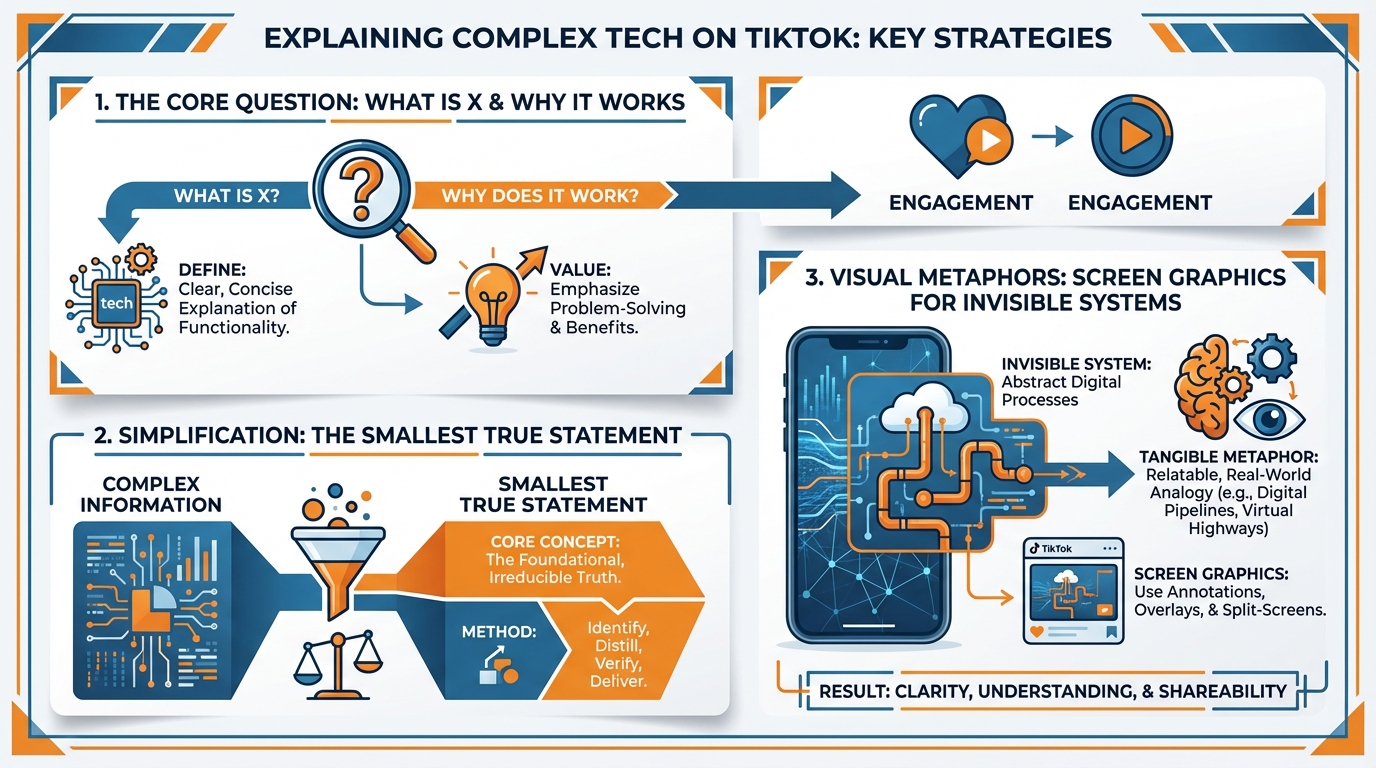
Instead of striving for the full truth, strive for the smallest true statement.
Before you script, draft the full correct explanation in text, and then edit it down to the point where there is only one statement left which would not make an engineer flinch, and would still make sense to a busy SMB owner.
One way to test this: if someone were to stitch your video and say prove it, could you stand by your sentence and defend it without backpedaling?
For example, I can skip secondary benefits and say that a CDN will make your site feel faster because it serves files from a location closer to the user.
This is not the full truth, but it is true enough to stand up, and gives a SMB owner a model they can immediately use.
Exceptions are where most YouTubers drop viewers, so you want a one-breath technique to show you’re aware of the exceptions, without making the whole video a caveat.
One limiter word or phrase and then back to the meat of the video: usually, in general, for most small businesses, unless you have X.
You aren’t glossing over the exception; you’re timeboxing it.
When I’m describing MFA, I might add one breath: it isn’t magic, but it prevents most stolen password logins unless the attacker also stole the second factor.
Then you move right on to the example, because examples shoulder the burden of nuance better than caveats do.
If you think about it, gotcha detail cycles are really predictable. They are like the weather. You prepare for a few and then ignore everything else.
If you can, for example, anticipate the most common gotcha and correct for it, if not doing so will lead to a misunderstanding that will cause actual harm for the customer (e.g. the difference between encryption at rest and end-to-end encryption, or backing up as a form of ransomware protection).
Pretty much everything else you can actually invite in and spin to your advantage: if you want the long story of that then throw your gotcha in the comments and I will get to it in part 2.
This basically turns the that’s actually… thing into a curriculum engine. It also leaves you with a comment stream littered with technical sounding tidbits that make your page sound authoritative to the next small business owner who reads it. This also matches what Pew Research observed about posting concentration: in their report on how U.S. adults use TikTok, the top 25% of adult TikTok posters produced 98% of publicly accessible videos in their observed sample.
Finally, get to the boundaries ASAP, since boundaries eliminate false equivalence and make you sound authoritative without sounding defensive.
Add one more simple sentence that starts with this is not the same as, in relation to the most common misconception.
For example, you might say this is not the same as AI taking over your department; this is automation eliminating rote tasks, and then immediately pivot to a business metric such as fewer invoice errors or faster ticket response times.
This line that sets boundaries does double duty: it protects truth, and it makes the audience feel safe that they are not getting a hard sell.
Show the invisible system with screen graphics
If the technology you are trying to explain to your TikTok followers is an invisible system, show them what is happening behind the scenes using screen graphics.
Want to become great at How to explain complex tech on TikTok?
Instead of talking louder, create a visual vocabulary that your audience can learn.
Choose a single metaphor for each type of idea and stick to it in every video: flows for things flowing, boxes for storage and accounts, queues for lines of things waiting to happen, locks for permissions, stacks for security.
When your shapes and colors are consistent every time, your viewers will have more bandwidth to understand your message.

And that’s important, because your audience comprehension will fall off a cliff if their brains need to translate the graphic and the idea at the same time.
Second, invent an on-screen way to measure the invisible mechanics, because measuring makes it concrete.
You can visualize latency as a fillable bar, rate limiting as a counter that reaches a max, or permissions as a before/after access list.
Simple heuristic: every time you use a technical term, show a quantifiable change related to that term (e.g. steps going from 6 to 2, or latency going from 1200ms to 200ms).
When I describe caching, I do two passes of the same request, and I physically strike through the duplicate work on the second pass so the viewer can see what’s being eliminated, not just hear about it.
Use text overlays as structure rather than captions, to explain how to watch the video.
For example, label the elements in the system you’re discussing, add a 3-step frame that you use on all your videos, and then provide one “what to watch for” annotation that indicates the precise moment when the system state changes.
This is particularly valuable for small businesses because it develops pattern recognition.
Later, when you use the term queue or lock, the viewer recalls what they look like and what business impact they have, such as slower checkout, or longer support ticket turnaround times, or access to the accounting system being blocked.
To keep cognitive load down, confine yourself to a single visual concept per beat.
Avoid multiple animations. Avoid animated backgrounds.
Ensure your message can be understood with the sound off, as a significant share of content is consumed with the sound off or at half volume.
The test is easy: pause the video at any moment and check that a time-poor business owner could process what’s being compared in less than a second.
If not, edit the frame until the only thing that moves is the thing that matters.
Use series + comments to build a curriculum
TikTok’s series feature and comment section can help you create a curriculum for your viewers, so they can learn about complex tech topics in a digestible way.
To level up on How to explain complex tech on TikTok, stop thinking of each video as a full lesson and start thinking of them as a course with unit lessons.
Each unit lesson still has to be freestanding and give one thing of value, because TikTok is going to serve Part 3 to new viewers who haven’t seen Part 1 and Part 2.
Construct each video so a viewer can enter the narrative cold, learn one thing that’s true, and still feel like they’re in the middle of something larger.
A useful heuristic here is that a unit lesson should have: 1. One core concept 2. One visible object 3. One small business result (e.g., fewer chargebacks, faster page loads, fewer accounts compromised, fewer hours of manual labor)
You need structure for a binge-worthy series.
Use on-screen and intro text that helps people quickly get their bearings and know what to expect from each episode.
Then leave each video with a hook for the next one by posing an actual constraint or trade-off rather than a vague teaser.
For example, once you explained caching, the next episode should open with the real-world issue caching causes: caching can return stale data, so how do you determine what should be cached in a checkout flow vs what needs to be live.
That kind of tension around an impending choice is how you get people to save the series and come back, because they know they will need to make that choice.
Next, convert comments to curriculum.
Let the reader’s choice of question guide the topics.
I fish for questions that come next, type out a response when a comment implies confusion, and treat a second identical confusion as a suggestion that my example needs a little more distinction or maybe a better metaphor.
I look for phrases like so is this the same as or does this mean that or why not just because those represent the most important questions to answer in the next video.
When I spot a mistaken assumption twice, my next video is a correction: I start with the assumption, substitute the smallest truth, and repeat the example so that the distinction is clear.
Last but not least, gain distribution by “co-teaching” instead of “promoting”.
Team up with experts from another discipline that already enjoys authority with the desired audience, and shamelessly use their terminology to explain the same idea.
If you’re a security consultant with SMBs as your target market, explain your solution through the eyes of an accountant, or an online store owner.
The trick is dead-simple: you maintain the technical description, but you let them define the context, and you gain visibility among people that would never look for the solution to a technical problem, but do know that they have an issue with their accounting, or online store. If you’re building a repeatable workflow around this, it helps to understand smart social media automation as part of the distribution plan.
In practice, this is also why TikTok influences what people believe and share: in Pew’s analysis of Americans’ experiences with news on TikTok, 52% of TikTok users say they regularly get news on TikTok, and among those users, 68% say they ever get news there from influencers/celebrities (vs. 67% from news outlets/journalists).
The End
Now before I publish I do have like a quick five-item checklist just to make sure that my content is still punchy and binge-worthy, so here’s five things: can you state the result in one sentence, can you argue one irrefutable claim without caveating, did you illustrate one concrete example, can you summarize it in one sentence, and do you conclude with the next logical question from the viewer?
And the reason that order is important is because TikTok incentivizes like those clarity signals, so replays and saves and completion rates and stuff, and your viewers will also incentivize you by trusting you when you have this repeatable kind of learning framework that you build with each individual video, as opposed to just being like an arbitrary information splat. (This lines up with teen behavior too: Pew Research reports in Teens, Social Media and Technology 2023 that 58% of teen TikTok users say they use TikTok daily.)
Now, you need to take a single complex idea and produce it as a 3 part series, because you have two brains to train: the audience’s pattern recognition, and the algorithm’s categorization of your channel.
Part 1 lays out the smallest true statement and its business significance.
Part 2 illustrates just one constraint or tradeoff that small businesses have to deal with.
Part 3 tackles the most common objection that shows up in the comments.
This is the most reliable way to build ongoing retention, because the audience knows what to expect, and they will come back to fill out the set. If you struggle with cadence, you’ll recognize this pattern from inconsistent social media posting.
I keep it real by choosing a theme and breaking it down into self-contained, but serial parts, like book chapters.
For example, if it's API 101, I'll do Part 1 defining a waiter and presenting a basic ordering scenario, Part 2 describing the practical compromise (like rate limits) if your coffee shop has surges of popularity, and Part 3 discussing the limits (why an API isn't like granting read-only access to your database) etc etc.
You should do the same for your vertical, because the small business person doesn't need the entire encyclopedia, they need a model to help them make a decision this week.
Now, let me know what technology topic you’d like explained next - and what you already understand about it.
Related reads
4/27/2026
B2B SaaS social media benchmarks: Set the right targets.
B2B SaaS social media benchmarks: Set the right targets. The trouble with defining B2B SaaS social media benchmarks is that it's an inherently impe...
4/25/2026
Building a personal brand as a technical founder (without becoming a creator)
Building a personal brand as a technical founder (without becoming a creator) Creating a personal brand as a tech founder should feel less about ma...
4/20/2026
Creative Post Ideas for Sustainable Brands (That Don’t Sound Greenwashy)
Creative Post Ideas for Sustainable Brands (That Don’t Sound Greenwashy) That’s not what creative post ideas for sustainable brands should look lik...