Auto-Generate Social Media Posts That Still Sound Like You
Looking for tools to auto-generate social media posts that sound like you? This article explains what to expect from auto tools for scalable, publishable content, focusing on voice control and quality.
Auto-Generate Social Media Posts That Still Sound Like You
I’m guessing that if you’re looking for tools that can auto generate social media posts for you, you’re not looking for a souped-up quote generator. You’re looking for something that can reliably use the things you know, such as the things you offer, your customer success stories, your viewpoint, your FAQs, and transform them into social posts in minutes, not hours. And you need it to be able to do that without draining your personality, relying on the same generic formulas as everyone else, or accidentally making a claim that’s likely to get your customers demanding refunds or filing complaints. And, if you’re a small business, without getting your ads rejected. That last part is more important than most sales pages for AI tools let on, because one badly auto-generated claim can wipe out months of goodwill.
In this article, I’m going to explain what to actually expect from an auto tool that delivers scalable, publishable content.
I’m going to explain the types of tools that address different problems, whether you need to shorten blog-length content into social posts or just want to create reusable templates that don’t read like bot prose.
And I’m going to walk you through how I assess them based on real use cases, such as the level of voice control, formatting consistency across platforms, and quality of alternatives, along with the tools that come built-in to keep you on track, so you can find an auto stack that quickly produces quality content that still feels like you. If you want a broader perspective on this, you can also read about social media automation.
So, what else can (or should) be auto generated for social media posts (apart from the caption)?
When assessing tools to auto generate social media posts, don’t let them redefine post to mean text.
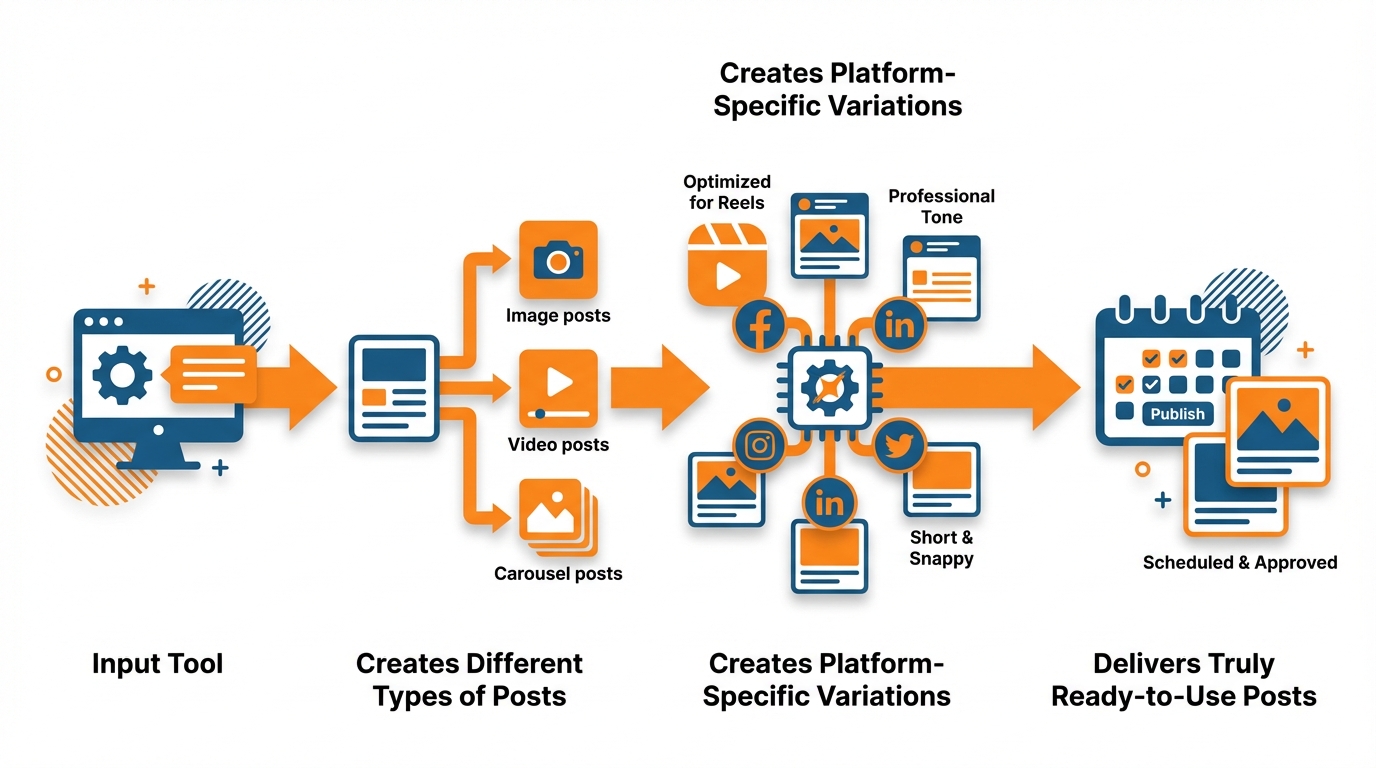
True automation is a fully automated workflow: you input the tool, it creates different types of posts, it creates platform-specific variations, and it delivers posts that are truly ready to use.
AI post generators fail to deliver automation because they only address the 10% easiest problem, the caption, leaving you to continue doing the heavy-lifting 90%, which includes:
- deciding on the idea
- rephrasing for each platform
- resizing the visual
- adding on-brand design elements
- expanding a single idea into a week’s worth of content
To maximize impact, the prompt should represent your unique value, not a blank template.
That means feeding it your services, your target customer problems, your customer FAQs, your testimonials, your transformations, and even brief inserts such as reasons to work with you.
Then the tool should convert these into a variety of the content types small businesses require to remain top-of-mind: value-added mini-educational posts, proof posts, simple explanations, basic objection-busting, and low-key promotional content that doesn’t feel like “advertising.”
For instance, I will take a single concept (like a customer question I had to answer three times this week), and ask the system to generate 8-15 versions of it rather than one carefully-crafted caption that I still need to creatively “work from.”
The first requirement is the ability to batch generate based on a schedule.
A tool that can’t take a theme and generate a week’s worth or month’s worth of posts all at once is not automation. It’s aided writing.
The second requirement is formatting for the various platforms that takes into account how those platforms incentivize format:
- X requires shorter punchier sentences.
- LinkedIn requires a strong first line and lots of spacing.
- Instagram requires a caption and an overlay.
You should be able to specify that you want to exclude certain phrases (i.e., health claims), phrases you never want to use (i.e., guaranteed outcomes), a reading level, and whether you want to include at least one statistic (because we have repeatedly found that being specific increases engagement. Across various platforms, when we compare posts with stats and specific items to more general advice, we see an average 20 to 30% increase in engagement rates, depending on vertical and audience size). This also aligns with findings like the Wyzowl AI marketing stats survey reporting that 86% say AI has made them more efficient / saved them time.
I think there’s some distinction to be made here between text-only solutions (that give you captions), and those that offer a creative direction (give you a visual concept/image/template/aspect ratio/brand styling like logo and colors etc).
With text-only solutions you still need to deal with the design, cropping, and branding part (which is why many small businesses aren’t consistent even when they nail the copy), but with the latter you’re closer to a solution that does everything for you. That broader “visual + speed” reality shows up in reports like Canva’s visual economy research where 90% agree generative AI has improved the quality of visual communication.
When I want to get something moving fast, I want a solution that can take my website and tone-of-voice as input, and give me a month’s worth of consistent social media posts in a matter of minutes, adapted for each channel, with properly branded creatives; that’s the distinction between dabbling and having a content engine running, which is what WoopSocial serves.
A pragmatic framework to select the tool that fits your workflow (rather than the tool that you heard the most about)
Choose a tool to generate social media content based on your weekly workflow, just like you’d choose a POS or email marketing tool.

If you’re a solo business owner, you probably need speed, little to no setup, and a simple export that needs as few tweaks as possible before posting.
As a small business, you likely need predictability: content categories, style guides, and batch export functionality to generate an entire week or month’s content at once.
If you work in an agency or as part of an in-house team, you need to enforce a very strict standard and have the ability to generate variations for clients or SKUs, or you’ll be suffocated by rounds of revisions.
I say this because most tool churn happens because the tool functions, but doesn’t fit into your existing content workflow.
Second, determine if you want the tool to integrate with your existing stack or act as a one-stop-shop.
If you already have an existing workflow for posting that you enjoy, focus on a generator that can export: social-ready copy, on-brand image dimensions, and multiple copy options for the same post to find the perfect one without having to generate new copy. If you’re mapping this into an actual system, it helps to pair it with a social media content calendar.
If you’d prefer to keep everything contained in one tool, focus on a tool that can read your site, understand your voice, and export a full set of branded copy and graphics for you instead of having to do the component parts across 5 different tabs.
For instance, I have experienced the difference between a copy-only generator and a full-stack engine and the difference in time is no joke: copy-only tools will typically cut out ~minutes per post, whereas a site-reading, brand-understanding tool can remove the full post assembly stage that typically takes ~60-70% of the time for a small content team.
Then select depending on how you derive the substance: visuals first or copy first.
If your customers consume your content because of the visual proof, demos, before-after images, product images, community feel then you will need a tool that produces or formats images with your branding, colors and formatting rules, not just your copy.
If your customers consume your content because of authority, credibility and objection removal then you will need stronger copy abilities: tone profiles that really work, forbidden words and phrases, claim validation, readability and the ability to transform 1 key insight into 10 to 15 different hooks without sounding like generic templates.
You should be able to test this in 10 minutes with 1 FAQ and 1 success story and verify if the tool can produce educational, proof, objection removal and soft promotion posts without regurgitating the same headline format.
Lastly, check the restrictions before getting emotionally attached to a tool’s demo.
Often credit-based systems ding you for everything a small business would need, such as multiple batch generations, variations, image output, and so you chew through your entire monthly allowance in a day or two and then automation is about rationing.
Consider the channels you can post to, as well, as some tools are perfect until you discover your most important platform is not on the list or that only select post types can be generated.
Be aware of generation limits, brand kits restricted to upgraded plans, and a “free” plan that’s only free if you don’t mind watermarks, very low monthly output, or outputs that will take hours of editing.
As a rough benchmark, you need something that can generate at least 30 post ideas quickly, adapt those ideas to different platforms, and easily keep branding consistent in both copy and graphics.
That’s the line between dabbling and having a working content machine, and that’s where something like WoopSocial comes in if you want all of those functions in one place. If you’re weighing the pros and cons, it’s worth comparing approaches in social media calendar automation.
3. Voice of the brand, quality assurance and risk management (the section most resources omit)
A lot of social media generation platforms can churn out copy. But if you can churn it out fast, without curation, you end up with either duplicates or stuff that’s off-brand. Or you end up with posts that are so off-message they’re risky.
In order to generate high quality copy fast, you have to treat your brand voice as a feature, not a feeling: give the platform 3-5 examples of social posts you’d send to the world with pride, and 3-5 examples you’d never send. And you have to tell it why.
You also have to make it associate every single generated post with your brand voice features: is it 10 words or 100? Is it funny or not? Are you sure about this or not? Are you really direct about this promotion or not?
I also enforce certain terms we have to use, certain words we never use, and the structure of a compelling first sentence in my brand’s voice, because otherwise, AI tends to default to the same generic marketing language that makes every small business sound the same. This adoption is widespread: Adobe’s creators survey reports 86% of creators report using creative generative AI.
Quality control has to be fast or you will not use it, so I have a two-step process you can do in a few minutes.
Pass one is pattern control: you just need to eyeball for classic AI stuff like the same hook structure repeated, fuzzy value propositions, and zero-risk sentences that tell you everything and commit to nothing.
One rule of thumb you can follow is density of variation: out of 30 posts, not more than 3 can have the same hook, and at least 60% of them have to include a fact object, such as a number, a time, a date, a caveat, a scenario.
Pass two is clarity control: does the post tell you one clear thing on first glance, and do you know who it is for?
This is how you cut out the big sin of AI that sounds smooth but leaves you feeling “where the hell did the real text go?” because it said no real problem, no real mechanism, no real result.
Risk management is also an area where most guidelines leave you hanging, and yet it’s the distinction between scaling peace of mind and scaling landmines.
You want to define some content guardrails that the generator cannot move, particularly when it comes to claims and regulated language: no guaranteed results, no medical or financial results, no before-after results unless previously approved, and no implicit user attribute.
Then add a factual accuracy rule: any post that includes a statistic, a feature, pricing, or a compliance-sensitive term must either come from approved source notes or be stated as a principle.
I do this by giving the system a short block of approved facts for each offer, and a “red list” of phrases that must be rewritten.
The red list is pure gold for small business because it manages risk without slowing you down, and keeps your marketing voice consistent no matter who’s writing for you that week…including you on a crazy day.
If you are testing out generator tools, don’t just consider the output on the first pass, but consider the knobs and dials: can you apply do and don’t rules? Can you nail your tone of voice? Can you generate several different options without the same boilerplate format? And can you stay within your guardrails of claims? Research even suggests metadata tweaks can matter: an arXiv field experiment on AI-generated titles found providing AI-generated titles increased valid watches by 1.6% and watch duration by 0.9%.
The tools that ingest your existing web copy and apply branding guides help to minimize drift because they tie down the output to your existing language and visual, which is why I personally prefer tools like WoopSocial for large-scale generation, provided you do all of the above.
The reward isn’t just volume of content, but consistency of both tone and facts, and a huge reduction in problematic language that can undermine a small business for months with a single misstep.
Taking generation to the next level: making it a prompt-to-calendar system that iterates
Wanting to use auto-generated social media posts to free up time, means you should think in terms of production rather than creation.
So schedule 3-5 content themes per month, with one theme per week, so you know what you are going to post each week.
It could be as basic as Week 1 is problem awareness, Week 2 is how it works, Week 3 is proof, Week 4 is offers and objections.
Then prompt for content in bulk per theme, not per one-off, and you will have a schedule that appears to have thought through, and you will stop posting 5 things about a theme one week, and then nothing about the theme that actually makes money.
Second, you need to make your batch prompts generate diversity or you’ll end up with the auto-generated spam problem.
You want each pillar to yield a range of content formats: a contrarian 2 minute read, a 3 item list, a quick customer example, a 1 item myth versus reality, and a single “promotional” item that feels like a helpful tip.
I will commonly use a single genuine customer question I received this week and create 12 different treatments, but I will demand different opening mechanics in the collection because the first line is the real asset inventory you are building.
A rough target is to try to get at least 30 items a month from each pillar where no more than 10 to 15% of the items use the same hook pattern and where 60% of the items include some kind of tangible object like a number, a time period, a price point, a number of steps, or a clear constraint.
Then, rather than copy-pasting, turn every core post into a series of platform-specific versions, since every platform incentivizes different behaviors.
You should be requesting a LinkedIn version with a hook as the first sentence and generous use of line breaks, an Instagram version which includes a caption and a basic in-image headline idea, and a TikTok-style hook version which begins with a curiosity gap and concludes with a single key insight.
I write prompts which hard-bake these requirements so that the results are not just reworded but pre-formatted.
This is where prompt-to-calendar gets scalable: you’re not writing posts, you’re writing pre-formatted distribution assets.
Last, complete the cycle so your next batch is driven by data, not intuition.
You don’t need a heavy analytics routine: label each post with a pillar and hook, then once a week color it red, yellow, or green according to one metric that’s most important to you currently, like saves, comments, or clicks.
After a month, you will have enough signal to level up: produce 2x more posts in the top two pillars, and reuse the winning hook formats but rotate the examples and anecdotes so it stays novel.
If you prefer to do generation and hands-free publishing in a single tool, there are sites like WoopSocial that can turn your blog into branded posts fast and schedule them across channels, if your desired outcome is one monthly content sprint and not daily content cram. If you want more context on that “sprint” approach, see weekly social media system.
Choose the tool that automates, not the tool that adds another edit
But the most valuable automation tools aren’t just about text generation.
They also automate the minor decisions that silently consume your days: the hook to use, how to start it, how long it should be, what you can legally say, and how to maintain a consistent visual and language style.
If you’re still having to re-write hooks, tweaking your words, and re-creating images, you didn’t buy automation, you bought a faster blank sheet of paper.
So, choose based on your actual workflow, i.e., the data you have (e.g., FAQs, reviews, images, offers), the data you need to approve (e.g., claims, prices, promises), and how you refine things when they work.
One of the fastest ways to evaluate any tool is to ask to test not excitement, but edit rate.
Generate 30 posts and look at how many could be published with less than 2 minutes of editing, because if it takes longer than that, the model breaks and so does any consistency, in a small business, you should see at least 70-80% of the posts requiring less than 2 min.
I’ve watched teams end up in the deadly middle: the tool creates content, but because it has no controls for voice, structure, and quality, they end up spending more time editing than they would creating from scratch. This matches broader usage patterns reported in the PRWeb release on marketers and influencers using AI, where 47.2% of marketers cite social media copy as a common use of AI.
Do you want a decision that’s actionable? Nail down one repeatable monthly sprint and lock the tool into doing it soup-to-nuts: give it one offer sheet with verified facts, one red list of verboten terms, and 3-5 samples of your social media voice.
Then expect a mix of formats in a single batch, such as 10 informative posts, 10 credibility posts, and 10 rebuttal posts, each with a different hook and at least one concrete detail in most of them.
If the results are too similar, or if they disregard your parameters, or if you have to totally rewrite them by hand, then that tool will be generating hidden work every week.
If ease of use is a priority for you, focus on platforms that can crawl your website and automatically capture your branding style to prevent us from constantly needing to monitor brand drift.
That’s the difference between writing headlines and captions and having a month’s worth of automated content workflow without having to rely on a house of cards.
Personally, I look to platforms such as WoopSocial to save me work when building, because the real benefit of content automation is not the saving of time writing, it’s the saving of editing work that prevents most small businesses from launching automated content.
Related reads
6/14/2026
YouTube API Alternatives in 2026: start developing right away
Skip the YouTube quota system caps and API calls. Compare the best YouTube API alternatives with code examples, pricing and understand recent changes.
6/12/2026
Best Facebook API Alternatives for Developers in 2026 for direct access
The Facebook Graph API review can take weeks. Compare the best Facebook alternatives for posting, scheduling and more.
6/12/2026
Best LinkedIn API Alternatives in 2026 - instant access for developers
See a list of all the LinkedIn API alternatives for all types of use cases so you can skip the waiting time and get right on automating your work on LinkedIn.