Smart Social Media Automation for Local Business Growth
Discover how local businesses can effectively automate social media. Turn everyday activities into fresh content, drive engagement, and get real results without losing your brand's authentic voice.
When it comes to automating social media for local business, it’s not about filling up the web. It’s about having a steady presence that actually yields results: more calls, more direction requests, more direct messages, and more reservations. Local marketing is straightforward. People are scrolling, they see that you’re active, they trust you faster, and they select you. Automation is valuable only insofar as it enables you to maintain a presence at every moment when your customer might need you, without making your brand look bland or pushy.
The easiest way to do that is to create a system where you take actual business activity and turn it into content. So I’m not just sitting there trying to think of stuff all the time. I’m taking the things that happen every week anyway. Jobs that get completed, new stock, questions customers have, before and after shots, testimonials, seasonal promotions, events in the community. I use those as inputs. You commit a very small, manageable amount of time each week to collect those things, and then we take that and create content and schedule it that’s local and personal and timely. If you want a fast way to generate drafts from those inputs, WoopSocial is built to turn real business activity into post ideas and variants from one place.
A fast dose of reality before we continue: I don’t automate being human. No comment bots, no automated DMs, no bots liking your posts, and no canned content that makes your business sound like all the other ones in your area. You’re going to automate what can be automated: Finding content, writing different versions of it, scheduling posts, and posting consistently. You’ll still have plenty of human oversight where you need it to protect your bottom line and your brand: Reviewing before publishing, anything that involves customer information, and any interactions that could result in a lead or complaint. This is how you maintain the benefits of automation without the garbage you need to avoid.
Small businesses also don’t have unlimited time for this—BIA/Kelsey notes that among SMBs who spend time on social media, the average weekly time is 5 to 10 hours in their report, Small Businesses Spend Most Time on Content on Social Media, which is why having a tighter system matters.
The First Chapter
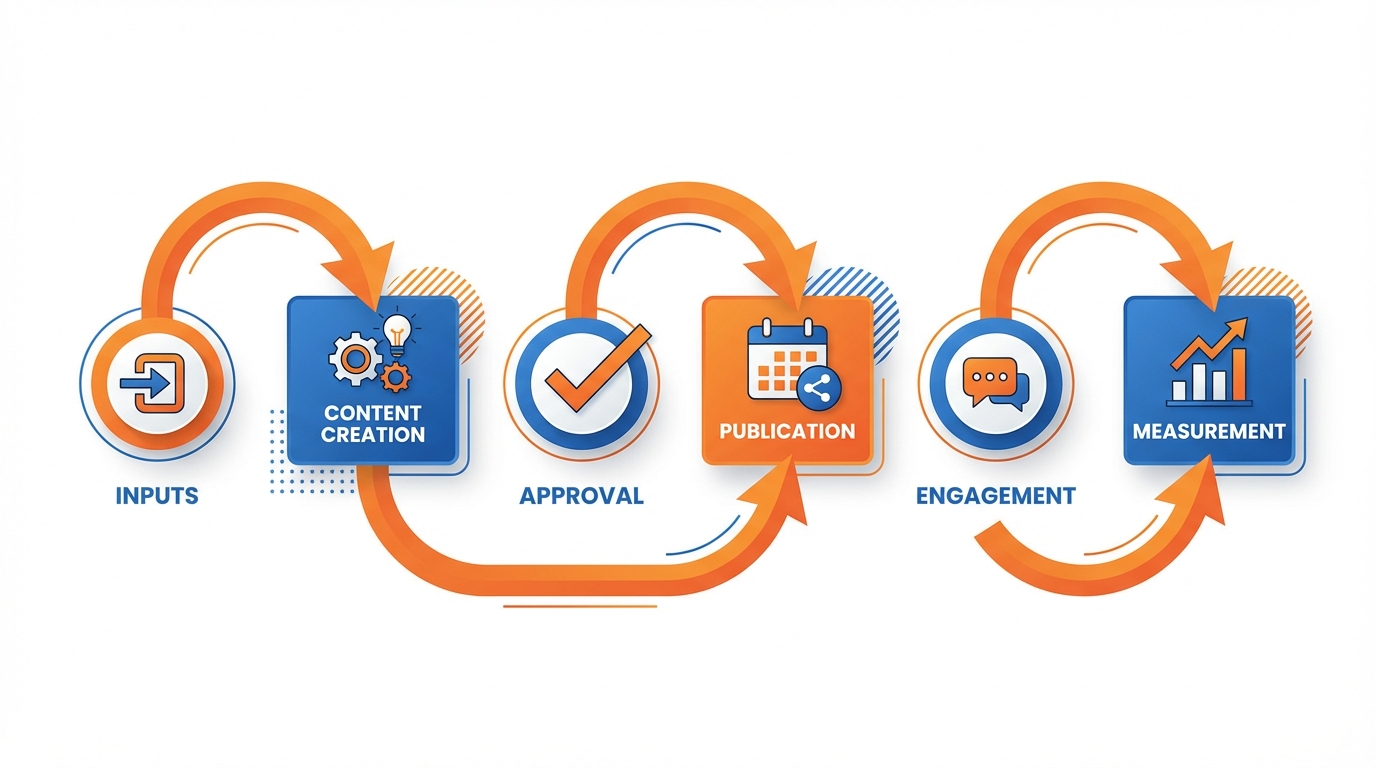
To have automated social media for local business and not be completely wallpaper, you’re going to need a minimal architecture that models the way work gets done in the real world: inputs drive content creation -> approval -> publication -> engagement -> measurement.
Because local buyers aren’t shopping in a vacuum; they are, among other things, testing whether you look busy, authoritative, and local at this moment.
The biggest error I see is to begin at publication and coerce a schedule of posts.
Begin at the inputs instead because when those are authentic your posts are automatically authentic and the algorithms will like that and provide you with more relevant signal. Start with the content that’s already right in front of you - that you can easily take while you’re working.
- Every photo of every job, every before-and-after photo, every two-second video taken on site is content.
- Every time you answer a customer question on the phone, that’s a content topic (because if you’re getting the question, someone is Googling it).
- Every line on every receipt and every invoice tells you what people are purchasing, which is why it’s amazing for product/service spotlights.
Add one customer review to talk about each week, one seasonal special you’re running that you would run whether you had content or not, and one local event you’re either attending or supporting, and all of a sudden you’ve got local content.
If you commit to a weekly capture exercise of 15 minutes, you’ll produce a month’s worth of content.
If you spend 5 minutes dragging over 5 photos or videos from the past week and describing what’s happening and the location.
If you spend 5 minutes typing out the 3 most frequent questions you were asked and the 2 objections you overcame verbatim.
And if you spend your final 5 minutes going through what your invoices rang up and recalling one anecdote for it, such as why I suggested this instead of that and what the result was.
From those simple notes, you can produce 12 to 20 non-obvious automated posts because they’re based on actual transactions and conversations which is what’s working in local newsfeeds, not generic tips.
So decide on where you need to prioritize your social assets and messaging based on the place where local intent occurs, not where most marketers tend to sit.
Social is for discoverability and trust, but it’s a Google business page where the decision to call, get directions, or book a room might actually happen, since most people who check out your Google page are close to taking action.
If you can’t be consistent everywhere, then pick the one most aligned with how you get your customers, and then support it with the other channel that enables demand capture at the moment of intent.
If I need to go fast from content capture to publish, I have a process that turns weekly inputs into on-brand posts fast; platforms like WoopSocial are designed for that, producing a month’s worth of post ideas and variants in a short amount of time so that your review and posting process can stop being the gating item. If you mainly need caption drafts, an AI social media caption generator can speed up the “writing different versions of it” part without changing your inputs.
Clutch’s findings also show why the process needs to be simple: in How Small Businesses Use Social Media (2019) | Clutch.co, 56% rely on in-house employees to manage social media, so the system has to fit into real operations.
Chapter 2
So how do you automate social media for local business without just winging it?
How do you get consistent social media that doesn’t feel like you just throw a dart and then hope that your audience will somehow identify with whatever it hits?
You take local signals and turn them into a content funnel.
The strongest local signals you have are the things that already demonstrate demand - what people called about today, what they bought, what they complained about, what they raved about, and what kept them from booking until you satisfied just one of their questions.
Use those things as inputs, not ideas.
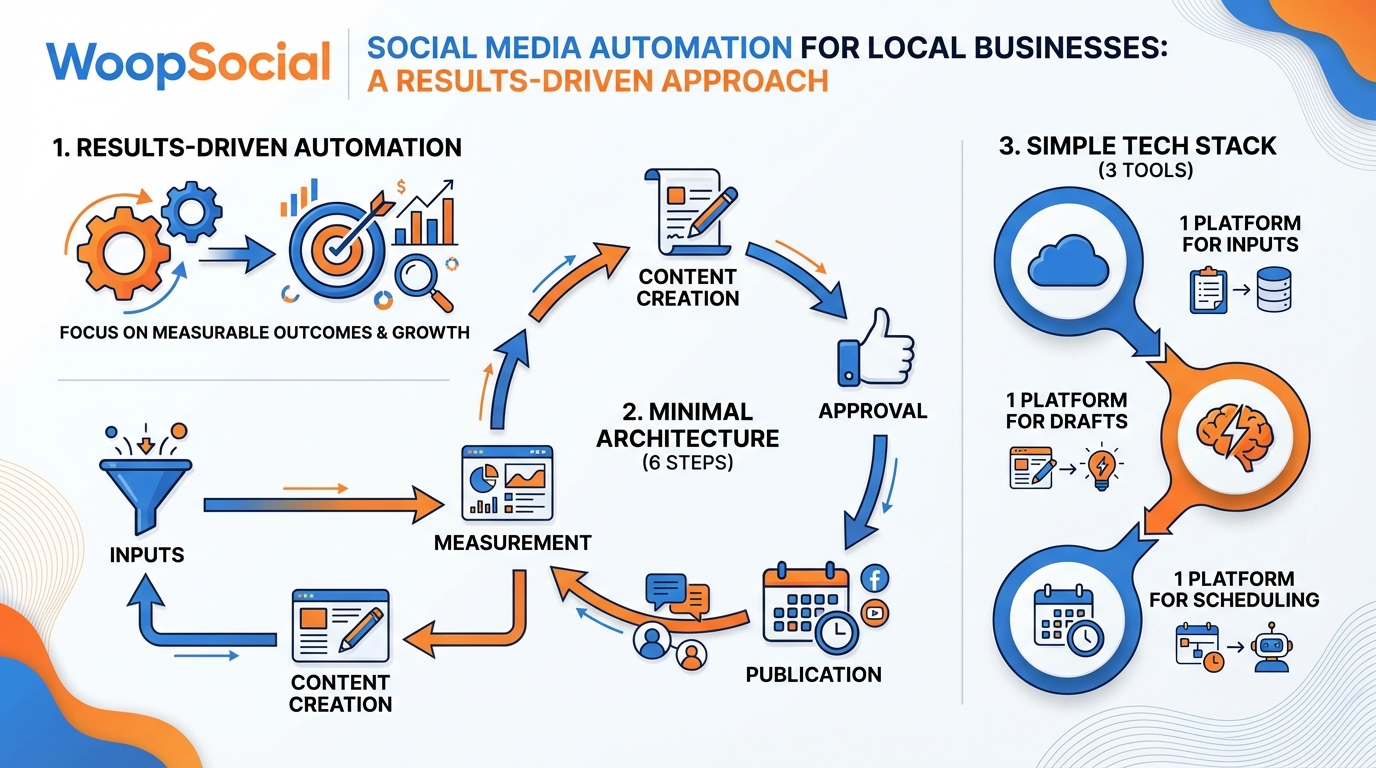
If you build a simple system for gathering those inputs on a weekly basis, you can quit relying on generic content themes and you can start publishing what your market is already voting for.
That’s how you create consistency that still feels like “news” to your audience: real jobs, real customers, real local details, transformed into posts that follow the way local buyers make decisions.
Then when you notice something working you have to copy yourself on purpose so it compounds instead of repeating.
You take a simple photo post about the project or product or your team on the job then you do a quick video post about the same moment that shows the how or the after, then you do a FAQ post that answers the question that people commented with or called about, then you do a testimonial or review post that shows proof of the point, then you do an offer reminder post that applies to that specific situation.
You have to vary the perspective as well as the medium, so that every single post adds something new to the message.
Proof, explanation, objection removal, and a reminder to act.
I do this because I can have a strong single local theme that turns into a week’s worth of posts without ever looking like duplicates, and the audience receives it as clarity rather than repetition.
Reviews are gold, but they require some rules to keep you in compliance and not make it robotic.
You should ask permission if a review is specific or if you’re going to use their name, picture, or particular circumstance, or you should remove their identifying data if you aren’t sure.
You also shouldn’t make a review sound like ad copy; you should use the exact words, you should focus on one result, and you should reply like a human who recalls the project, not like a sales page.
A suggested system is to divert all new reviews into a content pipe that has three items that come out of it: a social media post that quotes one sentence, an FAQ that solves the issue of the review, and a simple availability notice that reminds the public.
That way, the review isn’t just proof, it’s a mini-marketing campaign that stays humane and local.
For instance, here are calendar moments that keep the engine going:
- Semi-automate posts around holidays that affect your customer base. When holidays are near, something in the human brain thinks, “Oh, it’s that time of year again. I’d better get [whatever] done.”
- Changes in the weather create emergencies. Rain or extreme heat are signals that customers might need you.
- School semesters rearrange our routines. School’s out, or school is back in session, and habits are broken or re-made.
- Local events and sponsorships prove you’re involved in the community. You sponsored a Little League team, or participated in a county fair.
- Even your hours of operation can be news. “Surprise! We have an unexpected opening today!” or “We’re slow today, for some reason.”
Yes, AI can help here, but only if you confine it within guardrails. Program it to mirror your brand voice, prohibit stock phrases, and stipulate that at least one unique local reference must be included (e.g., the name of a neighborhood, service area, description of the weather, description of the job). Hootsuite’s survey work suggests why these guardrails matter: their press release notes 62% of consumers say they are less likely to engage with and trust content if they know it was created by an AI application, in Hootsuite Launches Social Media Trends 2024 Report.
If I’m in a huge rush, I can rely on platforms like WoopSocial to create a month’s worth of semi-automated posts, and then I go back in to customize each one with local proof, so that I’m not just letting the automation substitute for localness. When the priority is platform-specific drafting, using an AI Instagram post generator can help you get from weekly inputs to post drafts faster.
Chapter Three
Simple stack is key if you don’t want your SMB social media automation to feel Frankenstein.
Your stack should be 1 platform for your weekly inputs, 1 platform to transform inputs into post drafts, and 1 platform to schedule posts to platforms where local intent actually happens.
Only integrate what enables steps to get from proof to post.
Exclude anything that auto-responds to customers, scrapes non-owned content, or auto-posts the same media on all platforms, as that’s when SMBs can sound unlocal and platforms reduce your reach.
My standard is that every automated post has to be attached to a verifiable local signal that I can cite in a few seconds, such as a photo of a job, a customer inquiry, a review, a seasonal change, or a change in availability.
The batching strategy that allows this to be so fast is to do a month at a time with the caveat that there is a variation of posting format so it does not appear that the same thing is being posted on all platforms at the same time.
You decide the frequency and time of day you want to post for each platform that fits best for when your customers will take action, not necessarily based on the best times that the marketing wizards decide are best to post.
I do three posts a week and ensure that I alternate the types of posts so that they are not the same.
Examples are posting one testimonial type post about an experience you had at one of your jobs, one post that answers a frequently asked question that will eliminate resistance when calling for a booking, and one post that will be a locally based post that is a reminder of what is going on in the community or in the current season.
I also do this because I believe in the theory of repeating a message, but I do not believe in repeating the same package of a message.
Use the variable of switching the hook, the graphics, and the intent of the post but keeping the same local-based theme and you will have the consistency you are looking for without the look of an automated posting platform.
There’s still approval and review, but it’s got to be a rubber stamp and a 5-minute review.
It’s got to be that we run a quick quality control check before anything goes live to make sure there are four things true: factual, offers and prices are right, compliance, and tone.
Factual is that the location is real, the service is real and the claim is real.
Offers and prices is that dates and terms and conditions and things like that match what you’ll offer over the counter.
Compliance is that there’s no personal data, no unsubstantiated claims, no before and afters that you could get into trouble for in your industry.
And tone is that it doesn’t sound like a brand template; it sounds like you at your best.
So, that’s a 5-minute thing and that prevents the two biggest value fails which are: confusing people and teaching people not to trust what you’re posting.
The guardrails are what stop automation from looking like automation: same captions over and over, same hashtags over and over, images unrelated to the content, unrelated trending topics, auto-pilot: implement guardrails like the 14-day caption repeat rule, the every post has one local differentiator rule, the five hashtag maximum rule, the change-up your hashtags rule, the use your own images or images that are 100% a direct match to the service mentioned rule, implement the rule that you will spend 10 minutes a week reviewing what went out, what got engagement.
Because, auto-pilot is the secret automation killer.
If you need speed, use a tool that can generate 30 days’ worth of ideas in five minutes, can apply branding to each post automatically, can connect to all major platforms at once, can schedule 30 days at once. Hootsuite’s research also shows how broadly AI is being viewed: in Social Media Trends 2025 | Hootsuite (Research Report), 69% of marketers see AI as revolutionary technology that can create job opportunities.
I use WoopSocial for speed, then I make it local. If you’re building that “transform inputs into post drafts” step, an AI social media content generator fits directly into this stack.
Chapter 4
If you want to use social media automation for a local business and see that it really works, you need to track local results, not vanity metrics.
That’s all well and good, but you can’t pay employees in likes.
The best way to do this is to attribute a week’s worth of social media posting to the decisions a local consumer makes when they are deciding to buy.
When you organize your strategy like this, you stop speculating and you start stacking things that generate revenue.
I use social media as a demand driver, but I evaluate it as an owner would: did it create conversations that led to leads and did it smooth out any bumps that were preventing people from finding me?
Here are the 5 numbers you should review weekly, since they tie to cash:
- Bookings (or appointments).
- Calls.
- Direction requests (if you have a walk-in or location-based business).
- Clicks on website from social.
- Lead quality notes from phone calls.
That last one is a secret superpower: you want less tire-kickers and more qualified buyers who are basically pre-sold on you.
Lead quality is just a little note on the end of every call, examples include: asked about deadline already had a budget mentioned a post found us on Google, then checked social, etc.
You will begin to recognize patterns really quickly.
Pro Tip: I’ve found in most local service businesses that I’ve worked with, increasing the quality of the lead will pay off more than increasing the quantity of leads: 1 ‘right’ lead can pay for 10 ‘wrong’ ones.
You don’t have to make attribution perfect, but you have to make it methodical.
Run unique offer codes for each platform or promotion to know what actually triggered the sale, have specific booking links for each platform to know where your leads are coming from based on your schedule, and execute some basic call tracking to know which platform triggered the ring. For cleaner tracking links, a simple UTM generator helps you label clicks on website from social without guessing later.
Then tie it all together with a habit that supersedes most attribution software: have every caller answer one scripted question: what made you call us today and how did you find us?
Teach yourself and your team to record the answer in five seconds.
I have seen clients discover that a post that looked okay on engagement was quietly delivering the best calls, because the content was removing objections before the phone ever rang.
The key to automation is setting the parameters for escalation so that critical messages are not botched.
You can template questions about hours, range, what to wear, how to book, etc. and even template initial messages on availability, but you need to reply personally to any messages that have a trust or revenue impact: complaints, rates, safety, personal, or any message that has an emotional or urgent tone.
A simple rule: if the message could lose you a customer or cause a public problem, it gets a human reply.
Every 30 days, tune the engine: amplify the content topics that generated bookings, calls, or higher quality leads, eliminate the posts that generated noise but not action, and evolve successful posts by rotating the hook, image, and location rather than writing from scratch.
And, if you’re using WoopSocial to rapidly generate and customize content, the monthly tune-up just got a lot quicker as you are tweaking a process rather than creating one. This is especially relevant as more SMBs push for resources—MediaPost’s coverage of Verizon’s survey reports 77% of small to mid-sized businesses are currently using or planning to use social-media marketing to increase customer engagement and online traffic, in Small Businesses Striving For Social Media Resources, Study Shows.
The End
The goal of automating social media for a local business isn’t to post more often, it’s to create a hassle-free, brand-safe way to keep your content locally relevant and tied to business outcomes.
By automating with content derived from real work, real questions, real reviews, and real moments of community engagement, you dodge the two most common bullets that undermine trust: generic content and inconsistent publishing.
This is something that owners can probably feel in their bones without needing me to spell it out, because recent posts basically function as a trust signal, and trust is the thing that gets someone to hit the phone, ask for directions, or book a reservation after searching for your business.
The thing you should do now is to deal with this as an operations routine, not a marketing campaign.
You need to implement the capture this week, batch your first month in one go, and then commit to a weekly KPI review.
If you do nothing else, defend these three routines, because they are what create flywheel-effect: capture keeps it real, batching keeps it regular, and the weekly KPI keeps it connected to revenue.
And if you want to keep this going, your KPI review should be concerned with the local metrics that count: bookings, calls, directions requests, social website visits, and a one-liner on lead quality, so you can identify which posts are essentially pre-selling your ideal customers.
The most effective way to reduce the time it takes to set up is to automate the tasks that don’t need to have a human touch, and to leave the human component for the things that matter to the trust and the bottom line.
I rely on a process where I can have a tool produce a month of on-brand content concepts in less than five minutes, and have those ideas automatically scheduled across the major channels from a single screen, and then I just do a quick pass to localize and personalize and purge anything that might sound automated.
That’s the difference between automation that will grow your social presence, and automation that will lull people into disregarding you.
From there, all you have to do is hold the system accountable.
Each item should lead back to a source that you can track, each week should close with your 5-number weekly recap, and each month you should revisit what got calls and bookings and kill anything that just made a bunch of noise.
Keep the machine clean and local and automation is no longer a parlor trick, it’s your superpower: your business appears everywhere a customer looks before they buy, without you being glued to your phone.
Related reads
6/14/2026
YouTube API Alternatives in 2026: start developing right away
Skip the YouTube quota system caps and API calls. Compare the best YouTube API alternatives with code examples, pricing and understand recent changes.
6/12/2026
Best Facebook API Alternatives for Developers in 2026 for direct access
The Facebook Graph API review can take weeks. Compare the best Facebook alternatives for posting, scheduling and more.
6/12/2026
Best LinkedIn API Alternatives in 2026 - instant access for developers
See a list of all the LinkedIn API alternatives for all types of use cases so you can skip the waiting time and get right on automating your work on LinkedIn.