How to Create a Social Media Backlog Fast and Effectively
Discover how to create a social media backlog fast, building an inventory of publish-ready content to end last-minute posting. Get weeks of stress-free posts from just one work session.
How to Create a Social Media Backlog Fast
If you’re still struggling for what to post, the issue isn’t usually creativity. It’s inventory. A social media calendar tells you when to post, but it doesn’t tell you you’ll actually have something to post by then. The most effective way to end last-minute posting is to create a social media backlog: a basic inventory of publish-ready content you can use on demand, even on your most hectic weeks. In this guide on how to create a social media backlog fast, we’re going to build that inventory first, then circle back to the dates.
I’m defining it like that because the two terms are conflated by most small businesses. The backlog is the content inventory you have that’s ready to be published with minimal effort: you’ve got your hook, your caption, your visual direction (or actual creative), and your call to action defined. Scheduled content is that which is already booked for a particular day. The backlog allows you to be flexible and fast; scheduled content allows you to be consistent. I use backlog to prevent decision fatigue and preserve momentum, and then I schedule once I have a buffer to work from.
And by quickly, I’m talking about a tangible result: 2-8 weeks of publish-ready content in 1-3 work sprints. Not 100 potential ideas you’ll never actually write. Not half-baked blog posts. But content you can hit publish on this week (or today) without having to start from scratch. I’ve used this system to keep up with my blog even in my most client-packed weeks, and you can do the same to get weeks of stress-free blog posts from just one work session.
Create a backlog that actually delivers (what is it, the phases, and the minimum length)
The thing is, a backlog is only useful if it’s ready to be published.
I typically use the following real-life stages to organize my backlog:
- Idea bank (brainstorm ideas and concepts)
- Drafted (headline, copy and purpose)
- Designed (visual idea or ready design)
- Scheduled (set a publication date)
A lot of small business owners mix up the idea bank with a backlog and struggle with content creation on the day of publication.
To learn how to build a social media backlog fast, you have to define what counts as inventory: A headline, copy, visual idea, and purpose for example.
I don’t have a backlog without them.
Eliminate the ambiguous workflow and unnecessary columns, and instead, make it clear that this post needs to progress step by step, like an assembly line: Ideas > Drafted > Designed > Ready > Calendar.
This subtle change removes the need for a messy, giant, catch-all column that becomes the invisible clog.
I also recommend incorporating a “Blocked” status to indicate that the content is waiting on a photo, client, or other detail, like pricing, so you don’t waste energy reviewing the same partial captions.
Now introduce a WIP limit, because speed is the result of completing things, not starting things.
A reasonable limit is 10 Drafted items and 5 Designed items at any time; if you reach the limit, you cannot introduce new ideas, you just have to finish the stuff that is in progress.
This single rule avoids the worst outcome, 50 ideas, 0 posts, and it aligns with what the data says about flow efficiency in knowledge work: small batches are faster and more accurate than big batches, which is why WIP-limited teams ship more often than teams that dream big.
Lastly, decide on a minimum viable backlog so you can always tell if you’re ahead or behind.
A basic standard is 2-4 weeks of Ready content per channel you’re actively posting to: if you post three times a week on Instagram and twice a week on LinkedIn, two weeks ahead means 6 Ready Instagram posts and 4 Ready LinkedIn posts in inventory.
That simple math makes you feel less anxious since you can see the finish line.
If you want to crank the fill rate, WoopSocial can generate a month’s worth of ready-to-post ideas in a few minutes and keeps the copy on-brand, but the real win here is your system: clear definitions, tight stages, and WIP limits that ensure everything gets to a publishable state. That workflow matters even more as 43% of marketers using AI cite content creation as the top use case, according to a HubSpot report summary on marketers doubling AI usage in 2024.
Next step: fill the backlog quickly with an idea expansion system (not random brainstorming)
Want to learn how to create a social media backlog fast? Start with pillars, not topics.
Choose 3 to 5 content pillars that align with what your customers are trying to solve or accomplish (not what you offer).
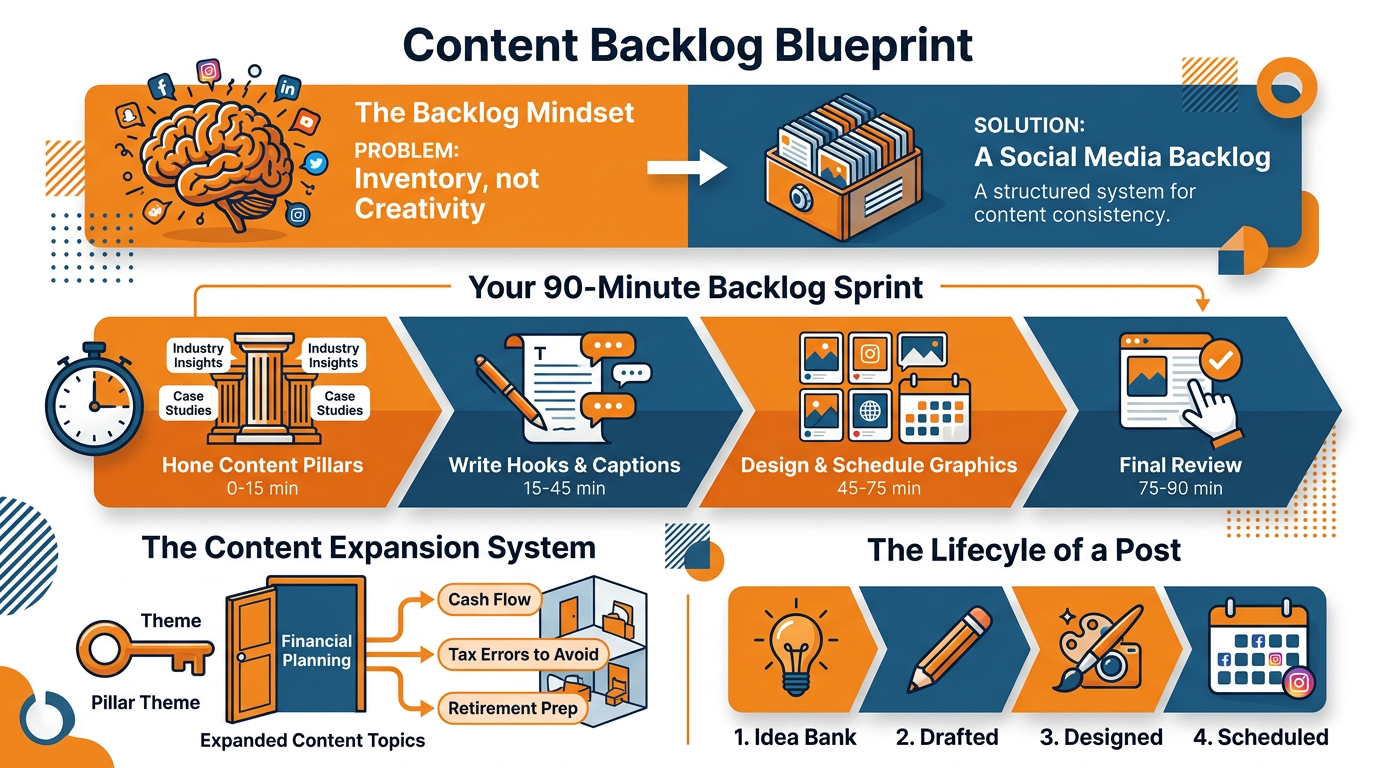
For an accountant this might be cash flow, tax errors, pricing, software set up, and owner mindset.
For a hair salon this might be hair health, color results, maintenance, booking, and confidence.
If your pillars are attached to actual customer results, you can produce volume without sliding into posts that get a lot of likes but not a lot of clients.
Then you double-click into each pillar using question-mining loops to always have a stack of specific, intent-driven subtopics.
By double-clicking I mean extracting the actual language your prospects and customers are using in calls, DMs, tickets, reviews, comments, Reddit, Quora, competitor content, etc.
The key is to always tie every question to at least one subtopic, and every repeat question to a priority subtopic.
The way I identify these is simple.
If I get the same question in three different sources within a month, I consider it a backlog-worthy topic because it’s a demonstrated need, not a guess.
You then multiply output by repackaging subtopics into angles, so a single problem becomes 6-10 unique pieces of content that don't feel like repeats.
Take a subtopic like 'why my Facebook ads are getting clicks but no calls' and turn that into:
- a how-to guide
- a myth-busting piece
- a checklist
- a 'quick lesson learned on the front lines' piece
- a 'before/after' piece
- a 'call a spade a spade' piece
This is the secret benefit of being a small business: you don't need more ideas, you just need more formats to discuss the same few problems your audience is absolutely fixated on.
Last, treat it as a production machine: pillars -> subtopics -> angles -> then hooks and copy.
When I do this, I can fill a weeks worth of Ready inventory in a single session because I’m not creating, I’m expanding.
If you want to shorten that first pass even more, WoopSocial is able to produce about 30 post-ready ideas in minutes once it has an understanding of your brand voice and you can use those as the first draft of which you perfect with your own mined questions so speed does not have to come at the expense of relevance. This lines up with the scale of adoption reported in HubSpot x Mention’s 2024 social trends research: they surveyed over 1,500 social media marketers and found 71% of social media marketers use AI tools.
Do a 90 min backlog sprint (from idea to publish)
Want to learn how to batch a social media content queue in a fraction of the time? Quit trying to get each post perfected and just start a timed batch.
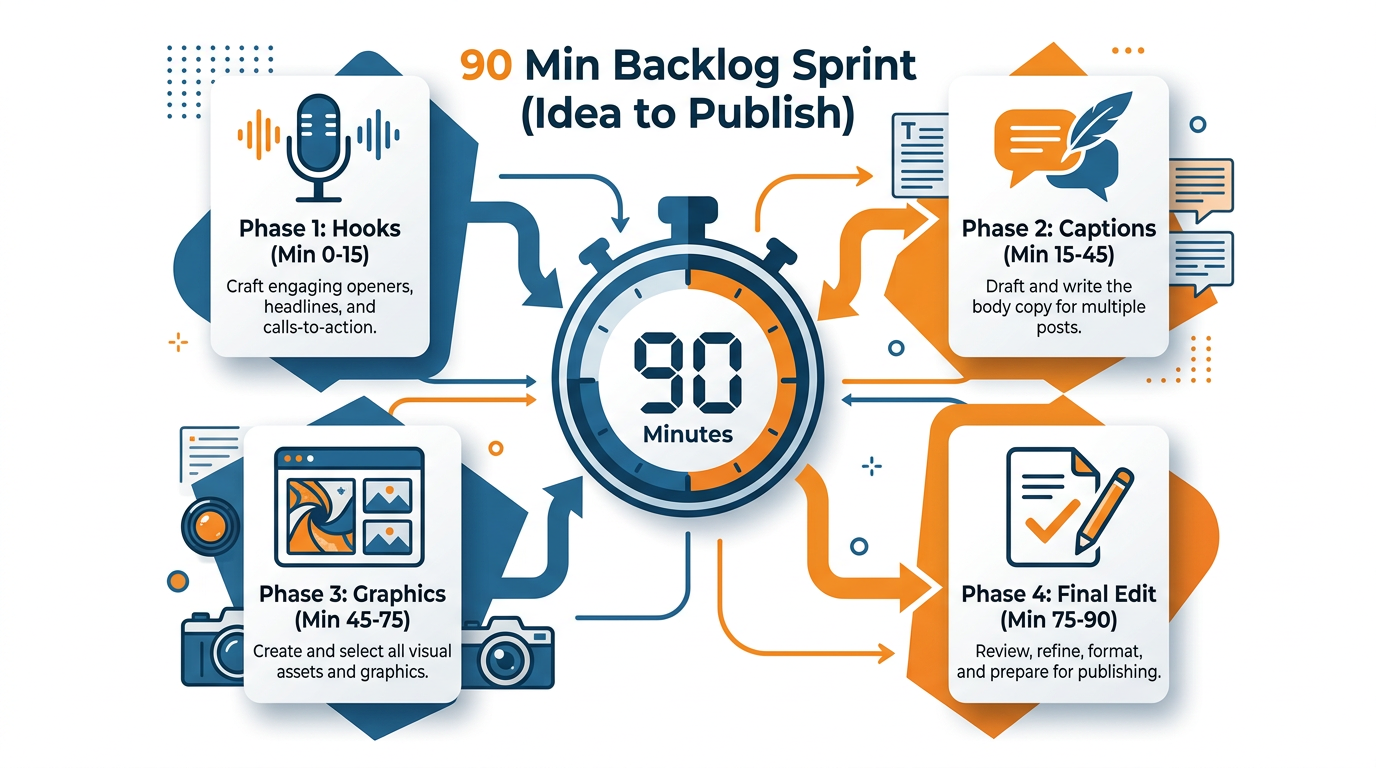
90 minutes. Hooks, Captions, Graphics, Final edit. That’s it.
Why? Because when you’re in one “thinking state” it limits the amount of switching between states - which is why in small business marketing a 2-minute pause between tasks can cost 20-30 minutes of time in every session.
Begin with hooks only for 20 minutes as a fixed number game, meaning you can’t start drafting captions until you’ve got, say, 15 hooks.
Hooks are the highest-leverage part of the post since they determine whether people will read the second line or not, so batch them when you’re at your most alert.
You can use a repeatable framework to keep it fast: problem and consequence, mistake and fix, myth and truth, or before and after.
I’ll often take one client question and spin it into three hooks by changing the angle, such as what most owners do wrong, what it costs them, and what to do instead, and that alone can triple your volume without new topics.
Then, take 40 minutes and write captions in bulk: select your top 10 hooks, and write basic captions that all have the same cadence: 1 sentence to relate, 3-5 sentences to educate, 1 sentence to illustrate, 1 sentence to instruct.
Go for something lightweight as your illustration so you don’t get hung up: a fast outcome, a big lesson, a small story.
You’re going for utility, not quality, here: a good rule of thumb is that a first pass at a caption should only take about 3-4 minutes.
This means you can do 10 of them in this time block, and still have some time to polish your favorites.
The last half-hour is when you match each caption to a basic asset type, then do a quick final publish-ready check to make sure nothing is left hanging.
Pick the most straightforward asset that conveys the core message: static image if it’s a single point, carousel if there are a few steps, short-form video if it’s one of those “see it for yourself moments,” text if the headline itself is the draw.
Then do a quick publish pass: add a CTA, add a UTM-enabled link if needed, write alt text, add relevant hashtags or keywords, ensure it looks and sounds like you. If you do need tracking links, a simple tool like this UTM generator keeps it consistent.
If you want to condense it even further, WoopSocial can generate an initial set of on-brand headlines and caption drafts in a few minutes, and your task becomes deciding, refining, and completing into Ready content that you can publish now, not “one day.” This is also consistent with survey-based time pressure data: Venngage’s 2024 marketing statistics roundup reports that 34.29% of marketers spend 10-15 hours/week producing content.
Decide what to build first
(to make sure the backlog is outcome-driven not activity-driven)
If you want to learn how to fill a social media content pipeline fast, the real constraint isn’t writing. The constraint is deciding what content to prioritize.
A pipeline full of TOFU-style tips is “busywork” and does nothing to advance your business. You need a quick way to prioritize the content in the pipeline by impact and difficulty and then assign it to the funnel intent (TOFU: awareness, MOFU: trust and education, BOFU: decision).
When you do, the first two weeks of content isn’t “filler”. It starts to act like a lead generation machine, driving consult requests, free trial signups, or demo requests.
Light scoring method, under a minute per item: Impact 1-5 and Effort 1-5.
Impact is not feelings, it is how directly the post could cause the right customer to take an action that matters, not just like it.
Effort is what it really takes to get the post to done (you can use Ready), with graphics, reviews, and even proof if needed.
Then calculate a simple Priority score: Impact / Effort.
That forces you to think clearly, that a BOFU post that handles an objection that stops purchases is likely more valuable than a fun trend post, because it converts attention into dollars.
I once scored the backlog for a local service business, and most of the top items were objection handling and price explanation content, not educational content.
Then assign a content offer to each idea, so your content calendar is attached to results instead of busyness.
TOFU tends to be a small lead-magnet, MOFU is a webinar/teaching-focused content offer or case-study walk through and BOFU tends to be trial, consult, estimate or straight book-a-call content.
You’re not changing your business overnight, you’re just making every piece of content have intent.
Example: I might take a MOFU idea like “Why your ads get clicks but not calls” and attach a short training offer, while a BOFU like “What’s included on my consult and who it’s not for” goes to a consult request.
Same brand, same audience, wildly different revenue impact.
Last but not least, craft your first 14 days to balance reach and conversion; aim for something like 60 TOFU for discoverability, 30 for MOFU for trust-building, and 10 for BOFU for sales without looking too sales-y.
Most SMBs do the opposite, doing 90 TOFU for a year, and then get confused that they don’t get results.
In case you are using WoopSocial to speed up the writing process, go through the above scoring and funnel planning stage right after it, so that instead of getting 30 headlines fast, you have to choose the top 10 to get the next leads or demos the fastest. If you need help structuring that work, this social media content calendar guide can help connect inventory to dates without confusing the two.
The end
Want to know the fastest way to get good at creating a social media backlog?
The best-kept secret is to approach it as inventory, not inspiration.
Fill it up with one short weekly maintenance session and one long session: the short session is for filling in the holes, the long session is for stockpiling.
In the short session, don’t worry about inspiration, just focus on flow: shift things from Drafted to Ready, get things un-Blocked, and aim to have at least a few things Ready to publish.
Then, in the long session, create net-new inventory in a single thinking mode, a key tool for small businesses looking to prevent the time-trap of switching between ideation, writing, and design multiple times per week. If you’re building that habit, this weekly social media system fits naturally with the sprint approach.
If you fall behind, don’t try to catch up by posting more, that results in lower quality and burnout.
Instead, reset the system: Reduce your posting frequency for a week and use the time to replenish your minimum viable buffer to 2 to 4 weeks for each active channel.
I do this by enforcing the WIP limit and finishing what is already half done first because unfinished work is the hidden tax that keeps you at zero.
A simple data point that makes this feel achievable: If your first pass captions take 3 to 4 minutes, a focused 60 minute writing block can produce 12 to 20 first drafts, which is often the difference between scrambling and being a month ahead once you add quick visuals.
For quality and speed, you can keep your funnel self-correcting. Each week, kill the worst performing items and double the concepts that worked. You don’t need a full analytics suite for this.
Just monitor three things per post as input for the next batch: Was it appealing to the right audience? Did it generate engagement? Did it generate a desired outcome?
Use those signals as input for the expansion system, which keeps your backlog improving over time, not just expanding. It’s how I avoid clogging up the supply chain with “activity” that doesn’t generate revenue.
And there’s a sneaky fast lane for those weeks where you have to get to a month of ready-to-post content in a few minutes without compromising your brand voice or visual identity: I create a first round of post-ready drafts and on-brand visuals with WoopSocial, and then I use the same backlog scoring, editing, and Ready-ing rules that you’re applying here. If video is part of your pipeline, repurposing supports this approach at scale-Wistia’s 2025 State of Video research page notes 100+ million videos analyzed, which is exactly the kind of dataset that supports a “create once, schedule many” workflow. For extra context, Chief Marketer’s coverage of the Wistia report cites that 57% create social clips from the event.
That means that speed doesn’t turn into a regular time suck, it becomes a one-off boost that integrates with your workflow and keeps your backlog topped up.
Related reads
4/27/2026
B2B SaaS social media benchmarks: Set the right targets.
B2B SaaS social media benchmarks: Set the right targets. The trouble with defining B2B SaaS social media benchmarks is that it's an inherently impe...
4/25/2026
Building a personal brand as a technical founder (without becoming a creator)
Building a personal brand as a technical founder (without becoming a creator) Creating a personal brand as a tech founder should feel less about ma...
4/20/2026
Creative Post Ideas for Sustainable Brands (That Don’t Sound Greenwashy)
Creative Post Ideas for Sustainable Brands (That Don’t Sound Greenwashy) That’s not what creative post ideas for sustainable brands should look lik...