Instagram Broadcast Channels for Customer Feedback
Learn how Instagram Broadcast Channels provide a direct, efficient method for small businesses to collect valuable customer feedback. Get faster insights.
Broadcast Channels on Instagram for Customer Feedback
Sure, comments, DMs, and the odd Story poll can function as a customer feedback tool, but they don’t quite feel like one. Comments incentivize snarky responses rather than genuine insights. DMs are perfect for one-on-one customer support, but they are impossible to quickly scan when you’re busy with a small business. And Story polls are ephemeral, making it harder to track responses over time, or even follow up with changes you’ve made as a result. I use broadcast channels for customer feedback because it offers a clear channel for feedback that is faster, neater, and ultimately easier to act on.
Why is this such a big deal for getting useful feedback? Well, broadcast channels are one-to-many, so you can send a single prompt and get it in front of your most devoted fans immediately, without trying to outsmart an algorithm. They’re also opt-in, meaning that the people who join want to help you improve your offer, menu, product, or service. And they’re push notification-based, which means that when you send a question or a poll, you’re not sending it out into the world hoping people might see it later on and respond. You’re actually creating a moment that draws the response back to you quickly, which is ideal when you’re trying to test an idea, decide between options, or figure out why sales were weak this week. When you want feedback you can use today instead of next month, that makes all the difference. If you want to tie this into a bigger operating system, see social media content calendar.
Now, just to make sure you’re totally grounded here-because broadcast channels are not yet available to all accounts, and in all regions. If you allow responses, you’ll actually have to moderate, which can be time-consuming, even with a relatively small group of recipients. And while you can export the comments received, the functionality isn’t as robust as a true survey app, which means you may want to develop a system for documenting the feedback as you receive it. These aren’t showstoppers, for sure. But hopefully going in you have a better understanding of how to leverage broadcast channels in a way that’s beneficial to you, without any major surprises. As context, reply mechanics have changed: Instagram added replies and prompts to broadcast channels, and prompts allow users to respond for up to 24 hours.
When to use instead of Stories, comments, and DMs
With Instagram broadcast channels for customer feedback, it doesn't feel like trying to reach 1000 people. It feels like having a little panel of your most engaged fans in one spot, where they know they'll be asked for thoughts, and you can send them tiny, regular prompts without needing to start from scratch each time.
In practice, I find this gives me quicker feedback from fewer people, and as a small business owner that's exactly what I'm looking for: 5 concrete responses I can use today, not 50 less-specific responses splattered across comments and DMs.
This is the key way that broadcast channels beat other Instagram response surfaces: you have better signal-to-noise, and more predictable response. If you’re also trying to solve the consistency problem that makes feedback harder to interpret, read inconsistent social media posting.
Comments are public, so it is surface level, or it’s dogpile; DMs are private, so it’s basically a support ticket hell; Stories responses do not have continuity, and it is a different crowd every time.
In a broadcast, you have a fixed audience, and a clean thread, so you can spot reps.
A practical signal to use: for polls and questions, you should be getting 5-15% response from the channel; if you are getting less, your questions are too vague, too long, or too often.
Second bonus: response rate is higher than forms because the ask is easier, because you are not sending someone out of the app to wait for a page load and then fill out 5 minutes of shit.
You are asking someone to answer for 3 seconds within the app, which boosts responses massively, especially for small local businesses and individual practitioners. This matches broader adoption signals too: in a holiday creator commerce report, a survey on creator broadcast sales impact reported that 75% of consumers are familiar with Instagram Broadcast Channels, and over half check them daily.
Sometimes I don’t use an Instagram broadcast channel for customer feedback.
I said it was a 1-to-many format and that was for a reason.
If you have a lot of support issues like problems with an order, modifications to a booking, or something not delivered, a channel will only encourage more chatter and follow-up than you need.
I also wouldn’t use a channel for anything sensitive like a complaint about a refund, a disagreement over prices, or anything that needs a back-and-forth conversation even if replies are enabled because it can still feel like you’re having a public argument.
A channel should be used to identify trends and to validate a decision.
Not for negotiating with someone.
One or multiple channels?
Start with a single one until you have a predictable flow, and until you have a good idea of what feedback you actually use.
Then split them if the questions differ in context: VIP customers for retention and service improvement, beta users for testing and bugs.
Over-segmenting too early lowers response rate, and doubles your work.
The test: if you cannot summarise the difference in one sentence, and ask different questions every week, then keep it all in one and use occasional one-offs to segment, e.g. customer or not, first time or repeat, local or online.
Take, for instance, its broadcast channels for Instagram customer feedback:
- Here’s a step-by-step guide on how to set up and use the broadcast channels.
- How to troubleshoot any access issues you may encounter.
- And the preventative measures you can take to ensure a safe and healthy community.
The part that impacts feedback quality is small, but it is underestimated by many.
Before you add anyone, create a one-sentence mandate that describes what type of feedback you want, and what you plan to do with it.
You want to put the right bait on the hook because without it, you get vague responses.
Then define the posting frequency and style, which should be more consistent with a small business than a content creator.
That is, how often will you ask questions, what does a good answer look like, and will you report back results?
Finally, define how you plan to respond to feedback so folks don’t feel they are talking into a void, or worse, spammed.
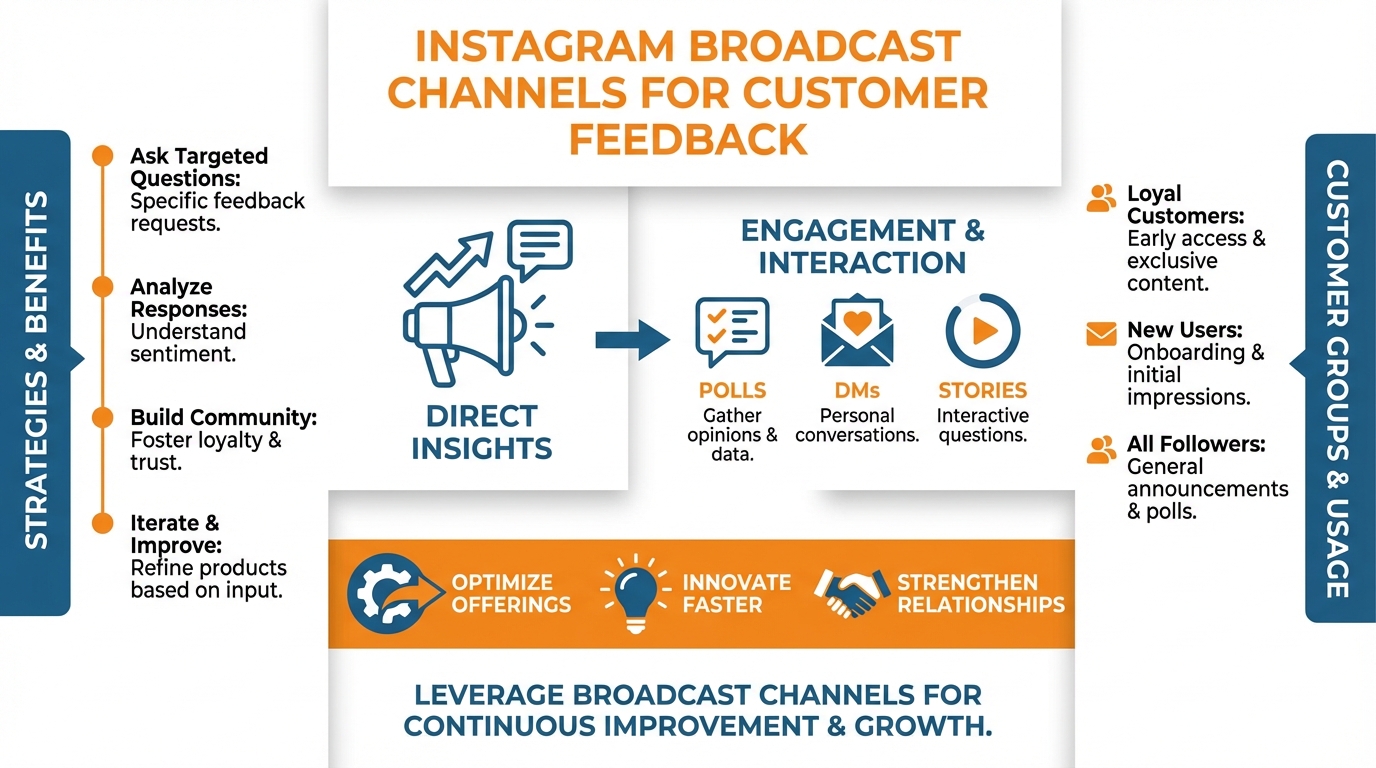
I treat the group like a mini advisory board, and try to address themes ASAP, even when I can’t respond to every single note.
That speed is what keeps the response rate in the 5 to 15% zone that is really useful, instead of allowing it to slide into a passive mailing list.
If you don’t have the Instagram broadcast channels for customer feedback, I recommend the following: first, verify that your account meets the requirements to avoid hours of unnecessary diagnosis: typically you’ll need to have a business account, be using the latest version of the app, and not have any banned or restricted activity, and still be patient because rollouts happen in stages and different accounts get this feature at different times.
When you are still on a staged rollout, try to keep the feedback loop contained within Instagram so you don’t lose any steam: this could be a pinned Story Highlight called “Feedback” where you change out a simple question every week and use a question sticker, and then move any really good responses to a DM label or into a saved replies workflow to respond.
I also offer a Close Friends Story for customers who want to be on it (they can sign up for it when they make an order or afterwards for a service I offer) as a way to mimic the sign-up process of a broadcast channel while still keeping the response rate above comments until I am granted access. If you’re thinking about how to make this sustainable over time, social media calendar automation is relevant here.
Interaction types: use each one deliberately
In the channel, think of each interaction type as a separate feedback tool and activate them deliberately.
Activate polls when you need a clear answer to a clear question, such as whether we should release this flavor or that flavor or what time works best for everyone, which gives you quick, measurable feedback with minimal load on your members.
Activate prompts when you need a little qualitative feedback that’s time-bound; the 24-hour clock gets members to respond quickly and answer the one question at hand, rather than leaving a discussion open that would get stuck in the endless thread loop. This is aligned with the product update covered in TechCrunch’s explanation of broadcast replies and prompts, which noted that previously viewers could not respond and were limited to emoji reactions.
Activate replies when you need additional information or problem-solving detail and you’re prepared to monitor the channel, but otherwise, use reactions, because reactions are your quick sentiment gauge for posts like this flavor just shipped or we’ve resolved the scheduling bug, where you want to gauge sentiment without opening the floodgates.
Guardrails that prevent noise
Guardrails make the channel useful for you and safe for customers, even if one is upset.
Avoid trainwrecks by:
- Making the questions specific.
- Keeping listening posts out of support: If someone has a specific issue, say “Thanks, we heard you! Taking this to DM for a fix”, and get back to the question of the day. If the issue is within the question of the day, keep it structured.
- When something negative comes up, do not suppress it, but rather give it structure: “What moment did it go sideways for you? What did you hope would happen instead? What would be a fair outcome here?” Actionable feedback has facts, not emotion.
I also have a simple ground rule that serves everyone well: “Talk about the experience, not the person. If you can’t do that, you lose access to the channel.”
The goal of an Instagram broadcast channel for customer feedback is to hear patterns you can fix this week, not to create arguments you can’t fix.
Here's my templated feedback loop (cadence, questions, and notes)
This rhythm is designed to prevent diminishing returns from an Instagram broadcast channel for customer feedback.
You get to send a short weekly survey if you want advice: 1 question (1 short question or 1 multiple choice) once a week on the same day, and taking less than 1 minute for users.
This earns you the privilege of sending a monthly weighty survey: 1 bigger question that will move the needle (e.g. “what nearly prevented you from buying?” or “what would make this purchase a no-brainer next time?”).
Around launch weeks, I insert 3-point breaks to provide an extra opinion: before launch to gauge positioning, middle of the launch to understand what’s unclear, and post launch to learn what people are still complaining about.
You want to avoid fatigue from feedback, so you should stagger the intensity of your messaging: quick week, quick week, longer month-end, and then back to quick, with a clear differentiation between listening and just sending news. If you want a broader system around that cadence, weekly social media system fits this.
What differentiates small talk from a solution is the type of question. I make every question concrete enough that someone who doesn’t know my company can use the answer to act. Rather than asking what do you think, I ask which of these two options would you choose today and what would you have to give up if you chose it.
Forced prioritization is my go-to tool: I ask people what one improvement would matter most, then what trade-off would you accept in return, such as higher price, less selection, longer delivery time, or less personalization.
I always try to capture the why immediately after the what, because the why is what survives into the next decision; I do that by asking what were you hoping for, what actually happened, and what would have made it a success.
If you do that, your funnel stops being a suggestion box and starts acting like a little decision lab.
Combine signal types intentionally
You have more meaningful results when you combine different signal types intentionally.
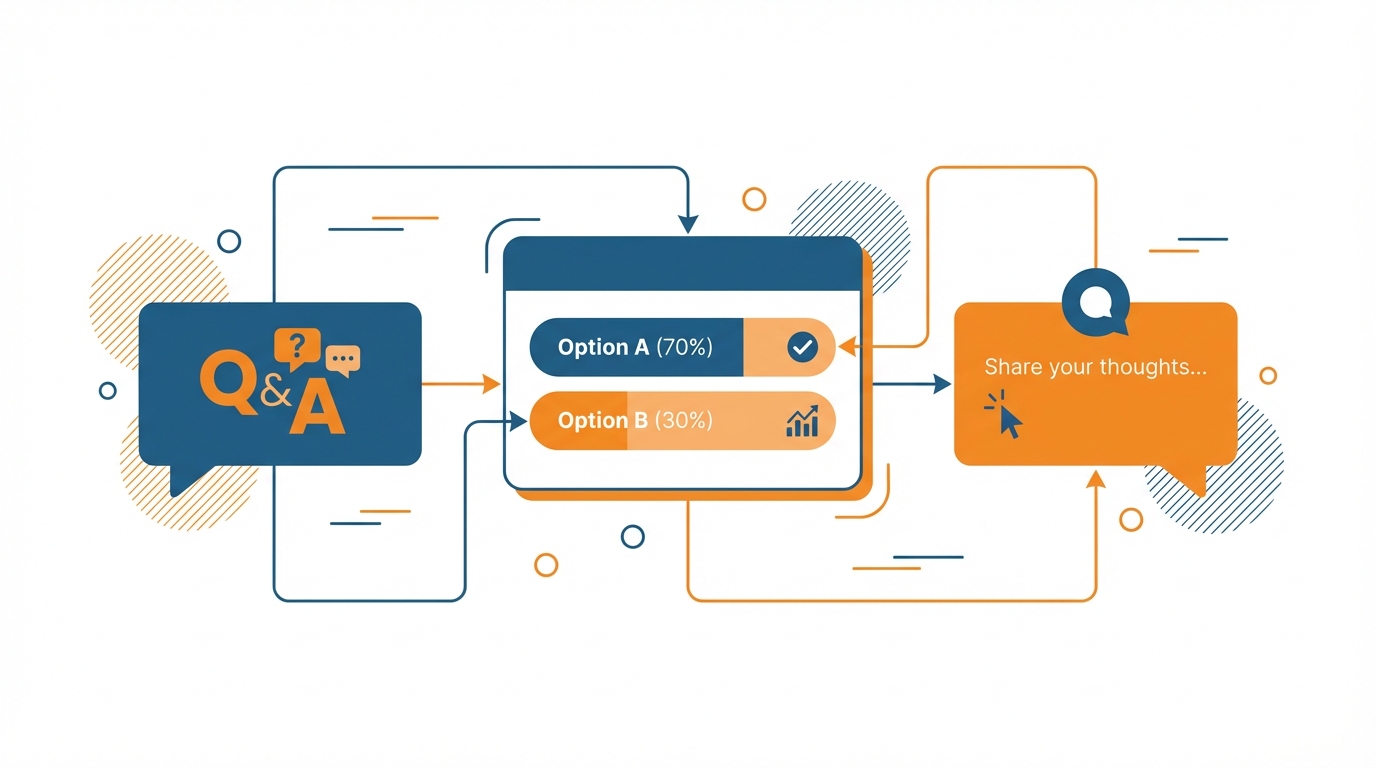
Surveys help you quickly make a decision. They’re ideal for any question involving whether or not to launch something, like an offer, an opening hour, or whether one photo format performs better than another.
Free responses provide explanations, which is the holy grail for small businesses, since it answers why customers didn’t bite, what they were unclear about, or how you compare to others.
Emotes are a casual check. You use them when you don’t want to turn a small update into a large discussion, and you treat them as a soft signal that reinforces or challenges what surveys and free responses tell you.
You can even audit your own questions by measuring response rates: if you’re outside of 5-15%, your question is too big, too wordy, or too frequent.
Finally, turn the responses into decisions, not just screenshots.
As you read, you label, then you count, to distinguish the everyday annoyances from the one-time annoyances, and you try to spot potential future landmines. You also try to distinguish loud from typical. You could have a passionate response that’s real but not typical, so you have to keep those in mind as separate factors.
Finally, you have to actually close the loop inside of Instagram, because that is what builds the participation. You say, “Hey, here’s a quick snapshot of what you said and what I did. Here are some changes that we made. Here are some things that we’re not changing, and why.”
If you do that every time, I think trust goes up, the quality of the feedback goes up, and this broadcast channel inside of Instagram that we built for customer feedback becomes a flywheel and not a one-time thing.
Measuring whether it’s worth it
Let’s take broadcast channels in Instagram for customer feedback as an example:
How do we measure this, is it worth the investment, and how do we expand the program without sacrificing the personal touch that customers love about it?
Rather than looking at the likes on an Instagram broadcast channel as a way of getting customer feedback, you should be monitoring KPIs that inform business decisions.
My five go-to KPIs for the effectiveness of the feedback process are response rate per prompt, theme velocity, repeat-issue rate, sentiment shifts, and time-to-decision.
Response rate per prompt is a way to gauge whether your prompt is effective.
There is a band of 5 to 15% response that you want to stay in for most prompts, and, if you fall below that, you need to either refine your ask or decrease the cadence.
Theme velocity measures how often a theme continues to resurface in your prompts.
If you see the same pain point three times in two weeks, it is not a coincidence, it is a problem that needs to be solved.
Repeat-issue rate is the most costly KPI you can measure as a small business.
If you are still hearing about the same issue after you have supposedly solved it, then either you did not solve it, or you did not communicate the solution.
Sentiment shifts are less about that one angry or upset message and more about the overall trend in sentiment from responses and replies after a solution is implemented.
Time-to-decision is your bang-for-your-buck KPI.
If you can make a decision in 48 hours on your broadcast channel, and it would have taken you two weeks to gather the data you needed from comments and DMs, then you have already earned your money back before you even consider revenue.
You need to analyze broadcast channel feedback differently from engagement.
Not all engagement is created equal, because a hype post will get a lot of engagement, but still not tell you anything about why customers aren’t buying, where they got stuck, or what to change.
With feedback, you want to optimize for “specificity density”: how many replies give you a concrete moment, constraint, or trade-off you can act on.
If you post a neutral prompt like “what almost stopped you from ordering?” and you get fewer responses than a meme, that’s not a failure.
It’s a signal.
Because the responses you do get will often be the ones that change your pricing, packaging, onboarding, or service flow.
Personally, I use reactions as a temperature check, polls as decision support, and prompts/replies as root cause analysis.
Your best feedback posts will often look “sleepier” superficially, but they’ll generate more precise language to reuse in your offer, more precise fixes to implement, and fewer of the same issues next week.
You do all of this while maintaining the scaling integrity of the channel, because you’re funneling the feedback back to its correct owners as quickly as possible, and maintaining a single source of truth, even as a team of one.
The mechanics of this are straightforward: As the responses roll in, you label them by both category and intended recipient, and then push each category to its appropriate home as soon as humanly possible, to prevent the feedback from going stale in your DMs.
Product or offering enhancements get added to your pipeline along with the customer’s language verbatim; service failures get turned into a same-day ticket with an assigned owner and expected completion date; content misfires get added to your content pipeline, because if three different customers are getting the same thing wrong, that’s not a customer issue, that’s a messaging issue.
I maintain a running weekly log of the top categories, along with “fixed” items and “won’t fix” items, so that I can follow up in-channel and know that I’ve actually closed the loop, without having to play a guessing game.
And that weekly log is the key enabler for scaling the model: It allows you to ask more questions, field more answers, and still have community members feel as though they’ve been heard, because you’re updating based on verifiable patterns instead of instincts.
Influencers and partners: scale without losing signal
Influencers and partners can give you scale without a YES fest, but you have to treat them like a broadcast platform, not a spokesperson.
Once you enable an influencer to say, “omg this brand is amazing go tell them what you love!” the results will be all lovely and no actual data.
When I involve influencers, I ask a neutral and behavior-based question, such as what part of this process felt confusing?
What would you change before you would refer it?
What would you assume is included at this price point that isn’t here?
If possible, I’d also try to decouple their audience from my channel by using the influencer to drive into the channel, then ask the question as me, of me, and then the social pressure of “being a good answerer” is gone, and the answers are more straightforward.
Done correctly, you increase your audience, but retain signal integrity, and your Instagram broadcast channel for feedback becomes a mini research mechanism that remains real as it scales. Adoption is not theoretical: Vogue’s report on how brands use broadcast channels cited channels like Saint Laurent’s at about 134,800 members, and Glossy’s breakdown of brand channel performance noted posts often reaching 94,300 viewers in Saint Laurent’s channel.
Conclusão
Feedback channels should be run more like micro research firms, rather than discussion rooms.
You have to select the right use case: a situation that requires quick detection of patterns (e.g. changing something on the menu, deciding on which package to introduce, identifying which checkout step needs an improvement, understanding which element of your service keeps triggering the same dispute), and then restrict the channel with a number of rules (don’t send broad questions, send support issues in DMs, don’t allow the ability to reply to your messages unless you’re actively watching it).
That last one ensures you won’t convert feedback to noise, and keeps your response rate in the 5 to 15% sweet zone of objective answers.
Finally, you want to maintain a regular tempo so that your customers know what kind of game they’re playing.
You want to be on a steady cadence that answers in seconds, not minutes: weekly micro-questions for tactical support and occasional macro-questions for more causal analysis.
A consistent cadence helps to keep the data apples-to-apples over time.
And this is really where you reap the rewards with a small business, which is: you begin to distinguish between one-off gripes and systematic issues that are silently eating away at your sales.
I write every question like a little experiment with a well-defined decision.
If you don’t know the decision, it’s a content exercise, not a feedback exercise.
The flywheel doesn’t start turning unless you close the loop back in the channel.
You don’t have to respond to every comment, but you need to report results: what you heard, what you changed, what you didn’t change and why.
That’s where the quality of participation increases, because users discover that the more information they provide, the more likely it is to result in progress.
I’ve observed that the quickest way to reduce the rate of recurrence is not just to address the issue, but to report it done in the same channel in which feedback was provided, so users stop re-reporting it and start helping you to find the next constraint.
The action to take is concrete and tangible: test Instagram broadcast channels for customer feedback on a small pilot, in a limited way, and assess the quality of the response for 2-4 weeks.
Not the quantity of the response, but the quality, as measured by the specificity density of the responses, and the rate at which they lead to decisions you can take within a week.
If the channel helps you get decisions within 48 hours that would take 2 weeks over comments, DMs, or Stories, you should scale the channel.
Related reads
4/27/2026
B2B SaaS social media benchmarks: Set the right targets.
B2B SaaS social media benchmarks: Set the right targets. The trouble with defining B2B SaaS social media benchmarks is that it's an inherently impe...
4/25/2026
Building a personal brand as a technical founder (without becoming a creator)
Building a personal brand as a technical founder (without becoming a creator) Creating a personal brand as a tech founder should feel less about ma...
4/20/2026
Creative Post Ideas for Sustainable Brands (That Don’t Sound Greenwashy)
Creative Post Ideas for Sustainable Brands (That Don’t Sound Greenwashy) That’s not what creative post ideas for sustainable brands should look lik...