API & MCP included on every plan
Automate Your YouTube Posting
Automate YouTube video posting with WoopSocial. Set up videos to publish automatically at scheduled times and maintain consistent channel presence.
Trusted by developers, agencies, and product teams building on the unified WoopSocial API
Post to YouTube through one unified social media API for your apps, AI agents, and automation tools. Use the WoopSocial REST API or MCP server to automate posting — we handle OAuth, tokens, and platform changes so you can ship features.
One API for posting
Publish to YouTube through a single unified social media API — no separate integrations per platform
Automatic YouTube Publishing
Schedule YouTube videos and let WoopSocial publish them automatically at your chosen times. No manual posting required- your videos go live on schedule. For regular videos, you can also schedule YouTube videos that publish automatically. schedule YouTube videos
- Automatic publishing
- No manual intervention
- Reliable delivery
Channel Content Automation
Plan your entire YouTube content calendar in advance and schedule videos for weeks ahead. Once scheduled, WoopSocial handles publishing automatically so you can focus on creating quality video content.
- Plan weeks ahead
- Batch scheduling
- Channel calendar planning
Consistent Channel Presence
Maintain an active YouTube channel presence without daily posting. Automated publishing ensures your channel stays engaged with regular video content that publishes on schedule.
- Consistent publishing
- Active channel presence
- Algorithm-friendly cadence
How It Works
Get your free API key
Sign up in under 70 seconds, connect your YouTube account, and start calling the unified API or MCP server.
Build your integration
Send posts from your app, workflow, or AI agent with one endpoint — no separate platform SDKs to maintain.
Publish automatically
Schedule or publish YouTube content instantly. WoopSocial handles OAuth, tokens, and platform API changes.
Reliable Automatic Publishing
WoopSocial publishes your scheduled YouTube videos automatically at the exact times you choose. No need to be online or remember to publish- your video content publishes on schedule every time.
Channel Content Scheduling
Schedule YouTube videos for any date and time in the future. Plan your entire channel content calendar weeks or months ahead and let automation handle the publishing process.
Channel Calendar Planning
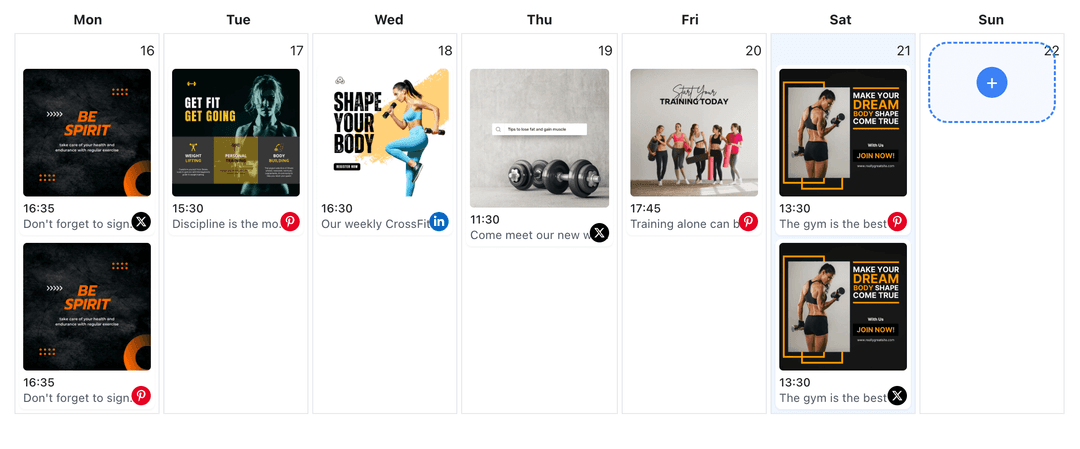
See all your scheduled YouTube videos in one visual calendar. Plan your automated publishing schedule, identify gaps, and maintain consistent presence on your YouTube channel.
Multi-Video Automation
Schedule multiple YouTube videos at once for automated publishing. Batch create and schedule weeks of channel content in one session, then let WoopSocial handle publishing automatically.
Why Automate YouTube Posting?
YouTube channels require consistent publishing to maintain engagement and visibility in subscribers' feeds. Automating your YouTube posting helps you maintain that consistency without the daily interruption of manual publishing. When you automate YouTube videos, you can plan your entire channel content strategy in advance and let WoopSocial handle publishing at your scheduled times.
Automated publishing saves hours every week by eliminating the need to manually publish each YouTube video. Instead of logging into YouTube multiple times per week, you can batch-create and schedule weeks of channel content during dedicated planning sessions. This approach gives you more time to focus on creating quality video content while ensuring your YouTube channel stays active and engaging.
YouTube's algorithm favors channels that publish consistently, and automated posting helps you meet that requirement effortlessly. By scheduling videos in advance and letting automation handle publishing, you can maintain a reliable publishing rhythm that your subscribers come to expect. This consistency helps your YouTube channel build audience expectations and improves engagement over time.
How Automated YouTube Posting Works
WoopSocial's automated posting feature lets you schedule YouTube videos for any future date and time. Once you create a video and set its publishing schedule, WoopSocial handles the rest automatically. Your videos publish at the exact times you choose, even when you are offline or busy creating new content.
The automation process is reliable and requires no manual intervention once videos are scheduled. You can plan your entire YouTube content calendar weeks or months in advance, schedule videos for optimal engagement times, and trust that WoopSocial will publish them automatically. This gives you complete control over your publishing schedule while eliminating the daily task of manual publishing.
Automated posting works with all YouTube video types, including regular videos and YouTube Shorts. You can mix different video types in your automated schedule and maintain a diverse, engaging YouTube channel presence. The visual calendar helps you see your entire automated publishing schedule at a glance, making it easy to plan and adjust your channel content strategy. YouTube content planner.
Ready to build your YouTube integration?
Start automating your YouTube videos today. Get your free API key and start posting in under 70 seconds. API and MCP access included on every plan, including free.
Automate your YouTube postingFrequently Asked Questions
Schedule your YouTube videos for future dates and times. WoopSocial automatically publishes them at the scheduled times without requiring manual intervention.
No, automated posting works even when you are offline. WoopSocial handles publishing automatically at your scheduled times.
Yes, you can automate regular YouTube videos and YouTube Shorts. All video types publish automatically at your scheduled times.
You can schedule YouTube videos for any future date and time. Plan weeks or months ahead and let automation handle publishing.
Yes, you can edit any scheduled YouTube video before it publishes. Update videos, titles, descriptions, or scheduling times from your calendar view.
Free includes up to 2 connected social accounts across all platforms. Pro plan users can automate posting for multiple YouTube channels from one dashboard.
Free plan includes unlimited posts on supported networks. Pro plan users can automate unlimited YouTube videos.
Start Automating Your YouTube Posting Today
Get your free API key and start posting in under 70 seconds. API and MCP access included on every plan, including free.
Get your free API key