API & MCP included on every plan
Build Your YouTube Content Planner Calendar Today
Map YouTube channel campaigns inside WoopSocial's content planner. Drag videos on a visual calendar, fill gaps, and publish automatically without jumping between tools.
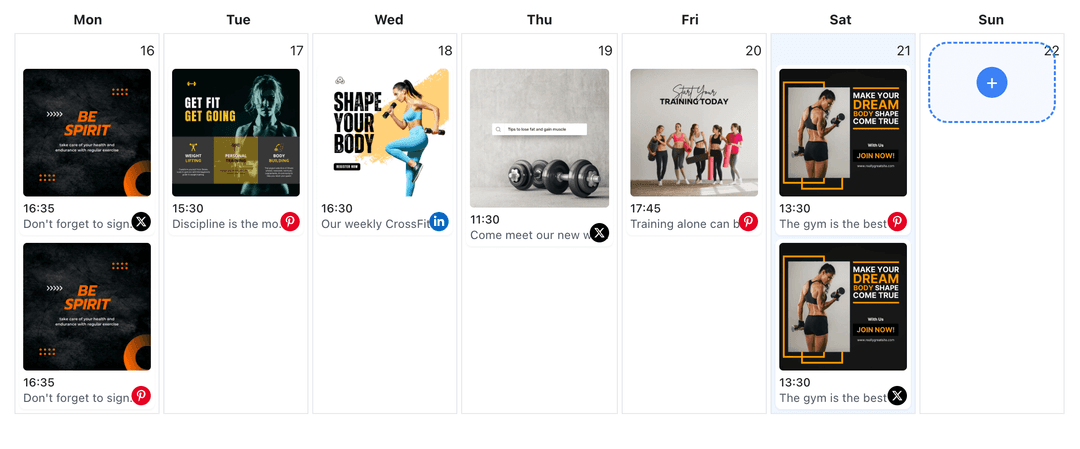
Relied on by creators and solo admins keeping YouTube channels organized
Post to YouTube through one unified social media API for your apps, AI agents, and automation tools. Use the WoopSocial REST API or MCP server to automate posting — we handle OAuth, tokens, and platform changes so you can ship features.
One API for posting
Publish to YouTube through a single unified social media API — no separate integrations per platform
Calendar-First Workflow
Drop ideas onto the visual calendar, adjust publish times, and keep every lane full in seconds. When you want to queue multiple videos at once, you can also bulk schedule YouTube videos. bulk schedule YouTube videos
- Drag time blocks
- Color-coded days
- Gap detection
Campaign Slots
Label each video by launch, series, or evergreen theme so you always know what content runs next. Notes stay inside WoopSocial, keeping approvals focused on titles and descriptions.
- Theme tagging
- Launch visibility
- Clear priorities
Cross-Channel Visibility
See which channel each video belongs to, duplicate proven content, and keep local admins aligned without copy-paste. When your roster grows, you can also manage multiple YouTube channels from the same planner. manage multiple YouTube channels
- Channel filters
- Reusable videos
- Shared context
How It Works
Get your free API key
Sign up in under 70 seconds, connect your YouTube account, and start calling the unified API or MCP server.
Build your integration
Send posts from your app, workflow, or AI agent with one endpoint — no separate platform SDKs to maintain.
Publish automatically
Schedule or publish YouTube content instantly. WoopSocial handles OAuth, tokens, and platform API changes.
Week Overview
Switch between week and month views to see morning, afternoon, and evening slots so you never overcrowd subscribers with back-to-back videos.
Post Limit Awareness
Built-in plan limits show your connected accounts and credits so you know when to upgrade for more capacity.
Asset Checklist
Add description notes and video reminders inside each slot so you know which videos still need a thumbnail or supporting link.
Reliable Publishing
Once a video is ready, WoopSocial handles the publish time automatically even if your team is offline or traveling.
Plan YouTube Campaigns with Context
Seasonal content, product drops, and educational series all need their own cadence. The content planner shows every YouTube channel story side by side so you can space promotions, layer reminder videos, and keep evergreen content running in the background.
Because every slot lives in the same calendar, shifting a campaign is as simple as dragging it to a new day. You keep stakeholders informed without exporting spreadsheets or chasing comments in disparate threads.
Give Video Content the Space It Deserves
Use the planner to mark which videos require fresh thumbnails or descriptions before they publish. Assign prep notes, ensure assets are ready, and keep creative teammates focused on the right deliverables.
When a slot calls for a regular video update, you can schedule YouTube videos without leaving the planner so all your content stays part of the same workflow. schedule YouTube videos.
Ready to build your YouTube integration?
Start your calendar, fill the week in minutes, and keep YouTube channel updates shipping even when your day gets busy.
Plan your YouTube contentFrequently Asked Questions
WoopSocial shows every scheduled YouTube channel video on one calendar so you see timing, themes, and post limits in context instead of juggling isolated drafts.
Yes. Free plan includes up to 2 connected social accounts. Pro unlocks more accounts and credits. Switch between channels and keep each queue organized without leaving the planner.
Every slot supports regular videos and Shorts. When you need a standard video update, you can schedule YouTube videos from the same workspace.
The planner lets you reschedule or delete drafts across your connected accounts. Upgrade to Pro whenever you need more connected accounts.
Yes. Drag any scheduled YouTube video to a new day or time. WoopSocial updates the publish slot automatically and keeps the rest of the queue intact.
No. Once videos are scheduled, WoopSocial publishes them automatically, so your YouTube channel stays active even when you are offline.
Keep Your YouTube Calendar Full
Launch the planner, line up every channel update, and stay ahead of campaigns with WoopSocial's simple workflow.
Get your free API key