API & MCP included on every plan
Switch Between YouTube Channels
Switch between multiple YouTube channels from one dashboard. Manage all your channels, schedule videos, and switch accounts without logging in and out repeatedly.
Trusted by creators managing multiple YouTube channels
Post to YouTube through one unified social media API for your apps, AI agents, and automation tools. Use the WoopSocial REST API or MCP server to automate posting — we handle OAuth, tokens, and platform changes so you can ship features.
One API for posting
Publish to YouTube through a single unified social media API — no separate integrations per platform
Instant Channel Switching
Switch between YouTube channels with one click. No need to log out and log back in- select the channel you want to manage and start scheduling immediately. For creators with multiple channels, you can also manage multiple YouTube channels from the same dashboard. manage multiple YouTube channels
- One-click switching
- No logout required
- Quick channel selection
Unified Channel Dashboard
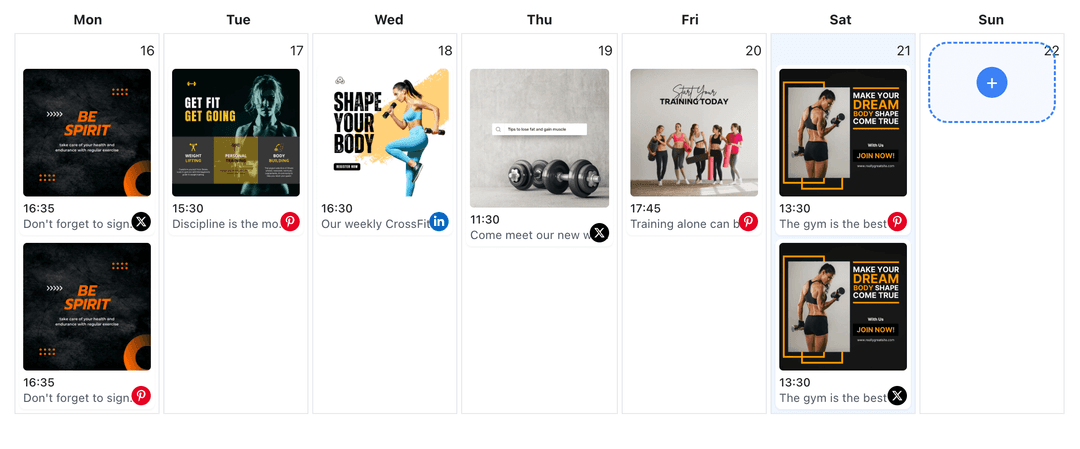
See all your YouTube channels in one place. View scheduled videos for each channel, switch between channels to schedule content, and maintain a clear overview of all your YouTube channel activity.
- All channels in one view
- Channel-specific calendars
- Easy navigation
Channel-Specific Video Scheduling
Schedule videos to any YouTube channel after switching. Select your target channel, upload your video content, and schedule it without leaving the dashboard. For regular videos, you can also schedule YouTube videos to any channel. schedule YouTube videos
- Select target channel
- Schedule to any channel
- Channel-aware scheduling
How It Works
Get your free API key
Sign up in under 70 seconds, connect your YouTube account, and start calling the unified API or MCP server.
Build your integration
Send posts from your app, workflow, or AI agent with one endpoint — no separate platform SDKs to maintain.
Publish automatically
Schedule or publish YouTube content instantly. WoopSocial handles OAuth, tokens, and platform API changes.
Multi-Channel Management
Connect and manage multiple YouTube channels from one WoopSocial dashboard. Switch between channels instantly to schedule videos, view calendars, and maintain all your YouTube channels without the hassle of multiple logins.
Channel-Specific Video Calendar
View scheduled videos for each YouTube channel separately. Switch between channels to see their individual calendars, plan video content for specific channels, and maintain organized scheduling across all your YouTube accounts.
Efficient Channel Workflow
Save time by switching between YouTube channels without logging out. Create videos for one channel, switch to another, and schedule content across all your channels in one efficient workflow session.
Free and Pro Channel Limits
Free includes up to 2 connected social accounts across all platforms. Pro plan users can connect and switch between multiple YouTube channels, making it easy to manage all your YouTube accounts from one dashboard.
Why Switch Between YouTube Channels?
Creators often manage multiple YouTube channels for different content niches, brands, or languages. Switching between channels traditionally requires logging out of one account and logging into another, which wastes time and disrupts your video workflow. WoopSocial's account switcher lets you manage all your YouTube channels from one dashboard, so you can switch between accounts instantly and schedule videos to any channel without the login hassle.
When you can switch between YouTube channels quickly, you maintain better control over all your accounts. Schedule videos for one channel, switch to another, and continue scheduling without losing your workflow momentum. This efficiency is especially valuable for creators running several niche channels or agencies managing multiple client channels simultaneously.
The account switcher also helps you maintain consistent posting across all your YouTube channels. Instead of remembering to log into each channel separately, you can view all your channels in one dashboard, identify which channels need content, and switch to schedule videos efficiently. This approach ensures all your YouTube channels stay active and engaged with your audience.
Managing Multiple YouTube Channels Efficiently
When managing multiple YouTube channels, organization is key. WoopSocial's account switcher shows all your connected channels in one place, making it easy to see which channels have scheduled videos and which need attention. Switch between channels to review their individual calendars, plan video content for specific channels, and maintain a balanced posting schedule across all your YouTube accounts.
The visual calendar helps you see scheduled videos for each YouTube channel. Switch to a specific channel to view its calendar, identify posting gaps, and schedule new video content. This channel-specific view ensures you maintain consistent presence on each of your YouTube channels without losing track of your overall content strategy.
Switching between YouTube channels also helps you coordinate campaigns across multiple accounts. If you're running a promotion that spans several brand channels, you can switch between channels to schedule related videos, ensuring all your channels support the campaign consistently. This coordination is much easier when you can switch between channels instantly without multiple logins.
Ready to build your YouTube integration?
Start managing all your YouTube channels from one dashboard. Switch between channels instantly and schedule videos efficiently without multiple logins.
Switch between YouTube channelsFrequently Asked Questions
Yes, you can connect and switch between multiple YouTube channels. Free includes up to 2 connected social accounts across all platforms. Pro plan users can connect and switch between multiple YouTube channels from one dashboard.
No, WoopSocial's account switcher lets you switch between YouTube channels instantly without logging out. Select the channel you want to manage and start scheduling immediately.
Yes, switch to the YouTube channel you want to schedule for, create your video post, and schedule it. You can switch between channels to schedule videos across all your YouTube accounts from one dashboard.
Free includes up to 2 connected social accounts across all platforms. Pro plan users can connect and switch between multiple YouTube channels, making it easy to manage all your YouTube accounts.
Yes, switch to a specific YouTube channel to view its individual calendar. Each channel has its own scheduled videos view, helping you maintain organized content across all your YouTube channels.
No, scheduled videos remain assigned to their specific YouTube channels. Switching between channels only changes which channel you are currently managing in the dashboard.
Yes, you can connect additional YouTube channels at any time. New channels will appear in your account switcher, allowing you to switch between all your connected channels instantly.
Start Switching Between YouTube Channels Today
Manage all your YouTube channels from one dashboard. Switch between channels instantly and schedule videos efficiently without multiple logins.
Get your free API key