YouTube Shorts to LinkedIn: Repurpose Video for Business Growth
Don't just dump YouTube Shorts on LinkedIn. Discover strategic ways to filter and adapt your short-form video content to resonate with professionals, drive engagement, and build credibility.
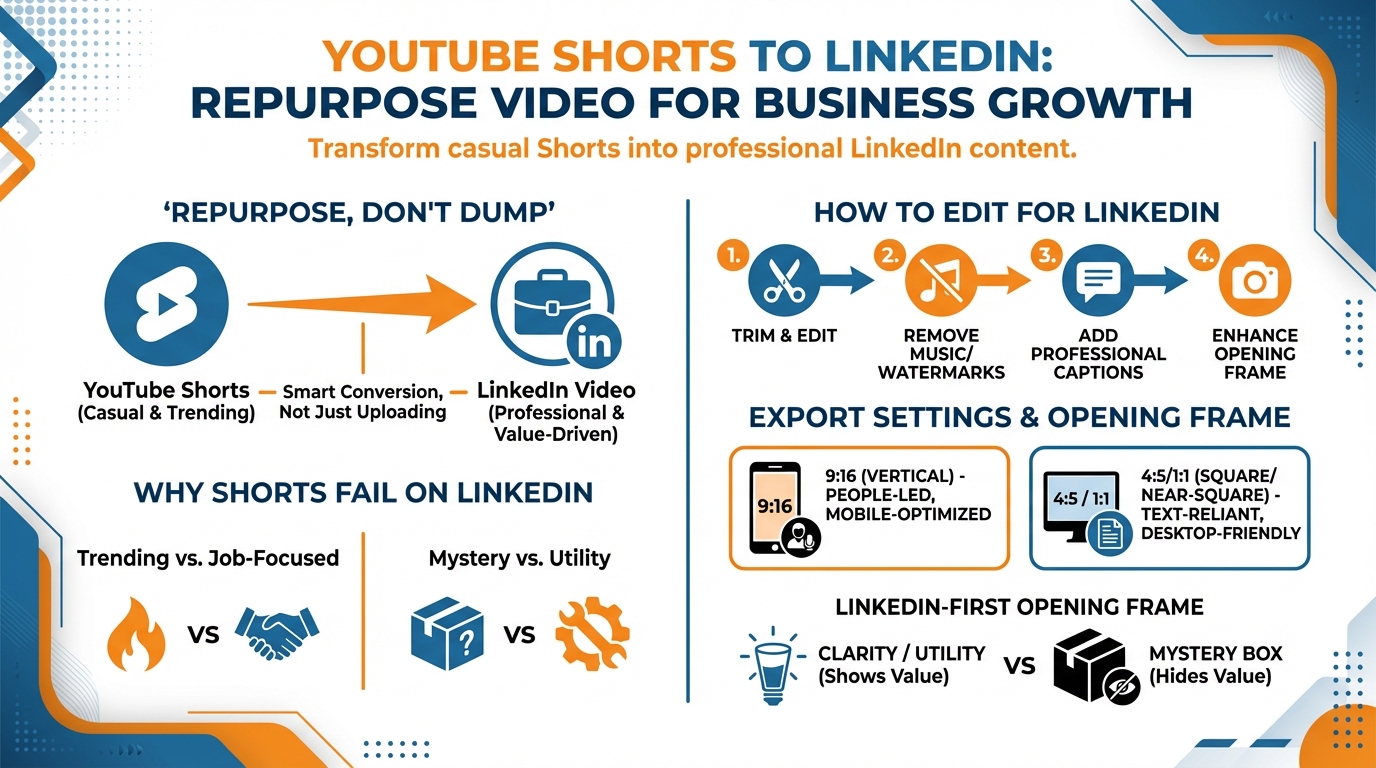
Reusing your YouTube Shorts for LinkedIn Video isn’t a quantity play.
If you dump every Short that worked on YouTube to LinkedIn, you will burn reach, confuse your audience and teach the algorithm to not care about you.
One of the reasons why most shorts don’t perform well on LinkedIn is because they are riding the wave of trending content that isn’t tailored to the job. They are based on channel history or innuendo. They are based on YouTuber-focused premise that LinkedIn users aren’t aware of. They have an ending that requires subscription that isn’t compatible with professional networks.
For a small business, such a disconnect is costly because each mediocre post is an opportunity lost to establish credibility and begin conversations that generate customers.
Be brutal with your filter.
As you select what to re-share, focus on the Shorts that offer an actionable professional lesson, a replicable principle, or an opinion that encourages debate in the comments.
Finally, before you start editing, make all the candidates go through two intent filters: Why would anyone in the company care about this, and what would they do as a result of this video.
If you can't include the answers to both in one sentence, please don't post it.
However, if I come across a Short with a great concept but the execution feels too "YouTube Short"-y, I don't repurpose that as is.
I use it as a source content, recreate the story for LinkedIn, and edit the hook, context and conclusion so you get a clear business result: authority, engagement and comments by the people you need to connect with. Tools like Flarecut can help you create shorts using a script, which makes this process more efficient.
It helps to remember the scale of short-form: YouTube Shorts reached 70+ billion daily views worldwide as of Oct 2023, according to a Statista breakdown of Shorts daily views. And by Cannes Lions 2025, YouTube Shorts now averages 200 billion daily views, as reported in a TheWrap recap of the 200B daily views announcement.
Reuse your YouTube shorts content for your LinkedIn video: how to edit your YouTube shorts for LinkedIn (not just resize them).
We use YouTube Shorts for LinkedIn Video, but we don’t just export them. If you’re building this into a broader process, smart social media automation can support curation without turning this into a volume game.
Export settings (don’t guess)
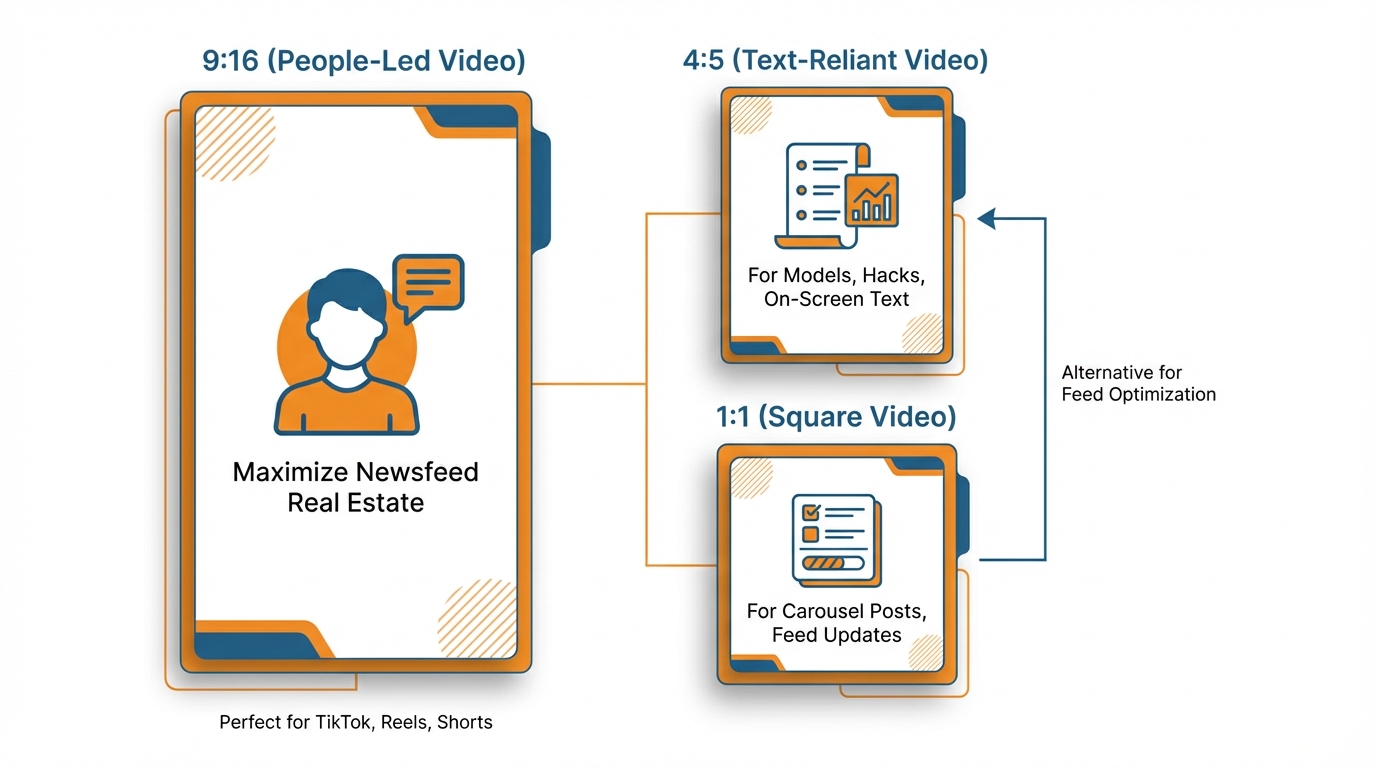
I export in 9:16 if the video is people-led, and your message is primarily delivered by voice and does not rely on on-screen text. Because you want to be taking up as much real estate as you can in the newsfeed.
I export 4:5 or 1:1 if your message relies on text, like you’re teaching a three-part model, a simple hack or any text which you need to communicate instantly on a smartphone.
The 30,000 ft heuristic I’d use is if you need to get your core message understood on a smartphone in <0.5 seconds then use 4:5 or 1:1 and supersize that bad boy.
If your message stands up with very little or no text, then 9:16 might be the way to go.
Build a LinkedIn-first opening frame
Next, create the first frame for LinkedIn, where folks watch for business utility, not plot.
For example, mystery-box openers that do well on Shorts can fall short on LinkedIn, since it’s just more useful for someone to know what the hell this is about and why I care, especially for work, up front.
So try having that first frame answer the “What is this about, and why should I care for work?” question, both with text on the screen and a line of copy.
Try rewriting your hook from curiosity or trend to problem -> insight -> outcome: here is the real business problem in simple terms, here is the surprising insight, and here is the outcome.
I’ve even taken a full YouTube-style hook and changed it to a one-line sentence of, here’s what most founders get wrong about pricing calls, and how to fix it in the next 20 seconds, with the role and the outcome right in the hook.
This shift matters because video is already rising on the platform: video watch time on LinkedIn rose 36% in 2024, and video posts are described as driving 1.4x more engagement than other media types, per a LinkedIn Pulse note on LinkedIn’s algorithm and video performance.
Captions (where most repurposes fall down)
Captions are where most repurposes fall down, since the LinkedIn audience will accept less visual information, but require more information from the text in the silent/low audio experience.
Burned in or SRT? If you want to control the look, feel, and emphasis of every single caption line, burned in is the way to go. If your audio is very clean and your cadence is slow, you can probably get away with SRT.
Regardless: Short lines. Break for sense, not length.
140 to 160 wpm is a good target pace. If you’re running faster than that, the solution is to cut breaths out of the script, not shrink the font in the captions.
Don’t build a wall of text: If there are only 1 to 3 words that contain the information in a line, emphasize those and lose the rest. If you need help getting the on-screen or post copy right quickly, an AI caption generator for Instagram can be useful as a drafting aid even when your final destination is LinkedIn.
Safe zones + remove platform-performance-killers
Lastly, edit for safe zones and cut out platform-performance-killers before exporting.
LinkedIn overlays will often overlap the corners and bottom of the screen on mobile.
Keep critical text far enough from the margins, and try to get the most impactful messaging closer to the focal point in the middle of the visual, where the eye goes while scrolling.
Cut out anything that indicates a copy: watermarks, YouTube interface leftovers, subscribe text, and outro calls that suggest platform behavior.
If you must use an outro, have it feel native to LinkedIn by ending on the result, the lesson, or a specific action you can take today, ending the video like a business idea, not a platform hand-off.
5. Repurpose Your Existing YouTube Shorts into a LinkedIn Video (Tweak to Post Like a Native LinkedIn Video)
If I’m Repurposing YouTube Shorts for LinkedIn Video, I’m going to write as if LinkedIn doesn’t know a thing about me.
You can’t include the history of your YouTube channel on the video, so you have to fill in the gaps in the video and in the post.
Before I hit the Publish button, I’ll write down one sentence that answers the three questions: what is this, who is this for at work, and what will happen if they implement it.
Then I make sure that sentence appears twice: once as text in the opening frame of the video and again as the first sentence in my LinkedIn post.
That one thing fixes the biggest mistake I see with repurposed LinkedIn content from small businesses: great content that doesn’t tell the viewer why it matters to their job.
Why reposts underperform (and the fast fix)
The reason why a repost doesn’t perform as well as an original post on LinkedIn is because of the context.
You can’t just share a video.
You have to give people context and entice the right people to leave a comment.
Here is what I do to write a post quickly:
- First, give context in 1 line.
- Second, give a takeaway in 1 line.
- Third, use 1 question to entice the right people to leave a comment.
Here is an example:
I’ll often share a video and explain that I’m going to teach you how to prevent prospects from asking for a discount before you even share price.
Then I’ll ask people what they’re currently saying when a prospect tells them that our budget is X, which is out of your price range.
Then I’m getting comments from people who are relevant (founders, sales leaders, salespeople) and I’m getting comments from people that are giving me details of their situation (which makes for a much better lead) and I’m giving LinkedIn the signal that they need to identify the post as engaging and worth showing to more people (because they are receiving comments that are meaningful instead of a thumbs up emoji). If you want a tighter system around consistency, a social media content calendar helps make sure these posts don’t become random one-offs.
Your commenting game also has to shift
Your commenting game also has to shift.
Because the algorithm on LinkedIn is heavily skewed towards increasing the distribution of posts with strong comment engagement.
Engagement on YouTube can be as simple as someone laughing at a joke or saying “nice edit”, but on LinkedIn people will aggressively fact-check you, bring up caveats, etc.
The two most obvious criticisms of your post, address them yourself in the comments.
Two of the most obvious criticisms, two of the most obvious caveats.
Get them out of the way so nobody else has to do it.
Then use the commenting system to further increase your distribution by expanding on your original post in 2 to 3 sentence chunks, each with its own mini conversation.
You get significantly better threads out of this.
And the language that you use when you’re replying, becomes fodder for your next post because you are literally listening to your audience describe their problem.
This pattern is consistent with what’s being observed publicly: video formats generate 1.4x more engagement than other formats, and CEO posts up 23% since 2023 and receive ~4x more impressions on average than other LinkedIn members (Australia context), according to a report on LinkedIn video surging and CEOs becoming influencers.
Quit the one-offs and start a series
Last, quit the one-offs and start a series, because a series educates both the algorithm and your audience.
Choose a theme that’s tight, that mirrors the way SMB buyers think, like pricing conversations, hiring your first marketer, or churn, and spin up multiple Shorts into that topic area with a consistent intro phrase and consistent POV.
I often limit automated syndication for this reason: curation and timing outrank volume.
Performance on LinkedIn is impacted by who is online, what else is being talked about in your niche this week, and whether your post contextualizes to the current business zeitgeist, so your best bet is to limit the number of videos, but make each one feel like it was intended for LinkedIn, on purpose, for the exact audience you are after. When you do automate, keep the “on purpose” standard by using a social media strategy generator to stay consistent with the theme and POV.
Measuring the Success of Repurposed Shorts for LinkedIn Video, Iterating for Results, and Determining Return on Investment (The Metrics I Use and My Refining Process)
Repurposing YouTube Shorts for LinkedIn Video: If view count is the goal you are measuring, you are doing this wrong.
You want to measure the quality of the signals you get back that show the right people were paying attention.
On LinkedIn I use retention as a first screen (if they don’t watch it, then who cares what else happens).
Then I look for intent signals:
- saves (this was worth keeping)
- comments (adding context, disagreeing, asking how, sharing what they tried)
- profile visits (who said this)
- follows (I want more of this)
- DMs (I want help or I want to talk)
Those last 3 are money signals for a SMB, because they decrease the distance between content and conversation, and they tell you this topic is attracting buyers, partners, and referrers, not just browsers.
This is when the LinkedIn algorithm starts to return dividends because you can change the wrapping while keeping the present inside the same.
Each time you repost, you can only test one thing in a scientific way: the first three seconds (results statement vs pain statement), the hook (problem-insight-results vs myth-busting vs list), the density of your commentary (a few power words vs a bit more content for those who can’t or won’t listen).
I also run format tests, even though the content is identical, because the algorithm often favors the quick-consumption experience: try 9:16 if the content is communicated with voice and body language, and 4:5 if the value is in text on the screen that the viewer needs to be able to read in less than half a second.
If you do this, you are not guessing, you are gathering data on what YOUR audience is responding to in the feed. If you want a faster way to draft variants of the post text that frames the same video differently, an AI LinkedIn post generator can help produce options to test.
I approach this like a technician, not an artist, so it’s useful to run through what to check based on whether there’s a problem.
Low retention? You broke the package: the first frame, the hook, the pacing, or the clarity.
OK retention, but no saves, no comments, no views on the profile? The idea is a bad fit for LinkedIn: it’s interesting, but it’s not about work, not pressing, or not unique.
Great engagement, but the wrong people? You targeted the wrong audience: you framed it too generally, used examples that appealed to starters but you want leaders, or didn’t put the job to be done and target in the first line.
I’ve kept the same essential lesson and just changed the first paragraph to appeal to a job to be done, because that simple change switches who the algorithm will test that video against.
To make this replicable, each Short should yield one data point to improve the next LinkedIn video.
The ideal cycle is to post, measure the same data every time, note one winning element, and implement one change for the next share.
At 30 days, you won’t feel like you’re re-sharing.
You will start to have a playbook: which opening lines receive more saves, which opening visuals better pause the viewer, which text treatment maintains viewership, and which content sparks more profile views and messaging.
That’s the true value of re-sharing: not merely getting more out of less, but using each LinkedIn video to inform the next one.
And it’s worth remembering that “video” isn’t only short: long-form videos above 30 minutes saw 11,000% growth over the past decade (compared to 36% growth for videos under 30 minutes), while most video content created in 2022 was under 60 seconds, per Wistia’s State of Video Marketing Report.
Related reads
4/27/2026
B2B SaaS social media benchmarks: Set the right targets.
B2B SaaS social media benchmarks: Set the right targets. The trouble with defining B2B SaaS social media benchmarks is that it's an inherently impe...
4/25/2026
Building a personal brand as a technical founder (without becoming a creator)
Building a personal brand as a technical founder (without becoming a creator) Creating a personal brand as a tech founder should feel less about ma...
4/20/2026
Creative Post Ideas for Sustainable Brands (That Don’t Sound Greenwashy)
Creative Post Ideas for Sustainable Brands (That Don’t Sound Greenwashy) That’s not what creative post ideas for sustainable brands should look lik...