Automate Content Distribution for Small Business Success
Small businesses struggle with content operations. This guide shows you how to automate content distribution, removing busy work and generating predictable traffic, engagement, and leads.
If you’re looking for how to automate content distribution, lose the notion that automation means posting frequency.
True automation is something you architect soup to nuts, from trigger to insights: triggering content transformation into versions by channel, distribution across those channels, and measurement to see which levers actually drove business impact to educate your next go round.
This is important for small businesses because the problem isn’t creativity, it’s operations: too many channels, too much reformatting, and too much inconsistency despite your best efforts. I’ve witnessed teams spend hours writing the same email five different ways and then question why we’re not getting the reach or the results we want from our leads.
In this guide, we’ll show you how to create a distribution system that preserves the qualities you care about - like brand tone, relevance to the platform, and valid links - and remove the busy work so that each new piece of content will generate predictable traffic, engagement, and leads. If you want a broader view of social media automation, see this related guide on social media automation.
Design your distribution stack (prior to any tooling decisions)
First define what done looks like, in one sentence.
Your automation can only be as intelligent as your destination.
Are you after traffic to raise awareness, subscribers to expand your attention, or demos and leads to stuff this month’s revenue pipe? Choose a primary objective, and a secondary one, then figure out what role distribution plays in that process from start to finish.
Most of the time when I see small businesses get stuck, it is because they target vanity reach when in fact they need pipeline, so their automation stack does the wrong thing, and just eats weeks.
The second thing is to identify roles for your channels to end the ‘post everywhere’ game of chance. You need discover channels that spark initial interest, nurture channels that generate familiarity, and conversion support channels that reduce effort when someone is trying to make a purchase decision.
When done correctly, each new piece of content is assigned a function: I might use a quick native post to grab attention, a newsletter excerpt to reinforce credibility, and a simple follow-up post that leads to a credibility-based page when intent is present.
This system is the missing piece when considering how to automate content distribution, and why automation tools tend to feel productive, but don’t work. For a deeper process view, you can pair this with a social media content calendar.
Write your automation decision rules before you automate anything
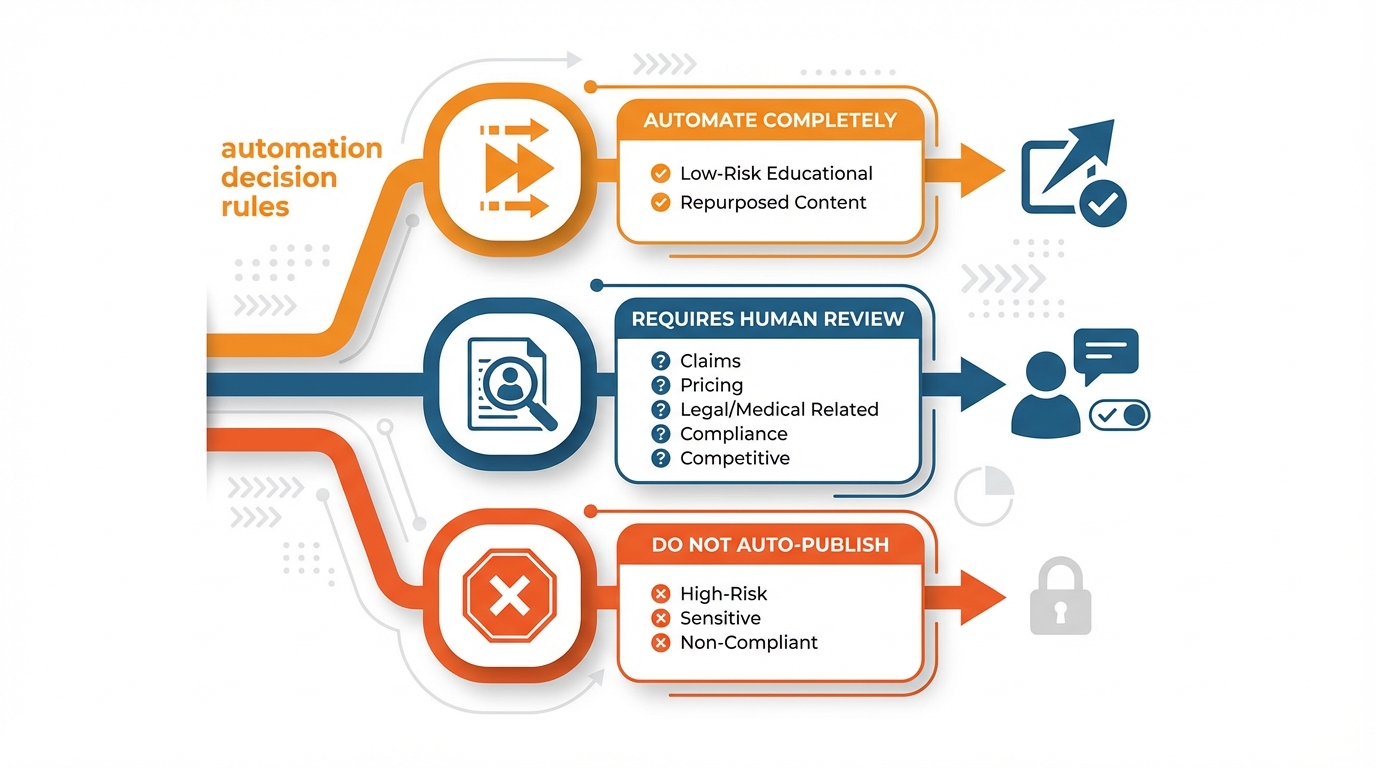
Determine what should be automated completely, what requires a human to look at it, and what should not be auto-published.
If it’s claims, pricing, medical or legal related, competitive, or anything related to compliance it should require review, if it’s low-risk educational and repurposed it can auto-publish.
Personally, I always try to approach automation as a safety-rated factory, sure, it’s faster, but only if the factory has safety protocols in place to prevent wrong links, over-posting, or a message that is factually accurate but contextually is the wrong tone.
Outline your content triggers and governance rules for how your platform will operate at scale
What are the triggers that cause content to be distributed, e.g., new blog post, new video, newsletter, product release, etc.
What does each of these triggers automatically generate, and where does it go?
How about ownership, approval, frequency caps by channel, link-check policies, and nuclear options to ensure that one piece of crappy content does not create a multi-post tsunami.
Once this is well understood, a platform like WoopSocial can really help put the pedal to the metal by producing platform variants and delivering a month’s worth of posts in a single setting, but it’s the architecture that ensures that the automation does not fail you.
Automating content transformations at scale (a step that many tutorials overlook)
So, what if you wanted to learn how to syndicate your content without making it feel like a copy and paste from one platform to the next?
Well, that’s where an atomize once, distribute many model comes into play.
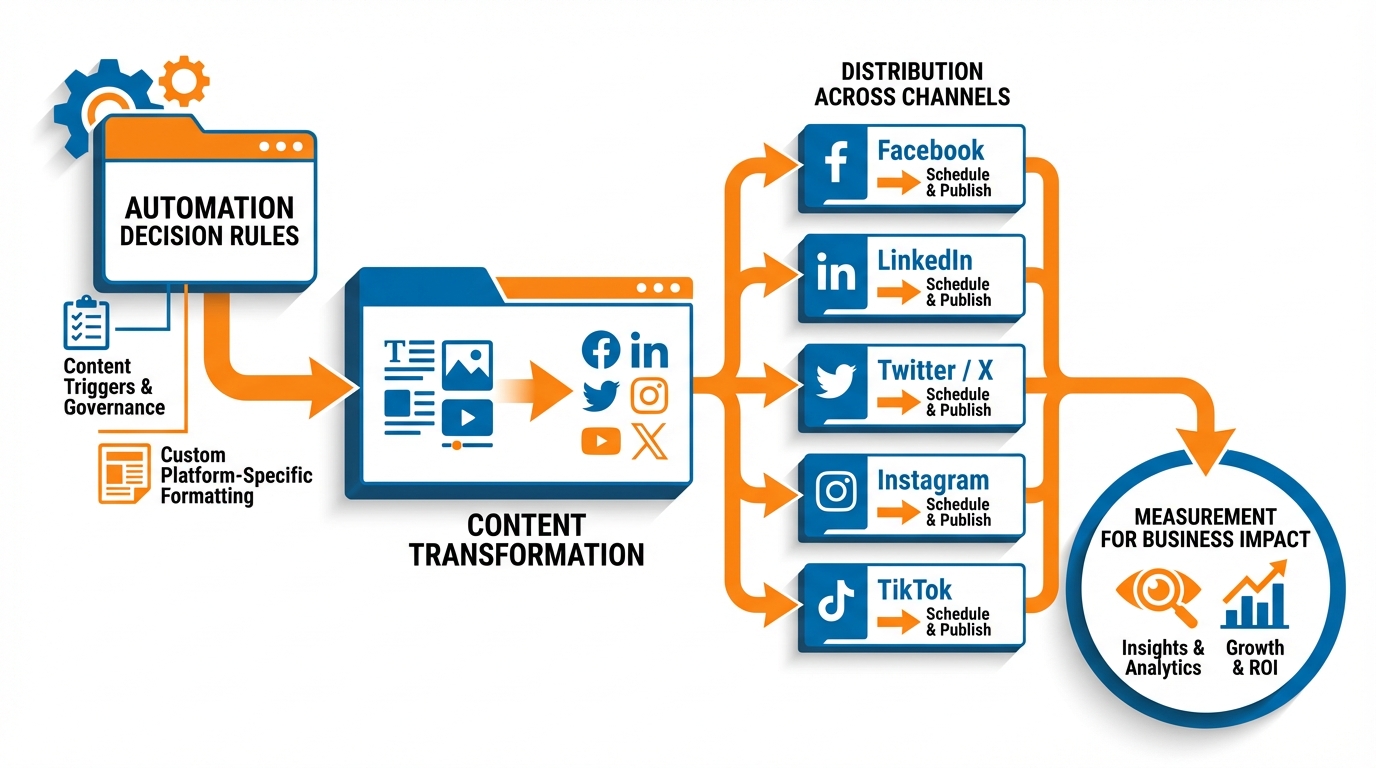
The trick is to create one really valuable core asset and then atomize that down into platform-specific content that feels native to the platform it’s being published on.
The way that I approach this is by thinking of every piece of content as a source file, and then pulling out a lot of different things so that the same concept can serve different levels of intent: people that are just browsing, people that are comparing, and people that are buyers.
And that’s how smaller organizations can really outmaneuver the bigger ones: you don’t have to pay the time penalty of starting from scratch, but you also don’t lose the engagement penalty of copying and pasting.
For starters, there are a certain number of variants you need for an asset to function, and that should be your baseline production requirement:
- You need multiple hooks, because the hook does the majority of the heavy lifting, and on most feeds if the hook doesn’t land the rest of the content is never consumed.
- You need short form and long form copy, because different platforms incentivize different consumption behaviors, and you need cut downs because sometimes a 60 second concept makes a great 12 second arousal device.
- You also need different CTAs, because you don’t want to teach your audience to tune you out, and because different levels of intent should have different asks.
This means your production baseline should probably include at least 3 hooks, 2 caption lengths, 2 different creative styles, and 2 different calls to action per asset, which is already 24 different versions before you even switch up the subject.
Use custom, platform-specific formatting rules
It’s pointless without custom, platform-specific formatting rules. If you don’t observe these, your potential impact is silently curtailed.
For text: Set character limits per platform, confine links to sections where they do not hurt your content’s display (often body text) and ensure that they do appear where they are expected (often profile text or comments), and avoid hashtag-spam by not introducing irrelevant ones that mark your content as low quality.
Same for visual assets: Make sure your visuals are properly dimensioned and fit the safe zone (don’t get cut off), include branding or a logo in a consistent place, and have clear enough fonts for a mobile screen, because most of the time your content will be seen on a mobile device.
If you implement these as rules to transform your content for posting, you have both automation and the signals that tell each platform that your content fits right in.
Add quality control gates
Last but not least, you have to have quality control gates to filter out the shit automation gets infamous for.
Before it ships, test the brand voice, filter out forbidden words and phrases and the biggest potential liabilities, make sure there aren’t dead links, make sure branding is consistent and your colours and logos and templates are intact.
AI is brilliant at first drafts, angles, and versions, but you’re responsible for the final edit, especially when it comes to the details, fact-checking, and tone, and doubly so when you’re a small brand and all that trust is on the line. HubSpot’s write-up on how marketers doubled AI usage in 2024 notes that 86% of marketers who use AI to make written content make edits before publishing, which matches this exact reality.
This is exactly why you need tools like WoopSocial to be set up right: generate a month’s worth of platform-specific variations in a minute, and still apply all of the same filters so automation increases volume, not errors.
Link the workflow: trigger → schedule → publish across channels (without wasting hours)
My best practice advice for this is that if you can nail automation of content distribution, you need to create a pathway from trigger to ‘posting’ in every relevant channel, with as few human steps as possible in between.
The trigger is that the asset was approved. And this should only ever happen once, in your ‘single source of truth’.
This might be your CMS entry for the blog, or your one Google document where you keep your final copy, creative, link, and UTM rules. If you want to standardize that tracking layer, an in-house UTM builder helps you utm tag every outgoing link consistently.
Once it’s approved there, there’s a connection which then triggers the asset to be pushed to your publishing layer, and which also connects to an asset library where all the files are kept to make sure the latest asset is always posted to every channel.
Once you have this pathway working, you stop having to upload, copy, and double-check the same asset five times, and this is where a lot of hours are wasted for small businesses.
The key to that is to make it efficient, to batch the tasks so you’re not switching between them every day.
You have one block of time to review assets, another block to decide how to post them, and then let the machine handle the grunt work of the distribution.
I usually do it on a weekly basis for timely content, and monthly for evergreen, because quality is higher when you’re not under pressure and the time is greatly reduced once templates and rules are established. If you struggle with inconsistency, this companion post on inconsistent social media posting fits alongside this workflow.
The evergreen engine is more important than most people realize: if you share your highest-performing pieces on a schedule, you always have something going, even between launches, and you take some of the pressure off having to constantly create.
Ideally, you should have a system where you have a core asset with multiple derivatives per platform, and a sharing schedule, so that one approval results in a month’s worth of publication.
More often, it’s a question of consistency rather than creativity. This is why I structure the process to be as fast as possible between idea and scheduling.
If I need a bunch of on-brand content ideas, on-brand visual themes, and to be able to schedule a month’s worth of content on all major platforms from a single dashboard, WoopSocial sits perfectly in the middle of this process: Generate variations, automate the brand styling, and then schedule them all in one go.
For you, the advantage is in operations: less tabs to have open, less opportunity for copy-paste fails, and less distance between asset approval and scheduling everywhere, which is the difference between intermittent posting and posting like you have all the time in the world. Content Marketing Institute’s breakdown of B2B content distribution channel usage highlights that 89% of B2B marketers use organic social media platforms to distribute content, which explains why “post everywhere” becomes operationally painful without a system.
And automation can also go boom, so I put fingers in the dyke where it does the most damage:
- Duplicate posts are caused when two triggers occur for the same asset, so you avoid that with a single approved flag, an idempotent identifier per asset, and a rule that says only one pipeline can own publishing.
- Wrong formatting per platform is caused when one generic caption gets copy-pasted across all platforms, so you implement formatting rules per channel prior to scheduling, including character limits, link placement, and creative dimensions.
- Overposting is caused when you batch and don’t have frequency caps, so you implement limits and spacing rules per channel, so that one approval does not create a posting cascade.
- And outdated CTAs are the toughest to track, so you store them in the source of truth and treat them like dependencies: update once, and every scheduled post that uses that CTA updates as well, rather than being a stale copy sitting on a platform somewhere.
Focus on measuring the metrics that count, and base the automation policies on these results
If you’re trying to learn how to automate content distribution, quit measuring content performance by engagement and focus on the 3-4 metrics that correlate with revenue.
For most small businesses, my list is pretty short: clicks to core pages (pricing, services, case studies, comparison pages), core actions (started signup, demo, etc.), and assisted conversions where social wasn’t the last click, but clearly helped warm up the user leading up to a conversion.
This is where surprises are often hiding: I’ve seen content with average like counts delivering 2-3x the visits to a pricing page as content that had peaked in the feed as seemingly more successful because that content lined up with purchase intent.
First, you have to measure before you can optimize, so establish clean inputs before you start fiddling with automation filters.
You should utm tag every outgoing link, name consistently in a way that Future You will recognize, and organize your channels by how you sell, not how platforms define themselves.
That clarity comes from one CTA per post whenever possible because it prevents messy results and makes automation filtering concrete: this post drives to demo, that one drives to newsletter, another one drives to case study.
If you do this, your automation filters aren’t just guesses, they’re a testable framework. Salesforce’s State of Marketing research highlights for 2023 points out that marketers predict they’ll use nearly twice as many data sources in 2023 as they used in 2021, which is exactly why clean naming and governance matter more over time, not less.
From there you create a basic monthly loop where you make the machine smarter: find what’s working, batch that into evergreen templates, and kill the shit that’s not working as fast as humanly possible.
“What’s working” needs to be defined in downstream metrics rather than “meh, I like this one”, for example: this post template outperforms others for high-intent clicks, in less time than copywriting it fresh.
I take the top 10-20% of “evergreen candidates” and turn them into a template: the hook, the proof stack, the CTA, and the landing page match.
And this is actually where a tool like WoopSocial really becomes valuable: you can generate more on-brand versions of what’s working to create an evergreen funnel driven by data, not infinite creativity. If you need a workflow framework that supports repeatable batching, this weekly social media system pairs well with the “monthly loop” described here.
The only way to maintain that evidence without too much additional process is through experimentation.
You can A/B hooks and CTAs, time shifts in small pockets, and distribute in batched intervals to attribute the impact.
You also have to know when not to automate: launch messaging where the details are updated hourly, sensitive messaging where tone is paramount, claims messaging where regulations are involved, and anything that could lead to context-sensitive community management. Gartner’s 2023 survey on first-party data and privacy underscores the reality that 60% of marketing leaders believe collecting first-party customer data while balancing privacy and customer value will be more challenging in 2023, which is another reason to keep deliberate friction where risk is high.
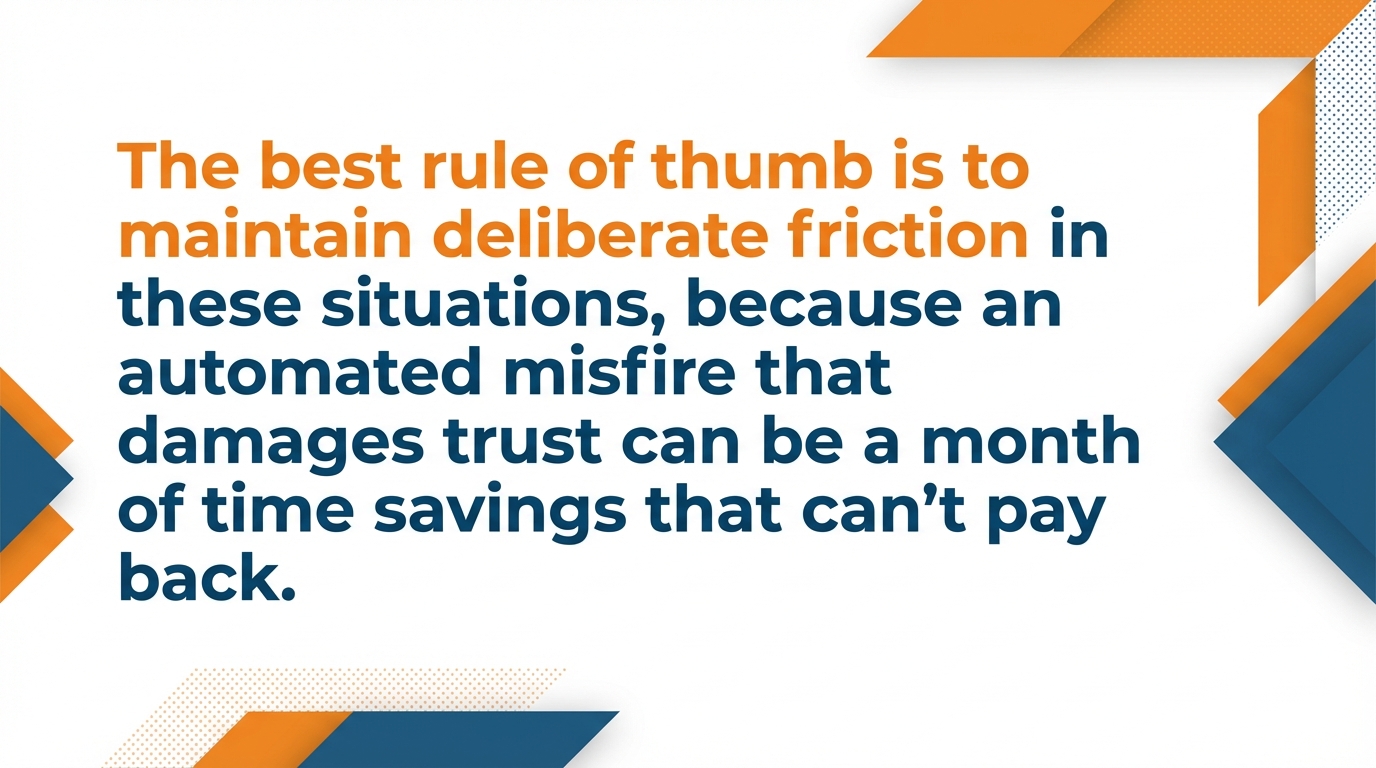
The best rule of thumb is to maintain deliberate friction in these situations, because an automated misfire that damages trust can be a month of time savings that can’t pay back.
An automated distribution engine should stack, not just share
If you take only one idea away from this post on automating content distribution, make it this: plan your architecture before you plan your transformations, plan your transformations before you plan your tools, and plan your analytics along the way.
Otherwise you are just being random faster.
A content atomization engine is something different: it makes many versions of each asset, it surrounds each version with guardrails, and it informs you month over month about what really works when it comes to intent signals and lead gen. Adobe’s 2025 AI and digital trends for customer engagement reports that 78% of customers want consistent brand experiences, which is exactly what guardrails protect.
Keep it small on purpose.
Start with one type of recurring content that you know you can deliver, and attach it to only 2 or 3 channels that each have a defined purpose.
This is where small organizations succeed: a contained, healthy process will always outpace a sprawled, broken process.
When the process is stable, scale by adding one channel or one new set of variants at a time, because every new output increases quality assurance, link maintenance, frequency rules, and the likelihood of mismatched messaging.
The easiest thing you can do this week: take a piece of content you already produce on a regular basis - e.g. a weekly tip, case study, quick video, monthly newsletter, etc.
Before you produce it, decide on the variations: 3 hooks, 2 caption lengths, 2 creative variations, 2 calls to action, and any hard constraints like character limits, link positioning, claims to check for, etc., and a dead link check.
I produce the variations first because it makes content a manufacturing function: you’re not crafting distribution, you’re producing inputs into a well-understood system.
Next, define a publish once, distribute everywhere workflow that triggers from a single approval point: one source of truth gets approved, and all the rest is automatically created, formatted by channel, and cued up within your frequency caps.
You’ll begin to experience the flywheel effect when your top 10 to 20 percent of content gets to be a repeat-and-remix motion, rather than a one-time hit.
If you’d like to move even faster without giving up consistency, WoopSocial can help you produce on-brand variations and schedule an entire month’s worth of content in a single go, but the true acceleration comes from the system you just established: standardized inputs, controlled outputs, and analytics that keep perfecting the machine.
Related reads
6/14/2026
YouTube API Alternatives in 2026: start developing right away
Skip the YouTube quota system caps and API calls. Compare the best YouTube API alternatives with code examples, pricing and understand recent changes.
6/12/2026
Best Facebook API Alternatives for Developers in 2026 for direct access
The Facebook Graph API review can take weeks. Compare the best Facebook alternatives for posting, scheduling and more.
6/12/2026
Best LinkedIn API Alternatives in 2026 - instant access for developers
See a list of all the LinkedIn API alternatives for all types of use cases so you can skip the waiting time and get right on automating your work on LinkedIn.