Claude Social Media Skill: What It Really Means (and How to Use It Without Headaches)
Claude Social Media Skill: What It Really Means (and How to Use It Without Headaches) If you are Googling “claude social media skill” you are likel...
Claude Social Media Skill: What It Really Means (and How to Use It Without Headaches)
TL;DR: Post from Claude itself right now - setup takes just 70 seconds. You can use this social media Claude skill to post to Facebook, Instagram, Threads, X/Twitter, Pinterest, LinkedIn, YouTube and TikTok.
No need to copy and paste any longer. By using the WoopSocial MCP in Claude, you can now directly post:
- Go to Settings in Claude
- Click on *Connectors and Add new connector
- Name it WoopSocial, enter the URL: https://api.woopsocial.com/mcp
- Click Add, then click Connect and authorize
See all instructions here: https://woopsocial.com/social-media-mcp
That's it. Start a new chat and tell Claude to list your social media accounts. If it works, you're live.
Using Claude Code? Install our companion skill for smarter multi-step workflows: '''npx skills add woopsocial/woopsocial-social-media-skill'''
If you are Googling “claude social media skill” you are likely looking for one of two things and conflating the two can cause unnecessary headaches.
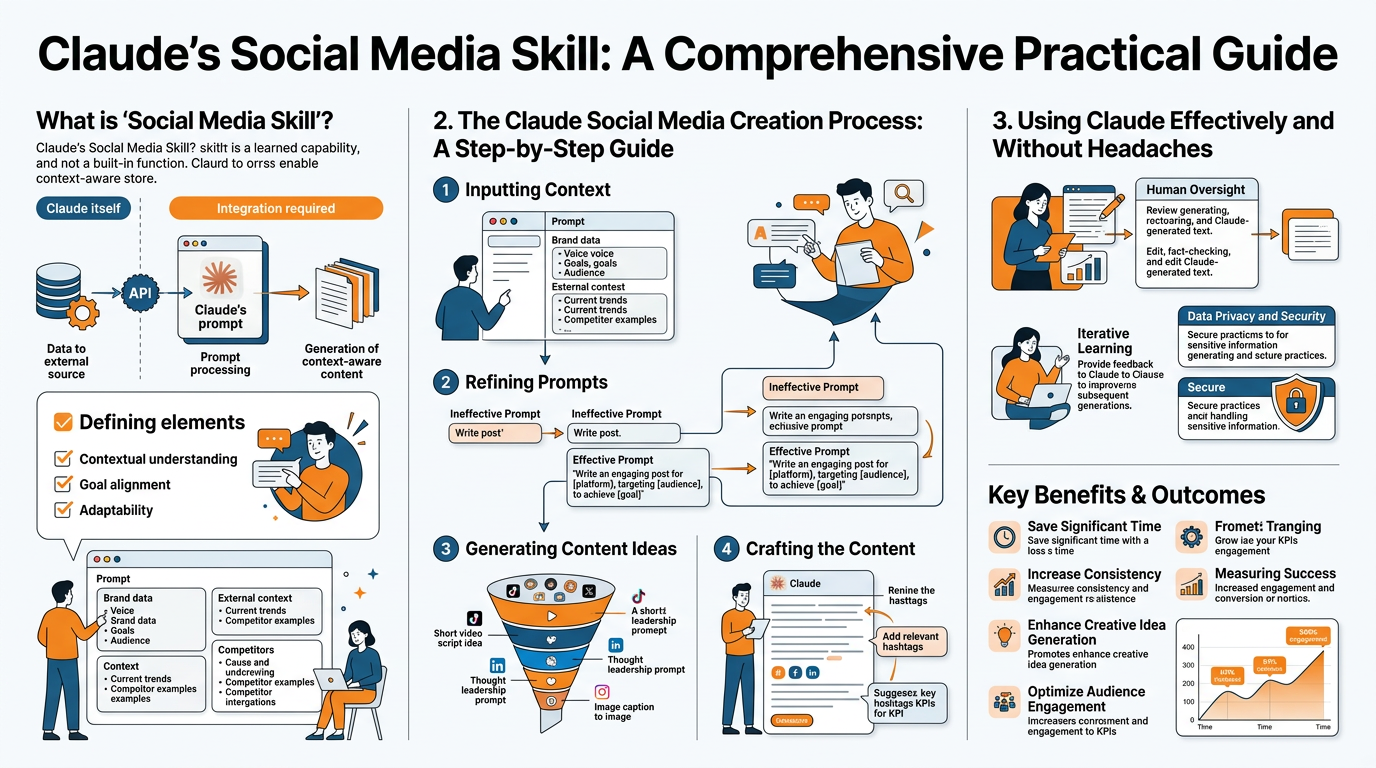
First meaning: a prebuilt Claude Skill that you install. It’s a bit like a formulaic set of instructions, prompts, and connectors that help Claude function in a certain way, as a social media strategist, say, or a repurposer, or an auditor. If your priority is speed, consistency and sharing across your team, this is the path for you.
Second: we talk about using Claude as a social media specialist superpower, but not just as a thing you download. In this case, the superpower isn’t a tool to install, it’s a formula to copy: You ask Claude to help you understand your audience, refine your messaging, create social media content that’s right for each platform, and then analyze the results to do even better next week. For a small business, that’s the holy grail, because it means that instead of a series of random posts, they now have a growth loop.
In this article, I’ll show you how to do both, correctly. You’ll learn how to select the right type of Claude social media skill for your desired result, how to configure it for safe operations so you don’t endanger your brand or publish something unintended, and how to execute a complete workflow that will get you the outcome you want: planning to content to publishing to analytics. The other top 10 pages for this search term are mostly just listings. I’ll provide you with decision-support, a closed-loop workflow you can execute weekly, and practical safety rails so you can function with confidence, not just tinker. For a deeper take on repeatable systems, see this guide on a weekly social media system.
Also, public conversation about AI on social platforms is massive: the Stanford HAI AI Index Report 2024 (Chapter 9) notes Quid analyzed over 7 million social media posts (Jan-Dec 2023) for the chapter’s social-media analysis.
Picking the correct Claude social media skill for the job (instead of just selecting the top result)
The reason you can’t tell a difference between one Claude social media skill from another is that the directories order them by demand, not by impact.
In reality there are only 5 skills you’ll ever need for your small business:
- Strategist or writer skills that can convert your offer into social media content
- Repurposer skills that can help you get the most out of the asset you have
- Auditor skills that can help you identify what’s not working
- Publisher or connector skills that can help you upload approved content onto your social media accounts
- Social listening or research skills to help you identify what your customers and competition are saying
The first thing you’ll do is choose the skill that solves your current constraint: if it’s sounding consistent, start with strategist or writer skills, if it’s getting the most out of your time with a piece of content you already have, start with repurposing, if you’re posting consistently and still not seeing growth, start with auditing, if it’s just a matter of getting it done, start with publishing, and if it’s just a matter of knowing what to talk about, start with listening and research. If your problem is consistency specifically, this breakdown of inconsistent social media posting pairs well with the workflow below.
Second, evaluate things the listing almost never mentions.
Check what platforms are supported, because that social media skill really only means LinkedIn and X which doesn't help you if your customers are on Instagram or TikTok.
Check where it can run, because a skill that only works in Claude Desktop is worthless if you work in Claude Code or want to automate via an API.
Look for signs it's well maintained, such as recent updates, responses to issues, and good installation instructions, because a badly maintained skill will fail silently the moment the platform updates.
Take data and privacy into account as part of your purchasing decision, rather than as an afterthought: if a skill requires account authentication, an API key, or the ability to read your DMs, you should know what data it's storing, who it's sending data to, and whether it requires explicit approval before posting anything.
Finally, have a clear idea of what success looks like for you before you even install a skill: do you want to generate on-brand post ideas, have a series of scheduled posts, have a weekly content testing strategy, or see leads and sales growth?
I choose based on the business model and funnel and then select the lowest common denominator of skills that fills the loop from attention to action.
If you’re a creator, you need a content engine and repurposing so one idea turns into many posts without burnout.
If you’re local, you need offer-first posts, proof, and community cues that drive calls, bookings, and walk-ins, plus just enough research so you stop copying generic trends that fail locally.
If you’re B2B, you need a strategist who can turn expertise into POV posts and case-study snippets that get people from awareness to conversation.
If you’re ecommerce, you need product storytelling, UGC angles, and a hook and offer testing cadence.
You should be able to define your loop in 1 sentence: who you want, what you want them to do next, and what content formats get that done, and then select only the skills that serve that loop.
Another nuance of the build vs buy question: you can still have a collection of skills that will give you all the flexibility in the world and still end up with a stack of drafts and no actual consistency.
If your core outcome is excellent, on-brand content and consistent publishing across a number of platforms, then you will almost always be better off with a single brand-aware tool to generate that content for you, and a single reliable way to publish it, rather than having five specialist tools that each cover 10% of your use case. If you want more on this, compare approaches in social media automation.
Which is also why I like things like the combo of Claude for strategy, headline and caption variants, and then WoopSocial for scheduling a month of on-brand posts at once while maintaining your branding, colours and tone, all while you get to focus on offers and talking to customers, not fiddling with tools. If you want a direct way to speed up caption variants, the AI social media caption generator fits this exact use.
How I got it to work (Claude surface, permissions, and a clean operating checklist)
The biggest implementation mistake I see with any social media Claude skill is that you use it as a plugin and never ask the hard question: what are the details of where this runs, and what triggers it.
A Claude skill that works flawlessly in Claude Desktop may not work at all in Claude Code, and an API-based implementation may work great but never execute because you never specify the precise action that kicks it off, whether typing a command, running a file, or sending an approval message.
Once you nail surface and trigger, you stop sending drafts into the void and start operating a system you can replicate every week.
To make this operational in practice, you have to have a practical operating protocol that you can follow even when you’re busy.
You choose your runtime deliberately: Desktop if you want a hands-on experience, Code if you want it closer to your content and dev workflows, and API if you want it hooked up to business APIs.
You then check that your authentication works as the first thing you do, because the vast majority of errors are due to a missing API key, an expired OAuth token, or an incorrectly set permission.
You then set a clear written definition of what the skill can and cannot do and what it may or may not access, because SMBs don’t have the luxury of a service that silently accesses the wrong account or posts to the wrong account.
You then implement a gating step before publishing: I make the skill generate a preview of its pre-publish content for approval, so nothing can move from creation to publishing without a human approving it.
When it breaks, there are patterns, and you can identify it quickly, once you know what to look for.
- Skill not loading? Surface mismatch, bad install location, or dependency didn't initialize.
- Skill loads, but can't do anything? Usually missing environment variables, permissions were revoked, or the token is otherwise valid but too limited in scope to actually publish.
- Works yesterday, but not today? Either rate limits, or they changed something in the platform APIs. That's usually captions generated, but can't post.
- Funny looking posts? Mis-matched formatting per platform, like line breaks failing to survive, hashtags getting truncated, links not showing right, which is why I always make at least one post per platform before I trust a new pipeline.
What I fear most is accidental publish. I consider anything that can post to be a production system, and treat it with the same respect. I do not consider it a fun little science experiment.
Safety-by-design allows you to be fast without risking your brand.
We operate with least-privilege permissions, meaning the Claude social media skill only has the permissions it requires to function, and we isolate test accounts and/or environments when possible, so that initial errors aren’t impacting your actual customers.
We also track what was generated vs what was posted, allowing you to audit the decision if you offer regulated products, make sensitive claims or share customer stories.
And, we maintain a human-in-the-loop for brand and compliance even if the rest is automated, because speed is irrelevant if you end up releasing something that generates refunds, screenshots or legal issues.
In reality, I like a flow where Claude generates & polishes, you approve, and a dedicated publishing platform like WoopSocial offers consistent cross-platform posting with your branding applied, so you can maintain the automation benefits without sacrificing your control.
One relevant research note: Anthropic found that Claude 3 Opus arguments did not statistically differ in persuasiveness compared to human-written arguments (as measured by participants' stance shifts) in its study on how persuasive language models are, using 4 distinct prompting styles and ~250-word arguments.
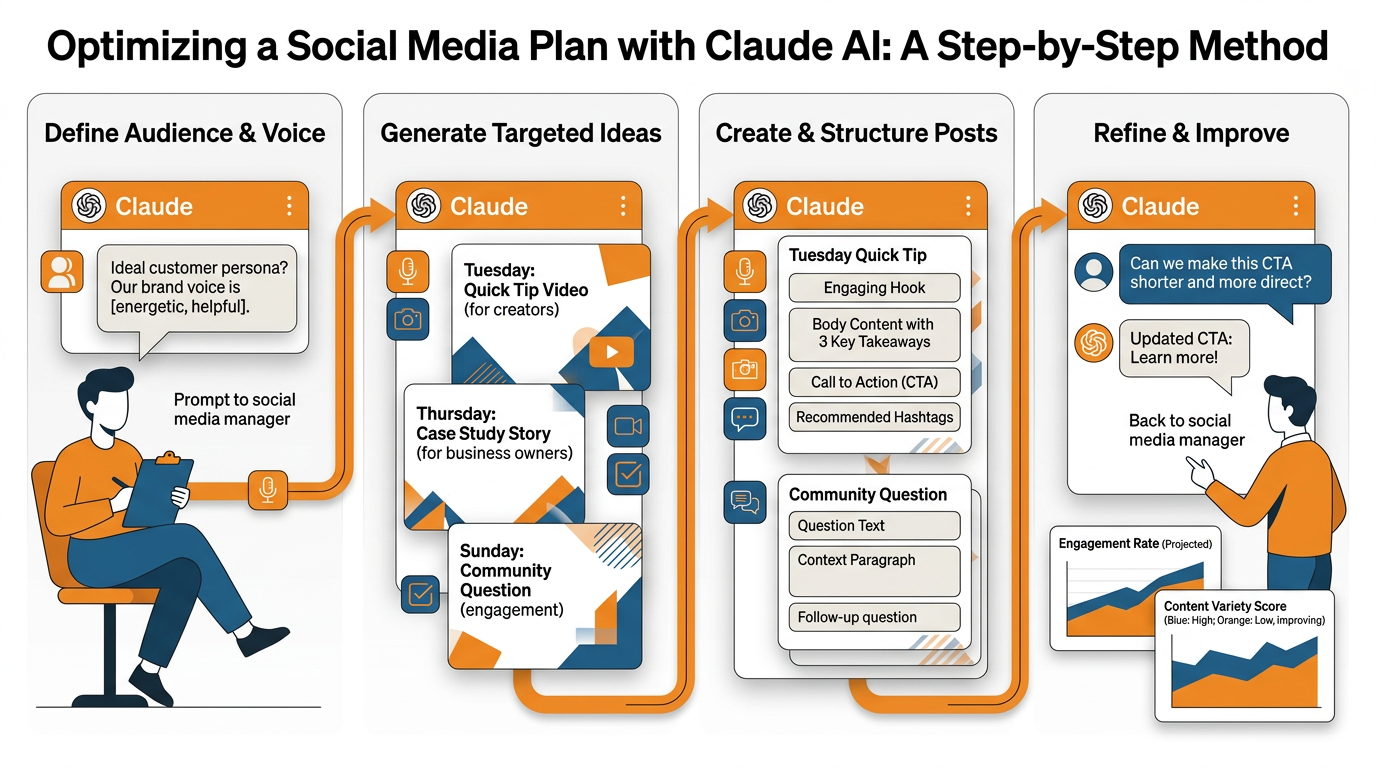
My week-by-week workflow: strategy -> production -> scheduling -> iteration (the missing piece that most results fail to provide)
The Claude social media skill only stops being generic when you give it actual strategic inputs, not vibes.
Before you generate anything, you need to specify 5 things: your top 3-5 audience pains you hear on real calls and DMs, your positioning in 1 sentence, your current offer and the next action you want, your proof assets such as testimonials, before and afters, mini case studies, and objections you can answer, and your content angles tied to real distribution opportunities.
The last part is the cheat code: you don’t brainstorm into a void, you choose angles that naturally have legs like a partner feature, an event you’re attending, a customer story you can tag, or an industry conversation that’s already happening.
I keep this list tight on purpose because 1 strong angle with real proof will outperform 20 generic posts that sound fine but don’t do anything.
Next, you grow your reach without paying for ads by being a distributor, not just a maker.
You identify all the people you should know in your niche right now: 20 local or industry accounts, 20 creators or micro-influencers, 20 businesses that share your target audience but don’t compete, 10 communities or newsletters your customers are already in.
Then you make a quick list of people with two bullet points per person: (1) what they value and (2) what you can share that will make them shine.
The share-friendly asset is the leverage: a bite-sized insight post with a clear takeaway, a mini checklist graphic, a small data point from your project, a before and after that’s easy for someone else to share.
When you do this, a small business can get one asset to get multiple impressions in a week, because you’re designing for distribution first, not praying that the algorithm will save you.
Production is where most of the time gets lost, so you need a system that generates platform-specific versions from a single core idea while keeping your voice intact.
You begin with a core idea, then ask Claude to generate from that core idea by dialing in four variables: hook, length, CTA, and visual direction.
For instance, you might ask for a curiosity hook, a contrarian hook, a proof hook; one short version, one medium, one long; one CTA that drives comments, one that drives profile visits, one that drives clicks; and some simple visual direction like one bold headline, two support lines, one proof element.
I do a fast quality control pass by testing for specificity: if a post cannot be traced back to a real customer pain, a real offer, or a real proof asset, it gets rewritten.
That’s how you maintain speed without sounding like all the others.
But planning is where you reclaim your days: you can dedicate one day a month to theme selection when possible, schedule to the exact times your audience is most active, and quit nitpicking daily.
The actual process is straightforward: you lock in your themes for next month, develop and refine the content variants, and schedule them so that each week has a balance of pain, proof, process, and pitch. If you want a tighter structure for this exact step, use a social media content calendar.
If you prefer Claude for its creative and editing capabilities, a branding oriented tool like WoopSocial can fill in by instantly transforming your prompts into a month of pre-posted content, unifying your brand voice and look across copy and graphics, and scheduling the content across 8 channels from a single interface. If you need the planning layer too, the AI social media content planner matches this workflow.
Then you simply loop back once a week to monitor the only metrics that ultimately drive your business: reach for distribution, saves and shares for engagement, profile visits for interest, and link or lead traffic for sales.
You then use those results to tweak your content for the following week: amplifying the top 20 percent of formats and messages, filtering out the stuff that gets the former but not the latter, and recycling the content that gets the latter but not the former by swapping out the headline and graphic, getting more mileage from the same idea.
A related measurement angle from research: the arXiv paper on predicting relative reaction to social-media posts frames evaluation as a pairwise “which gets more reaction” question, and reports best performance from a fine-tuned FLANG-RoBERTa cross-encoder using tweet content plus Claude-generated responses.
Trust, compliance, and account security when Claude can post (the secret deal-breakers)
The instant your Claude social media skill stops writing and starts posting you are no longer iterating on copy, you are running a production process.
Writing a post is relatively safe because someone can review the content for tone, factual accuracy, or the ever popular bad link before it hits the wire.
Posting is different, because a single erroneous response can lead to a customer complaint, lost revenue, or platform review in the blink of an eye.
You can mitigate that by treating access to posting like access to production: only use what is needed, reduce rights to the minimum necessary, and assume that every single automated action is worthy of a paper trail so you can explain what happened when questioned about the post.
Unfortunately, the platforms do not have a position of indifference on automation, and their policies are usually enforced through automated means rather than human ones.
It’s possible to trigger rate limiting, unusual activity, or repetitive posting violations, even if your content isn’t problematic.
The best defense for a small business is to gate publication through human review because that generally keeps you within the bounds of the intended policies and removes the risk of potentially violating activity bursts due to automation.
I’ve watched brands lose weeks of engagement because an automated publishing process posted a few times too many after a token renewal or because it started retrying a failing post in a loop.
You won’t have that issue if you introduce at least a single approval step, and if you decouple content creation from publishing, even if everything else in the process is automated.
The real guardrails are less exciting and that’s what makes them effective.
You have an approval process where nothing gets published without your approval and you have content parameters that you ensure Claude sticks to every time such as no sensitive assertions, no medical or financial promises, no unverified data, no before-and-after implications without evidence and no referencing other companies in any way that might be considered libelous.
You also set brand voice parameters that prevent Claude from veering into hype or sarcasm or controversy if your brand is not that way inclined.
I do two modes deliberately: research mode where I let Claude roam and investigate and brainstorm, and posting mode where it is restricted to parameters with a final review that you do for compliance, accuracy and customer value; if you are looking to scale consistently, then an added brand aware layer in WoopSocial can help with tone and visual consistency, but you still have to retain approval as the last hurdle.
If you require social listening or competitor research, you can still reap the rewards without the risks.
You have Claude analyze trend data you are authorized to work with such as your own exported comments, DMs you have permission to study, newsletters, public press releases and manually gathered examples you paste in, and then have it categorize things like repeated concerns, hooks that are working and strong offers.
You avoid overreach by only processing small representative samples rather than trying to scrape entire networks, and you attribute your sources so you can justify later.
If you actually require full scale, you rely on official APIs or licensed datasets, because the real catch is not whether the Claude social media skill can retrieve the data, it is whether that retrieval endangers your account, your brand and your customer’s trust.
As one example of how structured classification can get, an arXiv study on zero-shot crisis tweet classification includes 16 possible humanitarian classes (plus an informativeness decision) and reports results with macro, weighted, and binary F1-scores.
How to turn a Claude social media skill into predictable growth (without tool overload)
The true victory with any Claude social media skill is not your initial good results, it is the repeatable process that you can execute when you are busy with client work.
The prescription is simple: choose the skill type that addresses your current bottleneck, set up the skill correctly on the appropriate Claude canvas with the appropriate permissions, execute the same weekly workflow of plan to create to publish to evaluate, and gate publishing with guardrails that require human sign-off and block off-brand assertions.
Once you do this, social media moves from being a creative affair to a reliable cadence.
For it to translate into growth for a small business, start smaller than you think: 1 workflow, 1 distribution channel, and 1 measurement habit.
Meaning you do 1 weekly 60-min sprint where you create 12 posts out of 3 real customer pain points, publish 3 to 5 of them, and then you track only 4 metrics the week after: reach, saves+shares, profile visits, and clicks-leads.
I use that mini-dash because it corresponds to the funnel: reach represents distribution, saves-shares represents resonance, profile visits represent intent, and clicks-leads represent revenue traction.
After 2 to 4 weeks you will usually identify a trend, like how a proof first post can attract 2 to 3x profile visits compared to a generic tip post even at the same reach, which shows exactly what to do more of.
Before you add research to stop guessing what to say, auditing to diagnose why posts stall, and partnerships to multiply distribution without paying for ads, you need to demonstrate ROI on that tight loop.
Before you expand the Claude social media skill footprint, you need to show return on the current investment.
The side benefit to this is focus: each new feature has to demonstrate how it improves a metric you are already measuring, otherwise it’s just tool sprawl, more drafts, more tabs, less publishing.
Once I want to move from ideas to having a month’s worth of content already planned, crafted, and posted across all the big channels ASAP, I use Claude in conjunction with WoopSocial (as the branding & execution arm), so my consistency doesn’t rely on what day I have.
They really help me maintain quality: Claude gives me the ideas, hooks, and channel-by-channel adaptations I need, WoopSocial uses those to crank out a month’s worth of branded content ASAP, while maintaining your tone and aesthetic consistency, so you have the key ingredients that really allow you to grow your audience: continuous creation, continuous quality, and continuous optimization, without the extra work.
One more macro-data point for context: Anthropic’s 2025 index report on uneven enterprise AI adoption across 150+ countries notes “Directive” conversations rose from 27% to 39%, and coding dominated at 36% of Claude.ai conversations (in the report’s categorization).
Install it now
Connect it in 60 seconds:
- In Claude, go to Settings → Connectors → Add custom connector
- Name: WoopSocial / URL: https://api.woopsocial.com/mcp
- Click Add → Connect → Authorize
Related reads
4/27/2026
B2B SaaS social media benchmarks: Set the right targets.
B2B SaaS social media benchmarks: Set the right targets. The trouble with defining B2B SaaS social media benchmarks is that it's an inherently impe...
4/25/2026
Building a personal brand as a technical founder (without becoming a creator)
Building a personal brand as a technical founder (without becoming a creator) Creating a personal brand as a tech founder should feel less about ma...
4/20/2026
Creative Post Ideas for Sustainable Brands (That Don’t Sound Greenwashy)
Creative Post Ideas for Sustainable Brands (That Don’t Sound Greenwashy) That’s not what creative post ideas for sustainable brands should look lik...