BTS Content: Quick & Dirty Outperforms Polished Production
Unlock the power of authentic BTS content. Learn how SMBs can integrate a simple content capture routine to boost engagement and achieve business goals.
Quick and dirty BTS content will always outperform polished production
Quick and dirty BTS content will always outperform polished production because BTS isn’t advertising. It’s documentation. No one is judging your color grade or your dolly zooms. They want to see signs of legitimacy, proof of labor, and details that could only emerge if you’re really in the trenches doing the work. When I began to approach BTS as documentation rather than filmmaking, engagement increased because the content felt authentic and detailed, rather than fabricated.
The harsh reality for SMBs is that you don’t have a team, you don’t have extra hours, and you can’t stop everything to create media. If you turn BTS into a side project, it will be dead by week 2. The goal is to create a content capture routine that hums in the background as you serve your customers, fill orders, and help your clients.
In this article, I’m going to share with you a consistent and affordable way to capture content that integrates into your daily routine. You’ll discover the few pieces of equipment you need, the simple habits you can implement to get great footage in less than 10 minutes, how to share and reuse it without spending an entire day editing, and how to match each BTS piece of content with a specific business outcome (like generating more leads, making more sales, or establishing more credibility). For more on behind-the-scenes content, see behind-the-scenes content.
When it comes to capturing behind-the-scenes (BTS) footage on a budget, the first thing to think about isn’t the camera.
The first thing to think about is the capture system. Now that we have a camera, how can we cost-effectively take behind-the-scenes photos and videos?
Again, you don’t build the habits you want. You build the habits you have.
So decide 2-4 places you will normally be working and just leave a camera there:
- On a shelf in front of my workbench
- On a tripod in the corner of my office
- On a clamp facing the counter of my store
- On the dash of my car to give people context for my micro-vlogs
Each of these makes it as easy as possible to take a photo or video, because the more difficult it is, the less often you’ll do it.
Yes, I know, you’re saying “but moving the camera from one side of the room to the other isn’t that hard.”
But when I’m dealing with customers, I can promise you it’s hard enough to never happen.
Now set some automated guidelines to help you consistently give off the impression of a plan. If you want to build a repeatable cadence fast, a weekly social media system for can help connect this routine to consistent publishing.
Choose one or two static camera positions for each scene and establish a rule of thumb for where to point the camera.
From the head-on position, use the wide shot to capture your hands and tool, and the tight shot to show a close-up of your hands, a package you’re working on, or a screen in your control.
Establish a ritual for when you hit record and stop, so that this starts to become second nature.
The routine I try to follow is: hit record before I start something; capture 8-20 seconds of me performing a single motion; then stop.
I do this because ultimately I think most platforms value completeness over perfection, and I want to be able to easily share this content across different formats and platforms without needing to edit it.
Capturing footage keeps you from spending unnecessary time on BTS that you can't use, and it's where most small businesses go wrong.
Focus on smooth footage and audio: blurry is swipe, and bad audio is worse than bad lighting.
Take a 3-second moment before recording to inspect the background for distracting material and brand exposure, as people do notice the mess and it subtly suggests disorganization.
Check for open laptops, client paperwork, shipping labels, whiteboard notes, and credit card screens; all it takes is one piece of private info to destroy months of goodwill.
If you can't control the situation, look up, focus on the hands, or shoot from the back when needed.
Last step: make sure your videos are discoverable so they don’t go to die in your camera roll.
Create a single BTS Inbox folder in your phone and fill it with every video you shoot as soon as you shoot it, then use a simple naming convention that will help you find the video later on: date, location, activity, result.
Once a week go through them and delete duplicates and the portions that are wasted time, and save the gems to a “keep” folder so that you have an arsenal of BTS videos that can be posted when you get busy.
It’s a tiny digital organization habit that will stack up quickly: you’ll no longer lose videos, you’ll post more regularly, and your BTS will become a valuable resource rather than a graveyard of recorded content.
Shooting BTS content with a budget
(and ideal minimalist gear: ie. the essentials)
Making behind-the-scenes material more affordable is all about changing your mindset: Instead of buying as a filmmaker, buy as an operator.
The purpose of BTS is to show the work happened without making the work take longer.
This is why my stack is stability > audio > light > everything else: Stability is the deciding factor between watchable and immediately discarded - a shaky video is recorded by accident, not intended as proof of anything.
Audio is the credibility slider because although people will accept bad video, they will not accept bad audio (muffled, windy, far away, etc.)
Light is important but with BTS most of the time you can resolve 80% of the lighting issues by moving yourself and the phone 20 degrees toward a window (or away from the overhead fluorescent lights).
Being phone-first is a superpower when you focus on playing to the phone’s strengths and work around its weaknesses. If you want more smart social media automation for publishing these clips once they’re captured, see smart social media automation for.
Since you have an amazing camera already, with auto exposure and stabilization, use the environment to your advantage: place your workspace by a natural light source, move your body so that the window lights your face or hands, and avoid backlighting that makes you a silhouette.
For stabilization, you don’t need a magical gimbal to win; you need a cheap, fast, always-there solution like a small tripod, a clamp mount, or even a rigid surface you return to daily so your framing remains the same.
For audio when moving, solve the distance problem: keep the mic near your mouth or the phone near the action.
I’ll often record voice notes or quick spoken context right after a clip when the environment is loud, then overlay it later if needed, because clear explanation trumps noisy realism every time.
Those upgrades should make life easier, not be trophies on your kit.
If you’re constantly reshooting clips because your mounting hardware isn’t quite solid, you shouldn’t be buying a better camera. You should buy a better mount.
If you’re consistently getting garbage audio because you’re farther away from the mic than the distance between shoulder and fingertips, then you shouldn’t be spending money on a wide angle lens…you should be spending money on a basic wired or wireless lavaliere.
And if you’re constantly trying to get a lit shot but you’re working in the back room of a pawnshop, you shouldn’t be buying a full lighting kit that’ll take 15 minutes to set up and you’ll never use.
I tend to skip “would be nice” equipment that adds decisions, battery charging, bluetooth pairing and setup to my process because when you work in a real small business environment, the best equipment is whatever you can turn on in less than 10 seconds without having to think about it.
Respect is the final budget BTS task because the lowest-budget error is also the highest.
There’s a way to engineer respect into your workflow with low lift: scope out camera angles that ride on your hands, tools, and products rather than your screens and papers; identify just one spot where you’ll never shoot, for when you’re handling client data; and develop a quick consent motion to run through before filming people, to avoid deleting half your shots.
You can also develop a reflex to blur: If a license plate, label, whiteboard, or screen suddenly shows up in a frame, treat them like a default blur rather than a question mark.
That way, you can shoot liberally, share early, and still keep your credibility. This also aligns with brand trust findings in the 2025 Edelman Trust Barometer: Special Report — Brand Trust, From We to Me, where 80% of people trust brands they use, and 73% say their trust in a brand would increase if it authentically reflected today’s culture.
Getting budget-friendly behind-the-scenes footage with timeboxed sessions and a shot list
The problem with a BTS list is it won't tell you what to shoot today, so you don't shoot anything, or you shoot random things you can't use.
Shooting BTS on a budget becomes trivially easy when you replace inspiration with a repeatable checklist that runs in the background of real work.
I treat BTS like a receipt: proof the work was done, progress that shows it moved, and a result that makes it feel done.
If you show those three things, you don't need fancy edits, multiple takes, or a perfect environment because the story is inherent to the structure.
Make it timeboxed so it never conflicts with customers, deadlines, or deliverables.
You need just three micro-sessions, three minutes prior to beginning, two minutes during a natural break, and two minutes afterward, which sums up to just 7 minutes to produce a full set of valuable assets.
Prior to beginning, you capture the context and the baseline so people understand what you’re about to address.
During a break, you capture one clear milestone that proves progress, not just planning.
And at the end, you capture the results and one-line context, while it’s fresh in your mind, because a 10-second description can make a simple clip look like an expert how-to.
The checklist needs to impose a before process after flow, naturally.
Before is the chaos: the blank counter, the broken piece, the order ticket, the ingredients, the raw goods, the still sealed boxes.
Process is the evidence: one motion, one decision, one tool, one comparison, one test.
After is the reward: the completed item, the fulfilled order, the tidy station, the happy customer’s smile if relevant, or the completed screen that says done.
I do it because full cycles get better engagement than mere moments, and engagement is the most affordable distribution in that it tells platforms that you’ve enjoyed yourself.
To nail down diversity quickly, there are 5 shots you take that show most micro-entrepreneur functions: full frame for the backdrop, hands for the legitimacy, screen or zoom in for the zoom, the face for the personality, and the end result for the validation.
You are not looking for quality, you are looking for coverage.
If you get one clear 8-20 second clip for each shot, you have sufficient footage to publish a few posts without having to recreate, and you can change shots from day to day so that your stories appear varied even though your tasks are not.
This is how you ensure consistency on a budget: time, story richness and no “inspiration” to push content.
Affordable behind-the-scenes content creation and quick turnaround (with goal-oriented content)
You can only afford to create behind the scenes content if you make publishing as easy as possible.
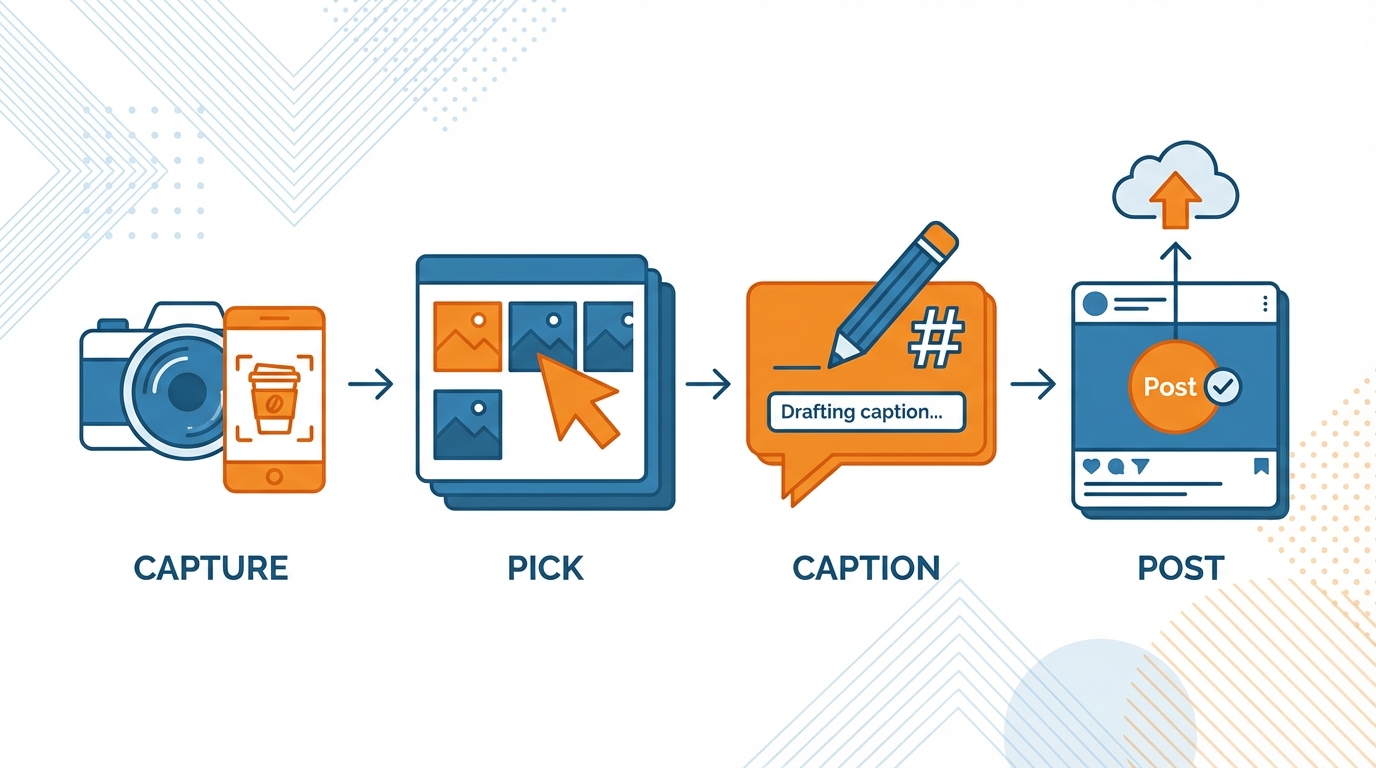
My pipeline is capture → pick → caption → post, because timing is always more important than editing ability.
Capture is the same as the 8-20 second videos you already make; pick is a 2 minute review that keeps only the pieces that show a clear before, a clear action, and a clear result; caption is one sentence that describes what changed and why that matters; post is a hard press of the button the moment you have prepared the content, while everything is still on your mind. If you want help with captions without slowing down, you can use an AI social media caption generator to stay within this capture → pick → caption → post flow.
This is not just a convenience, it’s also an advantage: short-form completion rate is a core signal on vertical platforms, and shorter videos with a more straightforward narrative tend to perform better than longer, rambling videos even if they’re technically less polished. This matches what Wistia reported in the Wistia’s 2025 State of Video Report Shows Use of AI in Video Production More than Doubled Over Last Year | PR Newswire, where videos under 1 minute had the highest average engagement rates (50%) versus 1-3 minutes (46%) and 3-5 minutes (45%).
You can increase the amount of value in a single minute by designing the minute to shatter into formats.
One minute of BTS can become a Reel (showing the full process), 2-4 Stories (showing the full process), a carousel (showing the full process as a slideshow), and a text post (summarizing the conclusion or decision).
Example: I can record a 12 second video showing a solution for a packaging fix. I can pull 3 frames from the video and create a mini tutorial carousel. I can write a text post about what single error was the cause of returns and what single constraint dictated the solution.
You can think in assets, not in posts: 1 minute of content, 4 contexts, no increased workload.
For your output to be consistent, use a structure so simple that it’s hard to get wrong: hook -> 3 clips -> payoff -> simple CTA.
Hook is the constraint or the stakes, e.g. what broke or what has to be true in order for this job to be considered done; 3 clips is proof of work, not a filming technique; payoff is the result or the metric that demonstrates an improvement; simple CTA is one low-friction next step like “comment with a question”, “check out the store”, or “reply for more info”.
This structure aligns with how people process BTS: people need quick context, visual evidence, and a clear conclusion.
The key observation here is that BTS acts like a receipt, and receipts are most trusted when they demonstrate a concise chain of evidence.
The absolute best bang for the buck is to figure out what BTS will get what result and quit wasting time and energy documenting things that don’t get you closer to your goal.
If you need trust and authority, you need to be capturing things like decision making, auditing, why I decided this, mistakes and corrections, etc. because it signals competence.
If you need selling, you need to be capturing things like limitations, process validation, testimonials in context, and delivery, because it all reduces anxiety by demonstrating that someone did indeed pay. This practicality lines up with Wyzowl’s findings in Video Marketing Statistics 2024 (10 Years of Data) | Wyzowl, where 85% of video marketers plan to maintain or increase spending on video in 2024, and 31% relied on organic reach (while 69% spent money on video ads).
If you need recruiting, you need to be capturing things like team rituals, tooling, standards, and learning, because the best candidates filter themselves based on how you work.
And if you need partners, you need to be capturing collaborator love and shared wins, because being a fly on the wall for each other is the cheapest way to get repeat exposure without having to pay for access.
The final takeaway I wanted to share with you is the rule that I follow to make sure I can consistently create behind-the-scenes content on a budget.
That’s the only way behind-the-scenes content works on a budget, and to ensure that, I enforce one rule: it has to be effortless, private by default, and publish fast.
If any of those three are broken, it falls apart.
Effortless means the camera is always available, and hitting record is a habit, not a choice.
Private by default means you have to assume that something confidential will be in the shot, so you work your shots and habits to prevent it.
Publish fast means that what you capture can go live without needing a second pass of production because your typical bootstrapped small business doesn’t have hours to edit documentation into drama.
In order for BTS to be maintainable, you need to create it such that it is resilient to your most intense weeks.
To do this, you need to eliminate all the friction from the capture process - it should take less than 10 seconds to capture a clip.
Then you need to guard the trust like it is revenue - because it is: the moment you show a customer name, an order, a screen or a piece of paper, you just took a revenue hit.
I use hands, tools and deliverables as the default language because it allows the work to shine through without exposing sensitive information, and it makes the videos more relatable and enjoyable.
The consistency multiplier is locking in on a single system for 2-4 weeks, and not modifying it daily.
Choose your repeatable locations, your repeatable shot cadence, and your simple post format, and let it run as a test.
After that time period, assess the data, not your personal feelings: what videos got saved, what videos got commented on, and what videos produced the type of engagement you are really looking for. If you want a quick way to quantify engagement as you assess the data, use an engagement calculator.
Saves are typically functional, and authoritative.
Comments are typically trust, and familial.
Shares are typically relevance, and immediacy.
When I began to assess BTS on the basis of those metrics, rather than whether or not it looked polished, I ceased to spend time on videos that made me feel busy, but accomplished nothing.
Afterward, you confidently lean harder into the BTS formats that aid your direct objective.
If you want leads, you should continue to post decision points, before and after results, and tiny quality tests that remove buyer risk.
If you want sales, you should post about packaging, shipping, and a real problem you overcame, because that is what will make the sale feel safe.
The budget is your ally here, because you are not attempting to do everything; you are creating a small, scalable engine that converts actual effort into proof, and proof into results. This is also consistent with Wistia’s trend reporting in Wistia’s 2024 State of Video Report Reveals Surge in Utilizing AI to Enhance Video Accessibility | PR Newswire, which noted Wistia analyzed over 90 million videos across 100,000+ businesses and found over 254% more businesses had closed captions on their videos in 2023 vs 2022—another “publish fast” lever that still improves clarity and trust.
Related reads
4/27/2026
B2B SaaS social media benchmarks: Set the right targets.
B2B SaaS social media benchmarks: Set the right targets. The trouble with defining B2B SaaS social media benchmarks is that it's an inherently impe...
4/25/2026
Building a personal brand as a technical founder (without becoming a creator)
Building a personal brand as a technical founder (without becoming a creator) Creating a personal brand as a tech founder should feel less about ma...
4/20/2026
Creative Post Ideas for Sustainable Brands (That Don’t Sound Greenwashy)
Creative Post Ideas for Sustainable Brands (That Don’t Sound Greenwashy) That’s not what creative post ideas for sustainable brands should look lik...