API & MCP included on every plan
Cross-Post Your X/Twitter Content to TikTok
Cross-post your X/Twitter videos and visual tweets to TikTok. Turn fast updates into short-form clips with refreshed captions and scheduled publishing.
Trusted by teams bringing Twitter highlights to TikTok
Post to X/Twitter through one unified social media API for your apps, AI agents, and automation tools. Use the WoopSocial REST API or MCP server to automate posting — we handle OAuth, tokens, and platform changes so you can ship features.
One API for posting
Publish to X/Twitter through a single unified social media API — no separate integrations per platform
Twitter to TikTok Cross-Posting
Select video tweets or image-based updates and publish them to TikTok with refreshed captions. Keep the Twitter context while formatting for vertical viewing. For Twitter-only publishing, you can also schedule X/Twitter video posts directly. schedule X/Twitter video posts
- Pick visual tweets
- Refresh TikTok hooks
- Schedule short posts
Thread to Clip Highlights
Turn a key point from a thread into a short TikTok clip. Add on-screen context, keep captions concise, and let the main takeaway lead the video.
- Pull key takeaways
- Add quick context
- Keep captions tight
Coordinated Cadence
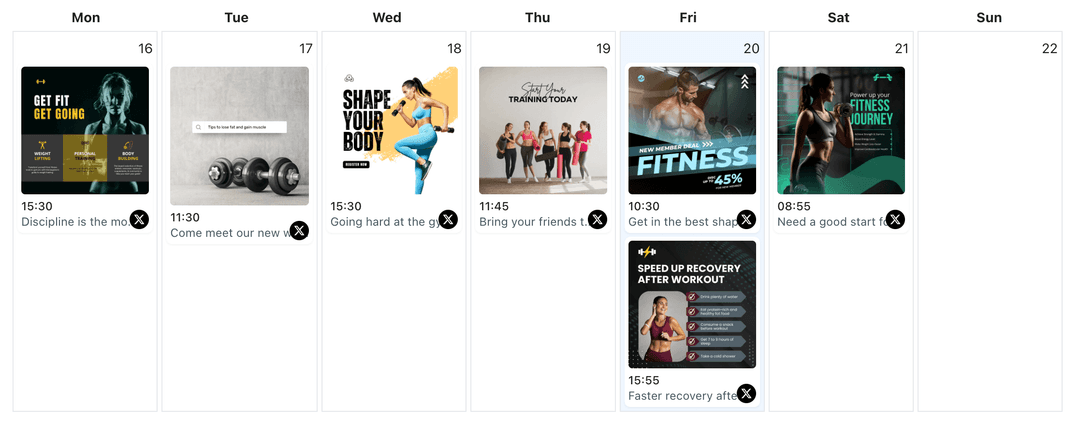
Plan tweet times and TikTok drops side by side. Avoid overlapping announcements, pace launches, and keep both feeds active. When planning campaigns, you can also use the X/Twitter content planner to map timing. X/Twitter content planner
- One shared calendar
- Avoid overlap
- Pace launches
How It Works
Get your free API key
Sign up in under 70 seconds, connect your X/Twitter account, and start calling the unified API or MCP server.
Build your integration
Send posts from your app, workflow, or AI agent with one endpoint — no separate platform SDKs to maintain.
Publish automatically
Schedule or publish X/Twitter content instantly. WoopSocial handles OAuth, tokens, and platform API changes.
Hook-First Captions
Write TikTok captions that mirror the tweet's main point. Lead with the takeaway, keep text short, and stay aligned with the clip.
Visual Formatting
Ensure visuals stay legible in vertical format. Keep overlays light, center the subject, and use clear cover frames that mirror the tweet's headline.
Multi-Account Ready
Switch between Twitter accounts while keeping one TikTok connection active. Route the right clips without re-authenticating every time.
Timing Control
Publish on TikTok when your short-form audience is active while maintaining your Twitter cadence. Use the calendar to stagger drops intelligently.
Why Cross-Post Twitter Content to TikTok?
High-performing tweets often contain the hook needed for a short-form clip. By pairing that message with a quick visual, you reach TikTok viewers without rebuilding the story.
Cross-posting keeps your content efficient. One idea can drive a tweet, a thread, and a TikTok clip, letting both audiences engage in the format they prefer.
Best Practices for Twitter to TikTok
Pick tweets that show movement or clear visuals. Keep overlays minimal and let the caption carry the context.
Stagger timing. Use your calendar to drop TikTok clips after the tweet goes live so both channels support the same conversation without spamming followers.
Ready to build your X/Twitter integration?
Send your best Twitter visuals to TikTok, refresh captions, and keep both feeds active from one dashboard.
Cross-post to TikTokFrequently Asked Questions
Yes. Choose the video tweet you want, refresh the caption for TikTok, and schedule it to publish.
You can turn image tweets into short clips or slides, then add a concise caption before scheduling.
Yes. TikTok publishing requires a Business account. Connect it once and manage permissions anytime.
Yes. Cross-posts count toward your monthly post total. Free plan includes up to 2 connected social accounts with API and MCP access on every plan.
Yes. Set separate publish times for Twitter and TikTok while viewing both in one calendar.
Yes. Switch between Twitter accounts and publish to the same TikTok profile without repeated logins.
Pull the key takeaway or clip from the thread, keep the TikTok caption concise, and schedule it as a standalone short-form post.
Bring Your Tweets to TikTok
Repurpose your Twitter visuals as TikTok clips, grow reach, and keep scheduling simple in one dashboard.
Get your free API key