API & MCP included on every plan
Cross-Post Your Facebook Content to TikTok
Cross-post your Facebook Page videos and clips to TikTok. Repurpose vertical-friendly Facebook content, rewrite captions, and publish short-form posts to reach TikTok audiences.
Trusted by Facebook Page owners extending their reach to TikTok
Post to Facebook through one unified social media API for your apps, AI agents, and automation tools. Use the WoopSocial REST API or MCP server to automate posting — we handle OAuth, tokens, and platform changes so you can ship features.
One API for posting
Publish to Facebook through a single unified social media API — no separate integrations per platform
Facebook to TikTok Cross-Posting
Select Facebook Page videos and send them to TikTok with updated captions and cover frames. Choose the clips that fit vertical viewing and schedule them alongside your Facebook posts. For ongoing Facebook content, you can also schedule Facebook video posts directly. schedule Facebook video posts
- Pick Page videos to reuse
- Update TikTok captions
- Schedule short-form posts
Short-Form Captioning
Rewrite Facebook captions to suit TikTok's fast, vertical feed. Keep hooks tight, add context that fits the clip, and keep your branding consistent across both platforms.
- Rewrite hooks quickly
- Keep brand voice aligned
- Stay within TikTok norms
Cross-Platform Calendar
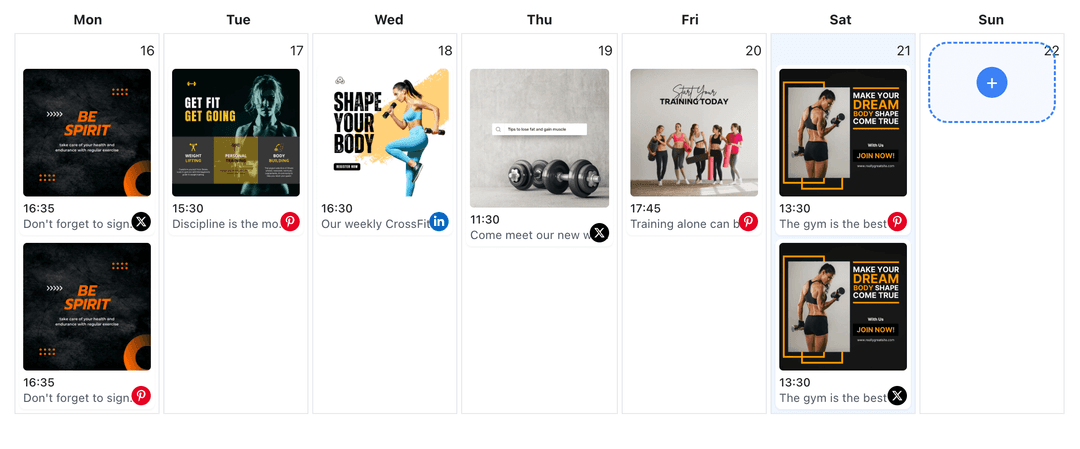
Plan Facebook and TikTok posts in one view. Balance Page updates with TikTok shorts, spot gaps, and coordinate launches without switching dashboards. When you need a detailed plan, you can also use the Facebook content planner to map your schedule. Facebook content planner
- One calendar view
- Balance both audiences
- Coordinate launches
How It Works
Get your free API key
Sign up in under 70 seconds, connect your Facebook account, and start calling the unified API or MCP server.
Build your integration
Send posts from your app, workflow, or AI agent with one endpoint — no separate platform SDKs to maintain.
Publish automatically
Schedule or publish Facebook content instantly. WoopSocial handles OAuth, tokens, and platform API changes.
Vertical-Ready Publishing
Prepare Facebook videos for TikTok by choosing the clips that work best vertically. Keep captions concise and align CTAs with TikTok's short viewing experience.
Audience-Specific Messaging
Keep Facebook copy for Page followers while crafting shorter TikTok hooks. Adjust tone for TikTok's quick-scroll audience without losing your brand voice.
Account Switching
Toggle between multiple Facebook Pages and your TikTok account from one place. Publish to the right Page and TikTok profile without re-authenticating every time.
Scheduling Controls
Choose exact publish times for both platforms. Keep your Facebook cadence steady while timing TikTok drops for when your audience is active.
Why Cross-Post Facebook Content to TikTok?
Facebook videos often include brand stories, product demos, and community updates that also resonate on TikTok when trimmed for short-form. Cross-posting lets you reuse that work, reach TikTok viewers, and keep a steady Page presence from one workflow.
By adapting captions and selecting the right clips, you can turn Facebook Page videos into TikTok-ready posts that fit vertical consumption. This keeps your effort focused on creating strong source content once, then distributing it to the channels where your audience spends time.
Best Practices for Facebook to TikTok
Start with videos that have a strong hook in the first seconds. Trim or reframe clips so the action is visible in vertical format, and keep captions concise with clear context for TikTok viewers.
Plan a posting rhythm that respects both audiences. Use your calendar to space Page updates and TikTok drops, and reuse brand visuals so viewers recognize you whether they follow on Facebook or TikTok.
Ready to build your Facebook integration?
Turn your Facebook Page videos into TikTok posts and publish on both platforms from one calendar.
Cross-post to TikTokFrequently Asked Questions
Yes. Connect your Facebook Page and TikTok account, pick the videos you want to reuse, and schedule them for TikTok with updated captions.
Short videos, product demos, and behind-the-scenes clips usually perform well. Focus on vertical-friendly footage and concise captions for TikTok viewers.
Yes. TikTok cross-posting requires a TikTok Business account. Connect it once and keep control of permissions at any time.
You can rewrite Facebook captions for TikTok before scheduling. Keep hooks short and focused on the clip you are publishing.
Yes. Cross-posts count toward your monthly post limit. Free plan includes unlimited posts on supported networks.
Yes. You can keep Facebook publishing times as they are and set different TikTok times from the same calendar.
Yes. Switch between Pages and keep one TikTok connection active so you can route the right videos without re-authenticating.
Expand from Facebook to TikTok
Reuse your Facebook Page videos on TikTok, keep both audiences engaged, and manage scheduling from one simple dashboard.
Get your free API key