How to Schedule Social Media Posts Without a Credit Card
Discover how to schedule your social media content without a credit card. Bypass hidden charges and payment walls to automate posting efficiently.
How to schedule posts without a credit card (and avoid the card wall)
The reason you need to search for how to schedule posts without a credit card is not because you need free advice on social media. It is because you want to skip two things that quietly eat into the time and budget of any small business: unexpected auto-trial charges, and the rude card wall that interrupts you just as you are about to schedule your first post. Other guides skip this because they think of no credit card as a pricing claim. In reality, it is a workflow demand: what you need is a system to schedule automatic posting, without entering a credit card when you sign up or any time after. If you’re using a scheduler like WoopSocial, the point is to get to publishing without the payment form being the first impression.
The caveat is that the no-card solution depends on what you’re trying to schedule. Instagram, LinkedIn, and X operate in different ways with respect to what can be auto-published, what requires an additional connection step, and what’s set up as a reminder rather than a scheduled post. Throughput also plays a role. Five posts a week for a single location is a completely different scenario than 30 days of scheduling for multiple services, staff, or clients. You also have to know what you want: scheduled posts where everything goes live automatically, or a drafts/reminders process that still saves you time but still requires a final click. This is also why posting cadence pressure matters-Adobe Express surveyed 433 business owners and found that 63% feel pressure to post daily, while 44% post weekly and 18% post daily, as noted in a practical posting frequency breakdown.
In this post, I’ll share a step-by-step plan to create and schedule content without entering payment information, and I’ll also provide a quick way to recognize and bypass the sneaky gotchas that prompt card information again. I’ll also walk you through how I test a no-card process before I spend my time creating a content calendar, so you won’t have to recreate it all after running into a payment gateway at the wrong time.
Ways to bypass the credit-card wall on sign-up (what methods DO work)
If you want to learn how to schedule posts without a credit card, the quickest way to fail is by pressing the wrong button.
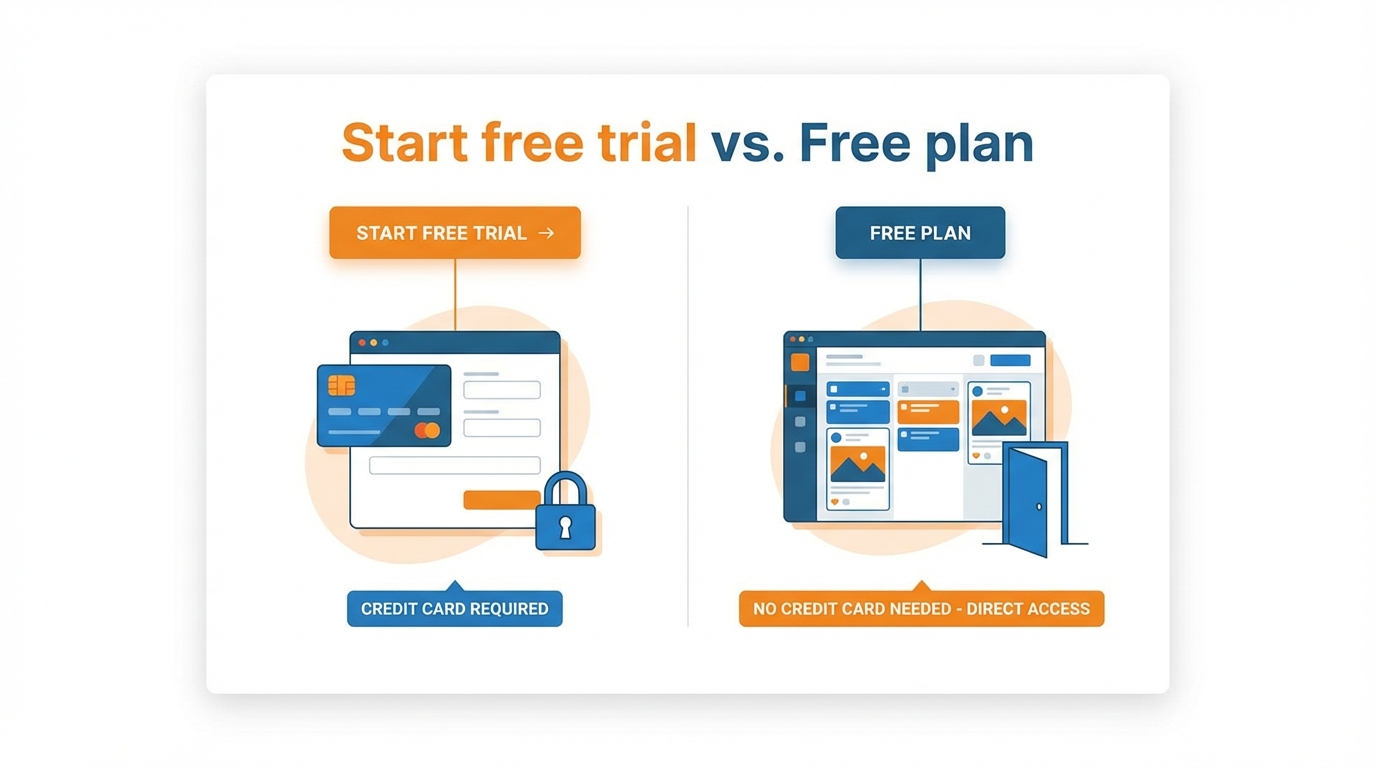
Most signups have two options: a Start free trial button that seems like a low-risk way to get started but immediately takes you to a checkout page, and a Free plan button that bypasses the payment processor altogether.
The difference is important if you’re a small business because the trial button is intended to maximize conversions, not help you start scheduling immediately.
What you want to do is get inside the application with the ability to publish before you spend hours crafting captions, organizing a content calendar, or adding additional accounts. So, here is the series of checks that I do before spending even 20 minutes of my time.
- You check for proof on the pricing page or in the help documentation, not a badge on the home page, because many times it will say no credit card required on the marketing site, but when you actually do the onboarding flow, it disagrees.
- You check that there is an actual free tier that isn’t a free trial, because free trial and free tier are not the same thing even if they sound the same in the UI.
- And then you see what will cause the first time a credit card is requested from you, because many times it is free until you add more channels, or add certain networks, or enable autoposting to a certain platform, or until you hit certain caps like number of scheduled posts, number of posts in your queue, number of posts you publish per month.
You also have to understand the correct mental model for the three typical free states because they change when you schedule.
“Free forever” means exactly that, but with low limits that you will hit once you post regularly.
A “free plan” with limits means exactly that; the limits are the point, and you can use the service in earnest so long as you don’t exceed them; it’s the long-term state for a single destination or a light weekly cadence.
A “no-card” trial is time-limited, but useful if you need to test the workflow; the point is, they don’t ask for a credit card, so you can do the publishing, connections, and scheduling calendar as a test without being charged from day one.
That’s where most listicles fall down: they give you choices, but they can’t tell you that this onboarding process doesn’t hit the paywall, but this one does.
When I evaluate a scheduler, I’m looking for that free click that will push you over the edge into paying money for the service.
What if I add another account?
What if I change my network to the “pro” network?
What if I schedule one more post past the threshold?
What if I try to schedule a month’s worth of posts at once?
If you try that too, you’ll know in two minutes whether it’s safe to schedule your week’s worth of posts, or if you need to sign up for a tool that offers a free plan with clearly defined features and limits that mean you won’t have to pay for the service, like WoopSocial does. If you want a deeper system view of this, see social media automation for how workflow decisions affect consistency.
Choose how you’re gonna schedule: built-in schedulers first, then free schedulers (dependent on your platforms)
Scheduling isn’t one big feature, it’s platform-specific.
Native scheduling on some networks is solid; it works because it’s not on top of another layer that can fail.
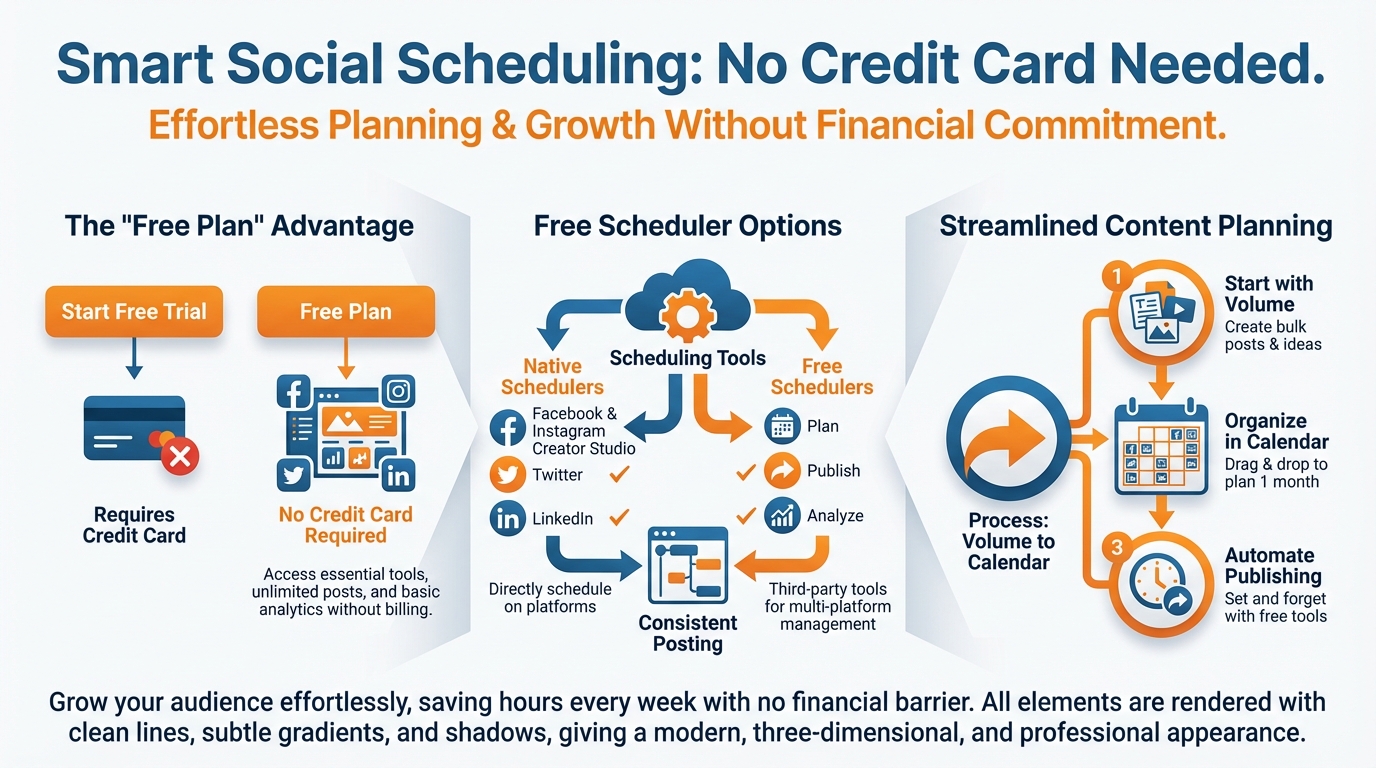
On other networks, it’s spotty or not available, so scheduling can sometimes mean a reminder or a draft you have to still tap publish on.
So the simplest way to figure out how to schedule without a credit card is to first figure out whether you even need a third-party scheduler or not, or if a native solution on one platform is all you need to get to auto-publish with less risk.
First, just have an intent-first approach.
- If you need to publish to just one platform and you want the most control and no 3rd party risk, you find out if native scheduling is available and build your week there.
- If you need to publish to multiple platforms from the same calendar because you're a small business and you can't do repetitive tasks, you pick a free plan that says 'card not required' and you know that there will be limitations.
- If you are prioritizing LinkedIn or X, you check that before you do anything because a lot of free plans don't allow you to connect or publish to those channels and that's the best way to spend an hour of your day building a calendar you can't use.
The caps that you’ll run into in real life are rarely the sexy things, they’re the mundane caps.
Like, I’ve used plans that were truly no-card, free, but that hard-cap you at, say, 10 posts per channel, and that sounds great, until you try to load two weeks of daily posts and suddenly realize half of your content won’t schedule.
You sidestep that by doing a volume test before you commit: you try scheduling a week’s worth of posts, then you try scheduling week 2, and you see when it gets blocked.
For a small business, that one test shows you if you need to work native, if you need a lighter posting schedule, or if you need to find a different no-card plan. This also aligns with real-world channel frequency-Service Direct’s 2022 survey found 60.96% of small businesses publish content at least weekly on Facebook and 55.17% at least weekly on Instagram, as captured in their small business content marketing stats.
I consider platform support to be another binary: in or out.
I want help center level transparency about credit card requirement for a free plan, and network support on the free plan, because that’s the actual truth, not a badge on the homepage.
If you’re on the right side of the filter, you then choose your path based on the degree to which you need single-platform reliability (native solution) or multi-platform control (free plan, no card).
If your goal is single dashboard scheduling for a month of content across major platforms, then you’re in the bullseye for a tool like WoopSocial to clear the scheduling hurdle without showing you a payment form as your first impression. If you want to map this into a repeatable workflow, social media content systems can help you see how the pieces fit together.
How I schedule a month’s worth of content (without a credit card)… and how I prevent it from crashing and burning!
If you’re interested in how to schedule posts without a credit card and actually get them posted on time, start with volume, not the calendar.
Prior to even creating, determine your posting frequency for the month, in absolute terms: posts per week, per platform, and total for the month.
Free plans are limited by monthly posts, queue size, or number of connected accounts, and it’s these limits that cause mid-month failures.
As a general guideline for small businesses, an achievable quality baseline is 3-5 posts a week per platform, to be increased only once you’ve validated your limits and your auto-posting is working.
Having established your volume, your process is now straightforward: you’re scheduling a volume your free plan can sustain, not a calendar that you can’t. If you need a structured approach, a social media content calendar can help you keep the volume aligned with what the free tier can actually handle.
Second, write the content in a single batch, and set a uniform style for each media channel so that the scheduling remains quick.
What you want to avoid is more choices, or more ways to express yourself within the scheduler: limit yourself to 2 or 3 common post formats per media channel, decide what your caption should look like, and figure out which posts require a link, a location, or a set of tags, in advance.
I do this because every little adjustment within the scheduling interface adds to the duration, and it’s the fastest way to fail to make a deadline when you need to make a change. If you want help making captions faster while keeping the same workflow, you can use an AI caption generator for Instagram.
With your content regularized, you can load it like ammunition: what the title should be, what the caption should be, what the media should be, and when it should be posted, are all pre-set, and so scheduling becomes a rote task, and not a content editing exercise.
If you have firm free limits, consider batching one week at a time rather than 30 days at a time.
What the tutorials don’t tell you is that if you can only schedule 30 posts at a time and then you hit a queue limit on day 9 and have to change everything, you are out of luck.
So, batch a week at a time.
Schedule Week 1, schedule Week 2, and make sure nothing is stuck, then repeat.
A reliability pattern I use is the 48-hour test: schedule 2-3 posts on each platform at different times and make sure they actually go live.
You can’t count on seeing errors if you don’t have the right permissions or if your connection tokens time out.
Also, at least once a week, go through and make sure all the accounts have the right permissions, reconnect if necessary, and watch for the platform messages that quietly switch autoposts to draft.
Lastly, accept the fact that some channels don’t offer auto-posting even on a free plan, although you may have the scheduling option.
You shouldn’t have to sacrifice your whole strategy because you have to manually post on one of the channels.
Save it as a reminder or as a draft while you schedule the rest, you still win because you have your content ready and the timing too.
If you want more than that, if you also want to generate a whole month of quality captions and images with your branding in just a few minutes, there is a generate plus branding plus scheduling workflow that you can follow in one platform.
WoopSocial is a dedicated platform for this, you can generate content for a whole month in just a few minutes, and schedule them without making content creation a daunting task. This also tracks with broader workflow trends-EMARKETER cites URLgenius April 2025 data showing 43% of creators and influencers say AI tools help them streamline their workflows, and 59% use AI at least occasionally, as summarized in their piece on how creators are split on AI’s role.
Your aim is to have a consistent presence without any surprises, you have to regulate how much you post, you have to test to see if it’s reliable and you have to have a backup plan just in case publishing on that one channel relies on one tenuous link.
The typical things that trigger late payment (and how I avoid them)
There are some telltale landmines that get triggered when people start free, and you can guess most of them in advance if you know to look.
For instance, a second social profile or brand usually does it, as many free plans are designed for one business location and one identity.
Quietly gated social networks are another, with LinkedIn and X being the usual culprits.
There are rate limits, too: you plan what seems like a typical month for a small business, and discover you’ve broken either a scheduled-post limit, a monthly-posting limit, or a queue-size limit you weren’t aware of.
The sneakiest of all is publishing mode: that seemingly regular schedule button is actually just reminders or notifications, and autopublishing is premium on some platforms.
If you want to stay grounded and know how to schedule posts without a credit card, then you have to check the limits like a user, not a customer.
And you need to check them before you pay, because which channels you can use on the free plan, and whether you can even add them without an upgrade, especially for LinkedIn or X if they’re part of your pipeline, makes all the difference.
Then you have to check what that “three posts” actually measures, because posts per channel, posts per month, and posts total are three different things; a plan where you can schedule 10 posts per channel is not the same as a plan where you can schedule 30 posts period.
Lastly, you have to check how each channel will be handled once it’s time to publish; auto-publish versus “remember to post for me” will drastically affect your time on your content calendar, and if you think you’re getting auto-publish but actually you’re getting reminders, you’re not saving yourself time.
I even do a quick load test before I build anything massive: you don’t need a 100% planned out content calendar to hit the paywall, you just need a semi-realistic load test.
So you schedule Week 1 across platforms, then try to schedule Week 2 as well, because a lot of plans look awesome until you schedule past the first cliff.
And you try scheduling different kinds of posts and times, because some publishing modes only break when you switch formats or try to post at primetime.
I do this because the absolute worst case is spending an hour writing captions and sorting out your media, only to discover that the final step of actually publishing requires an upgrade to actually post the way you assumed you were getting for free.
If you need even more, but won't put in a credit card, you can do either of two risk-free things: clean option one, you narrow focus, decrease frequency just a little bit, schedule week-by-week and keep a calendar in the free plan zone rather than trial period.
Clean option two, you try out multiple free services, but you have to keep all of your scheduling in a single calendar if you don't want to compound the number of things that can go wrong and cause you to miss scheduled posts because, again, limits are different or authentication tokens are different.
I personally prefer a single place to schedule and a clear, upfront presentation of all the platforms and limitations and what will happen upon auto-publish.
So I tend to use WoopSocial when I want to schedule a large number of small business posts, without a credit card prompt in the middle.
Opt for the lowest no-card option that also delivers a high success rate of publishing
If you want to learn how to schedule without a credit card, choose for facts not for ads.
First step is going native if you are only posting on one platform and you prioritize reliability above all else, since the less integrations, the less likely it is for something to go wrong.
When you need to start scheduling content across multiple platforms, go for a verified free plan that actually allows you to publish content without requiring credit card information, and make sure to keep your account simple: one brand, the least amount of channels, and a posting frequency you can maintain within the quota. Consistency matters because Forbes Advisor reported that 77% of businesses use social media to reach customers, and their roundup also noted an average social ads CTR of 1.21% in 2022, in their social media statistics and trends collection.
To maintain your credibility, consider the 2 easy tests that small businesses don’t take: the 48-hour post test and the caps-aware batch test.
The first means you schedule 2 to 3 posts on each platform at staggered times, and then check they actually posted and not merely stayed as draft reminders.
After that, you try scheduling a second week immediately, as many free versions work perfectly until you hit a queue limit or monthly post limit and it is that which quietly disables your consistency mid-month.
We select tools by platforms plus frequency, not buzzwords.
If you publish 3-5 times a week to two platforms, you can pretty much stay in the no-card zone; if you attempt to publish daily across 3 or more platforms, you will bump into limits quicker than you expect and it will hurt: you will end up doing a lot of manual posting at the last minute.
I’ve learned to treat whether or not something can be supported on LinkedIn or X as a yes or no gate that I have to go through before I do anything else, because that’s where I waste more time than any tool will ever save me. Platform prioritization differs in surveys too-Databox’s 2023 survey (58 small businesses, ≤250 employees) found LinkedIn was the most frequently used platform at 36.21%, as shared in their analysis of how often small businesses should post.
When you are ready to schedule consistently, the second lever is momentum: reduce the time it takes to come up with what to post.
If you can generate a month of ideas in no time and then schedule them in one go, no credit card stops being the constraint and consistent publishing is the new normal. If you want help to rapidly generate posts in that same flow, an AI social media post generator can reduce the time between ideas and scheduled posts.
That is when an all-in-one workflow like WoopSocial makes sense, because it helps you go from ideas to scheduled posts without turning no credit card into no momentum.
Related reads
6/14/2026
YouTube API Alternatives in 2026: start developing right away
Skip the YouTube quota system caps and API calls. Compare the best YouTube API alternatives with code examples, pricing and understand recent changes.
6/12/2026
Best Facebook API Alternatives for Developers in 2026 for direct access
The Facebook Graph API review can take weeks. Compare the best Facebook alternatives for posting, scheduling and more.
6/12/2026
Best LinkedIn API Alternatives in 2026 - instant access for developers
See a list of all the LinkedIn API alternatives for all types of use cases so you can skip the waiting time and get right on automating your work on LinkedIn.