Automate Google Business Profile Posts Without Breaking Things
Discover true automation for Google Business Profile posts. Go beyond simple scheduling to save time, avoid mistakes, and drive business results.
How to Automate Google Business Profile Posts (Without Breaking Things)
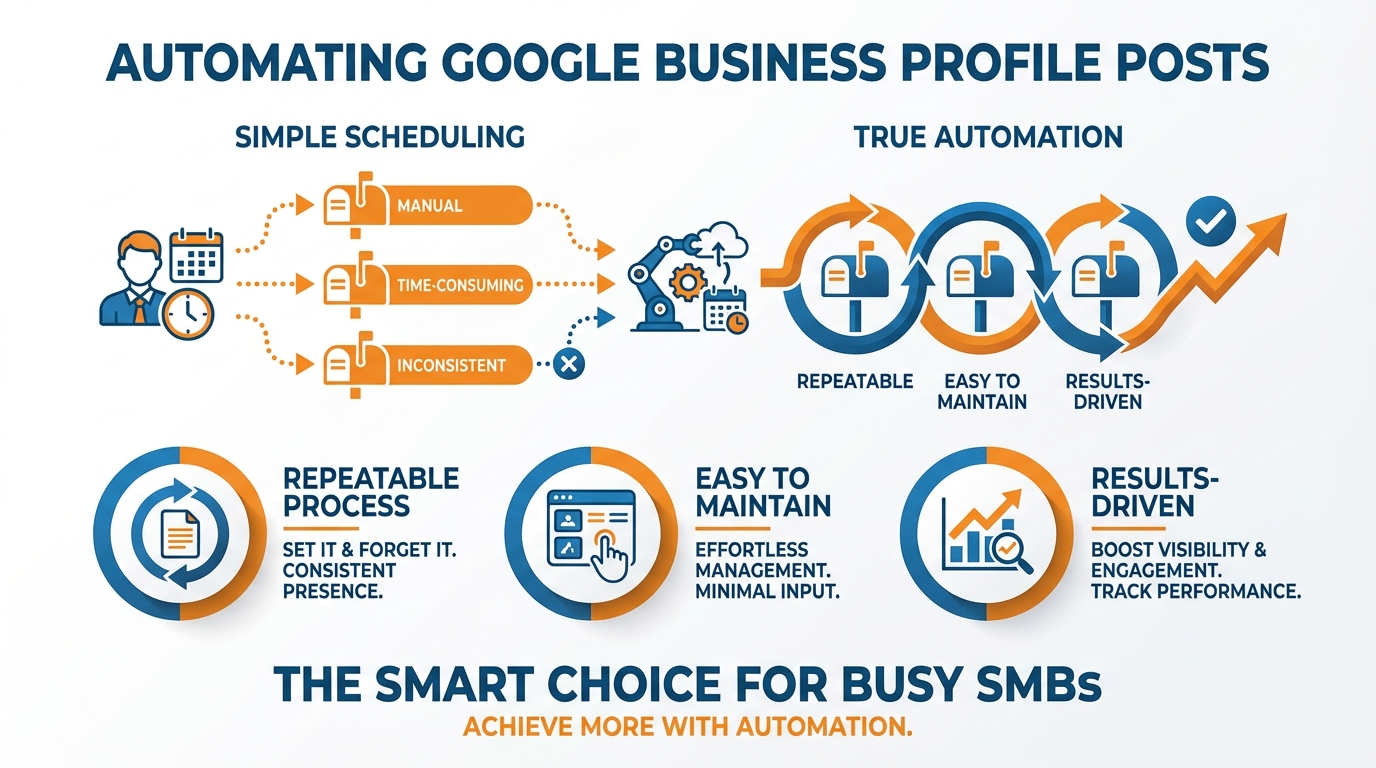
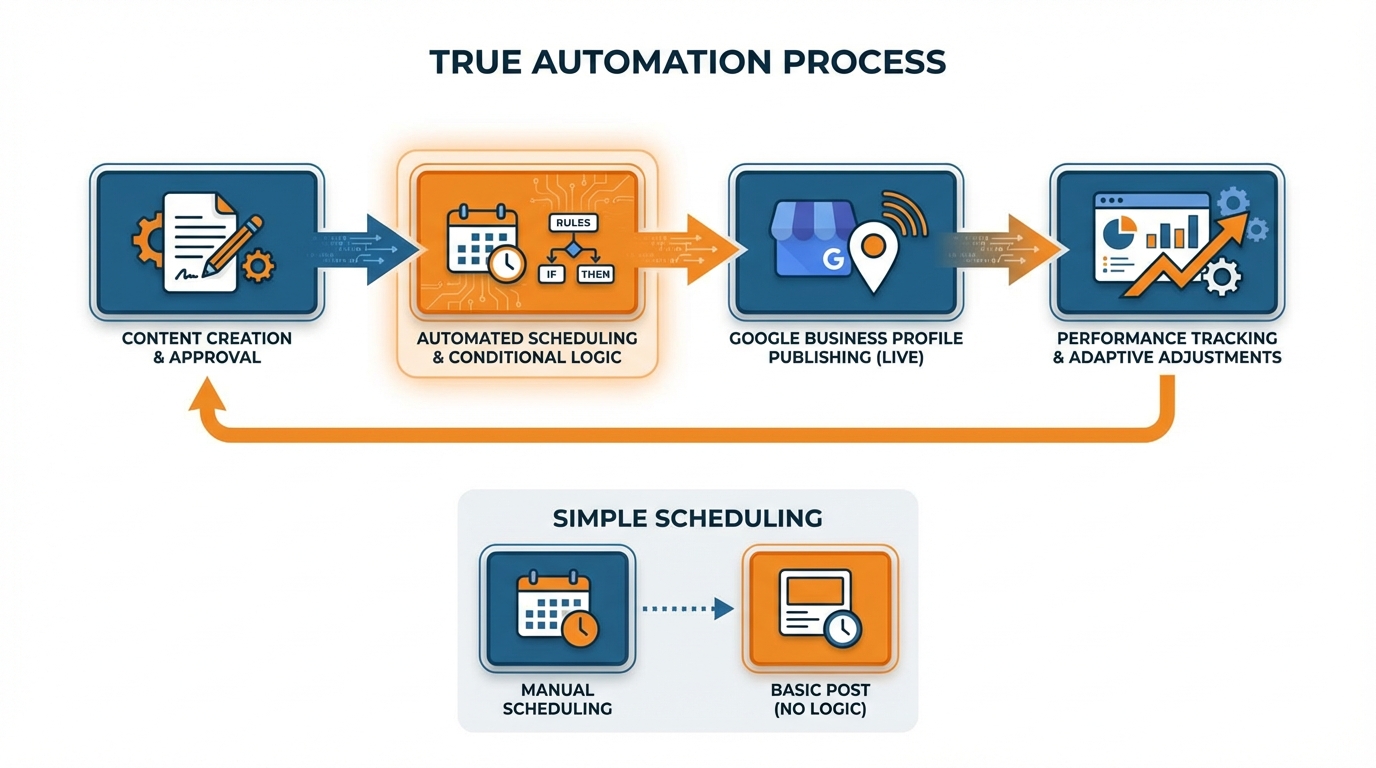
If you’ve ever looked for how to automate google business profile posts, you’ve probably seen that most answers end with a single suggestion: schedule posts in advance and set them to go live at a later time. That’s great, but it’s not automation the way a busy SMB would like it to be. True automation is a process that keeps your profile going when you’re busy serving customers, short on time or staff, or need to wear five different hats at once. It’s also where this gets harder than it seems, because google business profile posts are loaded with little ways things can go wrong: the wrong account permissions, inconsistent branding and business details from one location to the next, broken links, missing images, posts that get published with the wrong call to action, or offers and promotions that don’t stop running even after they’ve expired. There are a lot of moving parts in that chain, and if one link is weak then the entire thing falls apart. And that defeats the purpose.
My goal with automation is to make publishing repeatable, easy to maintain, and results-driven. You want to be able to broadcast messages that don’t require your constant attention but still maintain oversight of when and why you published something. If I am setting up an automated publishing solution, there are three things I concern myself with:
- I want to make sure it will save you time and effort in the long run and maintain a consistent presence.
- I want to make sure it reduces mistakes which can cost you credibility, promotional dollars, and mess with your customer when they are ready to make a purchasing decision.
- I want to make sure that it delivers business outcomes such as phone calls, direction requests, and website visits because this is how you will know your efforts are translating into conversions rather than just reach.
Whether to Automate or Schedule - How to Decide What’s Best for Your Business
If you google “how to automate google business profile posts”, the first question isn’t which one of these features do I want, it’s how much complexity can I reasonably handle?
I break it down into three “rungs” on a ladder:
- Manually posting or using native GBP posting when you need maximum customization and control.
- GBP posting scheduling when you want to keep a steady stream of content going with little to no effort.
- Using automation to trigger posts based on certain events.
Your goal is to always step down as far as possible to the simplest solution, because the more complicated your setup is, the more likely you are to introduce errors, whether that’s linking to the wrong page, a promotion running after it’s already ended, or a post that makes sense in a central location, but not for a particular individual store.
If you have one business location, first question is, are you posting less than weekly because you just forget, or because creating posts is the hard part?
If it’s just forgetfulness, then scheduling usually takes the cake, because you can create 4-8 posts at a time and schedule them out.
If creating posts is the hard part, then automation doesn’t have to be the publish button.
It can also be automated content creation that gets you to post-worthy assets as quickly as possible; I often automate a minimal planning flow to get started, and then backfill with automated on-brand post ideas and images scraped from your website, so you don’t have to start from scratch each Monday. If you’re also building a broader system beyond GBP, a related foundation is a social media content calendar.
This is also where something like WoopSocial comes in handy: you can generate a month’s worth of posts quickly, and then continue to use your preferred method to post to your GBP to keep it active without having to do a weekly push. If you want to speed up the “creating posts” part specifically, you can also use an AI social media post generator.
Businesses with multiple locations require the “consistent” or “local” test.
If the central marketing department can create a template for all locations that needs only location-specific updates (i.e. phone number, promo details, etc.) then a scheduler saves time and enforces brand consistency.
If the inventory, offers, and events change for each location, then automation (triggered through APIs or another method) can work as long as your data is well-maintained and easily accessed (i.e. in a single spreadsheet, database, etc.) - Automation makes everything faster, including making 30 mistakes and then spending more time undoing them than it would have taken to do them right in the first place.
When I approach automation for businesses with multiple locations, I approach it first as a data quality issue, and second as a content publication issue. If you want a quick structured way to uncover the gaps before scaling, a social media audit mindset applies well here too.
Set it and forget it? Yes, but just partially.
There are still 3 human tasks you’ll need to do: review and approve price- and legally-related promotional posts, a weekly gut check to ensure the links and images are rendering on mobile devices properly, and once a month, update the promotions so you don’t display something outdated and ruin the customer’s trust before they ever call.
If you want the absolute minimum that still works, you need to shoot for a system where you create and approve in bulk, schedule anything you can, and automate anything that is repeatable that you can count on.
That’s how you get the best of both worlds and keep the GBP posts generating calls, directions and website visits rather than another thing to maintain.
Pre-Flight Checks: Authorizations, Asset availability, and the policy constructs to avoid automation from failing.
Just like getting started with any automation, before you figure out how to automate google business profile posts, you have to nail down all the gatekeepers to publishing anything in the first place.
You have to have the correct access to the right profile, which means verifying you have owner or manager access (not a lower permission), and that each location in the list of locations you are about to publish to is labeled and organized in a way that you can easily identify.
I double-check that each of the foundational data points for each business are consistent for each location since any variance is magnified when automation starts to take over: business name, business category, address, service area status, phone number, and website.
Even if your NAP and category are slightly inconsistent, posts can still be published, but clicks won’t be sent where you expect, your local relevance may suffer, and you’ll start to debug performance issues when in fact it’s a data hygiene issue.
Finally, you should have a drop-in asset pack so you’re never scrambling for an image when it’s time to post.
You need a few approved photos, a crisp logo, some brand colors, and a brief list of services that match what customers search for, not what you call things internally.
The day-to-day win is simply speed and consistency: with 10-20 evergreen photos per location (and 3-5 services graphics) you can cycle through social posts for months without repeating the same photo of your storefront.
If you have social content created in another app, I reuse the same on-brand images to create GBP-safe images, and when I use WoopSocial to rapidly create a month of branded social post ideas, I treat them as raw material for GBP posts, not assuming every image and phrase is automatically policy-safe for local search.
Now define your operating boundaries, since not all of the things you can do when manually posting through the Google UI are possible through official channels. The official Google documentation on programmatically creating Google Business Profile posts is clear that Product posts cannot be created using the Google My Business / Business Profile API (only certain Post types like Event / Offer / Call-to-action are supported).
In general, automated posting seems to play nicely with standard update-style posts and simple offers, and the more advanced formatting options or edge cases can be hit-or-miss depending on how you generate the post.
Be judicious with media to reduce the chances of failed posts: use sharp clear JPGs or PNGs, shy away from super small low-res images, don’t overload images with baked-in text, and don’t get too aggressive with crops to reduce the risk of cutting off anything critical on mobile.
I design images as square with safe crop zones and ensure my landing pages are fast and mobile-friendly since a slow or non-functioning landing page is one of the biggest silent conversion-killers I see even when the post goes live successfully.
Last, but definitely not least, incorporate policy guidelines that will minimize the likelihood of your post being rejected or flagged without clear reason.
This includes negative keywords, over-the-top statements, “before-and-after” messaging, or any content that resembles a health, finance, or promise-based ad unless you’re sure that you’re absolutely within your vertical’s guidelines and have proof to back up any claims.
Only include one call to action, ensure your promotional conditions are legitimate, and adopt a best practice of having any copy with prices, services that are regulated, or promotion expirations be reviewed one last time by a human before publishing.
I also steer clear of shortened links or different domains as they can cause security flags to be raised; instead use direct links and standard UTM labeling to keep track of calls, directions, and web clicks based on post level so that delivery is not affected. If you need a clean way to build tracking, a UTM builder tool helps standardize the format.
And developing a repeatable content engine. (to prevent automation from churning out garbage)
This is why, if you want to learn how to automate Google Business Profile posts without just filling up your profile with static, you need to have a simple mechanism that is generating valuable inputs automatically.
The system I use is evergreen (your core services, top 10 questions, differentiators, reviews or mini case results) + timely (promos, seasonal angles, local events, weather, last-minute inventory or scheduling availability), but the error I see is businesses trying to be hyper-creative every week, when the truth is the most powerful GBP presence often looks pretty consistent and repetitive to a customer.
You can accomplish this in one afternoon by compiling 30-50 raw post ideas from your site pages, your call logs, and your team’s top customer questions and simply recycling them, so you’re never starting from scratch.
Now we get into the rules for which post intent gets which CTA, because automation accelerates the mismatch quickly.
Informational posts need to drive learn-more behavior, service posts need to drive a book or call action, and offer posts need to drive a redeem or shop action, each with a destination URL that obviously continues the promise of the post.
I keep it simple: one post, one intent, one action, one destination URL.
In doing so, your attribution gets simplified too; I use consistent UTMs so I can compare apples to apples month-over-month, and in many small businesses I work with, fixing this intent-to-CTA mapping is what ends the cycle of lots of views and almost no website clicks or calls.
For a multi-site enterprise, what you’re aiming for is local relevance, not repetitive spam.
My guideline for this is what I call the shared spine/local layer: 70% to 80% of the content skeleton remains the same, but each entity gets one customization that only that entity can reasonably claim, such as a neighborhood mention, a site-specific employee highlight, a local capability limitation, or an in-store inventory feature.
You should also swap out photos by location, and avoid publishing the same copy block on all entities on the same day, as this comes across to the customer as automated, and can weaken credibility.
I advocate staggering a three-week rolling timeline where the same campaign theme hits all sites, but with a different draw, a different photo, and a different landing page when the offering is genuinely different.
AI can also be used to assist with this (within the guardrails you’ve established for your business), such as writing different versions, condensing a sprawling service page into a terse update, or creating three customer-facing versions of an FAQ while you remain in control of what’s being asserted, the prices, and whether the content adheres to your policies.
To ensure that the brand voice is preserved, I always tether this process to a compact brand voice guide and a few sample posts, and then I scrutinize the first few results for tone before greenlighting further work.
If you’re looking to accelerate the idea-generation phase, I sometimes employ a hybrid brand voice and auto-branding process in a tool like WoopSocial to rapidly create a month’s worth of on-brand ideas, and then I cull and rewrite them into GBP posts to ensure that they not only sound human but also adhere to policy and retain local relevance.
Automation: The transition from scheduled queues to triggers and my calculation of the return on investment
So to solve the question of how to automate google business profile posts so it stands a chance in the wild, I created two modes that should fit nearly any small business: one is a posting schedule to maintain a consistent frequency: you create a batch of posts, schedule them, and avoid the freeze that happens when the rest of the week is just too much.
The second is an automated posting based on a trigger, which is where things get automated: you publish a new blog post or RSS feed and it posts, you create a new event and it posts with the correct notice, or you add a new promotion to a spreadsheet and the corresponding post gets posted.
The value here is that it stops being based on remembering and starts being based on business activity, so your GBP is updated when you actually have something new going on, not just when the day of the week changes.
For this to work, you need to plan for failure. Because when automation fails, it does so quietly.
You need to have some checks for when a publish fails, for when a permission is missing, and for when you get a duplicate content collision (i.e. when two instances of the same campaign are created, or two locations post the same content at the same time).
I implement three simple measures you can introduce right now:
- a fallback when publishes fail (and a notification that you actually read),
- a pre-check for a required permission before a workflow can run,
- and a dedupe key to avoid posting the same URL, headline, or offer ID twice within a certain period of time.
The dedupe key especially is a must-have when you involve multiple locations. If not, you will end up with a long list of duplicate posts that scream “automation” at your customers and will become a source of confusion when your analytics are polluted.
I then set up automatic tracking as well, or you’re just automating something busywork.
All GBP links that go out need to have UTMs formatted in a standard way so you can tell post-driven traffic apart from everything else: the source is google, the medium is organic, the campaign is the theme/promo name, and the content is the post type plus location and/or service line.
That enables apples-to-apples week-to-week and location-to-location comparison, and helps you avoid the SMB reporting trap of having all of your traffic reported as direct and not being able to attribute anything.
In GBP reporting, there are only a few metrics that matter to me that have revenue implications: calls, directions, website clicks, and profile views (since these are the types of engagement that indicate commercial intent, not just egostroking). For measuring per-post performance at scale, Google’s official endpoint for fetching post insights has a hard limit where Insights requests are limited to 100 posts per API call.
Lastly, I measure and demonstrate the value of increasing the frequency of posting by actually testing it rather than estimating.
You set a baseline frequency, bump it up to a test frequency for a fixed period of time with content buckets staying the same and compare the incremental lift in the KPI’s above, expressed on a per day basis.
I like to test for a month, bumping from 1 to 2 posts per week for half the locations, leaving the other half as a control and comparing the relative lift in calls and direction requests, for example, between the test and control groups.
If there is more lift in the test group than the control group, frequency is likely generating incremental behavior, not cannibalizing it.
In cases where there is a content constraint, I sometimes use WoopSocial to get 30 days’ worth of content topics that are on-brand, and then push the best of those into my content queue and triggers, so that I’m automating at a high level rather than filling with junk. This pairs well with the broader concept of social media automation.
Separately, be aware that measurement norms change: one industry update noted that Google removed certain GBP performance insight data points from the dashboard including post views and clicks, which affects how you evaluate automated posting if you relied on dashboard-level post metrics.
Also, the business case is hard to ignore: in a local SEO data roundup, BrightLocal data cited shows consumers using Google to research local businesses at 87% (2023); 81% (2024), which is exactly why keeping your profile current matters.
And if you’re sanity-checking expected exposure and readiness, one report highlighted that 64% of businesses were verified, and verified businesses averaged 1,803 monthly views from Google searches (average), which helps estimate what an automation program is trying to leverage.
The End.
What do you need to remember about how to automate google business profile posts?
You need to remember that if you can automate Google Business Profile posting, this is the time to get simple.
Start with the simplest system that will work, that will continue to produce posts without sacrificing quality.
Start with evergreen content, then earn the right to intent-to-CTA mapping, and then earn the right to use a trigger.
You don’t want to be a small business who automates a minor error that ends up being a month’s worth of wrong links, expired promotions, and inconsistent messaging between locations.
As soon as you schedule something, you are responsible for defending the data.
You want to automate when a promotion has been entered into a master system, an event has been created, a service page has been updated…not half-baked idea or 100th idea.
I approach every automated post with the idea that it must pass two tests; 1) will this make sense if I don’t open this up for 2 weeks and 2) will this be true if someone is standing 5 minutes from me?
If you can adhere to those two tests, automation will be an experience-enhancing feature, not a content dump.
Make sure to measure everything in a way that is not retrospective.
This means adding UTM parameters to every link you share, so you know which posts are generating website traffic, phone calls, and direction requests, and so you can measure which of your stores are performing better than others.
In practice, because this is really what UTMs do for your posting: you understand which messages and offers generate demand and you then repeat the ones that work and stop the ones that don’t, and you adjust the frequency of the posts based on the incremental demand they generate, not based on the belief that you need to post more often.
Make it light so it can breathe.
You batch create and approve, use an asset pack that ensures brand safety, and leave the boring stuff to the robot while you do promos, proofing and localisation.
When I need a means to churn out approved post themes to keep the pipeline flowing and I’ll use WoopSocial to generate a month worth of posts fast, and then I refine them to make them ready for GBP with the right level of localisation and tracking.
That’s the automation key here: less manual, less mistakes, more measurable results.
Related reads
6/14/2026
YouTube API Alternatives in 2026: start developing right away
Skip the YouTube quota system caps and API calls. Compare the best YouTube API alternatives with code examples, pricing and understand recent changes.
6/12/2026
Best Facebook API Alternatives for Developers in 2026 for direct access
The Facebook Graph API review can take weeks. Compare the best Facebook alternatives for posting, scheduling and more.
6/12/2026
Best LinkedIn API Alternatives in 2026 - instant access for developers
See a list of all the LinkedIn API alternatives for all types of use cases so you can skip the waiting time and get right on automating your work on LinkedIn.