API & MCP included on every plan
Create LinkedIn Images with AI
Generate professional LinkedIn visuals with AI. Produce on-brand banners, post images, and thought-leadership graphics you can edit and schedule to Profiles or Company Pages.
Trusted by founders, recruiters, and marketing teams who need polished LinkedIn visuals without long design cycles
Post to LinkedIn through one unified social media API for your apps, AI agents, and automation tools. Use the WoopSocial REST API or MCP server to automate posting — we handle OAuth, tokens, and platform changes so you can ship features.
One API for posting
Publish to LinkedIn through a single unified social media API — no separate integrations per platform
AI Visuals for Posts and Pages
Generate LinkedIn-friendly images for product news, hiring updates, or event recaps. When an image is ready, you can also schedule LinkedIn image posts directly from WoopSocial. schedule LinkedIn image posts
- Profile and Page support
- Brand-color aware
- Editable exports
Copy and Visual Alignment
Create caption starters that match each graphic- concise for leadership posts, more detailed for hiring or product updates- and finalize wording before publishing.
- Tone controls
- Goal-specific angles
- Compliance-friendly edits
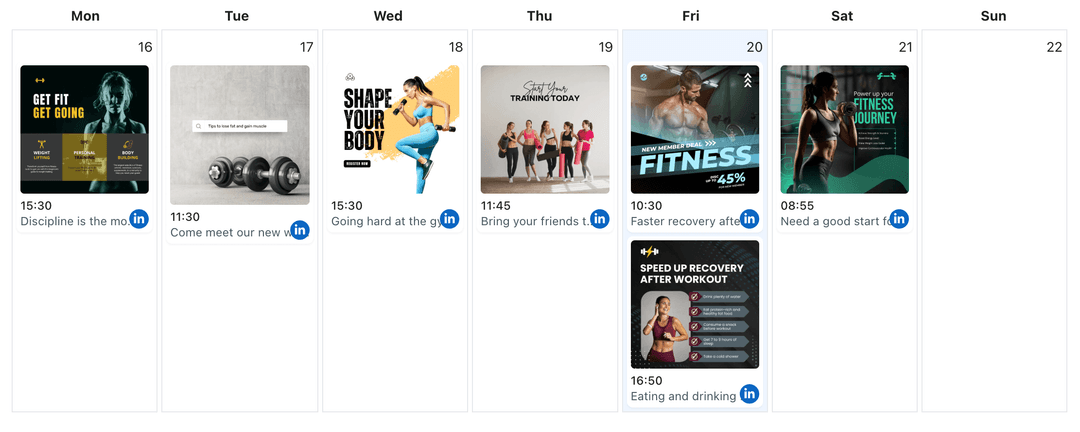
Plan Posts on a Visual Calendar
Place AI visuals into the LinkedIn content planner, space out campaigns, and keep executive updates and Company Page posts aligned on the same schedule. LinkedIn content planner
- Calendar visibility
- Campaign pacing
- Drag-to-reschedule
How It Works
Get your free API key
Sign up in under 70 seconds, connect your LinkedIn account, and start calling the unified API or MCP server.
Build your integration
Send posts from your app, workflow, or AI agent with one endpoint — no separate platform SDKs to maintain.
Publish automatically
Schedule or publish LinkedIn content instantly. WoopSocial handles OAuth, tokens, and platform API changes.
Brand Guardrails
Save color, typography, and style preferences so AI-generated LinkedIn visuals stay within your brand system and avoid off-brand experiments.
Multiple Variations per Topic
Request several layouts for the same announcement- banner, quote card, or stat graphic- then choose the one that communicates best.
Caption Starters for Every Visual
Ask AI for concise intros, bullet-style summaries, or story-led captions that align with your graphic. Edit them before scheduling to keep messaging precise.
Multi-Page Coordination
If you manage several Company Pages, generate variations for each audience, then schedule them from one dashboard when you upgrade beyond the free plan. manage multiple LinkedIn pages
Why Use AI for LinkedIn Images?
Professional visuals make LinkedIn posts easier to skim and share, but producing them for every update slows teams down. AI generation provides ready-to-edit options so you can focus on accurate messaging and compliance checks rather than blank canvases.
Because you control approvals, AI becomes a drafting tool- not autopilot. Keep only the visuals that match your standards and pair them with captions that reflect your expertise.
Keep LinkedIn Updates Consistent
Use AI images to support thought-leadership posts, hiring announcements, or event recaps without waiting for a designer. Mix data cards, quote graphics, and banners across the calendar to maintain variety.
Organize everything in the LinkedIn content planner, align executive profiles with Company Page updates, and shift timings until campaigns feel coordinated. plan posts with the LinkedIn content planner.
Ready to build your LinkedIn integration?
Generate professional LinkedIn visuals from simple briefs, finalize the copy, and schedule posts automatically with WoopSocial.
Create LinkedIn images with AIFrequently Asked Questions
AI can create banners, quote cards, stat graphics, and post images sized for LinkedIn. You review and edit every output before scheduling.
Yes. Include brand colors, tone, and layout preferences in your prompt. Save them as presets so future visuals stay consistent.
No. AI only generates drafts. You approve the creative, attach a caption, and schedule it. WoopSocial handles publishing at the time you set.
Yes. Choose the correct destination when you schedule. Free plan includes up to 2 connected social accounts; Pro adds more accounts and credits.
You can generate drafts on any plan. Free users get unlimited posts on supported networks with up to 2 connected social accounts; Pro adds more accounts and credits.
Yes. Create variations per Page, then switch destinations inside WoopSocial to schedule each update from the same calendar.
Start Creating LinkedIn Images with AI
Keep LinkedIn updates polished, on-brand, and on schedule with AI-generated visuals and WoopSocial’s calendar.
Get your free API key