API & MCP included on every plan
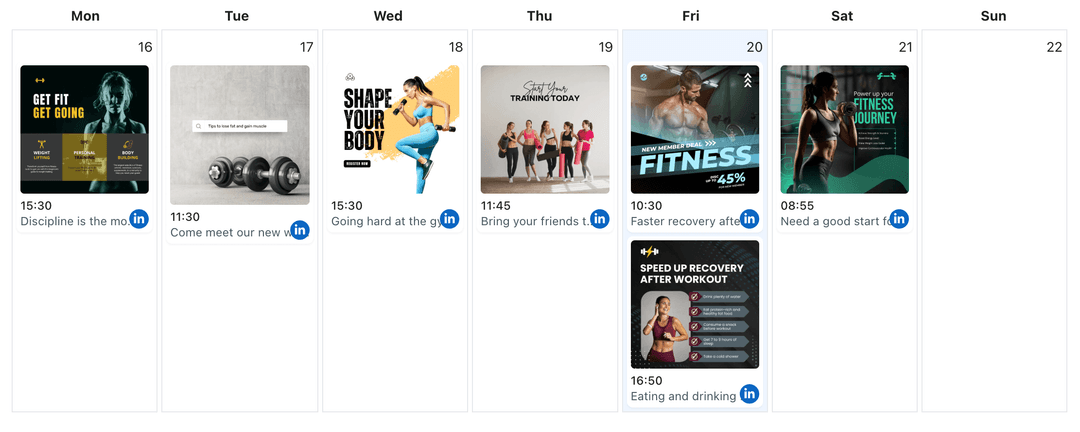
Manage Multiple LinkedIn Pages from One Professional Calendar
Connect LinkedIn profiles and Company Pages to one WoopSocial calendar so every audience receives coordinated updates that publish automatically on schedule.
Trusted by B2B marketers, agencies, and franchise teams managing several LinkedIn presences
Post to LinkedIn through one unified social media API for your apps, AI agents, and automation tools. Use the WoopSocial REST API or MCP server to automate posting — we handle OAuth, tokens, and platform changes so you can ship features.
One API for posting
Publish to LinkedIn through a single unified social media API — no separate integrations per platform
Account Hub
Connect personal profiles, Company Pages, or showcase pages and move between them instantly. When thought leadership requires video, you can schedule LinkedIn video posts without opening another tool. schedule LinkedIn video posts
- Profiles and Pages
- Single dashboard
- Secure connections
Professional Calendar View
Review every scheduled update in a single visual calendar, then filter to one Page when you need detail. For image-led announcements you can also schedule LinkedIn image posts directly from this view. schedule LinkedIn image posts
- Per-page filters
- Week and month views
- Content balance
Reliable Publishing Control
Select the target Page, set a publish time, and trust WoopSocial to deliver the update. No manual posting windows or shared spreadsheets.
- Automatic posting
- Clear ownership
- Audit-friendly history
How It Works
Get your free API key
Sign up in under 70 seconds, connect your LinkedIn account, and start calling the unified API or MCP server.
Build your integration
Send posts from your app, workflow, or AI agent with one endpoint — no separate platform SDKs to maintain.
Publish automatically
Schedule or publish LinkedIn content instantly. WoopSocial handles OAuth, tokens, and platform API changes.
Centralized Professional Messaging
Plan leadership updates, hiring announcements, and regional news in one place. The calendar keeps every LinkedIn voice coordinated.
Per-Account Visibility
Filter down to a single LinkedIn Page to review its queue, edit captions, or shift timing without disrupting other schedules.
Plan-Friendly Limits
Free plan includes up to 2 connected social accounts with API and MCP access on every plan. Pro unlocks multiple profiles or Pages with unlimited scheduling.
Automatic LinkedIn Publishing
Every scheduled post publishes automatically to the Page you select, so you never have to log in during critical meetings.
Keep LinkedIn Voices in Sync
Brands often maintain multiple Company Pages for regions, product lines, or subsidiaries while executives post from personal profiles. Without a shared calendar, messaging drifts and audiences receive outdated news. WoopSocial brings those presences together so you always know which Page is covering which announcement.
Coordinated scheduling keeps corporate messaging polished. You can roll out a global update, tailor supportive posts for each regional Page, and ensure every audience hears the right details at the right time.
Simplify Multi-Page Campaigns
Hiring pushes, quarterly updates, and conference recaps often hit several LinkedIn Pages. Managing those posts inside WoopSocial means you can stage content once, assign it to the proper Page, and review the timeline before anything publishes.
Need to adjust timing for one market? Filter the calendar for that Page, move the post, and the rest of your schedule stays untouched. Everything remains visible for audits and follow-ups.
Ready to build your LinkedIn integration?
Plan every professional update from one calendar, keep messaging aligned, and publish automatically.
Manage your LinkedIn pagesFrequently Asked Questions
Free plan includes up to 2 connected social accounts with API and MCP access on every plan. Pro unlocks multiple profiles and Pages with unlimited scheduling.
Yes. WoopSocial treats them as separate destinations inside the same dashboard so you can schedule content for both without switching tools.
Choose the destination profile or Page when you create the post. The calendar view and filters show exactly which account each post belongs to.
Yes. Plan video updates with the same workflow you use to schedule LinkedIn video posts, then add supporting visuals through LinkedIn image posts when needed.
Once you approve the schedule, WoopSocial posts to LinkedIn at the exact times you select. There is no manual publishing required.
You can disconnect any Page at any time. Scheduled posts for that Page pause until you reconnect or reassign them.
Coordinate Every LinkedIn Presence
Keep executives and Company Pages aligned, stay consistent, and publish on time with WoopSocial.
Get your free API key