API & MCP included on every plan
Organize Your LinkedIn Content Planner in One Calendar
Coordinate LinkedIn posts, Company Page announcements, and executive commentary inside WoopSocial's content planner so every professional message publishes on schedule.
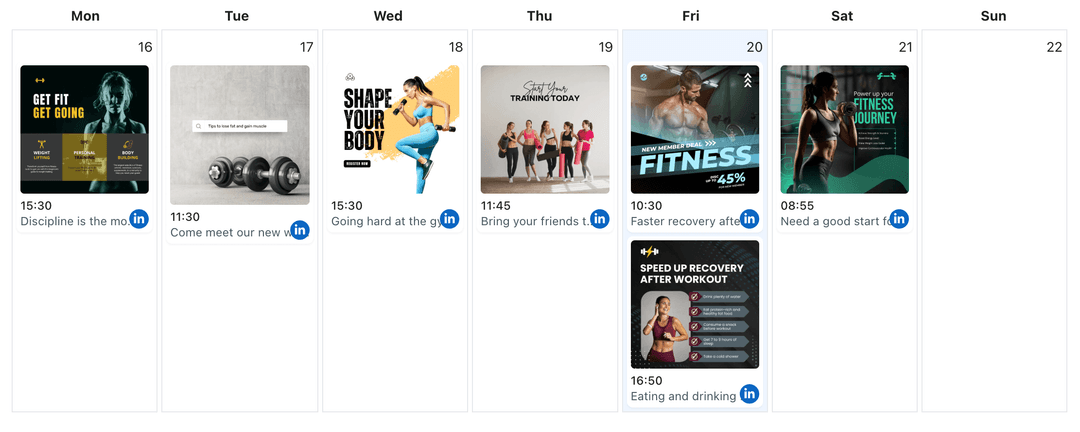
Trusted by B2B marketers, HR teams, and agencies aligning multiple LinkedIn voices
Post to LinkedIn through one unified social media API for your apps, AI agents, and automation tools. Use the WoopSocial REST API or MCP server to automate posting — we handle OAuth, tokens, and platform changes so you can ship features.
One API for posting
Publish to LinkedIn through a single unified social media API — no separate integrations per platform
Campaign Lanes
Segment posts by initiative- funding, recruiting, or thought leadership- so stakeholders know what publishes next. When a lane depends on native video, you can also schedule LinkedIn video posts right from the planner. schedule LinkedIn video posts
- Initiative tags
- Timeline clarity
- Drag to adjust
Executive + Page Pairing
Assign each update to a Company Page or executive profile, reuse approved copy, and keep compliance reviews visible.
- Profile assignments
- Copy reuse
- Approval notes
Ready-for-Publish Checklist
Track which posts still need images, supporting links, or internal sign-off. For visual-heavy posts you can also schedule LinkedIn image posts without switching tools. schedule LinkedIn image posts
- Attachment tracking
- Link reminders
- Status indicators
How It Works
Get your free API key
Sign up in under 70 seconds, connect your LinkedIn account, and start calling the unified API or MCP server.
Build your integration
Send posts from your app, workflow, or AI agent with one endpoint — no separate platform SDKs to maintain.
Publish automatically
Schedule or publish LinkedIn content instantly. WoopSocial handles OAuth, tokens, and platform API changes.
Professional Timeline View
Week and month views show which audiences hear from you and when, helping you balance product, culture, and leadership stories.
Role-Based Notes
Leave reminders for hiring managers, exec comms, or agencies so each post carries the right final details before publishing.
Free vs Pro Visibility
See free plan usage (up to 2 connected social accounts) and upgrade to Pro when campaigns need more capacity.
Audit-Friendly History
Every scheduled post retains its timing and copy so you can report back to stakeholders or compliance teams effortlessly.
Coordinate Every LinkedIn Audience
Recruiting, investor relations, and marketing all need their own drumbeat on LinkedIn. The content planner gives each stream a dedicated lane without forcing you into separate spreadsheets.
Drag campaigns forward when launch dates shift, pause a post while legal reviews copy, and maintain clarity across Company Pages and personal profiles.
Blend Media Types Without Losing Focus
Some stories demand video while others lean on infographics or executive quotes. Track which assets are attached, who owes creative, and when everything is due.
When you need deeper dives using native media, you can also manage multiple LinkedIn Pages from the same calendar to ensure every audience receives the right mix. manage multiple LinkedIn Pages.
Ready to build your LinkedIn integration?
Keep Company Page updates and executive voices aligned with a single calendar built for LinkedIn.
Plan your LinkedIn contentFrequently Asked Questions
Yes. Free plan includes up to 2 connected social accounts. Pro unlocks more accounts managed from the same API.
You can assign posts to leadership profiles just like Company Pages, making it easy to coordinate thought leadership alongside brand updates.
Each slot stores notes for images, documents, or videos. When you need a visual-first post, you can schedule LinkedIn image posts directly from the planner. schedule LinkedIn image posts
The planner shows your scheduled posts across connected accounts. Upgrade to Pro when you need more connected accounts and credits.
Yes. Drag a post to a new day or time and WoopSocial updates the publish slot automatically.
No. Once scheduled, WoopSocial publishes LinkedIn posts automatically, letting you focus on replies and outreach.
Keep LinkedIn Messaging Coordinated
Plan initiatives, attach assets, and keep leadership aligned with WoopSocial's LinkedIn-focused content planner.
Get your free API key