API & MCP included on every plan
Automate LinkedIn Posts with AI
Use AI to draft LinkedIn updates faster and automate publishing. Approve every line, keep your tone professional, and post on schedule without manual work.
Used by founders, marketers, and recruiters who need consistent LinkedIn activity without sacrificing voice or compliance
Post to LinkedIn through one unified social media API for your apps, AI agents, and automation tools. Use the WoopSocial REST API or MCP server to automate posting — we handle OAuth, tokens, and platform changes so you can ship features.
One API for posting
Publish to LinkedIn through a single unified social media API — no separate integrations per platform
AI Drafts for LinkedIn
Share the topic, audience, and call to action and get LinkedIn-ready copy you can refine. When you want more options you can create LinkedIn posts with AI for different angles. create LinkedIn posts with AI
- Professional tone guidance
- Hook and summary options
- Edit before scheduling
Visual Support for Updates
Ask AI for captions that fit the slide, chart, or photo you plan to share. If you need fresh graphics you can create LinkedIn images with AI and pair them with the right copy. create LinkedIn images with AI
- Image-aware suggestions
- Slide-friendly copy
- Link-friendly text
Approve and Automate
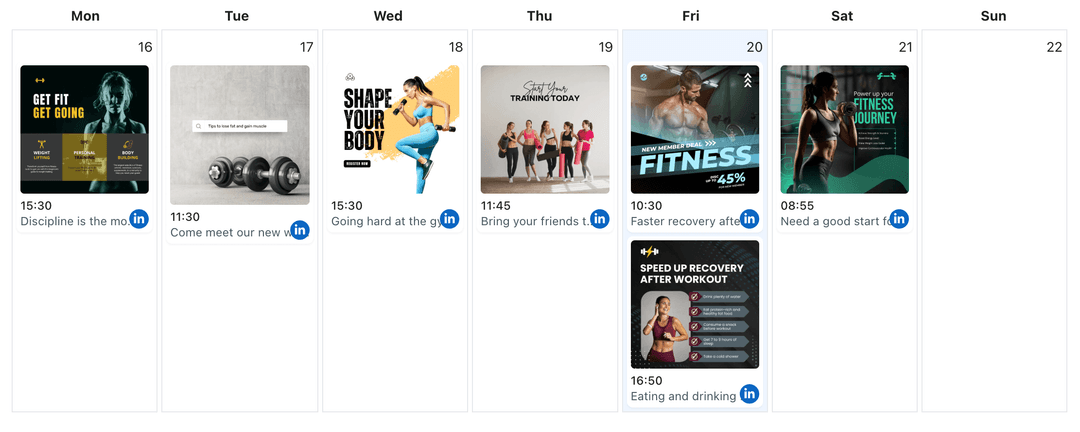
Place approved drafts on the calendar and adjust timing in the LinkedIn content planner when schedules shift. WoopSocial publishes automatically when slots come due. LinkedIn content planner
- Manual review first
- Drag-and-drop timing
- Hands-off publishing
How It Works
Get your free API key
Sign up in under 70 seconds, connect your LinkedIn account, and start calling the unified API or MCP server.
Build your integration
Send posts from your app, workflow, or AI agent with one endpoint — no separate platform SDKs to maintain.
Publish automatically
Schedule or publish LinkedIn content instantly. WoopSocial handles OAuth, tokens, and platform API changes.
Compliance-Friendly Drafting
Keep AI suggestions as drafts until they meet brand, legal, or HR guidelines. Nothing is published until you approve the final copy.
Prompt Libraries for Teams
Save prompts for hiring updates, product releases, or thought-leadership threads so teammates can generate on-brand drafts quickly.
Cadence Control
Balance announcements, culture posts, and industry takes by arranging AI drafts on the calendar. Space updates to avoid feed fatigue.
Free Plan Ready
Generate AI drafts and schedule unlimited posts on the free plan with up to 2 connected social accounts. Upgrade when you need more accounts and credits.
Why Pair AI with LinkedIn Automation?
Professional audiences expect relevant posts, not recycled text. AI gives you quick first drafts so you can keep sharing updates without spending hours on wording. Automation then posts them reliably while you focus on work.
Because every draft is editable, you keep authority over claims, data points, and tone. AI proposes language; you approve what represents your brand or personal voice.
Stay Consistent During Busy Weeks
Plan content for launches, hiring waves, or events, then let AI suggest supporting posts that keep momentum between major announcements. Place them on the calendar and shift timing as your schedule changes.
If you spot open days, generate quick tips, leadership notes, or customer stories to keep visibility steady. Automation makes sure those posts go live even when you are traveling or in back-to-back calls.
Ready to build your LinkedIn integration?
Draft faster, review for accuracy, and let WoopSocial publish to your profile or Company Page on your schedule.
Automate LinkedIn posts with AIFrequently Asked Questions
No. AI only drafts text. Publishing happens after you approve the copy and schedule it on your calendar.
Yes. Update wording, links, or media anytime before the scheduled time. The calendar keeps the latest version ready to publish.
You do. Set the exact date and time in the LinkedIn content planner; automation only handles delivery. LinkedIn content planner
Yes. Provide context for either audience and edit the draft to fit. You approve every post before it goes live.
Yes. You can generate AI drafts and publish via API on the free plan with up to 2 connected social accounts, then upgrade for more accounts and credits.
Upload your own graphics or create LinkedIn images with AI to pair with the approved copy. create LinkedIn images with AI
Automate Your Next LinkedIn Posts with AI
Keep your LinkedIn presence active with AI-assisted drafting and hands-off publishing that respects your voice.
Get your free API key