API & MCP included on every plan
Create Your LinkedIn Posts with AI
Use AI to draft LinkedIn posts faster. Generate professional copy for profiles and Company Pages, then edit and schedule updates from one organized calendar.
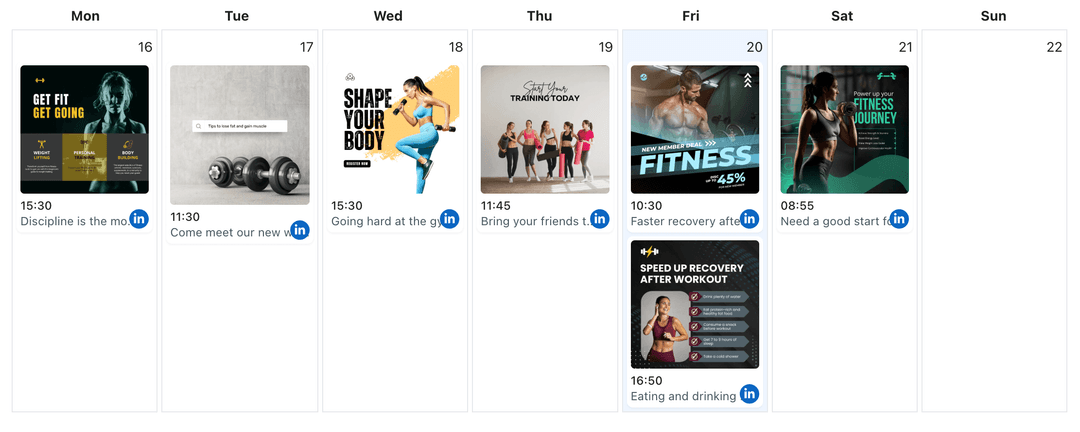
Trusted by founders, marketers, and HR teams who need to publish consistent LinkedIn updates without writing every sentence from scratch
Post to LinkedIn through one unified social media API for your apps, AI agents, and automation tools. Use the WoopSocial REST API or MCP server to automate posting — we handle OAuth, tokens, and platform changes so you can ship features.
One API for posting
Publish to LinkedIn through a single unified social media API — no separate integrations per platform
AI Drafts for Professional Updates
Share the key message, audience, and goal of your LinkedIn post, then let AI propose professional copy you can adjust. When a draft is ready, drop it straight into the LinkedIn content planner for scheduling. LinkedIn content planner
- Profile and Page support
- Context-aware drafts
- Edit-friendly suggestions
Multiple Angles from One Brief
Ask AI for several ways to present the same announcement- a concise update, a story-led version, or a more data-heavy post- and keep the one that fits your audience best.
- Short and long formats
- Narrative or direct tone
- Data-focused variants
Copy that Matches Your Visuals
Describe the image or document you are sharing, and ask AI to write LinkedIn copy that frames it clearly. When you are done, you can schedule LinkedIn image posts that reuse the same message. schedule LinkedIn image posts
- Image-aware context
- Post + visual alignment
- Calendar-ready copy
How It Works
Get your free API key
Sign up in under 70 seconds, connect your LinkedIn account, and start calling the unified API or MCP server.
Build your integration
Send posts from your app, workflow, or AI agent with one endpoint — no separate platform SDKs to maintain.
Publish automatically
Schedule or publish LinkedIn content instantly. WoopSocial handles OAuth, tokens, and platform API changes.
Templates for Common LinkedIn Updates
Save prompt templates for hiring announcements, product releases, milestone posts, and thought-leadership commentary so AI knows how to structure future drafts quickly.
Tone Controls for Different Audiences
Ask AI to keep copy executive-level, recruiting-friendly, or more conversational depending on whether you are posting from a Company Page, personal profile, or employer brand handle.
Support for Multi-Language Drafting
Provide example wording in your preferred language and let AI suggest improvements or variants you can review, even when your team collaborates across different regions.
Draft-Only, Human-Controlled Publishing
AI never posts directly to LinkedIn. It only helps you generate drafts. You decide which posts to keep, how to edit them, and when they appear on your calendar.
Why Use AI for Your LinkedIn Posts?
LinkedIn posts often carry more weight than updates on other platforms because they represent your brand or personal reputation. That pressure can slow down publishing and leave Company Pages quiet for weeks at a time. AI-assisted drafting gives you a safe starting point so you can move from idea to professional copy faster without compromising quality.
Instead of writing every line from scratch, you spend your time checking for accuracy, adjusting nuance, and tailoring language to your audience. AI handles structure and phrasing, while you remain responsible for what the post says and how it reflects your brand.
Where AI Fits in a LinkedIn Content Plan
Use the LinkedIn content planner to map campaigns for hiring, product updates, or thought leadership, then lean on AI to create draft posts for specific dates and audiences. For example, you might generate one version for your Company Page and a slightly different one for an executive’s profile.
After you have edited and approved each AI-generated draft, schedule posts across your profiles and Pages so the full story lands over several days instead of all at once. The combination of AI drafting and calendar-based scheduling helps you maintain a consistent, professional LinkedIn presence even during busy periods.
Ready to build your LinkedIn integration?
Turn your talking points into polished LinkedIn updates faster, then schedule them across profiles and Company Pages with WoopSocial.
Create LinkedIn posts with AIFrequently Asked Questions
AI can assist with drafting professional updates for your personal profile or Company Page, including announcements, hiring posts, product news, and thought-leadership style commentary.
Yes. AI suggestions are only starting points. You should always review and edit every draft to ensure it is accurate, compliant, and on-brand before scheduling.
You can prompt AI to focus on specific audiences, such as candidates, customers, or investors, so the tone and emphasis match who should see the update.
No. AI handles content drafting only. You choose dates and times in WoopSocial’s calendar, and WoopSocial publishes at the schedule you define.
Free plan users can generate AI drafts and schedule unlimited posts on supported networks. Pro adds more connected accounts and credits.
Yes. Paste your existing LinkedIn copy into the prompt and ask for clearer, shorter, or more detailed variations, then choose the version that works best.
Start Writing LinkedIn Posts with AI Today
Use AI-assisted drafting plus WoopSocial’s calendar to keep your LinkedIn presence active, polished, and easy to manage.
Get your free API key