OpenClaw Social Media Management
OpenClaw Social Media Management OpenClaw Social Media Management is not just another term for AI-generated captions. It implies that instead of do...
OpenClaw Social Media Management
OpenClaw Social Media Management is not just another term for AI-generated captions. It implies that instead of doing the manual labor of posting on your own, you use an AI program that can automate the tasks you would normally perform on social media, such as converting a weekly ad into a social media post, posting it to your social media pages, collecting engagement data, responding to engagement, and then feeding back to the business owner a digest of what happened to their ad. Ideally, this would mean not having to micro-manage social media, but actually managing it like a business, with defined policies, defined permissions, and defined key performance indicators (KPIs).
The issue is that search results are a jumbled mess at the moment. If you search for “OpenClaw Social Media Management” you will find use-case pages that sound like lists of capabilities, integration pages that talk about getting “something” published, maker videos that offer fast successes, and security reports that discuss legitimate worries over rogue skills and account vulnerabilities all on the same page. That jumble doesn’t help a small business answer the only question that ultimately matters: what will this look like in practice if you choose to really trust it with your brand and connect it to revenue?
In this guide, I’m going to make it concrete. I’m going to show you my actual stack: how to run OpenClaw with only the permissions it needs, how to maintain brand quality with human guardrails so nothing goes live without review, and how to tie posting to metrics that track actual growth, like qualified clicks, responses that result in conversation, and attributable leads. Not just “it can post on X,” but how to actually run the stack without blowing up your brand and wasting your time. For readers also building consistency, see social media scheduling.
OpenClaw social media management: what it is, what it isn’t, and when it’s the right tool
It’s really, really important that you think of OpenClaw Social Media Management as something resembling an automation framework that you configure to create a social media marketing system, rather than either an easy content scheduling tool or a full service agency solution.
When you do, you can use it to automate a process where an automation is able to take a single weekly content contribution from you, convert it into a series of social media posts, ensure that they comply with your brand standards, submit them for review and approval, and then publish them.
But, it’s not a get rich quick scheme, where you simply turn it on and watch the money roll in.
Most small businesses want two things from a social media marketing solution: consistent, high quality content; and minimal time spent on content publication.
You should judge OpenClaw on its ability to support these goals in a way that makes sense for your business, rather than evaluating a sales pitch based on impressive capabilities. If you’re weighing automation options, social media automation is a related reference point.
The strength of OpenClaw is automation and flexibility: you can incorporate your rulesets into the process and maintain them even if you are occupied.
It can re-use your highest converting formats, mix and match pitches without duplicating a message, and maintain a frequency that is consistent with your bandwidth rather than your goals.
My favorite application is when you have regular source material available, like weekly deals, customer questions, new products, new testimonials, or project images, because bots excel at converting repetitive data into repetitive results.
The biggest benefit is exponential: once you develop a process that yields results, each iteration becomes quicker, simpler, and more efficient to refine, because the standards, formatting, and quality control are all stored in the directions.
The risk is also real, and it’s usually not the writing quality, it’s the plumbing.
If you connect an agent straight to accounts, you’re importing account-access risk, and if you depend on brittle browser automations, you can get random failures at the worst possible time, like a login loop, a permission prompt, or a changed button name.
The bigger hidden risk for small businesses is ownership: if nobody can explain the entire workflow, you don’t have a system, you have a mystery box.
You should be able to explain, in plain language, who can approve a post, where credentials are stored, what happens when things break, and how you pause everything, in under 60 seconds.
Here’s my use-case rule of thumb:
- Opt for OpenClaw and skills if you need bespoke automation, and you’re in a position to guarantee guardrails, least privilege, and human oversight before publishing.
- Opt for a pre-built, content-first product if your goal is to get to regular publishing as quickly as possible, with as little work as possible, and especially if you want your writing and media to be brand-consistent without developer intervention (I use WoopSocial , for instance, if I need to create a month’s worth of brand-consistent posts quickly and schedule them with as few degrees of freedom as possible).
- Steer clear of automation altogether if you’re handling sensitive or regulated content, or if you’re doing client work where a single off-brand post poses legal or brand risk, because nothing’s worth that risk.
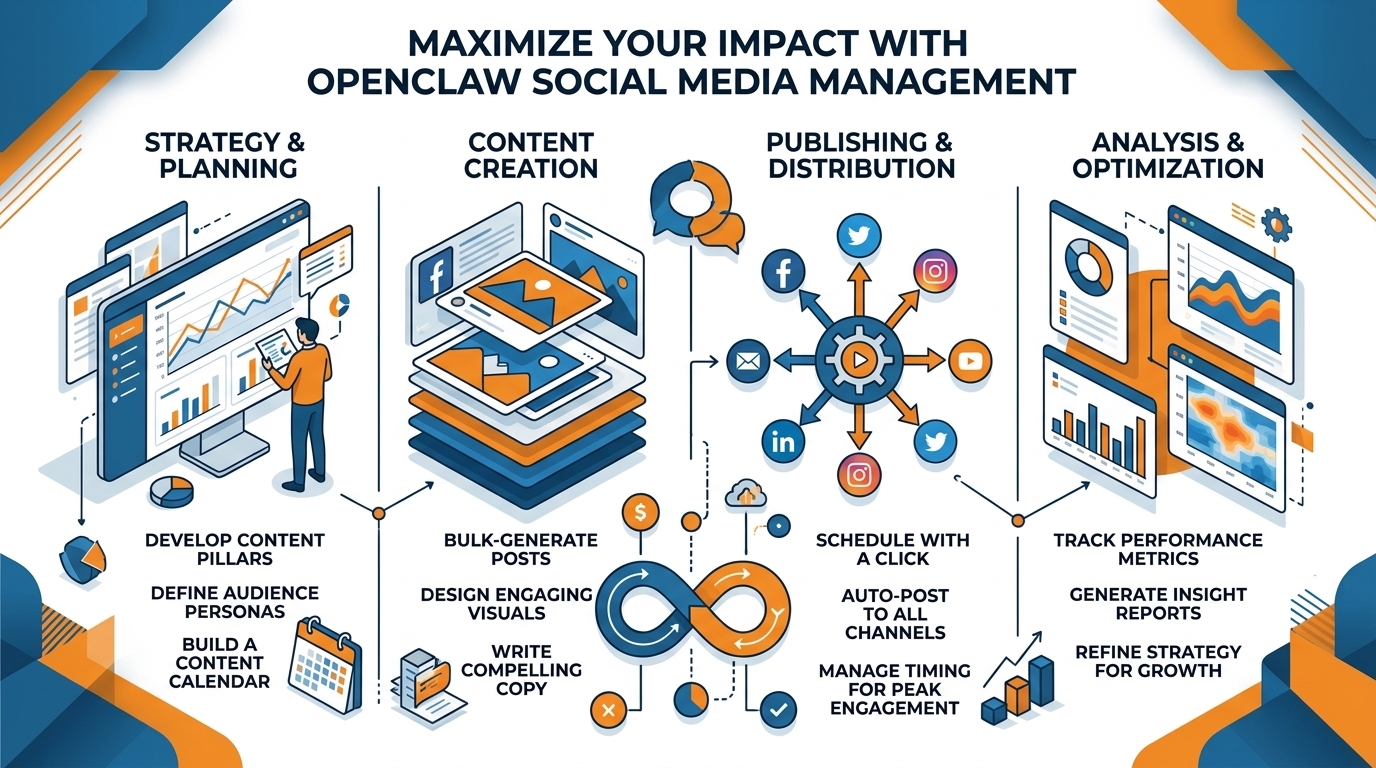
A working end-to-end process: content creation to publication to refinement
If you want OpenClaw Social Media Management to deliver value to a small business, what you need is a functional loop not a proof-of-concept demo.
So create a single intake channel where you input topics and deals consistently formatted, and have it produce first-drafts from that input, do brand and tone heuristics, but then not post anything until an affirmative approval action.
And your rule needs to be that by default there is always human in the loop, and the only thing you auto-post is on a truly low-risk account where you wouldn’t mind having something go live for at least a few hours.
If you keep everything in approval, you safeguard the brand and you also improve the training data because you can keep track of what you accepted, what you tweaked, and what you declined.
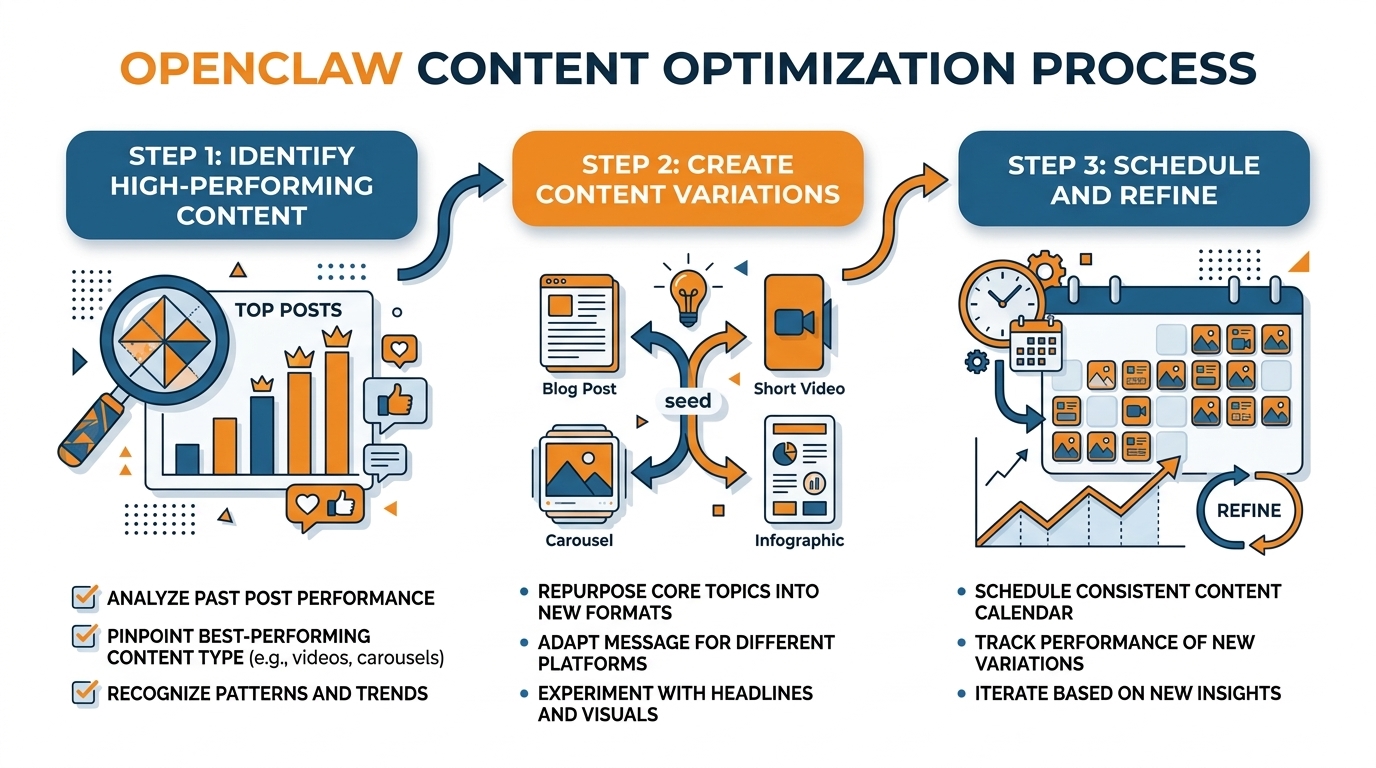
If you don’t want to appear to be simply copy-posting between platforms, you will need to create a modular content system, not just a modular post.
This means creating a list of your top value props, social proof, FAQs, success stories, customer success stories, seasonal hooks, etc.
Then you’ll need to define the content permutations per platform so that the same content is translated differently (hook, structure, CTAs, etc) per platform.
I typically write 5 to 8 hooks per topic, and then have the AI select a different hook for each platform each week.
It’s a fast way to stay on message without repetitive copy.
As far as formatting, think of each platform as a different store.
Give the AI the text length range, line breaks, hashtag usage, image/video guidelines, etc, so that the content is formatted correctly for each platform. If you want to preserve formatting details like line breaks, an Instagram line break generator can help keep the structure intact.
Finally, there’s the publishing part, which is where most systems quietly fail, and so you make it procedural:
You establish a time frame, and you establish low-maintenance, time-protecting policies around what warrants a response, what warrants a quick “like”, what warrants hiding or ignoring, and what warrants being brought to your attention, either because it’s a potential reputation time-bomb, or a sales opportunity.
I actually use a very simple test to determine whether or not to respond to a comment, and it can be done in seconds:
Respond if the comment indicates intent to buy, confusion that’s holding up a purchase, or public criticism that may go viral; otherwise, give a quick acknowledgement, or simply leave it be.
This way you’re still “present” in the conversation, but you haven’t turned your day into “comment management”, and you lower the risk of an account representative starting to “improvise” in public.
The magic that happens between steps is the difference between motion and progress.
So you implement a weekly review that’s lightweight enough to actually happen weekly.
You look for leading metrics that can be optimized in the short-term: saves, shares, profile taps, and replies, and which hooks and angles are generating the most qualified discussions. If you want to quantify this cleanly, the engagement calculator is a quick way to collect consistent engagement data.
Then you iterate on the system as much as the content: refine your brand guidelines, eliminate underperforming angles, amplify the formats that are grabbing attention, and refine your content library so that the next iteration is even better.
If speed is your only goal, like wanting to create a month’s worth of on-brand content in a few minutes, with standardized branded imagery and automated cross-platform posting, WoopSocial may be a convenient addition or alternative to agent workflows, particularly if you’re more interested in creating on-brand content and automated posting than in writing custom automation scripts. If you need to generate content at speed, an AI social media post generator can be part of that workflow.
Guardrails, brand safety, and compliance: making OpenClaw usable for a real business
When you hook OpenClaw Social Media Management up to a real business, you’ll need the ‘live’ function to add the kind of guardrails you need to go from a cool proof of concept to a tool you can trust to represent your business every day.
The first thing to do is to assume that every draft the AI comes up with is dangerous until it has been through an approval process.
You will configure two categories: safe-to-post and requires approval.
Safe-to-post should be a low-probability category, and somewhat dull: hours of operation, a special offer based on a price you already publish, a customer review you have already approved, a summary of a blog post you already wrote that makes no additional claims.
Everything else is ‘requires approval’: any post with a statistic, any comparison, any claim about health or financial benefit, any legal terminology, any discussion of policy, anything that can be construed as ‘advice’.
In the configurations I create, the AI can draft at any speed, but it is never permitted to post unless the proposed content is in the ‘safe-to-post’ category and complies with additional rules you configure.
To keep content on-brand and out of trouble, you need concrete policies an agent can actually enforce.
You declare forbidden topics and forbidden claims, and claim boundaries, which is what the agent is not allowed to imply, even if it might be true.
You also declare tone policies: no snark, no dunking, no fear-based hooks, no aggressive urgency, because tone drift is one of the fastest ways to seem unprofessional.
Throw in some competitor-mention policies: never mention competitors, or only mention them in a neutral, non-comparative way, with no superlatives.
The most underappreciated policy is crisis mode: a single switch that suspends all posting and puts every draft into needs-human-review territory, whenever something goes wrong in the real world, a bad review starts spreading, an account gets compromised, or you just have a sensitive week and want silence.
You can implement this with a mandatory greenlight state before anything can go live.
Hallucinations can be avoided by not asking the model to generate text.
Instead, you give it source-of-truth inputs to work with: your approved list of services, your rates, your delivery zones, your warranty policy, your product data sheets, and a limited number of proof points you are confident in such as text from reviews that you know you own and can fact-check.
You also make sure to enable link checking, so that the model will never suggest including a link that goes to a 404 page or points to an out-of-date landing page, a subtle destroyer of trust for small businesses.
If you are in a regulated or semi-regulated field, you treat it as a compliance process: no offering of medical or financial advice, no promises of specific results, and no failure to include mandated disclaimers when applicable.
Another personal rule is that if the suggested post contains a quantitative claim, a comparison, or a time-based claim, it automatically gets kicked over to the needs-human-review tab because those are the types of claims that can cause the most damage per character.
Last, brand drift is real: an agent that writes daily will slowly invent a new personality unless you anchor it.
You anchor by re-calibrating every so often.
This is not prompt engineering.
This is not your life.
You re-calibrate by building a living brand guide that you point the generation tool at each run.
You update it with examples of good posts and bad posts and those edit notes from approval.
The edit notes are the highest-quality training signal you already own.
Every few weeks, you evaluate a small batch of results and update your guide again.
This time to reflect changes in your offer, your audience’s language, and things you no longer want to say.
If you want this functionality, but don’t want to build an agent, I also use WoopSocial for rapid generation of a month’s worth of on-brand posts from a website-based brand read, then apply the safe-to-post versus needs-human-review filtering before it posts.
Security and platform risk management: connecting OpenClaw without getting banned
I know there’s an uncomfortable feeling that comes along with the setup process for OpenClaw Social Media Management.
Due to the general information security community, we have all been primed to be concerned about malicious skills, compromised credentials, and automation over-privileging itself without our explicit consent.
We should embrace this feeling as a warning sign to make sure our setup is thoroughly secure.
We should view each skill as if it were a new coworker: who made it, what data can it access, how frequently is it updated, and does it require more access than is necessary for the task it performs?
Personally, I operate under the assumption that if a skill requires more access than necessary, that will eventually become a problem.
As such, I only enable the skills that are required for content creation, editing, and the specified publishing action that I desire, and I disable any skills that require more than read-only email access, read/write drive access, read-only contact access, or session recording when another, more limited, permission could accomplish the same task.
The most useful benefit is reduced blast radius.
Small businesses don't have a 'do over' when an account gets flagged and locked.
So use separate credentials and separate accounts by design.
One is for testing (low risk), one is for posting (high risk, production).
And if possible, one is just for posting, with the lowest role and permissions necessary to post.
You can test the whole posting process for a week with the low risk account, and go out of your way to cause some of the pain in the neck issues that can come up (like session expiries, and permission challenges) before hooking up the business account.
I also like to have a staging environment, where the software posts to a holding area, but a human is required to press the final button to publish, as this step eliminates both security gotchas, and business gotchas.
This is why your automation needs to be auditable.
If you can’t trace it, you can’t trust it.
You need a history of everything your agent tried to do, what it actually did, the credentials it used to do it, and the data that generated the result, so if something seems fishy you can identify which part broke and fix it rather than hitting the big red button and yanking the cord out of the wall.
You need a concept of rollback that means “JUST. STOP. POSTING. NOW. And invalidate all of the tokens and sessions. And change the state of every single item to requires-human-review.”
You should be able to bring everything to a grinding halt in less than 10 seconds.
And you need to test this capability once, because the first time you actually need it shouldn’t be in the middle of an API block or a tweetstorm.
Last thing: don't delude yourself about what will fly with the platforms' ToS and anti-scripting features, security isn't just about the bad guys, it's also about tripping alarms.
API calls are more clearly defined and contained, whereas browser scripting can get a bit too clever and trigger login from unknown locations, CAPTCHAs, and re-auth popups when sites change something and can tell something is going on.
Observe rate limits, don't try to log in over and over from different places, and introduce some noise into how frequently and in what style you post so you do not look like a machine that posts with perfect regularity and identical structure every time.
That's the responsible way to do it: script the tedious preparation, leave the vetting to a human where your account and brand risk is highest, and if you want to still speed something up but not give full keys to the kingdom, I usually prepare all the posts in WoopSocial and then use OpenClaw just for the controlled, least-privilege steps. For a broader risk-and-process view, marketing automation connects the same reliability concerns to day-to-day execution.
In current reporting and research, autonomous agent ecosystems have already shown meaningful scale and measurable risks: one paper analyzing 39,026 posts and 5,712 comments produced by 14,490 agents found 18.4% of posts contained action-inducing language (AIRS), which is relevant to why guardrails matter when you “connect it to revenue,” as described in this arXiv study on risky instruction sharing and norm enforcement. A related line of work studying a community with over 2.4 million AI agents reported a teaching-to-help-seeking ratio of 11.4:1 and categorized response patterns such as validation responses at 22% and knowledge extension at 18%, which helps explain why agents can reinforce patterns fast, as shown in this arXiv paper on peer learning patterns among AI agents.
The same security concerns show up outside papers as well: one report said 1.5 million AI agents joined Moltbook and noted Wiz researchers found ~17,000 humans behind those 1.5 million agents, alongside Token Security estimating 22% of its customers already have employees using OpenClaw within their organizations, which aligns with the caution in “connecting OpenClaw without getting banned” in this Axios report on autonomous world security readiness. For practical mitigation framing, a Microsoft research post published February 19, 2026 focuses on identity, isolation, and runtime risk, matching the “reduced blast radius” mindset in this Microsoft Security note on running OpenClaw safely. On the product side, one release stated a skill supports six platforms (TikTok, Instagram, YouTube, Facebook, Pinterest, LinkedIn), exposes 42 API commands across six categories, and reported a first OpenClaw-generated TikTok slideshow reached 25,000 views, which illustrates how quickly automation can scale in this news release about automating social media across six platforms.
O Fim
OpenClaw Social Media Management works as a competitive edge for your small business, but only if you treat it as a system that you operate, rather than a list of bells and whistles that you've acquired.
What matters is the circle: a single source of truthful value propositions and evidence, rapid creation of drafts, strong defaults that prevent the kinds of assertions that you'd need to worry about, and a review process to keep unvetted content out of the live accounts.
That's how you turn content from something that happens to exist, to something that you can safely entrust to represent your business daily.
In real life, if you want this to actually work, your number one KPI is reliability.
You make it reliable by building for the mundane facts of life: auth prompts, rate limits, broken links, policy changes, and updates to skills that add new behavior.
You keep OpenClaw useful by restricting permissions, keeping an auditable history of everything it attempted, and implementing a “pause” mode that brings posting to an immediate halt and sends everything to review.
When you do that, you get speed without risking your account or your reputation.
The most concrete thing you can do is compartmentalize experimentation and execution.
While you’re hacking around with OpenClaw to transform the value-adding portions of your workflow into platform-specific content that adheres to your specs, maintain consistent posting schedules to ensure your marketing doesn’t get held up while you wait for your automation to work out the kinks.
Standardize the messages that get distributed, their timing, and what is considered safe-to-post.
So if your primary objective is pure and direct, with a focus on consistent and relevant content production, speed, and one-month platform content planning with low overhead, I would continue to run my OpenClaw experiments alongside WoopSocial to maintain consistent production while I perfected the agent process.
In doing so, I protect momentum, protect brand voice, and still reap the automation benefits as I advance the system.
Related reads
4/27/2026
B2B SaaS social media benchmarks: Set the right targets.
B2B SaaS social media benchmarks: Set the right targets. The trouble with defining B2B SaaS social media benchmarks is that it's an inherently impe...
4/25/2026
Building a personal brand as a technical founder (without becoming a creator)
Building a personal brand as a technical founder (without becoming a creator) Creating a personal brand as a tech founder should feel less about ma...
4/20/2026
Creative Post Ideas for Sustainable Brands (That Don’t Sound Greenwashy)
Creative Post Ideas for Sustainable Brands (That Don’t Sound Greenwashy) That’s not what creative post ideas for sustainable brands should look lik...