API & MCP included on every plan
Schedule Your Pinterest Story Pins
Schedule Pinterest Story Pins (Idea Pins) with WoopSocial. Upload vertical panels, add keyword-rich notes, and publish multi-page stories automatically to the right boards.
DIY educators, recipe bloggers, and ecommerce teams trust WoopSocial to keep Pinterest Story Pins flowing
Post to Pinterest through one unified social media API for your apps, AI agents, and automation tools. Use the WoopSocial REST API or MCP server to automate posting — we handle OAuth, tokens, and platform changes so you can ship features.
One API for posting
Publish to Pinterest through a single unified social media API — no separate integrations per platform
Panel-by-Panel Planner
Upload up to 20 vertical frames, arrange them in sequence, and attach notes for overlays or text. Need a static teaser as well? You can also schedule Pinterest image pins from the same dashboard. schedule Pinterest image pins
- Vertical ratio guidance
- Drag-to-reorder frames
- Overlay reminders
Keyword + Link Fields
Write optimized titles, add ingredient or supply lists, and store destination URLs so each panel reinforces the story and drives clicks.
- Keyword checklist
- Ingredients/supplies fields
- Destination link storage
Board-Aware Calendar
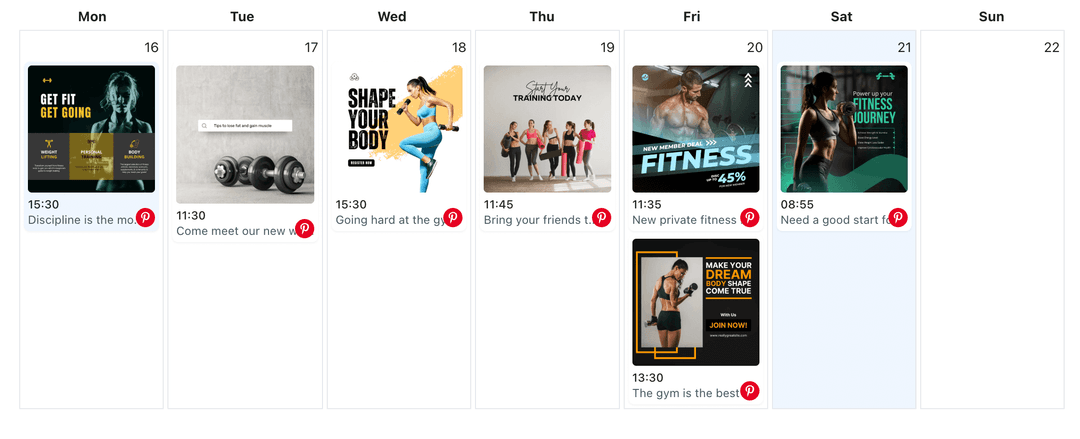
See Story Pins in the calendar next to seasonal promotions, video Pins, and evergreen posts. Need to rebalance? Jump into the Pinterest content planner and drag slots where they belong. Pinterest content planner
- Board filtering
- Seasonal labeling
- Week/month views
How It Works
Get your free API key
Sign up in under 70 seconds, connect your Pinterest account, and start calling the unified API or MCP server.
Build your integration
Send posts from your app, workflow, or AI agent with one endpoint — no separate platform SDKs to maintain.
Publish automatically
Schedule or publish Pinterest content instantly. WoopSocial handles OAuth, tokens, and platform API changes.
Aspect Ratio Safeguards
Stay within Pinterest’s 2:3 or 9:16 recommendations so every panel fills the feed without cropping vital text.
Ingredient & Step Lists
Store ingredients, materials, or timeline notes along each panel so you never forget critical details when rendering overlays.
Motion Pairing
Mix short clips with still panels to reset viewer attention. When an idea needs more motion, schedule Pinterest video pins right alongside the Story Pin. schedule Pinterest video pins
Performance-Friendly Cadence
Track how many Story Pins you have in the queue each month so you can maintain a steady cadence even on the free plan.
Why Pinterest Story Pins Matter
Idea Pins sit at the top of Pinterest discovery surfaces, but only if you keep panels informative and consistent. Scheduling gives you time to assemble complete instructions rather than improvising from your phone.
When campaigns launch, you can line up teaser panels, behind-the-scenes shots, and final reveals at once so the full story publishes without gaps.
Creative Tips for Story Pins
Use the first panel to state the promise clearly- “3-step fall mantel styling”- then dedicate each following panel to a single actionable step.
Mirror the Story Pin with supporting posts by scheduling Pinterest video pins or static images on related boards so users can save the format they prefer. schedule Pinterest video pins.
Ready to build your Pinterest integration?
Storyboard once, assign boards, and keep Idea Pins publishing automatically when seasonal demand spikes.
Get your free API keyFrequently Asked Questions
Pinterest currently supports up to 20 panels for Idea Pins, and WoopSocial follows the same limit when you upload assets.
Yes. Combine still images with looping clips inside the same Story Pin to keep viewers engaged throughout the sequence.
You can store destination links inside WoopSocial so you remember to add the correct URL when publishing, following Pinterest’s current linking rules.
Story Pins are supported on the free plan with up to 2 connected social accounts. Pro adds more accounts and credits.
Yes. Update panels, captions, boards, or publish times anytime before WoopSocial sends it live.
Clone the scheduled pin, swap board assignments or seasonal text, and keep variations organized in the same calendar.
Keep Pinterest Story Pins Flowing
Batch idea-driven panels, optimize keywords, and publish to the right boards automatically with WoopSocial.
Get your free API key