API & MCP included on every plan
Design a Pinterest Content Planner for Every Board
Turn seasonal ideas, product pins, and inspiration boards into a Pinterest content planner. Map posts on WoopSocial's calendar so every board stays fresh automatically.
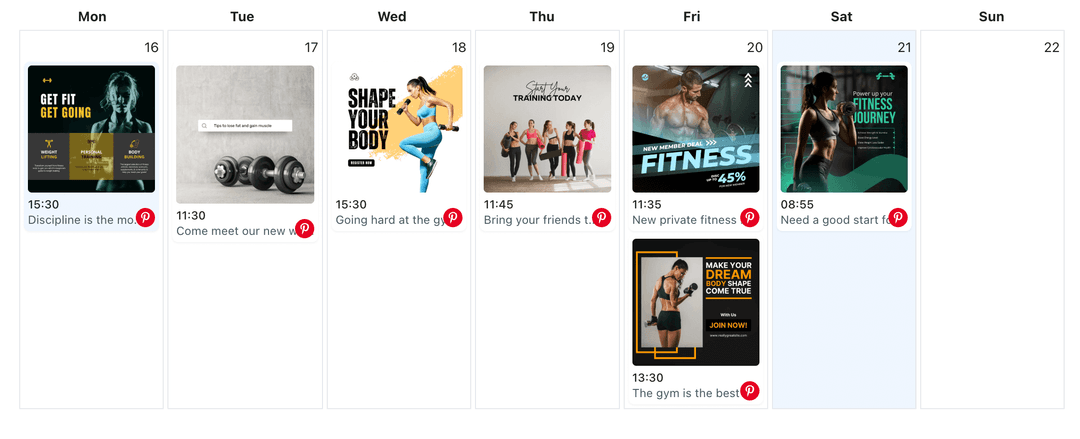
Loved by merchants, DIY bloggers, and agencies coordinating multiple Pinterest boards
Post to Pinterest through one unified social media API for your apps, AI agents, and automation tools. Use the WoopSocial REST API or MCP server to automate posting — we handle OAuth, tokens, and platform changes so you can ship features.
One API for posting
Publish to Pinterest through a single unified social media API — no separate integrations per platform
Board Assignment View
Tag pins with their destination board, drag them to new days, and keep holiday, evergreen, and promotional boards balanced. For static visuals, you can also schedule Pinterest image pins right from the planner. schedule Pinterest image pins
- Board tagging
- Drag-to-move
- Balanced cadence
Idea Pin Checklist
Break multi-page pins into easy steps, store script reminders, and check off panels as they are approved.
- Panel tracking
- Copy notes
- Asset status
Multi-Account Filters
Manage brand, client, or regional Pinterest accounts from one dashboard. When your roster grows, you can also manage multiple Pinterest accounts from the same calendar. manage multiple Pinterest accounts
- Account switching
- Shared guidelines
- Centralized workflow
How It Works
Get your free API key
Sign up in under 70 seconds, connect your Pinterest account, and start calling the unified API or MCP server.
Build your integration
Send posts from your app, workflow, or AI agent with one endpoint — no separate platform SDKs to maintain.
Publish automatically
Schedule or publish Pinterest content instantly. WoopSocial handles OAuth, tokens, and platform API changes.
Seasonal Roadmaps
Lay out holiday, back-to-school, or wedding timelines weeks ahead so every board tells a cohesive story.
Keyword Reminders
Store researched keywords next to each pin so descriptions stay optimized for Pinterest search.
Free vs Pro Visibility
See free plan usage (up to 2 connected social accounts) and upgrade to Pro when you need more capacity.
Mixed Media Support
Plan static images, videos, and idea pins side by side. When campaigns lean on motion, you can also schedule Pinterest video pins in the same workspace. schedule Pinterest video pins
Keep Every Board Fresh
Pinterest audiences look for seasonally relevant ideas. The content planner lets you stage product collections, inspiration lists, and tutorials so each board receives consistent attention.
When a board needs an extra push, duplicate an existing pin, tweak the description, and drop it into an open slot without reworking the entire schedule.
Balance Visual and Video Pins
Mix how-to videos with step-by-step photo pins inside the same calendar to ensure variety. Track which ideas still need footage or vertical crops before they publish.
If you are leaning into motion, you can also schedule Pinterest video pins directly from the planner to keep discovery-friendly clips on cadence. schedule Pinterest video pins.
Ready to build your Pinterest integration?
Give each board a clear roadmap and keep pins publishing automatically with WoopSocial.
Plan your Pinterest contentFrequently Asked Questions
Yes. Each planner slot stores the destination board so you always know where a pin will land before it publishes.
You can store storyboard notes, outline steps, and mark when each idea pin panel is approved before it goes live.
Use the grid to line up static imagery, then schedule Pinterest image pins directly from the planner whenever you need a photo-heavy stretch. schedule Pinterest image pins
Free plan includes up to 2 connected social accounts, while Pro lets you add more accounts and credits.
Yes. Update descriptions, images, or timing any time before the publish slot. The rest of your calendar stays intact.
No. WoopSocial publishes scheduled pins automatically so you can focus on creating the next batch of ideas.
Keep Pinterest Boards Planned
Stay weeks ahead with a board-aware planner that keeps every pin on schedule.
Get your free API key