API & MCP included on every plan
Schedule Your Pinterest Video Pins
Schedule Pinterest video pins to your boards. Upload videos, write descriptions, and schedule automatic pinning with WoopSocial.
Trusted by developers, agencies, and product teams building on the unified WoopSocial API
Post to Pinterest through one unified social media API for your apps, AI agents, and automation tools. Use the WoopSocial REST API or MCP server to automate posting — we handle OAuth, tokens, and platform changes so you can ship features.
One API for posting
Publish to Pinterest through a single unified social media API — no separate integrations per platform
Pinterest Video Pin Scheduling
Schedule video pins to your Pinterest boards. Upload MP4 or MOV videos, write descriptions with keywords, and set your pinning schedule to reach your audience. For static images, you can also schedule Pinterest image pins. schedule Pinterest image pins
- Video pin scheduling
- Board selection
- Automatic pinning
Multiple Board Video Support
Pin videos to different Pinterest boards from one dashboard. Organize your video content across boards and maintain a consistent pinning schedule.
- Multiple boards
- Board organization
- Easy board selection
Pinterest Video Planning
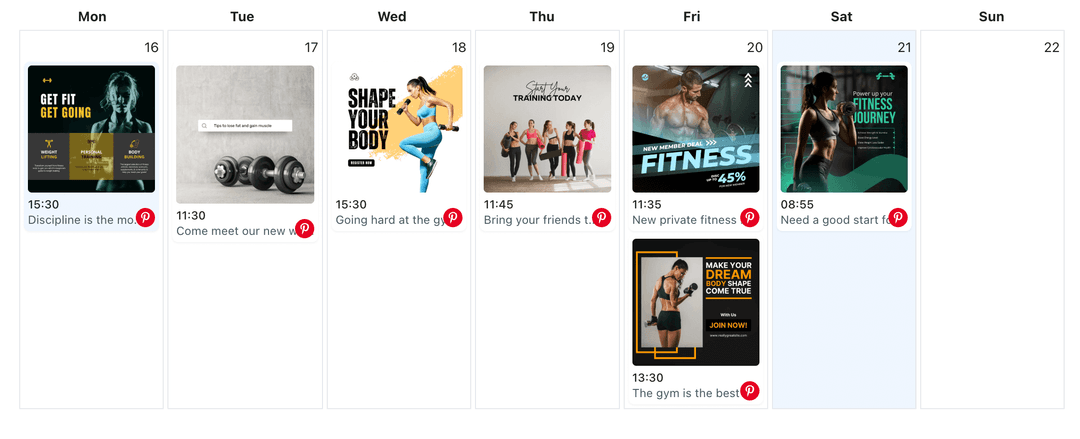
Plan your Pinterest content strategy with scheduled video pins. See your pinning calendar and maintain consistent visibility on Pinterest with video content.
- Visual calendar
- Content planning
- Consistent pinning
How It Works
Get your free API key
Sign up in under 70 seconds, connect your Pinterest account, and start calling the unified API or MCP server.
Build your integration
Send posts from your app, workflow, or AI agent with one endpoint — no separate platform SDKs to maintain.
Publish automatically
Schedule or publish Pinterest content instantly. WoopSocial handles OAuth, tokens, and platform API changes.
Video Pin Board Organization
Schedule video pins to different Pinterest boards based on your content themes. Organize your video pins across boards and maintain a strategic pinning schedule that reaches your target audience.
Keyword-Rich Video Descriptions
Write descriptions for your Pinterest video pins that include relevant keywords. Well-written descriptions help your video pins appear in Pinterest search results and reach more users.
Strategic Video Pinning Schedule
Schedule Pinterest video pins at optimal times to maximize visibility. Plan your video pinning strategy in advance to maintain consistent presence and grow your Pinterest following.
Video Content Calendar View
See all your scheduled Pinterest video pins in one calendar view. Plan your video pinning strategy, identify gaps in your schedule, and maintain a balanced mix of video content across your boards.
Why Schedule Pinterest Video Pins?
Pinterest is a visual discovery platform where video pins help you reach new audiences and drive traffic more effectively than static image pins alone. Scheduling video pins helps you maintain an active Pinterest presence without the daily interruption of manual pinning. When you schedule Pinterest video pins in advance, you can plan your entire content strategy around seasonal trends, product launches, tutorials, or content themes. This approach gives you control over your Pinterest boards and ensures your video pins reach your audience consistently.
Pinterest's algorithm favors accounts that pin regularly, especially with native video content uploaded directly to the platform. Scheduling video pins helps you meet that requirement effortlessly. Instead of remembering to pin videos at specific times, you can batch-create and schedule multiple video pins during dedicated content planning sessions. This saves hours every week while ensuring your Pinterest boards stay active and discoverable.
Video pins on Pinterest perform best when they're high-quality, keyword-optimized, and pinned consistently. By scheduling these pins strategically, you can reach your audience at optimal times without being online when the videos go live. Whether you're sharing product demonstrations, tutorials, or inspiration content, scheduled video pins help you maintain a strong Pinterest presence that drives traffic and engagement.
Best Practices for Pinterest Video Pins
When scheduling Pinterest video pins, consider Pinterest's video requirements and best practices. Pinterest recommends vertical videos (2:3 or 9:16 ratio) that are at least 1000 pixels wide for optimal display. Vertical videos perform better on Pinterest because they take up more screen space in the feed and are more likely to capture attention.
Plan your Pinterest video pins around your content themes and board organization. Mix product demonstrations with tutorial content, inspiration videos, and seasonal imagery to create a diverse, engaging Pinterest presence. The visual calendar helps you see your pinning schedule at a glance, making it easy to balance different types of video pins and maintain consistent activity across your boards.
Schedule Pinterest video pins at times when your audience is most active. While WoopSocial doesn't provide analytics, you can use Pinterest's native analytics to identify peak engagement times and schedule your video pins accordingly. Consistent scheduling helps you build a reliable pinning rhythm that keeps your video content visible and discoverable on Pinterest.
Ready to build your Pinterest integration?
Get your free API key and start posting in under 70 seconds. API and MCP access included on every plan, including free.
Get your free API keyFrequently Asked Questions
Yes, you can schedule video pins to your Pinterest boards. Upload videos in MP4 or MOV formats, write descriptions with keywords, select your board, and set your pinning schedule.
WoopSocial supports MP4 and MOV video formats for Pinterest pins. Videos are automatically optimized for Pinterest's requirements.
Pinterest recommends vertical videos (2:3 or 9:16 ratio) that are at least 1000 pixels wide. Vertical videos perform better on Pinterest because they take up more screen space in the feed.
Yes, you can schedule video pins to different Pinterest boards. Organize your video content across boards and maintain a strategic pinning schedule from one dashboard.
Free includes up to 2 connected social accounts across all platforms. Pro plan users can connect and schedule video pins to multiple Pinterest accounts from one dashboard.
Yes, WoopSocial automatically pins your scheduled video pins at the specified date and time. You don't need to be online when they go live.
Yes, you can edit any scheduled Pinterest video pin before it publishes. Update videos, descriptions, board selection, or scheduling times from your calendar view.
Get your free Pinterest API key
Get your free API key and start posting in under 70 seconds. API and MCP access included on every plan, including free.
Get your free API key