API & MCP included on every plan
Post Content to Multiple Pinterest Accounts
Post the same pin to multiple Pinterest accounts at once. Share images, videos, and idea pins across all your Pinterest accounts with one workflow.
Trusted by agencies, brands, and creators managing multiple Pinterest accounts
Post to Pinterest through one unified social media API for your apps, AI agents, and automation tools. Use the WoopSocial REST API or MCP server to automate posting — we handle OAuth, tokens, and platform changes so you can ship features.
One API for posting
Publish to Pinterest through a single unified social media API — no separate integrations per platform
Multi-Account Pinning
Create one Pinterest pin and publish it to multiple accounts simultaneously. Select all the Pinterest accounts you want to reach, upload your image or video once, and let WoopSocial handle publishing to each account. For managing your accounts, you can also manage multiple Pinterest accounts from one dashboard. manage multiple Pinterest accounts
- Select multiple accounts
- One pin, multiple accounts
- Automatic publishing
Visual Content Consistency
Ensure brand announcements, product launches, and visual updates reach all your Pinterest accounts at the same time. Maintain consistent aesthetic and messaging across personal brands, business accounts, and client profiles without manual duplication.
- Unified visual brand
- Simultaneous publishing
- Consistent aesthetic
Efficient Pinning Workflow
Save hours by posting to multiple Pinterest accounts in one step. Instead of uploading the same image or video multiple times, create it once and select all target accounts. For video content, you can also schedule Pinterest video pins to multiple accounts. schedule Pinterest video pins
- One-time content creation
- Batch account selection
- Streamlined workflow
How It Works
Get your free API key
Sign up in under 70 seconds, connect your Pinterest account, and start calling the unified API or MCP server.
Build your integration
Send posts from your app, workflow, or AI agent with one endpoint — no separate platform SDKs to maintain.
Publish automatically
Schedule or publish Pinterest content instantly. WoopSocial handles OAuth, tokens, and platform API changes.
Selective Account Targeting
Choose which Pinterest accounts receive each pin. You can post to all accounts at once, or select specific accounts for targeted messaging. This flexibility helps you customize content distribution based on your Pinterest strategy.
Synchronized Visual Publishing
All selected Pinterest accounts receive the pin at the same scheduled time. This ensures consistent visual messaging across your brand presence and helps you maintain unified communication with all your Pinterest audiences.
Account-Specific Customization
While the core visual content remains the same, you can adjust pin titles, descriptions, or board selections per account if needed. This allows you to maintain brand consistency while accommodating account-specific keywords or board strategies.
Visual Calendar Tracking
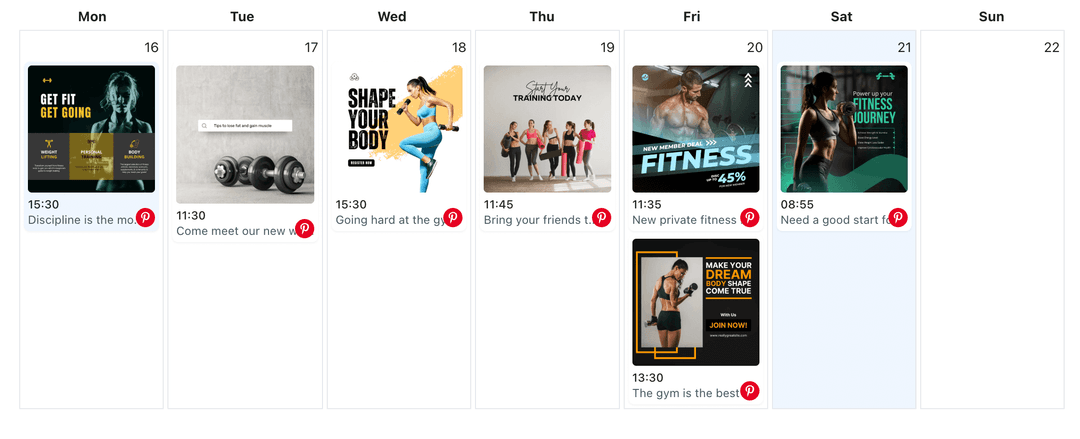
See all your multi-account pins in the visual calendar. Track which Pinterest accounts received each pin, verify publishing times, and ensure your Pinterest content strategy is executed across all your connected accounts.
Why Post to Multiple Pinterest Accounts?
Brands and creators with multiple Pinterest accounts often need to share the same images, videos, or idea pins across all their accounts. Whether you manage personal brands, business accounts, or client profiles, posting the same pin manually to each account is time-consuming and increases the risk of inconsistencies.
Posting to multiple Pinterest accounts at once ensures all your audiences receive the same visual message simultaneously. This approach maintains brand consistency, saves hours of repetitive work, and helps you coordinate campaigns across your entire Pinterest presence from one workflow.
Perfect for Agencies and Multi-Brand Creators
Agencies managing multiple client Pinterest accounts can share campaign updates, product launches, or brand announcements to all relevant accounts simultaneously. This ensures consistent messaging and efficient campaign execution without switching between multiple Pinterest accounts.
Creators with multiple Pinterest accounts for different niches or brands can also benefit from multi-account posting. Share visual content, tutorials, or product pins across all your Pinterest accounts at once, maintaining your presence on each account without duplicating pin creation work.
Ready to build your Pinterest integration?
Start posting the same pins to multiple accounts at once. Connect your Pinterest accounts and streamline your visual content distribution.
Post to multiple Pinterest accountsFrequently Asked Questions
Yes. WoopSocial lets you create one pin and publish it to multiple Pinterest accounts simultaneously. Select all the accounts you want to reach, and the pin will be published to each account at the scheduled time.
You can post to all connected Pinterest accounts at once. Free plan includes up to 2 connected social accounts, while Pro plan allows more accounts for multi-account posting.
The core visual content remains the same across all accounts, but you can adjust pin titles, descriptions, or board selections per account if needed. For completely different pins per account, you can manage multiple Pinterest accounts and schedule unique pins to each. manage multiple Pinterest accounts
Yes. When you post to multiple Pinterest accounts, all selected accounts receive the pin at the same scheduled date and time, ensuring synchronized publishing across your brand presence.
You can post image pins, video pins, and idea pins to multiple Pinterest accounts. For image-specific content, you can also schedule Pinterest image pins to multiple accounts simultaneously. schedule Pinterest image pins
You can select which Pinterest accounts receive each pin. Choose specific accounts from your connected profiles, or select all accounts for brand-wide announcements.
Streamline Your Multi-Account Pinterest Strategy
Post the same pins to multiple Pinterest accounts with one workflow. Save time and maintain consistent visual messaging across all your accounts.
Get your free API key