API & MCP included on every plan
Manage Multiple Pinterest Profiles and Boards from One Calendar
Connect every Pinterest profile you run, plan pins for multiple boards in a single WoopSocial calendar, and publish image or video pins automatically.
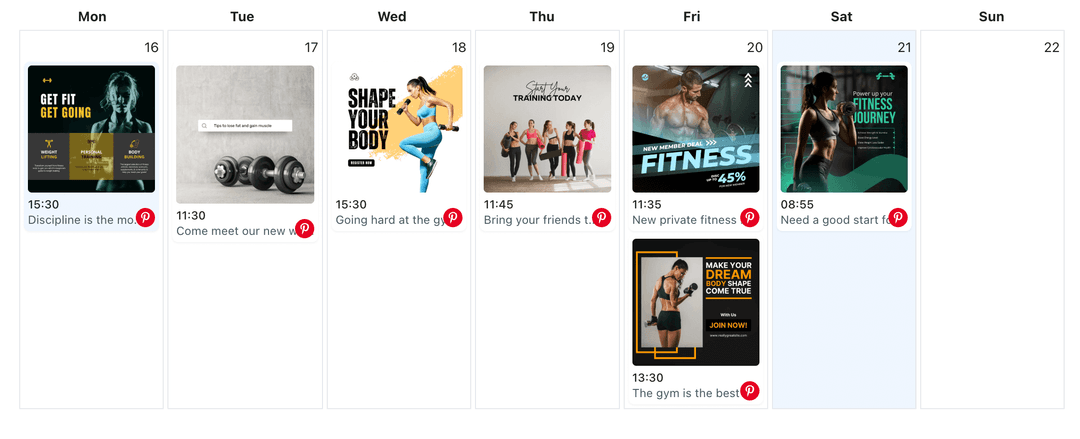
Organizes creators, eCommerce teams, and agencies scheduling pins for several Pinterest profiles
Post to Pinterest through one unified social media API for your apps, AI agents, and automation tools. Use the WoopSocial REST API or MCP server to automate posting — we handle OAuth, tokens, and platform changes so you can ship features.
One API for posting
Publish to Pinterest through a single unified social media API — no separate integrations per platform
Profile & Board Hub
Connect each Pinterest profile you manage along with its boards. Assign pins to the right destination and reuse descriptions when campaigns span multiple boards. For static imagery you can immediately schedule Pinterest image pins from the same screen. schedule Pinterest image pins
- Multiple profiles
- Board assignments
- Shared descriptions
Board-Level Calendar
View every scheduled pin by week or month, then filter down to a single board to balance topics. When a board relies on motion, you can also schedule Pinterest video pins without leaving the workflow. schedule Pinterest video pins
- Week and month views
- Board filters
- Campaign clarity
Automatic Pinning
Pick the board, choose the publish time, and WoopSocial pins the content automatically. You focus on visuals while the platform handles delivery.
- No manual pinning
- Timezone friendly
- Consistent cadence
How It Works
Get your free API key
Sign up in under 70 seconds, connect your Pinterest account, and start calling the unified API or MCP server.
Build your integration
Send posts from your app, workflow, or AI agent with one endpoint — no separate platform SDKs to maintain.
Publish automatically
Schedule or publish Pinterest content instantly. WoopSocial handles OAuth, tokens, and platform API changes.
Central Calendar Oversight
See how often each board publishes, spot gaps, and keep seasonal boards active even when you manage several brands.
Profile Filters
Switch to a single Pinterest profile to double-check descriptions, adjust timing, or duplicate pins for a related board.
Free and Pro Options
Start with up to 2 connected social accounts on the free plan. Upgrade to Pro for unlimited scheduling and more profile connections.
Automatic Delivery
WoopSocial pins your scheduled content at the exact time you choose, so you never need last-minute reminders.
Why Centralize Pinterest Profiles?
Retailers, publishers, and agencies often juggle multiple Pinterest profiles plus dozens of boards. Without a shared calendar it is hard to see which board is active or when a seasonal campaign last received attention. WoopSocial brings those profiles together so you can quickly confirm coverage and keep visuals fresh.
Centralization also helps you repurpose content responsibly. Spot a high-performing pin on one board, duplicate the idea for another audience, and schedule it without rebuilding the description from scratch.
Plan Board-Specific Campaigns
Launching a new collection might involve story pins on lifestyle boards, product close-ups on catalog boards, and teaser videos on idea boards. With WoopSocial you plan all of those touchpoints at once and assign them to the correct boards before the release date.
If a board is posting too often, filter the calendar, move a pin, and keep the rest of your schedule intact. Every change is reflected instantly so collaborators always know what is next.
Ready to build your Pinterest integration?
Connect your profiles, keep every board active, and publish pins automatically from one calendar.
Manage your Pinterest profilesFrequently Asked Questions
Yes. Free plan includes up to 2 connected social accounts with API and MCP access on every plan. Pro lets you connect multiple profiles and schedule without limits.
Assign each pin to a board when you schedule it and label boards by theme. The calendar filter lets you review a single board whenever you need.
Yes. Use the same workflow to schedule Pinterest image pins and video pins, so every board gets the mix it needs.
Once you set the publish time, WoopSocial pins the content for you. There is no need to log into Pinterest when the pin is due.
You can edit descriptions, change boards, or adjust timing up until the scheduled publish time.
Scheduled pins for that profile pause until you reconnect. Other profiles continue publishing as planned.
Keep Every Pinterest Board Active
Plan campaigns, publish consistently, and grow all of your Pinterest profiles from one workspace.
Get your free API key