API & MCP included on every plan
Cross-Post Your Pinterest Content to TikTok
Cross-post your Pinterest pins, Idea Pins, and videos to TikTok. Turn Pinterest visuals into TikTok-ready clips with concise captions and scheduled publishing.
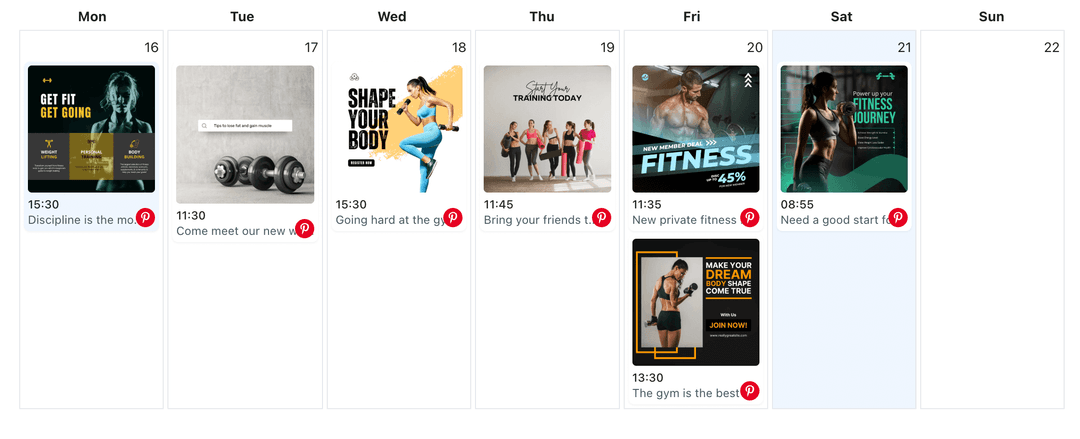
Trusted by creators turning Pinterest visuals into TikTok clips
Post to Pinterest through one unified social media API for your apps, AI agents, and automation tools. Use the WoopSocial REST API or MCP server to automate posting — we handle OAuth, tokens, and platform changes so you can ship features.
One API for posting
Publish to Pinterest through a single unified social media API — no separate integrations per platform
Pinterest to TikTok Cross-Posting
Choose pins, Idea Pins, or video pins and republish them to TikTok with refreshed captions. Keep your Pinterest workflow running while scheduling TikTok drops. For Pinterest-only scheduling, you can also schedule Pinterest video pins directly. schedule Pinterest video pins
- Select pins to reuse
- Refresh TikTok captions
- Schedule short clips
Idea Pin Sequencing
Break Idea Pins into tight TikTok story beats. Pick the frames that carry the hook, keep text minimal, and match the clip pacing TikTok viewers expect.
- Pick key frames
- Keep text light
- Match clip pacing
Calendar Alignment
Plan board activity and TikTok drops together. Avoid overlapping pushes, keep seasonal pins and TikTok clips in sync, and track everything in one schedule. When mapping campaigns, you can also use the Pinterest content planner for detail. Pinterest content planner
- One shared schedule
- Seasonal alignment
- Campaign visibility
How It Works
Get your free API key
Sign up in under 70 seconds, connect your Pinterest account, and start calling the unified API or MCP server.
Build your integration
Send posts from your app, workflow, or AI agent with one endpoint — no separate platform SDKs to maintain.
Publish automatically
Schedule or publish Pinterest content instantly. WoopSocial handles OAuth, tokens, and platform API changes.
Vertical-First Presentation
Ensure your pins fit TikTok's vertical feed by centering the main subject and trimming extra text. Keep the visual focus clear so viewers stay through the first seconds.
Caption Refinement
Rewrite Pinterest descriptions into concise TikTok captions. Lead with the benefit, keep copy short, and use only the hashtags that matter to the clip.
Board-to-Clip Mapping
Map Pinterest board themes to TikTok topics. Keep brand consistency while tailoring the delivery to TikTok's fast-scrolling audience.
Coordinated Timing
Pair TikTok drops with fresh pins or seasonal boards. Schedule both from one calendar so each channel supports the same campaign moments.
Why Cross-Post Pinterest Content to TikTok?
Pins are designed for discovery. Turning them into TikTok clips lets you carry that discovery energy into short-form, reaching viewers who prefer video without recreating assets.
Cross-posting focuses your effort on the visuals you already know perform. With quick caption edits and smart timing, those assets can drive saves on Pinterest and views on TikTok.
Best Practices for Pinterest to TikTok
Start with pins that have a clear hook or transformation. Keep overlays minimal, let the visual lead, and add a concise caption that explains the value fast.
Align timing with Pinterest performance. Use your calendar to stagger TikTok clips alongside fresh pins so both channels benefit from the same campaigns.
Ready to build your Pinterest integration?
Turn your top Pinterest pins into TikTok clips, keep captions aligned, and manage both schedules together.
Cross-post to TikTokFrequently Asked Questions
Yes. Choose the Idea Pin frames you want, trim them for short-form, and publish them to TikTok with a concise caption.
Yes. TikTok publishing requires a Business account. Connect it once and manage permissions from your dashboard.
Yes. Set unique publish times for each platform while viewing both calendars together to avoid overlap.
Yes. Cross-posts count toward your monthly post total. Free plan includes up to 2 connected social accounts with API and MCP access on every plan.
Yes. Rewrite the caption for TikTok before scheduling so the hook fits the clip and remains concise.
Yes. Keep your Pinterest schedule intact while setting TikTok times, all from the same calendar view.
Yes. Switch between Pinterest profiles and keep the same TikTok connection active without repeated logins.
Bring Your Pins to TikTok
Repurpose Pinterest visuals into TikTok clips, reach new viewers, and keep both channels consistent from one dashboard.
Get your free API key