API & MCP included on every plan
Schedule Your LinkedIn Carousel Posts
Schedule LinkedIn carousel posts in WoopSocial. Upload PDF slides or image sequences, organize captions, and publish automatically to your Company Page or personal profile.
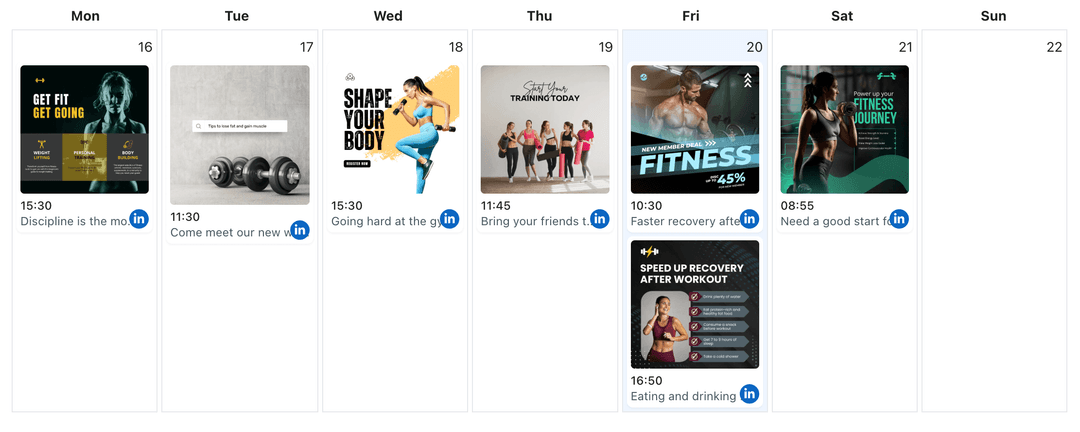
Used by B2B marketers, recruiters, and founders who rely on carousel storytelling on LinkedIn
Post to LinkedIn through one unified social media API for your apps, AI agents, and automation tools. Use the WoopSocial REST API or MCP server to automate posting — we handle OAuth, tokens, and platform changes so you can ship features.
One API for posting
Publish to LinkedIn through a single unified social media API — no separate integrations per platform
Document Carousel Scheduling
Upload a PDF or up to ten images, control slide order, and attach your headline plus intro text before scheduling. For single-image updates you can also schedule LinkedIn image posts. schedule LinkedIn image posts
- PDF + image support
- Slide order control
- Automatic publishing
Executive-Ready Copy Blocks
Draft the hook, supporting points, and CTA in one workspace so leadership quotes, stats, and metrics read cleanly on desktop and mobile feeds.
- Rich text editor
- Character count helper
- Saved talking points
Stakeholder-Friendly Calendar
Review carousel slots next to product launches, hiring campaigns, or customer stories. Need to manage multiple regions? Open the LinkedIn multi-page workspace without duplicating tools. manage multiple LinkedIn Pages
- Campaign visibility
- Easy rescheduling
- Role-based context
How It Works
Get your free API key
Sign up in under 70 seconds, connect your LinkedIn account, and start calling the unified API or MCP server.
Build your integration
Send posts from your app, workflow, or AI agent with one endpoint — no separate platform SDKs to maintain.
Publish automatically
Schedule or publish LinkedIn content instantly. WoopSocial handles OAuth, tokens, and platform API changes.
Slide Order Locking
Lock your slide order so stakeholders know exactly what will go live even if they are reviewing the post minutes before it publishes.
CTA Consistency
Keep the CTA in your main caption aligned with the closing slides so prospects always know the next step.
Repurpose Webinar Decks
Upload trimmed versions of webinar or investor decks and adapt them into LinkedIn-friendly swipe sequences without exporting extra files.
Multi-Page Visibility
See which market or Page owns each carousel so global teams avoid launching the same announcement twice. When you need broader oversight, you can schedule LinkedIn video posts or other formats from the same calendar. schedule LinkedIn video posts
Why LinkedIn Carousels Need a Plan
Decision-makers scroll during busy workdays, so every slide must earn its place. Scheduling gives you time to refine data points, add proof, and keep copy concise.
Planning ahead also lets you pair carousels with press releases, blog launches, or webinar reminders so your audience encounters the same narrative across multiple touchpoints.
Because WoopSocial keeps carousels alongside video and single-image posts, you can balance top-of-funnel thought leadership with deeper mid-funnel assets.
Best Practices for LinkedIn Carousel Content
Lead with a concise hook slide- think headline plus stat- then deliver context through supporting slides that highlight value props or customer outcomes.
Use consistent typography, padding, and brand colors so the deck feels like a polished presentation rather than a collection of screenshots.
Close with a clear CTA slide that mirrors the caption so readers know whether they should book a demo, download a resource, or reach out via InMail.
Ready to build your LinkedIn integration?
Line up your slides, maintain a professional narrative, and keep LinkedIn audiences informed without late-night uploads.
Get your free API keyFrequently Asked Questions
Yes. WoopSocial supports PDF uploads for LinkedIn document posts, letting you keep native slide quality.
LinkedIn currently supports up to 300 pages, but most high-performing carousels use 5–12 slides. WoopSocial lets you schedule within those limits.
LinkedIn treats document posts separately from image albums. Upload a single PDF or image set per carousel to follow platform standards.
You can replace the PDF or swap images anytime before the scheduled publish time. Update the caption and thumbnail from the same screen.
Yes. Once scheduled, WoopSocial publishes automatically at the chosen time, so you do not need to be logged in.
Admins with access to the same WoopSocial workspace can review copy, adjust slides, and confirm timing without exporting files.
Keep LinkedIn Carousels Polished
Plan every slide like a presentation, automate publishing, and free up time for strategy.
Get your free API key