API & MCP included on every plan
Generate LinkedIn Captions with AI
Use AI to generate LinkedIn post captions faster. Describe your professional update, get caption suggestions, then edit and schedule them from one calendar.
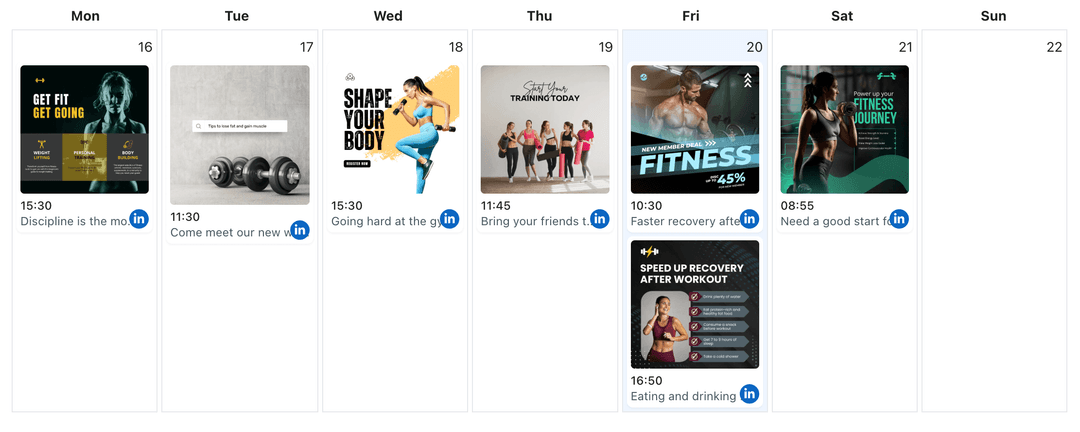
Used by professionals and businesses who want to write LinkedIn captions faster without losing their professional brand voice
Post to LinkedIn through one unified social media API for your apps, AI agents, and automation tools. Use the WoopSocial REST API or MCP server to automate posting — we handle OAuth, tokens, and platform changes so you can ship features.
One API for posting
Publish to LinkedIn through a single unified social media API — no separate integrations per platform
AI Caption Drafts for LinkedIn
Describe your professional update, company announcement, or industry insight and ask AI to draft LinkedIn captions that match your professional tone. When a caption feels right, you can schedule the post from the same LinkedIn content planner. LinkedIn content planner
- Professional tone options
- Network-appropriate length
- Editable AI suggestions
Caption Variations for Professional Posts
Generate multiple caption options for the same update so you can test different angles, professional tones, or call-to-action phrases without rewriting everything from scratch. Choose the version that best matches your LinkedIn profile or Company Page voice.
- Multiple caption ideas
- Concise and detailed variants
- Post-specific professional tone
AI Captions that Match Your Professional Content
Upload an image or describe your professional visual content, and ask AI to write LinkedIn captions that complement the image and convey your message. When you are ready to publish, you can also schedule LinkedIn image posts with the AI-generated captions. schedule LinkedIn image posts
- Professional content-aware prompts
- Visual and caption pairs
- Calendar-ready copy
How It Works
Get your free API key
Sign up in under 70 seconds, connect your LinkedIn account, and start calling the unified API or MCP server.
Build your integration
Send posts from your app, workflow, or AI agent with one endpoint — no separate platform SDKs to maintain.
Publish automatically
Schedule or publish LinkedIn content instantly. WoopSocial handles OAuth, tokens, and platform API changes.
Caption Templates for Professional Posts
Save caption prompts for common LinkedIn updates like company announcements, hiring posts, product launches, or industry insights so you can generate new caption drafts with a couple of clicks instead of starting from scratch.
Maintain Your Professional LinkedIn Voice
Tell AI how your LinkedIn profile or Company Page should sound- authoritative, approachable, or thought-leading- and reuse those guidelines so generated captions stay close to your usual professional tone instead of sounding generic.
Caption Length Controls for LinkedIn
Ask AI for shorter or longer versions of the same caption so you can decide whether a concise update or a fuller explanation works best for your LinkedIn network and professional goals.
Safe, Editable Caption Suggestions
AI caption suggestions always stay as drafts until you approve them. You choose what gets scheduled, what needs edits, and what should be discarded before anything reaches your LinkedIn network.
Why Generate LinkedIn Captions with AI?
LinkedIn professionals know what they want to share but often struggle to turn those ideas into clear, engaging captions when balancing work responsibilities. AI caption generation gives you a starting point so you are never staring at a blank caption box. Instead of writing every caption from scratch, you can move quickly between ideas, caption drafts, and approvals while keeping your focus on your core work.
Using AI for caption drafts does not replace your professional judgment. You still control what goes live, which company updates you highlight, and how you communicate with your network. AI simply speeds up the early drafting step so you can spend more time refining your professional message and less time trying to find the first sentence that sounds right.
How AI Caption Generation Fits Into Your LinkedIn Workflow
Start by planning your LinkedIn content in your content planner, then use AI to fill specific gaps with caption ideas that match those calendar slots. For example, you might ask for a concise caption for a company announcement, a longer thought leadership caption for an industry insight, or a professional update caption that fits your niche.
Once the AI captions are generated, you choose which ones deserve a place on your calendar. Edit each caption to confirm it is accurate, on-brand, and aligned with your LinkedIn professional presence. When the wording feels right, schedule the post alongside your manually written content and let WoopSocial handle publishing to maintain your professional consistency.
Ready to build your LinkedIn integration?
Use AI to draft LinkedIn captions faster, then edit and schedule them from one simple calendar without losing your own professional voice.
Generate LinkedIn captions with AIFrequently Asked Questions
AI can help you draft LinkedIn captions for professional posts, company announcements, and industry insights based on your prompts. You describe your update, and AI returns caption suggestions you can review and edit before scheduling.
Yes. AI only generates caption drafts. You decide which captions to keep, how to edit them, and when they get scheduled on your LinkedIn profile or Company Page.
You can paste existing captions or website copy into the prompt and ask AI for new variations or updated versions, then refine them before you schedule.
No. AI helps you write captions, while you decide the schedule. WoopSocial publishes at the times you choose inside the content planner.
Yes. Free plan users can generate AI caption drafts and schedule unlimited posts on supported networks. Pro adds more connected accounts and credits.
AI can suggest hashtags in the caption text, but you should review and adjust them before publishing to make sure they match your LinkedIn strategy and professional brand.
Yes. You can generate AI captions for text posts, image posts, or video posts on both personal profiles and Company Pages. For comprehensive post creation support, you can also create LinkedIn posts with AI.
Start Generating LinkedIn Captions with AI Today
Move from blank caption box to scheduled LinkedIn posts in minutes with AI-assisted caption generation and WoopSocial's visual calendar.
Get your free API key