API & MCP included on every plan
Schedule Your YouTube Shorts
Schedule YouTube Shorts to your channel. Upload vertical videos, write descriptions, and schedule automatic publishing with WoopSocial.
Franchises, boutiques, and local teams rely on WoopSocial to keep their YouTube Shorts publishing daily
Post to YouTube through one unified social media API for your apps, AI agents, and automation tools. Use the WoopSocial REST API or MCP server to automate posting — we handle OAuth, tokens, and platform changes so you can ship features.
One API for posting
Publish to YouTube through a single unified social media API — no separate integrations per platform
YouTube Shorts Composer
Upload vertical videos up to 60 seconds, write descriptions, and add titles before you hit schedule. When the content needs a longer follow-up, you can also schedule YouTube videos from the same workspace. schedule YouTube videos
- Vertical video support
- Up to 60 seconds
- Automatic publishing
Channel-Level Targeting
Pick the YouTube channel that should receive the Short, keep branding consistent, and reuse proven descriptions across channels without copy-paste mistakes.
- Multiple channel picker
- Saved brand voice
- Reusable snippets
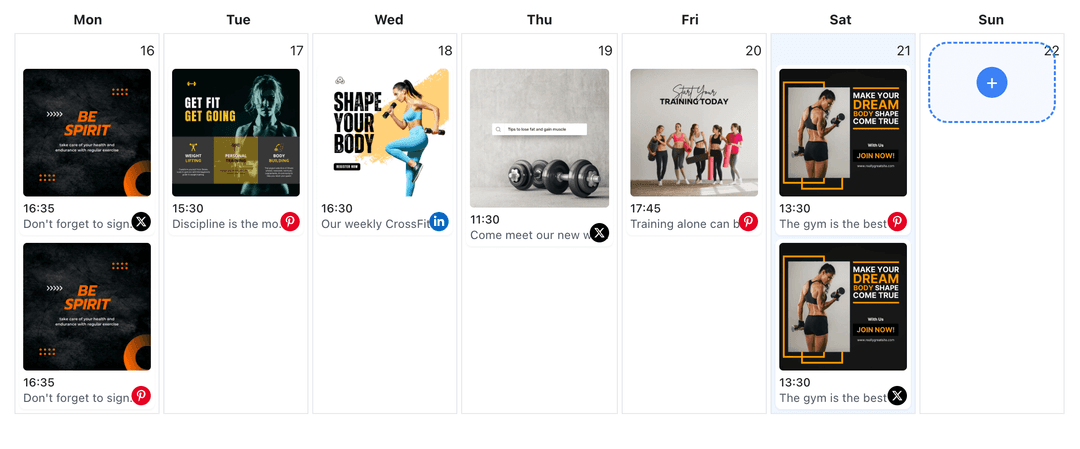
Calendar Synced Shorts
See Shorts alongside regular videos and other content so you never double-book a day. If you need a bigger planning view you can open the YouTube content planner without switching tabs. YouTube content planner
- Week and month views
- Color-coded entries
- Gap detection
How It Works
Get your free API key
Sign up in under 70 seconds, connect your YouTube account, and start calling the unified API or MCP server.
Build your integration
Send posts from your app, workflow, or AI agent with one endpoint — no separate platform SDKs to maintain.
Publish automatically
Schedule or publish YouTube content instantly. WoopSocial handles OAuth, tokens, and platform API changes.
Vertical Preview Controls
See how each Short displays in a 9:16 canvas so text never gets trimmed and Shorts look polished on every device.
Description Optimization
Write descriptions that help your YouTube Shorts get discovered. Add relevant keywords and hashtags to improve visibility in YouTube's Shorts feed.
Media Reuse Library
Store evergreen Shorts assets- logos, product shots, testimonials- and drop them into new campaigns without hunting through folders.
Free vs Pro Limits
Track free plan usage (up to 2 connected social accounts) and upgrade to Pro when you need more Shorts capacity.
Why Schedule YouTube Shorts?
YouTube Shorts help you reach new audiences and keep your channel active between longer video uploads. Scheduling lets you batch create content, queue multiple Shorts per week, and keep momentum even when production gets hectic.
It also keeps campaigns consistent. Launch teasers, behind-the-scenes clips, and community shoutouts can all be staged at once, giving you time to review branding and ensure every Short supports the main message.
Tips for High-Performing YouTube Shorts
Lead with engaging visuals or bold text so viewers stop scrolling. Mix quick video snippets with branded content, and finish with a clear call to action to visit your channel or subscribe.
Pair Shorts with other content types for full coverage- when you tease a product in Shorts, you can also schedule YouTube videos on the channel to provide deeper information for anyone who wants more detail.
Ready to build your YouTube integration?
Keep daily Shorts rolling without babysitting your uploads. Build them once inside WoopSocial and publish on time automatically.
Get your free API keyFrequently Asked Questions
Yes. Upload several vertical videos, arrange them in order, and WoopSocial publishes them at the scheduled times.
No. Once the Short is scheduled, WoopSocial publishes it automatically so you can stay offline or work on other tasks.
Saved media stays in your workspace, making it easy to drag older clips or graphic templates into new Short sequences.
Shorts are supported on the free plan with up to 2 connected social accounts. Upgrade to Pro for more accounts and credits.
Yes. Update videos, descriptions, or publish times anytime before the Short goes live.
Shorts appear in the same visual calendar as your regular video content, and you can reference the YouTube content planner to see how everything fits together.
Keep YouTube Shorts Consistent
Batch Shorts, organize media, and publish automatically so your channel feels active every day.
Get your free API key