API & MCP included on every plan
Cross-Post Your YouTube Content to TikTok
Cross-post your YouTube videos and Shorts to TikTok. Trim highlights, refresh captions, and publish short-form clips without rebuilding your content.
Trusted by creators sharing YouTube highlights with TikTok audiences
Post to YouTube through one unified social media API for your apps, AI agents, and automation tools. Use the WoopSocial REST API or MCP server to automate posting — we handle OAuth, tokens, and platform changes so you can ship features.
One API for posting
Publish to YouTube through a single unified social media API — no separate integrations per platform
YouTube to TikTok Cross-Posting
Pick YouTube videos or Shorts and publish them to TikTok with refreshed captions. Keep the story intact while focusing on the strongest moments. For YouTube-only scheduling, you can also schedule YouTube videos directly. schedule YouTube videos
- Select videos or Shorts
- Refresh TikTok captions
- Schedule short drops
Highlight Extraction
Identify the segment that hooks viewers quickly. Lead with the payoff, keep overlays light, and use captions that match TikTok's fast pace.
- Lead with the hook
- Keep overlays minimal
- Match TikTok pacing
Calendar Coordination
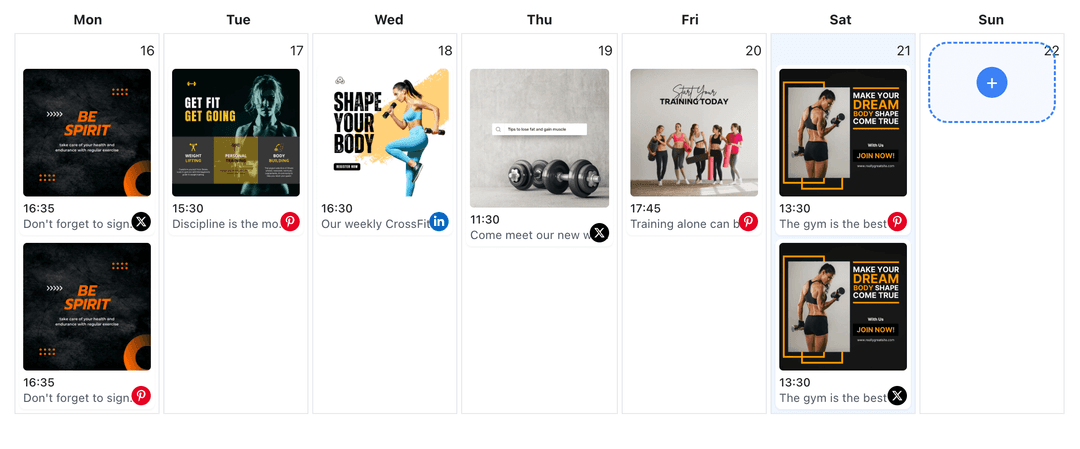
Plan channel uploads and TikTok drops together. Avoid releasing the same story twice in one day and keep Shorts, long-form, and TikTok clips coordinated. When organizing campaigns, you can also use the YouTube content planner. YouTube content planner
- One calendar view
- Avoid overlap
- Coordinate releases
How It Works
Get your free API key
Sign up in under 70 seconds, connect your YouTube account, and start calling the unified API or MCP server.
Build your integration
Send posts from your app, workflow, or AI agent with one endpoint — no separate platform SDKs to maintain.
Publish automatically
Schedule or publish YouTube content instantly. WoopSocial handles OAuth, tokens, and platform API changes.
Short-Form Ready Output
Keep the video framed for vertical viewing and front-load the story. Short clips drive TikTok attention while your full video remains on YouTube.
Caption Alignment
Write TikTok captions that summarize the clip. Keep them concise, avoid long descriptions, and make sure they reinforce the main moment.
Multi-Channel Oversight
Manage multiple YouTube channels and one TikTok connection without re-authenticating. Route clips from the right channel every time.
Release Timing
Stagger TikTok clips around YouTube premieres or uploads. Use the shared calendar to keep both audiences engaged without duplicating drops.
Why Cross-Post YouTube Content to TikTok?
Your YouTube videos already include the stories that perform in short-form. By trimming highlights for TikTok, you extend reach, send viewers to your channel, and keep production focused on a single source video.
Cross-posting keeps your workflow efficient. One recording can power a full video, a Short, and a TikTok clip, letting each audience watch in the format they prefer.
Best Practices for YouTube to TikTok
Lead with the strongest moment. Keep captions short, avoid heavy graphics, and let the clip speak quickly.
Use timing to your advantage. Publish TikTok highlights after your YouTube upload to spark interest and keep the conversation going across both channels.
Ready to build your YouTube integration?
Send your YouTube highlights to TikTok, adjust captions, and manage both schedules from one dashboard.
Cross-post to TikTokFrequently Asked Questions
Yes. Choose the Short you want to reuse, adjust the caption for TikTok, and schedule it to publish.
Select the best segment from a full video, trim it for short-form, and publish it as a TikTok clip.
Yes. TikTok publishing requires a Business account. Connect it once and manage permissions anytime.
Yes. Cross-posts count toward your monthly post limit. Free plan includes unlimited posts on supported networks.
Yes. Keep your YouTube upload cadence and schedule TikTok clips separately while viewing both calendars together.
Yes. Switch between channels and keep the same TikTok connection active without repeated logins.
No. YouTube cross-posting focuses on connecting, scheduling, and publishing. AI features are not applied to YouTube content.
Share Your Channel on TikTok
Repurpose YouTube videos into TikTok clips, grow reach, and keep both schedules organized in one place.
Get your free API key