API & MCP included on every plan
Cross-Post Your YouTube Content to Pinterest
Cross-post your YouTube channel videos to Pinterest boards. Repurpose YouTube videos, thumbnails, and descriptions to reach Pinterest audiences and grow your presence.
Trusted by businesses expanding their reach across YouTube and Pinterest
Post to YouTube through one unified social media API for your apps, AI agents, and automation tools. Use the WoopSocial REST API or MCP server to automate posting — we handle OAuth, tokens, and platform changes so you can ship features.
One API for posting
Publish to YouTube through a single unified social media API — no separate integrations per platform
YouTube to Pinterest Cross-Posting
Select YouTube channel videos and cross-post them to your Pinterest boards. Repurpose video thumbnails, descriptions, and links to reach Pinterest audiences searching for inspiration. For original Pinterest content, you can also schedule Pinterest image pins directly.
- Repurpose YouTube videos
- Select target boards
- Automatic cross-posting
Content Repurposing Workflow
Take your best-performing YouTube channel content and adapt it for Pinterest. Video thumbnails from YouTube work well on Pinterest boards, and you can adjust descriptions to match Pinterest's search-focused platform.
- Adapt existing content
- Optimize for Pinterest
- Save creation time
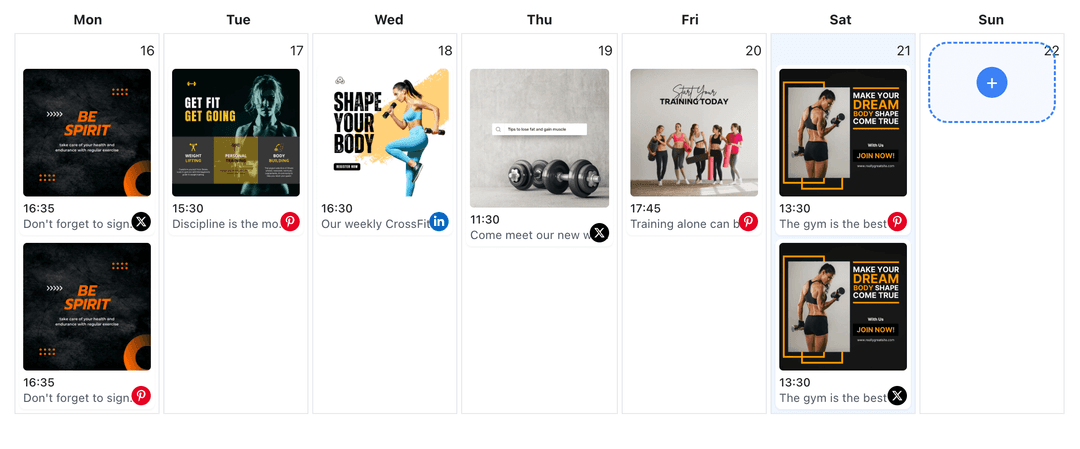
Multi-Platform Calendar
See your YouTube and Pinterest content in one calendar view. Plan cross-posting strategies and maintain consistent presence on both platforms from one dashboard. When planning campaigns, you can also use the YouTube content planner to coordinate videos. YouTube content planner
- Unified calendar view
- Cross-platform planning
- Consistent scheduling
How It Works
Get your free API key
Sign up in under 70 seconds, connect your YouTube account, and start calling the unified API or MCP server.
Build your integration
Send posts from your app, workflow, or AI agent with one endpoint — no separate platform SDKs to maintain.
Publish automatically
Schedule or publish YouTube content instantly. WoopSocial handles OAuth, tokens, and platform API changes.
Content Adaptation Tools
Adapt YouTube channel content for Pinterest audiences. Adjust descriptions to include Pinterest-friendly keywords, select appropriate boards, and optimize thumbnails for Pinterest's visual discovery platform.
Board Selection
Choose which Pinterest boards receive your cross-posted YouTube content. Organize content by theme, product category, or audience to maintain board relevance and improve discoverability.
Time-Saving Repurposing
Save hours by repurposing your best YouTube channel content to Pinterest. Instead of creating separate content for each platform, cross-post strategically to reach both audiences efficiently.
Consistent Multi-Platform Presence
Maintain active presence on both YouTube and Pinterest without doubling your content creation time. Cross-posting helps you reach audiences on both platforms while managing everything from one calendar.
Why Cross-Post YouTube Content to Pinterest?
YouTube channels and Pinterest serve different audiences and purposes, but your best content can work on both platforms. Cross-posting from YouTube to Pinterest helps you reach Pinterest's discovery-focused audience while maintaining your YouTube channel presence. Pinterest users search for ideas, inspiration, and products, making it an ideal platform for repurposing your YouTube video thumbnails and descriptions.
When you cross-post YouTube content to Pinterest, you extend the reach of your videos, thumbnails, and descriptions without creating everything from scratch. YouTube channel videos with strong visuals, educational content, or lifestyle imagery often perform well on Pinterest boards. By adapting descriptions and selecting relevant boards, you can make your YouTube content discoverable to Pinterest users searching for related topics.
Cross-posting also saves time in your content workflow. Instead of creating separate content for YouTube and Pinterest, you can repurpose your best-performing YouTube channel content to Pinterest boards. This approach helps you maintain consistent presence on both platforms while focusing your creative efforts on producing high-quality YouTube content that works across both platforms.
Best Practices for YouTube to Pinterest Cross-Posting
When cross-posting YouTube channel content to Pinterest, focus on videos with strong visual appeal that align with Pinterest's discovery mindset. Educational content, tutorials, how-to videos, and lifestyle content from YouTube often translate well to Pinterest boards. Adapt your YouTube descriptions to include Pinterest-friendly keywords and descriptions that help users discover your content through search.
Select Pinterest boards that match your YouTube content themes. If your YouTube channel focuses on a specific niche, create or use Pinterest boards that align with those topics. This helps your cross-posted content reach the right Pinterest audience and improves board organization for better discoverability.
Consider timing when cross-posting. While YouTube videos might perform best at specific times, Pinterest content has a longer shelf life and can be discovered weeks or months after pinning. Schedule cross-posts strategically to maintain consistent presence on both platforms without overwhelming either audience.
Ready to build your YouTube integration?
Start repurposing your YouTube channel content to Pinterest boards today. Connect both accounts and reach new audiences on Pinterest.
Cross-post to PinterestFrequently Asked Questions
Yes, you can cross-post your YouTube channel videos, thumbnails, and descriptions to Pinterest boards. Connect both accounts in WoopSocial and select content to repurpose for Pinterest audiences.
Visual content from YouTube channels works well on Pinterest. Educational videos, tutorials, how-to content, and lifestyle videos often perform well when cross-posted to relevant Pinterest boards.
Yes, you need both a YouTube channel and a Pinterest account. Connect both accounts in WoopSocial to enable cross-posting between the platforms.
Yes, you can adjust descriptions, select Pinterest boards, and optimize content for Pinterest's search-focused platform when cross-posting from YouTube.
Cross-posts are supported on the free plan with unlimited posts on supported networks.
Yes, you can schedule YouTube to Pinterest cross-posts in advance. Plan your cross-posting strategy and let WoopSocial handle publishing to both platforms automatically.
Select Pinterest boards that match your YouTube content themes. Organize cross-posted content by topic, product category, or audience to maintain board relevance and improve discoverability.
Expand Your Reach Across YouTube and Pinterest
Cross-post your YouTube channel content to Pinterest and reach new audiences on both platforms with one workflow.
Get your free API key