API & MCP included on every plan
Cross-Post Your YouTube Content to Instagram
Cross-post YouTube videos and Shorts to Instagram. Trim highlights, adjust captions for the feed, and schedule both channels from one calendar without rebuilding assets.
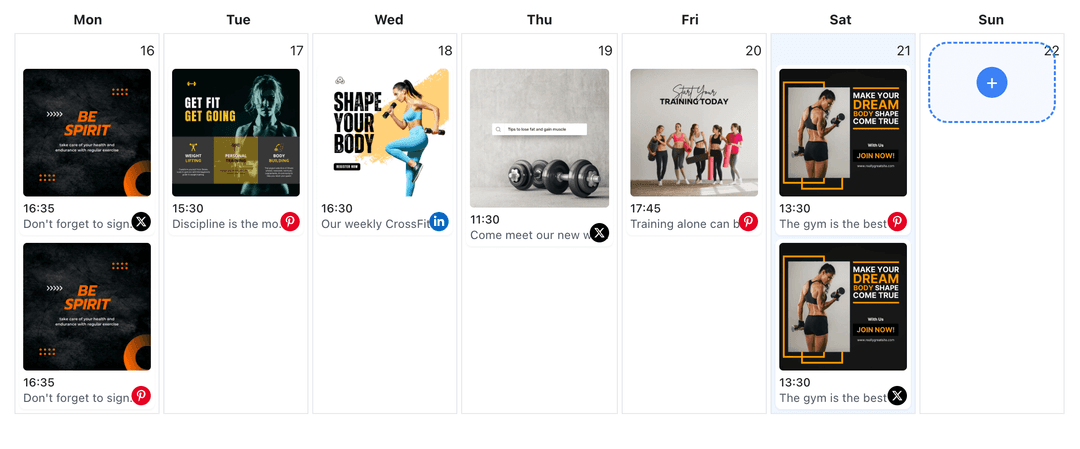
Creators repurpose YouTube videos for Instagram with WoopSocial to keep both audiences engaged
Post to YouTube through one unified social media API for your apps, AI agents, and automation tools. Use the WoopSocial REST API or MCP server to automate posting — we handle OAuth, tokens, and platform changes so you can ship features.
One API for posting
Publish to YouTube through a single unified social media API — no separate integrations per platform
YouTube to Instagram Cross-Posting
Select a YouTube video or Short, trim the highlight, and adapt the caption for Instagram. When you need YouTube-only scheduling, you can also schedule YouTube videos directly. schedule YouTube videos
- Pick videos or Shorts
- Refresh Instagram captions
- Schedule automatically
Highlight Packaging
Keep the strongest 15–60 seconds, center the subject, and limit overlays so the clip feels native to Instagram's feed.
- Front-load the hook
- Keep overlays light
- Preview before posting
Calendar Coordination
Plan YouTube uploads and Instagram drops together. Avoid announcing the same video twice in one day and align promos with the YouTube content planner when you need more detail. YouTube content planner
- One shared schedule
- Avoid same-day overlap
- Campaign clarity
How It Works
Get your free API key
Sign up in under 70 seconds, connect your YouTube account, and start calling the unified API or MCP server.
Build your integration
Send posts from your app, workflow, or AI agent with one endpoint — no separate platform SDKs to maintain.
Publish automatically
Schedule or publish YouTube content instantly. WoopSocial handles OAuth, tokens, and platform API changes.
Caption Adaptation
Shorten YouTube descriptions into Instagram captions. Lead with the outcome, keep hashtags selective, and avoid long links in the copy.
Format Readiness
Maintain vertical or square framing for Instagram. Ensure text and subjects stay inside safe areas so the clip looks clean in the feed.
Audience Timing
Stagger Instagram highlights after the YouTube upload to keep conversations going. Use the calendar to prevent crowding followers on either channel.
Multi-Channel Control
Switch between multiple YouTube channels while posting to one or several Instagram accounts without reauthorizing connections.
Why Cross-Post YouTube Content to Instagram?
YouTube viewers see the full story; Instagram audiences want the fastest highlights. Cross-posting lets you reuse existing footage, reach new viewers, and keep branding consistent without re-editing from scratch.
Running both schedules in one place keeps launches organized. Share the hero clip on YouTube, then follow with a shortened highlight on Instagram to spark more views and comments.
Best Practices for YouTube to Instagram
Lead with the strongest moment. Keep captions concise, trim long intros, and avoid heavy overlays that can crowd the Instagram frame.
Pair each highlight with a clear cover frame. Schedule it when your Instagram followers are most active so the clip lands while the YouTube upload is still fresh.
Ready to build your YouTube integration?
Move your best YouTube moments to Instagram, keep captions aligned, and publish on time from one calendar.
Cross-post to InstagramFrequently Asked Questions
Yes. Pick the Short, adjust the caption, and schedule it for Instagram without re-uploading files.
No. YouTube and Instagram each keep their own timing. You decide when highlights run on Instagram.
Only trim or reframe if needed for Instagram. Most clips work by selecting the best segment and ensuring the subject stays centered.
Yes. Cross-posts are supported on the free plan. Pro adds more connected accounts and removes other plan limits.
Pro users can switch between channels and keep the same Instagram connections active without repeated logins.
Instagram Business or Creator accounts are required for scheduling. Connect once and manage permissions anytime.
Absolutely. Continue scheduling full YouTube videos and Shorts while choosing which highlights you want to share on Instagram.
Share YouTube Highlights on Instagram
Reuse the best parts of your videos, keep both audiences engaged, and manage scheduling in one place.
Get your free API key