API & MCP included on every plan
Cross-Post Your Pinterest Content to Instagram
Cross-post Pinterest pins and Idea Pins to Instagram feed or carousels. Keep visuals consistent, adapt captions for Instagram, and schedule both channels from one calendar.
Relied on by merchants and creators who pair Pinterest discovery with Instagram reach
Post to Pinterest through one unified social media API for your apps, AI agents, and automation tools. Use the WoopSocial REST API or MCP server to automate posting — we handle OAuth, tokens, and platform changes so you can ship features.
One API for posting
Publish to Pinterest through a single unified social media API — no separate integrations per platform
Pinterest to Instagram Cross-Posting
Select pins or Idea Pins, keep the hero visuals, and rewrite the caption for Instagram. For new Pinterest content, you can also schedule Pinterest image pins without leaving the dashboard. schedule Pinterest image pins
- Pick pins to reuse
- Refresh captions
- Schedule automatically
Carousel Ready
Combine Idea Pin frames or multiple pins into a streamlined Instagram carousel. Choose the order, trim extras, and keep the first slide focused on the hook.
- Reorder frames quickly
- Keep covers aligned
- Preview carousels
Calendar Alignment
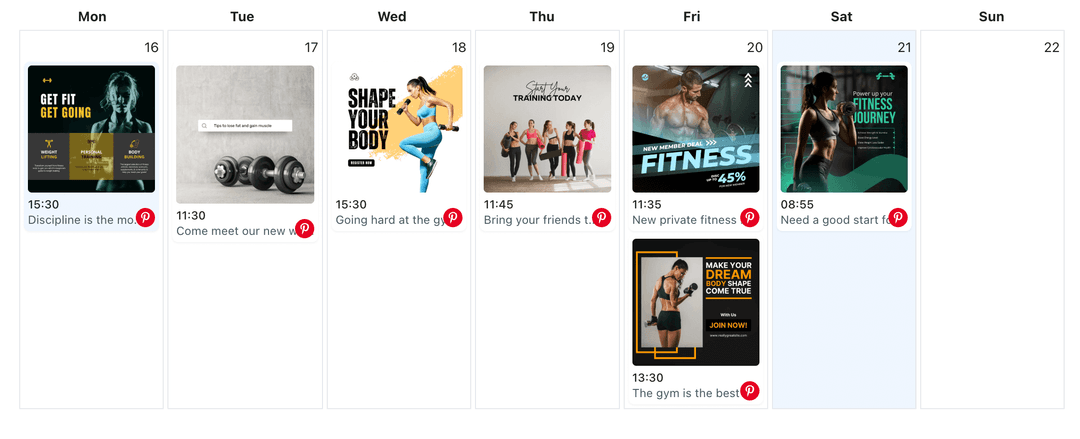
Plan Pinterest saves and Instagram posts together. Avoid flooding followers on the same day, and expand campaigns with the Pinterest content planner when you need detail. Pinterest content planner
- Unified schedule view
- Avoid overlap
- Campaign spacing
How It Works
Get your free API key
Sign up in under 70 seconds, connect your Pinterest account, and start calling the unified API or MCP server.
Build your integration
Send posts from your app, workflow, or AI agent with one endpoint — no separate platform SDKs to maintain.
Publish automatically
Schedule or publish Pinterest content instantly. WoopSocial handles OAuth, tokens, and platform API changes.
Caption Refinement
Convert Pinterest descriptions into concise Instagram captions. Lead with the benefit, keep hashtags selective, and keep the CTA simple.
Visual Consistency
Keep the same photography and branding across platforms. Crop for square or vertical layouts so pins look polished in the Instagram feed.
Board to Feed Mapping
Map Pinterest board themes to Instagram content pillars. Ensure each post supports the same campaign while respecting how each audience scrolls.
Schedule Safeguards
View both calendars to prevent posting the same story twice in one day. Slide a post forward or back to keep interest high on every channel.
Why Cross-Post Pinterest Content to Instagram?
Pins that earn saves are already validated creative. Moving them to Instagram extends that momentum to a second feed without recreating graphics or captions from scratch.
Running both schedules in one place means you can stagger launches, keep seasonal campaigns visible, and make sure each audience sees fresh creative instead of duplicates.
Best Practices for Pinterest to Instagram
Choose pins with clear focal points and minimal text overlays. Lead your caption with the outcome, keep hashtags short, and avoid long URLs in the body.
When adapting Idea Pins, pick the frames that tell the story in under a few swipes. Set a cover that matches the campaign and keep the sequence concise so viewers finish the carousel.
Ready to build your Pinterest integration?
Reuse your strongest pins as Instagram feed posts or carousels and keep both audiences engaged from one calendar.
Cross-post to InstagramFrequently Asked Questions
Yes. Pick the frames you want, group them into a carousel, adjust the caption, and schedule them for Instagram without reuploading assets.
Only adjust what is needed for Instagram. Shorten the intro, keep hashtags selective, and remove links that do not belong in captions.
No. Pinterest and Instagram each keep their own timing. You decide when cross-posts go live on either channel.
Yes. Cross-posts are supported on the free plan with up to 2 connected social accounts. Pro adds more accounts and credits.
Boards stay untouched. Cross-posting copies the asset for Instagram while your Pinterest boards remain organized.
Absolutely. Continue scheduling Pinterest image or video pins, and only cross-post the pieces you want on Instagram.
Instagram Business or Creator accounts are required for scheduling. Connect once and manage permissions anytime.
Bring Your Pins to Instagram
Share your top-performing pins with Instagram followers, keep messaging aligned, and manage both calendars together.
Get your free API key