API & MCP included on every plan
Create Your Pinterest Pins with AI
Use AI to draft Pinterest pin titles and descriptions faster. Generate keyword-rich copy for your boards, then edit and schedule image and video pins from one calendar.
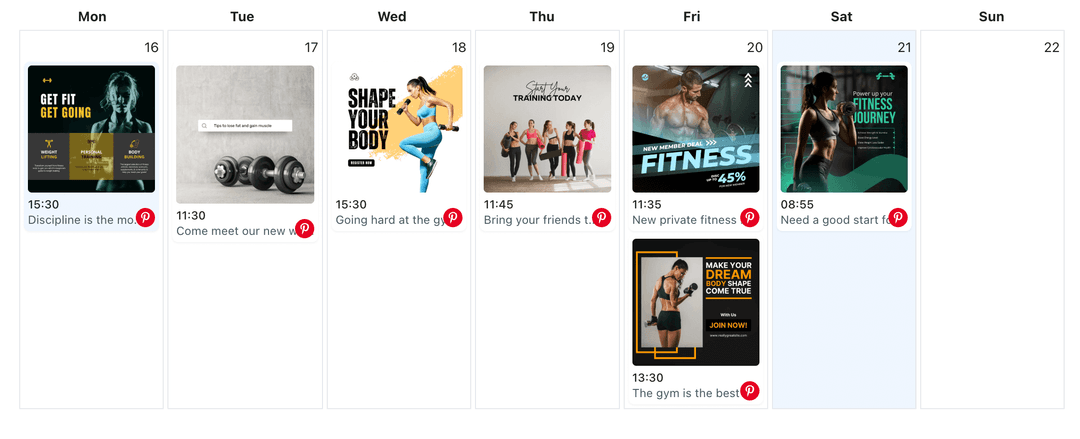
Relied on by bloggers, merchants, and creators who need keyword-focused pin copy without spending all day writing descriptions
Post to Pinterest through one unified social media API for your apps, AI agents, and automation tools. Use the WoopSocial REST API or MCP server to automate posting — we handle OAuth, tokens, and platform changes so you can ship features.
One API for posting
Publish to Pinterest through a single unified social media API — no separate integrations per platform
AI Titles and Descriptions for Pins
Describe your pin image, URL, and board theme, then let AI suggest titles and descriptions that are written for people first and search second. When you are ready, schedule them as Pinterest image pins from the same workspace. schedule Pinterest image pins
- Idea-based prompts
- Title + description pairs
- Human-readable copy
Keyword-Aware Suggestions
Add a short list of keywords you care about, and ask AI to weave them naturally into pin descriptions instead of stuffing them in a way that feels unnatural.
- Keyword input fields
- Natural language output
- Search-friendly wording
Copy that Matches Your Boards
Tell AI which board a pin belongs to and what role it plays in your content plan. Then reuse approved AI drafts across similar pins inside the Pinterest content planner when it makes sense. Pinterest content planner
- Board-specific context
- Reusable description patterns
- Planner integration
How It Works
Get your free API key
Sign up in under 70 seconds, connect your Pinterest account, and start calling the unified API or MCP server.
Build your integration
Send posts from your app, workflow, or AI agent with one endpoint — no separate platform SDKs to maintain.
Publish automatically
Schedule or publish Pinterest content instantly. WoopSocial handles OAuth, tokens, and platform API changes.
Template Prompts for Recurring Content
Save prompt structures for recipes, DIY projects, product roundups, or blog promotions so AI knows how to handle similar pins next time without extra setup.
Support for Image and Video Pins
Whether you are pinning static images or video, you can use AI to create descriptions that explain what viewers will learn or see when they click through.
Board-Level Consistency
Keep pin language aligned across each board by asking AI to follow existing examples, then fine-tune drafts so collections feel cohesive instead of random.
Draft-Only until You Approve
AI never publishes directly. You decide which titles and descriptions to use, how to adjust them, and when they become part of your scheduled pins.
Why Create Pinterest Pins with AI?
High-quality visuals draw people into Pinterest, but thoughtful titles and descriptions help those visuals get discovered and saved. Writing unique, keyword-aware copy for every pin can slow down even disciplined workflows. AI-assisted drafting helps you move faster without copying the same text across every image.
By letting AI handle first drafts, you spend your time choosing the right examples, refining search phrases, and verifying that each description sets realistic expectations for what happens after the click. This keeps your pins helpful, discoverable, and aligned with your broader content strategy.
Using AI Inside a Pinterest Content Plan
Use the Pinterest content planner to decide which boards and themes you want to focus on this month, then lean on AI to generate pin copy that supports those themes. For example, you might generate ten variations of descriptions for a single blog category or product line and attach them to different assets.
As you learn which pins perform well, you can adapt your AI prompts to mirror winning patterns without copying text word-for-word. Over time, this combination of AI drafting and human editing helps you produce more high-quality pins in less time while keeping your boards organized and on-topic.
Ready to build your Pinterest integration?
Move from ideas and images to keyword-rich pins faster. Draft titles and descriptions with AI, then schedule them to your boards with WoopSocial.
Create Pinterest pins with AIFrequently Asked Questions
AI can assist with pin titles and descriptions based on your prompts about the image, destination, and board, giving you text you can edit before scheduling.
You stay in control of which keywords matter. AI can suggest ways to integrate them naturally into descriptions, but you decide which terms to include or remove.
You can duplicate and adapt successful AI-written descriptions, but it is best to keep copy slightly different per pin so boards feel natural and not repetitive.
No. AI only produces copy. WoopSocial handles publishing on the schedule you configure, after you approve each title and description.
Yes. Free plan users can generate AI drafts and publish via API with up to 2 connected social accounts. Pro adds more accounts and credits.
You can paste existing descriptions into a prompt and ask AI for clearer, more detailed, or more concise versions, then choose the one you prefer.
Start Writing Pinterest Pins with AI Today
Use AI-assisted drafting and WoopSocial’s Pinterest calendar to keep boards full of helpful, keyword-aware pins.
Get your free API key